Source Code
<div class="ov-card">
<div class="ov-icon">
<svg width="26" height="26" viewBox="0 0 24 24" fill="none" stroke="#4f46e5" stroke-width="2" stroke-linecap="round" stroke-linejoin="round"><rect x="3" y="11" width="18" height="10" rx="2"/><path d="M7 11V7a5 5 0 0110 0v4"/></svg>
</div>
<h2>Enter the 6-digit code</h2>
<p class="ov-sub">We sent a verification code to your phone ending in <strong>••42</strong>.</p>
<div class="ov-otp-row" id="ovOtpRow">
<input type="text" inputmode="numeric" maxlength="1" class="ov-otp-box" data-index="0" />
<input type="text" inputmode="numeric" maxlength="1" class="ov-otp-box" data-index="1" />
<input type="text" inputmode="numeric" maxlength="1" class="ov-otp-box" data-index="2" />
<input type="text" inputmode="numeric" maxlength="1" class="ov-otp-box" data-index="3" />
<input type="text" inputmode="numeric" maxlength="1" class="ov-otp-box" data-index="4" />
<input type="text" inputmode="numeric" maxlength="1" class="ov-otp-box" data-index="5" />
</div>
<p class="ov-error" id="ovError"></p>
<button class="ov-verify-btn" id="ovVerifyBtn">Verify</button>
<p class="ov-resend">
Didn't get a code?
<button class="ov-resend-btn" id="ovResendBtn" disabled>Resend code (<span id="ovCountdown">30</span>s)</button>
</p>
</div>* { box-sizing: border-box; }
body { font-family: system-ui, -apple-system, sans-serif; background: #f1f5f9; margin: 0; min-height: 100vh; display: flex; align-items: center; justify-content: center; padding: 24px; }
.ov-card { width: 100%; max-width: 360px; background: #fff; border: 1px solid #e2e8f0; border-radius: 16px; padding: 30px; text-align: center; box-shadow: 0 10px 30px rgba(15,23,42,0.06); }
.ov-icon { width: 52px; height: 52px; border-radius: 50%; background: #eef2ff; display: flex; align-items: center; justify-content: center; margin: 0 auto 16px; }
.ov-card h2 { margin: 0 0 8px; font-size: 18px; color: #1e293b; }
.ov-sub { margin: 0 0 24px; font-size: 12.5px; color: #64748b; line-height: 1.6; }
.ov-sub strong { color: #334155; }
.ov-otp-row { display: flex; gap: 8px; justify-content: center; margin-bottom: 10px; }
.ov-otp-box { width: 42px; height: 50px; text-align: center; font-size: 20px; font-weight: 700; border: 1.5px solid #e2e8f0; border-radius: 10px; font-family: inherit; color: #1e293b; }
.ov-otp-box:focus { outline: none; border-color: #4f46e5; box-shadow: 0 0 0 3px rgba(79,70,229,0.15); }
.ov-error { min-height: 16px; font-size: 12px; color: #dc2626; font-weight: 600; margin: 0 0 14px; }
.ov-verify-btn { width: 100%; background: #4f46e5; color: #fff; border: none; padding: 11px; border-radius: 9px; font-weight: 700; font-size: 13.5px; cursor: pointer; font-family: inherit; margin-bottom: 16px; }
.ov-resend { margin: 0; font-size: 12.5px; color: #64748b; }
.ov-resend-btn { background: none; border: none; color: #4f46e5; font-weight: 700; font-size: 12.5px; cursor: pointer; font-family: inherit; padding: 0; margin-left: 4px; }
.ov-resend-btn:disabled { color: #94a3b8; cursor: not-allowed; }var boxes = Array.prototype.slice.call(document.querySelectorAll('.ov-otp-box'));
var errorEl = document.getElementById('ovError');
var verifyBtn = document.getElementById('ovVerifyBtn');
var resendBtn = document.getElementById('ovResendBtn');
var countdownSeconds = 30;
var countdownTimer = null;
function setResendLabel(seconds) {
resendBtn.innerHTML = 'Resend code (<span id="ovCountdown">' + seconds + '</span>s)';
}
function startCountdown() {
countdownSeconds = 30;
resendBtn.disabled = true;
setResendLabel(countdownSeconds);
clearInterval(countdownTimer);
countdownTimer = setInterval(function () {
countdownSeconds -= 1;
if (countdownSeconds <= 0) {
clearInterval(countdownTimer);
resendBtn.disabled = false;
resendBtn.textContent = 'Resend code';
} else {
setResendLabel(countdownSeconds);
}
}, 1000);
}
boxes.forEach(function (box, index) {
box.addEventListener('input', function () {
box.value = box.value.replace(/[^0-9]/g, '').slice(0, 1);
errorEl.textContent = '';
if (box.value && index < boxes.length - 1) {
boxes[index + 1].focus();
}
});
box.addEventListener('keydown', function (e) {
if (e.key === 'Backspace' && !box.value && index > 0) {
boxes[index - 1].focus();
}
});
box.addEventListener('paste', function (e) {
e.preventDefault();
var pasted = (e.clipboardData || window.clipboardData).getData('text').replace(/[^0-9]/g, '');
if (!pasted) return;
var digits = pasted.slice(0, boxes.length).split('');
digits.forEach(function (digit, i) {
if (boxes[i]) boxes[i].value = digit;
});
var nextIndex = digits.length < boxes.length ? digits.length : boxes.length - 1;
boxes[nextIndex].focus();
});
});
verifyBtn.addEventListener('click', function () {
var code = boxes.map(function (box) { return box.value; }).join('');
if (code.length < boxes.length) {
errorEl.textContent = 'Please enter all 6 digits.';
return;
}
errorEl.textContent = '';
verifyBtn.textContent = 'Verified';
verifyBtn.disabled = true;
});
resendBtn.addEventListener('click', function () {
if (resendBtn.disabled) return;
boxes.forEach(function (box) { box.value = ''; });
boxes[0].focus();
startCountdown();
});
startCountdown();
boxes[0].focus();Learn Coding Visually
Learn to code with interactive, live-preview playgrounds — HTML, CSS, JavaScript, React & more.
 HTML Playground42 lessons · Click-based · Live preview
 CSS PlaygroundLearn CSS with a live editor
 JavaScript Playground60 lessons · DOM · Async · Canvas
 React PlaygroundLearn React with a live code editor
 GSAP PlaygroundLearn GSAP animation interactively
 SVG Playground44 lessons · shapes · paths · animation
 SCSS Playground45 lessons · Sass modules · tokens
 Tailwind PlaygroundLearn Tailwind CSS with a live editor
 Bootstrap 5 Playground50 lessons · live preview
Two-Factor OTP Verification Screen — Free HTML CSS JS Snippet
Two-Factor OTP Verification Screen · Forms · Plain HTML, CSS & JS · Live preview
What's included
Features
About this UI Snippet
Two-Factor OTP Verification Screen — Auto-Advancing 6-Digit Code Input
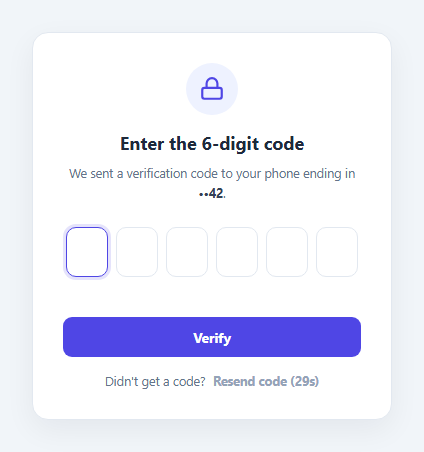
Two-factor and OTP verification screens live or die on the details of their input handling. This snippet implements the full expected interaction set for a 6-box digit input: auto-advancing focus as digits are typed, backspace navigating back to the previous box, full-code paste support that splits a pasted 6-digit string across all boxes at once, and a Resend code link gated behind a live 30-second countdown.
Auto-advance and backspace navigation
Each of the six inputs listens for its own input event, strips any non-digit character, and — if a digit was entered — moves focus to the next box automatically via .focus(). A separate keydown listener watches for Backspace on an already-empty box and moves focus back to the previous one, matching the behavior users expect from native OTP inputs on mobile keyboards.
Splitting a pasted code across all boxes
The paste event is intercepted with preventDefault() so the browser's default single-box paste never happens. The clipboard text is stripped to digits only, sliced to at most six characters, and distributed one digit per box in a single loop — then focus jumps to whichever box comes after the last pasted digit (or the last box, if all six were pasted).
A real, live countdown on the resend link
startCountdown() resets a 30-second counter, disables the Resend button, and runs a setInterval that decrements the displayed number every second, re-enabling the button and swapping its label back to plain "Resend code" once the counter reaches zero. Clicking Resend while enabled clears every box, refocuses the first one, and restarts the same countdown — so a user can't resend indefinitely without waiting out the timer each time.
Step by step
How to Use
- 1Load the snippetClick "Two-Factor OTP Verification Screen" in the sidebar to load its HTML, CSS, and JS into the editor panels. The preview updates instantly.
- 2Edit the codeModify any panel — HTML, CSS, or JS. The preview refreshes as you type. Use Reset in each panel header to restore the original.
- 3Preview on devicesClick the Mobile (375px), Tablet (768px), or Desktop buttons in the preview header to check responsiveness.
- 4Export in your formatClick "HTML" to download a standalone file, "JSX" for a React component, "Tailwind" for a React + Tailwind CSS component, "Tailwind HTML" for a standalone HTML file with Tailwind CDN, "Vue" for a Vue 3 SFC with <template>/<script setup>/<style scoped>, or "Angular" for a standalone Angular .component.ts file. "Copy all" copies the full code to clipboard.
- 5Save your versionClick "Save as", type a name, and press Enter. Your snippet saves to IndexedDB and appears in the Saved tab.
Real-world uses
Common Use Cases
Got questions?
Frequently Asked Questions
Each box listens for its own input event. After stripping non-digit characters, if the box now holds a digit and it is not the last box, JavaScript calls .focus() on the next box in the boxes array.
The paste event is intercepted with preventDefault(), the clipboard text is reduced to digits only and capped at 6 characters, then each digit is written into the corresponding box by index in a single loop, after which focus moves to the box after the last one filled.
startCountdown() sets a 30-second counter, disables the Resend button, and runs a setInterval that decrements and redisplays the number every second. When it reaches zero, the interval is cleared, the button re-enables, and its label reverts to plain "Resend code".
The six box values are joined together; if the resulting string is shorter than 6 characters, an inline error message is shown and the verify action does not proceed.