Source Code
<div class="ss-shell">
  <nav class="ss-nav" id="ssNav">
    <a href="#ss-overview" class="ss-link" data-target="ss-overview">Overview</a>
    <a href="#ss-features" class="ss-link" data-target="ss-features">Features</a>
    <a href="#ss-pricing" class="ss-link" data-target="ss-pricing">Pricing</a>
    <a href="#ss-faq" class="ss-link" data-target="ss-faq">FAQ</a>
    <a href="#ss-contact" class="ss-link" data-target="ss-contact">Contact</a>
  </nav>
  <div class="ss-content" id="ssContent">
    <section class="ss-section" id="ss-overview">
      <h3>Overview</h3>
      <p>This scrollable panel contains five sections. As you scroll through the content on the right, the matching link on the left highlights automatically to reflect which section is currently in view.</p>
    </section>
    <section class="ss-section" id="ss-features">
      <h3>Features</h3>
      <p>The highlighting is driven entirely by an IntersectionObserver watching all five sections at once, rather than manual scroll-position math or scroll event listeners.</p>
    </section>
    <section class="ss-section" id="ss-pricing">
      <h3>Pricing</h3>
      <p>Because the observer's threshold and root are tuned to this internal scroll container, the active link updates correctly even though the outer page itself never scrolls.</p>
    </section>
    <section class="ss-section" id="ss-faq">
      <h3>FAQ</h3>
      <p>Clicking a nav link smooth-scrolls the content area to the matching section, and the observer then takes over to keep the highlight in sync as you continue scrolling manually.</p>
    </section>
    <section class="ss-section" id="ss-contact">
      <h3>Contact</h3>
      <p>This is the final section. Scrolling to the bottom keeps the last link highlighted since it remains the most visible section within the observer's threshold.</p>
    </section>
  </div>
</div>
* { box-sizing: border-box; margin: 0; padding: 0; }
body { font-family: system-ui, -apple-system, sans-serif; background: #f8fafc; min-height: 100vh; display: flex; align-items: center; justify-content: center; padding: 24px; }
.ss-shell {
display: grid; grid-template-columns: 160px 1fr; gap: 20px; width: 100%; max-width: 620px;
background: #fff; border: 1px solid #e2e8f0; border-radius: 16px; padding: 20px;
}
.ss-nav { display: flex; flex-direction: column; gap: 4px; position: sticky; top: 0; align-self: start; }
.ss-link {
text-decoration: none; color: #64748b; font-size: 13px; font-weight: 600; padding: 8px 10px;
border-radius: 8px; border-left: 3px solid transparent; transition: color 0.15s, background 0.15s, border-color 0.15s;
}
.ss-link:hover { background: #f8fafc; color: #1e293b; }
.ss-link.ss-active { color: #6366f1; font-weight: 800; background: #eef2ff; border-left-color: #6366f1; }
.ss-content { max-height: 360px; overflow-y: auto; padding-right: 6px; }
.ss-section { padding: 18px 4px; border-bottom: 1px solid #f1f5f9; min-height: 160px; }
.ss-section:last-child { border-bottom: none; }
.ss-section h3 { font-size: 15px; font-weight: 800; color: #1e293b; margin-bottom: 8px; }
.ss-section p { font-size: 13px; color: #64748b; line-height: 1.7; }const links = document.querySelectorAll('.ss-link');
const sections = document.querySelectorAll('.ss-section');
const content = document.getElementById('ssContent');
function setActive(id) {
links.forEach((link) => {
link.classList.toggle('ss-active', link.dataset.target === id);
});
}
const observer = new IntersectionObserver((entries) => {
const visible = entries.filter((e) => e.isIntersecting);
if (visible.length === 0) return;
const topMost = visible.reduce((a, b) => (a.intersectionRatio > b.intersectionRatio ? a : b));
setActive(topMost.target.id);
}, {
root: content,
rootMargin: '-10% 0px -60% 0px',
threshold: [0, 0.25, 0.5, 0.75, 1],
});
sections.forEach((section) => observer.observe(section));
links.forEach((link) => {
link.addEventListener('click', (e) => {
e.preventDefault();
const target = document.getElementById(link.dataset.target);
if (target) {
target.scrollIntoView({ behavior: 'smooth', block: 'start' });
}
});
});
setActive(sections[0].id);Learn Coding Visually
Learn to code with interactive, live-preview playgrounds — HTML, CSS, JavaScript, React & more.
 HTML Playground42 lessons · Click-based · Live preview
 CSS PlaygroundLearn CSS with a live editor
 JavaScript Playground60 lessons · DOM · Async · Canvas
 React PlaygroundLearn React with a live code editor
 GSAP PlaygroundLearn GSAP animation interactively
 SVG Playground44 lessons · shapes · paths · animation
 SCSS Playground45 lessons · Sass modules · tokens
 Tailwind PlaygroundLearn Tailwind CSS with a live editor
 Bootstrap 5 Playground50 lessons · live preview
Scrollspy Section Navigation — Free HTML CSS JS Snippet
Scrollspy Section Navigation · Navigation · Plain HTML, CSS & JS · Live preview
What's included
Features
About this UI Snippet
Scrollspy Section Navigation — IntersectionObserver-Driven Active Link Highlighting
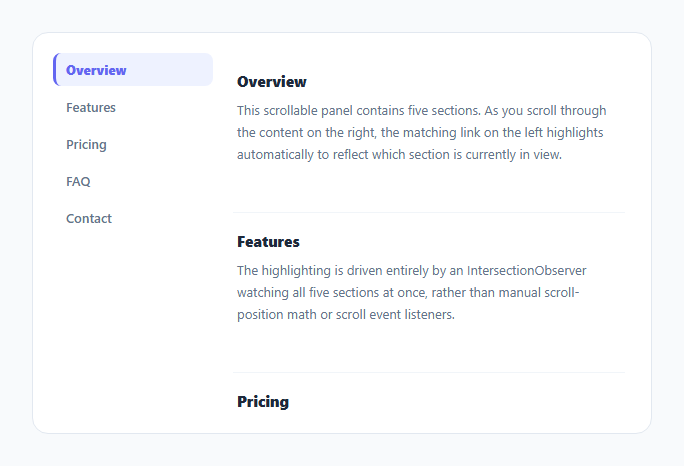
This snippet is a classic "scrollspy" navigation: a sticky list of section links on the side, and a scrollable content area whose currently visible section is reflected by highlighting the matching link — all driven by a single IntersectionObserver rather than a scroll event listener with manual position math.
Watching every section at once
One IntersectionObserver is created and told to observe() all five <section> elements. Its root option points at the content container itself (#ssContent), since that element — not the page — is the actual scrolling context, set up with a fixed max-height and overflow-y: auto in CSS.
Tuning rootMargin to define "currently in view"
The observer's rootMargin: '-10% 0px -60% 0px' shrinks the effective observation area to a horizontal band near the top of the content container — pulling in 10% from the top and 60% from the bottom. This means a section only counts as "in view" once it has scrolled up close to the top of the panel, rather than the moment it merely appears anywhere on screen, which produces a much more natural-feeling highlight as the reader scrolls.
Picking the most visible section among several matches
Because threshold is an array ([0, 0.25, 0.5, 0.75, 1]), the callback can fire with more than one section simultaneously satisfying isIntersecting near a boundary. The callback filters to only the intersecting entries and picks the one with the highest intersectionRatio, so the highlight always tracks whichever section is most prominently in view rather than flickering between adjacent sections.
Click-to-scroll stays in sync
Clicking a nav link calls scrollIntoView({ behavior: 'smooth' }) on the matching section rather than jumping instantly — and because the same observer is still watching, the highlight updates itself automatically as the smooth scroll completes, with no separate logic needed to sync the click behavior with the scroll-driven highlight.
Step by step
How to Use
- 1Load the snippetClick "Scrollspy Section Navigation" in the sidebar to load its HTML, CSS, and JS into the editor panels. The preview updates instantly.
- 2Edit the codeModify any panel — HTML, CSS, or JS. The preview refreshes as you type. Use Reset in each panel header to restore the original.
- 3Preview on devicesClick the Mobile (375px), Tablet (768px), or Desktop buttons in the preview header to check responsiveness.
- 4Export in your formatClick "HTML" to download a standalone file, "JSX" for a React component, "Tailwind" for a React + Tailwind CSS component, "Tailwind HTML" for a standalone HTML file with Tailwind CDN, "Vue" for a Vue 3 SFC with <template>/<script setup>/<style scoped>, or "Angular" for a standalone Angular .component.ts file. "Copy all" copies the full code to clipboard.
- 5Save your versionClick "Save as", type a name, and press Enter. Your snippet saves to IndexedDB and appears in the Saved tab.
Real-world uses
Common Use Cases
Got questions?
Frequently Asked Questions
Negative rootMargin values shrink the observer's effective viewport instead of expanding it. Here it creates a thin horizontal band near the top of the content panel, so a section is only considered "intersecting" once it scrolls up close to that band — producing a highlight that changes right as a section reaches near the top, rather than as soon as it barely appears at the bottom.
An array of thresholds fires the observer callback at each of those intersection ratio steps, giving multiple data points as a section scrolls through the viewport. Combined with filtering to isIntersecting entries and picking the highest intersectionRatio, this lets the code reliably choose the most visible section when two sections briefly overlap the observed area at once.
The default root is the browser viewport, which assumes the page itself scrolls. Here the content area scrolls internally via CSS (max-height plus overflow-y: auto), so root must be set explicitly to that container for the observer to calculate intersection relative to the correct scrolling context.
No — clicking calls scrollIntoView with smooth scrolling, and the same observer that drives scroll-based highlighting also fires during that programmatic scroll, so the correct link ends up highlighted automatically once the target section reaches the observed zone, with no separate synchronization code required.