Source Code
<div class="lsw-wrap">
  <div class="lsw-display" id="lswDisplay">00:00.00</div>

  <div class="lsw-controls">
    <button class="lsw-btn lsw-btn-primary" id="lswStartBtn">Start</button>
    <button class="lsw-btn" id="lswLapBtn" disabled>Lap</button>
    <button class="lsw-btn" id="lswResetBtn">Reset</button>
  </div>

  <div class="lsw-laps" id="lswLaps"></div>
</div>
* { box-sizing: border-box; margin: 0; padding: 0; }
body { font-family: system-ui, -apple-system, sans-serif; background: #f8fafc; min-height: 100vh; display: flex; align-items: center; justify-content: center; padding: 24px; }
.lsw-wrap { width: 100%; max-width: 360px; background: #fff; border: 1px solid #e2e8f0; border-radius: 20px; padding: 26px; box-shadow: 0 16px 36px rgba(30,41,59,0.08); }
.lsw-display { text-align: center; font-size: 42px; font-weight: 800; color: #1e293b; font-variant-numeric: tabular-nums; letter-spacing: -1px; margin-bottom: 22px; }
.lsw-controls { display: flex; gap: 8px; margin-bottom: 18px; }
.lsw-btn {
flex: 1; padding: 11px; border-radius: 11px; border: 1.5px solid #e2e8f0; background: #fff; color: #475569;
font-size: 13px; font-weight: 700; font-family: inherit; cursor: pointer; transition: all 0.15s;
}
.lsw-btn:hover:not(:disabled) { background: #f8fafc; }
.lsw-btn:disabled { opacity: 0.45; cursor: not-allowed; }
.lsw-btn-primary { background: #6366f1; border-color: #6366f1; color: #fff; }
.lsw-btn-primary:hover:not(:disabled) { background: #4f46e5; }
.lsw-btn-primary.lsw-stop { background: #ef4444; border-color: #ef4444; }
.lsw-btn-primary.lsw-stop:hover { background: #dc2626; }
.lsw-laps { max-height: 200px; overflow-y: auto; }
.lsw-lap-row {
display: flex; align-items: center; justify-content: space-between; padding: 9px 10px; border-radius: 8px;
font-size: 12px; font-variant-numeric: tabular-nums;
}
.lsw-lap-row:nth-child(odd) { background: #f8fafc; }
.lsw-lap-num { font-weight: 800; color: #6366f1; width: 42px; flex-shrink: 0; }
.lsw-lap-split { color: #64748b; flex: 1; text-align: center; }
.lsw-lap-total { color: #1e293b; font-weight: 700; width: 80px; text-align: right; }
.lsw-laps-empty { text-align: center; color: #94a3b8; font-size: 12px; padding: 12px 0; }const display = document.getElementById('lswDisplay');
const startBtn = document.getElementById('lswStartBtn');
const lapBtn = document.getElementById('lswLapBtn');
const resetBtn = document.getElementById('lswResetBtn');
const lapsEl = document.getElementById('lswLaps');
let running = false;
let startTimestamp = 0;
let accumulatedMs = 0;
let rafId = null;
let laps = [];
function formatTime(ms) {
const totalMs = Math.max(0, ms);
const minutes = Math.floor(totalMs / 60000);
const seconds = Math.floor((totalMs % 60000) / 1000);
const centis = Math.floor((totalMs % 1000) / 10);
return String(minutes).padStart(2, '0') + ':' + String(seconds).padStart(2, '0') + '.' + String(centis).padStart(2, '0');
}
function currentElapsed() {
if (running) return accumulatedMs + (Date.now() - startTimestamp);
return accumulatedMs;
}
function renderDisplay() {
display.textContent = formatTime(currentElapsed());
}
function loop() {
renderDisplay();
if (running) rafId = requestAnimationFrame(loop);
}
function renderLaps() {
if (laps.length === 0) {
lapsEl.innerHTML = '<div class="lsw-laps-empty">No laps recorded yet.</div>';
return;
}
const rows = [];
for (let i = laps.length - 1; i >= 0; i--) {
const total = laps[i];
const prevTotal = i > 0 ? laps[i - 1] : 0;
const split = total - prevTotal;
rows.push(`
<div class="lsw-lap-row">
<span class="lsw-lap-num">Lap ${i + 1}</span>
<span class="lsw-lap-split">+${formatTime(split)}</span>
<span class="lsw-lap-total">${formatTime(total)}</span>
</div>`);
}
lapsEl.innerHTML = rows.join('');
}
startBtn.addEventListener('click', () => {
if (running) {
running = false;
accumulatedMs += Date.now() - startTimestamp;
cancelAnimationFrame(rafId);
startBtn.textContent = 'Start';
startBtn.classList.remove('lsw-stop');
lapBtn.disabled = true;
renderDisplay();
} else {
running = true;
startTimestamp = Date.now();
startBtn.textContent = 'Stop';
startBtn.classList.add('lsw-stop');
lapBtn.disabled = false;
loop();
}
});
lapBtn.addEventListener('click', () => {
if (!running) return;
laps.push(currentElapsed());
renderLaps();
});
resetBtn.addEventListener('click', () => {
running = false;
cancelAnimationFrame(rafId);
accumulatedMs = 0;
laps = [];
startBtn.textContent = 'Start';
startBtn.classList.remove('lsw-stop');
lapBtn.disabled = true;
renderDisplay();
renderLaps();
});
renderDisplay();
renderLaps();Learn Coding Visually
Learn to code with interactive, live-preview playgrounds — HTML, CSS, JavaScript, React & more.
 HTML Playground42 lessons · Click-based · Live preview
 CSS PlaygroundLearn CSS with a live editor
 JavaScript Playground60 lessons · DOM · Async · Canvas
 React PlaygroundLearn React with a live code editor
 GSAP PlaygroundLearn GSAP animation interactively
 SVG Playground44 lessons · shapes · paths · animation
 SCSS Playground45 lessons · Sass modules · tokens
 Tailwind PlaygroundLearn Tailwind CSS with a live editor
 Bootstrap 5 Playground50 lessons · live preview
Lap Stopwatch with Splits — Free HTML CSS JS Snippet
Lap Stopwatch with Splits · Misc · Plain HTML, CSS & JS · Live preview
What's included
Features
About this UI Snippet
Lap Stopwatch with Splits — Timestamp-Based Stopwatch and Lap Tracker
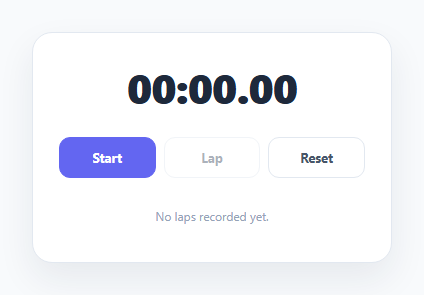
A stopwatch that simply adds a fixed amount to a counter on every tick will lose accuracy, because timers in the browser aren't perfectly regular — especially across pause/resume cycles. This snippet instead always derives elapsed time from real timestamps, keeping it accurate no matter how the render loop is actually scheduled.
Elapsed time derived from Date.now(), not accumulated per-tick
When the stopwatch starts, startTimestamp = Date.now() is captured once. currentElapsed() then always computes elapsed time as accumulatedMs + (Date.now() - startTimestamp) while running — the accumulated time from any previous run-then-stop segments, plus how long the current segment has been running, both measured against real timestamps rather than an incrementing counter.
requestAnimationFrame drives the display, not the timing
A requestAnimationFrame loop calls renderDisplay() on every frame while running, but the loop's only job is to repaint the display as often as the browser can manage — the actual elapsed-time value it renders always comes fresh from currentElapsed()'s timestamp math, so frame-rate variance never affects timing accuracy, only how smoothly the display updates.
Stop preserves exact accumulated time across sessions
Clicking Stop adds Date.now() - startTimestamp (the just-finished segment's real duration) into accumulatedMs and cancels the animation frame loop. Starting again later captures a new startTimestamp and resumes counting from the previously accumulated total — so multiple start/stop cycles never lose or double-count time.
Laps store total elapsed time; splits are derived
Clicking Lap pushes the current total elapsed time (not a duration) into the laps array. renderLaps() then computes each lap's split by subtracting the previous lap's total from the current one, displaying both the split and the running total for every lap, with the most recent lap listed first.
Step by step
How to Use
- 1Load the snippetClick "Lap Stopwatch with Splits" in the sidebar to load its HTML, CSS, and JS into the editor panels. The preview updates instantly.
- 2Edit the codeModify any panel — HTML, CSS, or JS. The preview refreshes as you type. Use Reset in each panel header to restore the original.
- 3Preview on devicesClick the Mobile (375px), Tablet (768px), or Desktop buttons in the preview header to check responsiveness.
- 4Export in your formatClick "HTML" to download a standalone file, "JSX" for a React component, "Tailwind" for a React + Tailwind CSS component, "Tailwind HTML" for a standalone HTML file with Tailwind CDN, "Vue" for a Vue 3 SFC with <template>/<script setup>/<style scoped>, or "Angular" for a standalone Angular .component.ts file. "Copy all" copies the full code to clipboard.
- 5Save your versionClick "Save as", type a name, and press Enter. Your snippet saves to IndexedDB and appears in the Saved tab.
Real-world uses
Common Use Cases
Got questions?
Frequently Asked Questions
setInterval and requestAnimationFrame callbacks don't fire at perfectly regular intervals — small delays accumulate over time. By deriving elapsed time as accumulatedMs + (Date.now() - startTimestamp), the displayed time is always mathematically correct regardless of any variance in how often the render loop actually runs.
It records the current total elapsed time (via currentElapsed()) into the laps array. The split time shown for each lap is then computed by subtracting the previous lap's total from the current one, not stored directly.
No — stopping adds the just-completed segment's duration into accumulatedMs, and restarting begins a new segment from a fresh startTimestamp, so total elapsed time across any number of stop/start cycles stays exactly accurate.
requestAnimationFrame syncs the display refresh to the browser's paint cycle, giving a smooth-looking update without wasting work when the tab isn't visible, while the actual timing math stays independent of the loop's exact frequency.