Source Code
<div class="pcd-wrap">
  <div class="pcd-tabs" id="pcdTabs">
    <button class="pcd-tab pcd-tab-active" data-mode="focus" data-mins="25">Focus</button>
    <button class="pcd-tab" data-mode="short" data-mins="5">Short Break</button>
    <button class="pcd-tab" data-mode="long" data-mins="15">Long Break</button>
  </div>

  <div class="pcd-display" id="pcdDisplay">25:00</div>
  <div class="pcd-status" id="pcdStatus">Ready to focus</div>

  <div class="pcd-controls">
    <button class="pcd-btn pcd-btn-primary" id="pcdStartBtn">Start</button>
    <button class="pcd-btn" id="pcdResetBtn">Reset</button>
  </div>
</div>
* { box-sizing: border-box; margin: 0; padding: 0; }
body { font-family: system-ui, -apple-system, sans-serif; background: #f8fafc; min-height: 100vh; display: flex; align-items: center; justify-content: center; padding: 24px; }
.pcd-wrap { width: 100%; max-width: 340px; background: #fff; border: 1px solid #e2e8f0; border-radius: 20px; padding: 28px; text-align: center; box-shadow: 0 16px 36px rgba(30,41,59,0.08); }
.pcd-tabs { display: flex; gap: 6px; background: #f1f5f9; padding: 4px; border-radius: 12px; margin-bottom: 24px; }
.pcd-tab {
flex: 1; padding: 8px 6px; border: none; background: none; border-radius: 9px; font-family: inherit;
font-size: 11.5px; font-weight: 700; color: #64748b; cursor: pointer; transition: background 0.15s, color 0.15s;
}
.pcd-tab-active { background: #fff; color: #1e293b; box-shadow: 0 2px 6px rgba(30,41,59,0.08); }
.pcd-display { font-size: 56px; font-weight: 800; color: #1e293b; font-variant-numeric: tabular-nums; letter-spacing: -1px; margin-bottom: 6px; }
.pcd-display.pcd-done { color: #ef4444; }
.pcd-status { font-size: 12.5px; color: #94a3b8; font-weight: 600; margin-bottom: 22px; }
.pcd-controls { display: flex; gap: 10px; }
.pcd-btn {
flex: 1; padding: 12px; border-radius: 12px; border: 1.5px solid #e2e8f0; background: #fff; color: #475569;
font-size: 13.5px; font-weight: 700; font-family: inherit; cursor: pointer; transition: all 0.15s;
}
.pcd-btn:hover { background: #f8fafc; }
.pcd-btn-primary { background: #6366f1; border-color: #6366f1; color: #fff; }
.pcd-btn-primary:hover { background: #4f46e5; }const MODE_LABELS = { focus: 'Ready to focus', short: 'Time for a short break', long: 'Time for a long break' };
const NEXT_MODE = { focus: 'short', short: 'focus', long: 'focus' };
const tabs = document.querySelectorAll('.pcd-tab');
const display = document.getElementById('pcdDisplay');
const statusEl = document.getElementById('pcdStatus');
const startBtn = document.getElementById('pcdStartBtn');
const resetBtn = document.getElementById('pcdResetBtn');
let currentMode = 'focus';
let durationMs = 25 * 60 * 1000;
let endTime = null;
let remainingMs = durationMs;
let running = false;
let tickId = null;
function formatTime(ms) {
const totalSeconds = Math.max(0, Math.ceil(ms / 1000));
const mins = Math.floor(totalSeconds / 60);
const secs = totalSeconds % 60;
return String(mins).padStart(2, '0') + ':' + String(secs).padStart(2, '0');
}
function render() {
display.textContent = formatTime(remainingMs);
display.classList.toggle('pcd-done', remainingMs <= 0);
}
function setMode(mode, mins, skipStatusReset) {
currentMode = mode;
durationMs = mins * 60 * 1000;
remainingMs = durationMs;
running = false;
endTime = null;
clearInterval(tickId);
startBtn.textContent = 'Start';
if (!skipStatusReset) statusEl.textContent = MODE_LABELS[mode];
tabs.forEach((t) => t.classList.toggle('pcd-tab-active', t.dataset.mode === mode));
render();
}
function tick() {
remainingMs = endTime - Date.now();
if (remainingMs <= 0) {
remainingMs = 0;
render();
clearInterval(tickId);
running = false;
statusEl.textContent = "Time's up!";
startBtn.textContent = 'Start';
const next = NEXT_MODE[currentMode];
const nextMins = next === 'focus' ? 25 : (next === 'short' ? 5 : 15);
setTimeout(() => {
setMode(next, nextMins, true);
statusEl.textContent = MODE_LABELS[next] + ' (up next)';
}, 1800);
return;
}
render();
}
function start() {
if (running) return;
running = true;
endTime = Date.now() + remainingMs;
statusEl.textContent = currentMode === 'focus' ? 'Focusing...' : 'On a break...';
startBtn.textContent = 'Pause';
tickId = setInterval(tick, 250);
}
function pause() {
running = false;
clearInterval(tickId);
remainingMs = Math.max(0, endTime - Date.now());
startBtn.textContent = 'Start';
statusEl.textContent = 'Paused';
render();
}
startBtn.addEventListener('click', () => {
if (running) pause();
else start();
});
resetBtn.addEventListener('click', () => {
const mins = parseInt(document.querySelector('.pcd-tab-active').dataset.mins, 10);
setMode(currentMode, mins);
});
tabs.forEach((tab) => {
tab.addEventListener('click', () => {
setMode(tab.dataset.mode, parseInt(tab.dataset.mins, 10));
});
});
render();Learn Coding Visually
Learn to code with interactive, live-preview playgrounds — HTML, CSS, JavaScript, React & more.
 HTML Playground42 lessons · Click-based · Live preview
 CSS PlaygroundLearn CSS with a live editor
 JavaScript Playground60 lessons · DOM · Async · Canvas
 React PlaygroundLearn React with a live code editor
 GSAP PlaygroundLearn GSAP animation interactively
 SVG Playground44 lessons · shapes · paths · animation
 SCSS Playground45 lessons · Sass modules · tokens
 Tailwind PlaygroundLearn Tailwind CSS with a live editor
 Bootstrap 5 Playground50 lessons · live preview
Pomodoro Countdown Timer — Free HTML CSS JS Snippet
Pomodoro Countdown Timer · Misc · Plain HTML, CSS & JS · Live preview
What's included
Features
About this UI Snippet
Pomodoro Countdown Timer — Drift-Free Focus and Break Countdown
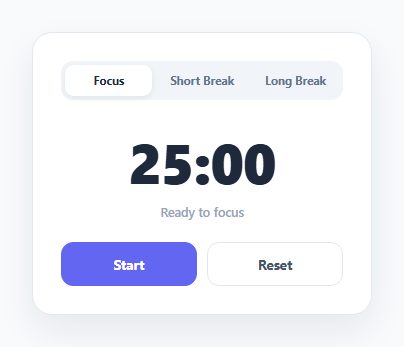
A naive countdown timer that just decrements a counter every second inside setInterval will drift over time, because setInterval isn't guaranteed to fire exactly every 1000ms — background tabs, GC pauses, and CPU load all introduce small delays that accumulate into visible skew over a 25-minute session. This timer avoids that by never trusting the interval's timing directly.
Timestamp-based countdown instead of a decrementing counter
When the timer starts, start() computes endTime = Date.now() + remainingMs once. From then on, every tick (running every 250ms for a responsive display) recomputes remainingMs = endTime - Date.now() fresh from the wall clock, rather than subtracting a fixed amount each tick. Because the remaining time is always derived from two real timestamps, any delay in when a particular tick actually fires has no effect on accuracy — the displayed time is always correct at the moment it's read.
Pause preserves exact remaining time
Pausing calls clearInterval and recomputes remainingMs one final time from endTime - Date.now() before stopping, so resuming later calls start() again with that exact remaining value and computes a fresh endTime — there's no accumulated rounding error across multiple pause/resume cycles.
Three modes, one shared engine
Focus (25 min), Short Break (5 min), and Long Break (15 min) are just three different durationMs values applied to the same setMode()/start()/tick() functions — switching tabs resets remainingMs to the new mode's duration and updates the active tab styling, but uses identical timing logic underneath.
Auto-advance on completion
When remainingMs reaches zero, the timer shows "Time's up!" and, after a short pause, automatically switches to the logically next mode (focus after a break, short break after a focus session) via a lookup table, so a full focus/break cycle can run without the user manually re-selecting a tab each time.
Step by step
How to Use
- 1Load the snippetClick "Pomodoro Countdown Timer" in the sidebar to load its HTML, CSS, and JS into the editor panels. The preview updates instantly.
- 2Edit the codeModify any panel — HTML, CSS, or JS. The preview refreshes as you type. Use Reset in each panel header to restore the original.
- 3Preview on devicesClick the Mobile (375px), Tablet (768px), or Desktop buttons in the preview header to check responsiveness.
- 4Export in your formatClick "HTML" to download a standalone file, "JSX" for a React component, "Tailwind" for a React + Tailwind CSS component, "Tailwind HTML" for a standalone HTML file with Tailwind CDN, "Vue" for a Vue 3 SFC with <template>/<script setup>/<style scoped>, or "Angular" for a standalone Angular .component.ts file. "Copy all" copies the full code to clipboard.
- 5Save your versionClick "Save as", type a name, and press Enter. Your snippet saves to IndexedDB and appears in the Saved tab.
Real-world uses
Common Use Cases
Got questions?
Frequently Asked Questions
setInterval callbacks are not guaranteed to fire at exactly the requested interval — delays accumulate over a 25-minute session and cause visible drift. By recomputing remainingMs as endTime - Date.now() on every tick, the displayed time is always correct regardless of exactly when a given tick fires.
Pausing captures the exact remaining milliseconds (endTime - Date.now()) and stops the interval. Resuming computes a brand new endTime from that exact remaining value, so no time is lost or gained across multiple pause/resume cycles.
Yes — when a session reaches zero, after a short "Time's up!" pause it automatically switches to the logically next mode (a break after focus, focus after a break) using a lookup table, though you can start or reset manually at any time.
Yes — edit the data-mins attribute on each tab button in the HTML (and the fallback minute values in the auto-advance logic in the JS) to whatever durations you want for each mode.