Source Code
<div class="acs-wrap">
  <div class="acs-thread" id="acsThread">
    <div class="acs-row acs-row-user">
      <div class="acs-bubble acs-bubble-user">What's a good way to explain event delegation in JavaScript?</div>
    </div>
    <div class="acs-row acs-row-ai" id="acsAiRow">
      <div class="acs-avatar">AI</div>
      <div class="acs-ai-col">
        <div class="acs-bubble acs-bubble-ai" id="acsAiBubble"><span id="acsAiText"></span><span class="acs-cursor" id="acsCursor"></span></div>
        <button class="acs-stop-btn" id="acsStopBtn">
          <svg width="12" height="12" viewBox="0 0 24 24" fill="currentColor"><rect x="6" y="6" width="12" height="12" rx="2"/></svg>
          Stop generating
        </button>
        <div class="acs-actions" id="acsActions" hidden>
          <button class="acs-icon-btn" id="acsCopyBtn" title="Copy">
            <svg width="14" height="14" viewBox="0 0 24 24" fill="none" stroke="currentColor" stroke-width="2" stroke-linecap="round" stroke-linejoin="round"><rect x="9" y="9" width="12" height="12" rx="2"/><path d="M5 15H4a2 2 0 0 1-2-2V4a2 2 0 0 1 2-2h9a2 2 0 0 1 2 2v1"/></svg>
          </button>
          <button class="acs-icon-btn" id="acsRegenBtn" title="Regenerate">
            <svg width="14" height="14" viewBox="0 0 24 24" fill="none" stroke="currentColor" stroke-width="2" stroke-linecap="round" stroke-linejoin="round"><path d="M23 4v6h-6"/><path d="M1 20v-6h6"/><path d="M3.51 9a9 9 0 0 1 14.85-3.36L23 10M1 14l4.64 4.36A9 9 0 0 0 20.49 15"/></svg>
          </button>
        </div>
      </div>
    </div>
  </div>
</div>
* { box-sizing: border-box; margin: 0; padding: 0; }
body { font-family: system-ui, -apple-system, sans-serif; background: #f8fafc; min-height: 100vh; display: flex; align-items: center; justify-content: center; padding: 24px; }
.acs-wrap { width: 100%; max-width: 460px; }
.acs-thread { background: #fff; border: 1px solid #e2e8f0; border-radius: 16px; padding: 20px; box-shadow: 0 12px 30px rgba(30,41,59,0.06); display: flex; flex-direction: column; gap: 16px; }
.acs-row { display: flex; }
.acs-row-user { justify-content: flex-end; }
.acs-row-ai { justify-content: flex-start; gap: 10px; align-items: flex-start; }
.acs-avatar { width: 28px; height: 28px; border-radius: 50%; background: #6366f1; color: #fff; font-size: 10px; font-weight: 800; display: flex; align-items: center; justify-content: center; flex-shrink: 0; margin-top: 2px; }
.acs-bubble { padding: 11px 14px; border-radius: 14px; font-size: 13.5px; line-height: 1.6; max-width: 320px; }
.acs-bubble-user { background: #6366f1; color: #fff; border-bottom-right-radius: 4px; }
.acs-bubble-ai { background: #f1f5f9; color: #1e293b; border-bottom-left-radius: 4px; }
.acs-ai-col { display: flex; flex-direction: column; align-items: flex-start; gap: 8px; }
.acs-cursor {
display: inline-block; width: 2px; height: 14px; background: #64748b; margin-left: 2px;
vertical-align: middle; animation: acsBlink 0.9s step-end infinite;
}
.acs-cursor[hidden] { display: none; }
@keyframes acsBlink { 0%, 49% { opacity: 1; } 50%, 100% { opacity: 0; } }
.acs-stop-btn {
display: flex; align-items: center; gap: 6px; padding: 6px 12px; border-radius: 999px; border: 1px solid #e2e8f0;
background: #fff; color: #475569; font-size: 11.5px; font-weight: 700; cursor: pointer; font-family: inherit;
}
.acs-stop-btn:hover { background: #f8fafc; }
.acs-stop-btn[hidden] { display: none; }
.acs-actions { display: flex; gap: 6px; }
.acs-actions[hidden] { display: none; }
.acs-icon-btn {
width: 26px; height: 26px; border-radius: 8px; border: 1px solid #e2e8f0; background: #fff; color: #64748b;
display: flex; align-items: center; justify-content: center; cursor: pointer; transition: background 0.12s, color 0.12s;
}
.acs-icon-btn:hover { background: #eef2ff; color: #6366f1; }
.acs-icon-btn.acs-copied { color: #16a34a; border-color: #86efac; }const RESPONSE = "Event delegation means attaching a single listener to a common parent element instead of separate listeners on each child. Because events bubble up through the DOM, the parent's handler can inspect event.target to figure out which child was actually clicked. This is faster to set up, uses less memory, and automatically works for children added later, since you're not relying on a listener already existing on that specific element.";
const words = RESPONSE.split(' ');
const textEl = document.getElementById('acsAiText');
const cursorEl = document.getElementById('acsCursor');
const stopBtn = document.getElementById('acsStopBtn');
const actionsEl = document.getElementById('acsActions');
const copyBtn = document.getElementById('acsCopyBtn');
const regenBtn = document.getElementById('acsRegenBtn');
let intervalId = null;
let wordIndex = 0;
function startStreaming() {
textEl.textContent = '';
wordIndex = 0;
cursorEl.hidden = false;
stopBtn.hidden = false;
actionsEl.hidden = true;
intervalId = setInterval(() => {
if (wordIndex >= words.length) {
finishStreaming();
return;
}
textEl.textContent += (wordIndex === 0 ? '' : ' ') + words[wordIndex];
wordIndex += 1;
}, 55);
}
function finishStreaming() {
clearInterval(intervalId);
intervalId = null;
cursorEl.hidden = true;
stopBtn.hidden = true;
actionsEl.hidden = false;
}
stopBtn.addEventListener('click', () => {
finishStreaming();
});
copyBtn.addEventListener('click', () => {
const text = textEl.textContent;
if (navigator.clipboard && navigator.clipboard.writeText) {
navigator.clipboard.writeText(text).catch(() => {});
}
copyBtn.classList.add('acs-copied');
setTimeout(() => copyBtn.classList.remove('acs-copied'), 1200);
});
regenBtn.addEventListener('click', () => {
clearInterval(intervalId);
startStreaming();
});
startStreaming();Learn Coding Visually
Learn to code with interactive, live-preview playgrounds — HTML, CSS, JavaScript, React & more.
 HTML Playground42 lessons · Click-based · Live preview
 CSS PlaygroundLearn CSS with a live editor
 JavaScript Playground60 lessons · DOM · Async · Canvas
 React PlaygroundLearn React with a live code editor
 GSAP PlaygroundLearn GSAP animation interactively
 SVG Playground44 lessons · shapes · paths · animation
 SCSS Playground45 lessons · Sass modules · tokens
 Tailwind PlaygroundLearn Tailwind CSS with a live editor
 Bootstrap 5 Playground50 lessons · live preview
AI Chat Streaming Bubble — Free HTML CSS JS Snippet
AI Chat Streaming Bubble · Misc · Plain HTML, CSS & JS · Live preview
What's included
Features
About this UI Snippet
AI Chat Streaming Bubble — Simulated Word-by-Word LLM Response Bubble
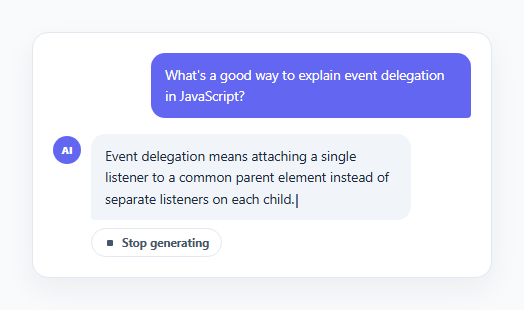
Chat interfaces built on top of language models typically show the assistant's reply appearing incrementally rather than all at once, which this snippet reproduces entirely on the front end using a hardcoded response string and setInterval — no real API call is involved.
Word-by-word streaming via setInterval
The response is split into an array of words up front. startStreaming() runs an interval every 55ms that appends the next word (with a leading space, except for the first) to the bubble's text content and advances an index counter, until every word has been appended, at which point finishStreaming() clears the interval.
A blinking cursor tied to streaming state
A thin <span class="acs-cursor"> sits right after the streaming text and blinks via a CSS @keyframes opacity animation. It's shown for the duration of the interval and hidden (via the hidden attribute) the moment finishStreaming() runs, so the blinking cursor visually communicates "still generating" without any extra JS state to track.
A stop button that actually halts generation
"Stop generating" is only visible while intervalId is active; clicking it calls finishStreaming(), which clears the interval immediately, leaving whatever words had already been appended in place — an accurate simulation of interrupting a real stream mid-response.
Post-completion actions
Once streaming finishes, the stop button is hidden and a small action row appears with copy and regenerate icon buttons. Copy uses navigator.clipboard.writeText and gives brief visual feedback by toggling a class; regenerate clears any leftover interval and calls startStreaming() again to replay the same response from scratch.
Step by step
How to Use
- 1Load the snippetClick "AI Chat Streaming Bubble" in the sidebar to load its HTML, CSS, and JS into the editor panels. The preview updates instantly.
- 2Edit the codeModify any panel — HTML, CSS, or JS. The preview refreshes as you type. Use Reset in each panel header to restore the original.
- 3Preview on devicesClick the Mobile (375px), Tablet (768px), or Desktop buttons in the preview header to check responsiveness.
- 4Export in your formatClick "HTML" to download a standalone file, "JSX" for a React component, "Tailwind" for a React + Tailwind CSS component, "Tailwind HTML" for a standalone HTML file with Tailwind CDN, "Vue" for a Vue 3 SFC with <template>/<script setup>/<style scoped>, or "Angular" for a standalone Angular .component.ts file. "Copy all" copies the full code to clipboard.
- 5Save your versionClick "Save as", type a name, and press Enter. Your snippet saves to IndexedDB and appears in the Saved tab.
Real-world uses
Common Use Cases
Got questions?
Frequently Asked Questions
No. The assistant reply is a hardcoded string revealed word-by-word using setInterval purely for visual effect — no network request or API key is involved anywhere in this snippet.
The click handler calls clearInterval on the active streaming interval immediately, leaving whatever text had already been appended in place, hides the stop button, and reveals the copy/regenerate actions.
Replace the setInterval word-appending loop inside startStreaming() with your fetch/EventSource stream handler, appending each real token chunk to textEl.textContent as it arrives, and call finishStreaming() when the stream ends.
This is a simulation with one fixed RESPONSE string. In a real implementation, regenerate would trigger a new API call and stream back a genuinely different response.