Source Code
<div class="apc-wrap">
  <div class="apc-topbar">
    <select class="apc-model-select" id="apcModel">
      <option value="8000">Swift-1 (fast)</option>
      <option value="32000" selected>Orbit-3 (balanced)</option>
      <option value="128000">Titan-X (advanced)</option>
    </select>
    <div class="apc-token-meta">
      <span id="apcTokenLabel">~0 / 32000 tokens</span>
    </div>
  </div>

  <div class="apc-token-bar-track"><div class="apc-token-bar-fill" id="apcTokenFill"></div></div>

  <div class="apc-composer">
    <textarea id="apcTextarea" class="apc-textarea" placeholder="Ask anything, or describe what you'd like help with..." rows="1"></textarea>
    <div class="apc-toolbar">
      <button class="apc-attach-btn" id="apcAttachBtn" title="Attach a file" type="button">
        <svg width="16" height="16" viewBox="0 0 24 24" fill="none" stroke="currentColor" stroke-width="2" stroke-linecap="round" stroke-linejoin="round"><path d="M21.44 11.05l-9.19 9.19a5 5 0 0 1-7.07-7.07l9.19-9.19a3.5 3.5 0 0 1 4.95 4.95L10.13 17.02a1.5 1.5 0 0 1-2.12-2.12l8.49-8.49"/></svg>
      </button>
      <button class="apc-send-btn" id="apcSendBtn" type="button" disabled>
        Send
        <svg width="14" height="14" viewBox="0 0 24 24" fill="none" stroke="currentColor" stroke-width="2.5" stroke-linecap="round" stroke-linejoin="round"><path d="M22 2L11 13"/><path d="M22 2l-7 20-4-9-9-4 20-7z"/></svg>
      </button>
    </div>
  </div>
</div>
* { box-sizing: border-box; margin: 0; padding: 0; }
body { font-family: system-ui, -apple-system, sans-serif; background: #f8fafc; min-height: 100vh; display: flex; align-items: center; justify-content: center; padding: 24px; }
.apc-wrap { width: 100%; max-width: 460px; background: #fff; border: 1px solid #e2e8f0; border-radius: 16px; padding: 16px; box-shadow: 0 12px 30px rgba(30,41,59,0.06); }
.apc-topbar { display: flex; align-items: center; justify-content: space-between; margin-bottom: 10px; gap: 10px; }
.apc-model-select {
font-family: inherit; font-size: 12px; font-weight: 700; color: #334155; padding: 6px 10px; border-radius: 8px;
border: 1px solid #e2e8f0; background: #f8fafc; cursor: pointer;
}
.apc-token-meta { font-size: 11px; font-weight: 700; color: #94a3b8; white-space: nowrap; }
.apc-token-meta.apc-warn { color: #d97706; }
.apc-token-meta.apc-danger { color: #dc2626; }
.apc-token-bar-track { height: 4px; background: #f1f5f9; border-radius: 999px; overflow: hidden; margin-bottom: 12px; }
.apc-token-bar-fill { height: 100%; width: 0%; background: #6366f1; border-radius: 999px; transition: width 0.15s, background 0.15s; }
.apc-composer { border: 1.5px solid #e2e8f0; border-radius: 14px; padding: 10px 10px 8px; transition: border-color 0.15s; }
.apc-composer:focus-within { border-color: #6366f1; }
.apc-textarea {
width: 100%; border: none; outline: none; resize: none; font-family: inherit; font-size: 13.5px;
color: #1e293b; line-height: 1.6; max-height: 200px; overflow-y: auto; padding: 4px 4px 8px;
}
.apc-textarea::placeholder { color: #94a3b8; }
.apc-toolbar { display: flex; align-items: center; justify-content: space-between; }
.apc-attach-btn {
width: 30px; height: 30px; border-radius: 8px; border: 1px solid #e2e8f0; background: #fff; color: #64748b;
display: flex; align-items: center; justify-content: center; cursor: pointer;
}
.apc-attach-btn:hover { background: #f8fafc; }
.apc-send-btn {
display: flex; align-items: center; gap: 6px; padding: 8px 16px; border-radius: 10px; border: none;
background: #6366f1; color: #fff; font-size: 13px; font-weight: 700; font-family: inherit; cursor: pointer;
transition: background 0.15s;
}
.apc-send-btn:hover:not(:disabled) { background: #4f46e5; }
.apc-send-btn:disabled { background: #e2e8f0; color: #94a3b8; cursor: not-allowed; }const textarea = document.getElementById('apcTextarea');
const modelSelect = document.getElementById('apcModel');
const tokenLabel = document.getElementById('apcTokenLabel');
const tokenFill = document.getElementById('apcTokenFill');
const tokenMeta = tokenLabel.parentElement;
const sendBtn = document.getElementById('apcSendBtn');
const attachBtn = document.getElementById('apcAttachBtn');
function estimateTokens(text) {
if (!text) return 0;
return Math.max(1, Math.ceil(text.length / 4));
}
function getLimit() {
return parseInt(modelSelect.value, 10);
}
function updateMeter() {
const text = textarea.value;
const tokens = text.trim().length === 0 ? 0 : estimateTokens(text);
const limit = getLimit();
const pct = Math.min(100, (tokens / limit) * 100);
tokenLabel.textContent = `~${tokens} / ${limit} tokens`;
tokenFill.style.width = pct + '%';
tokenMeta.classList.remove('apc-warn', 'apc-danger');
tokenFill.style.background = '#6366f1';
if (pct >= 90) {
tokenMeta.classList.add('apc-danger');
tokenFill.style.background = '#dc2626';
} else if (pct >= 70) {
tokenMeta.classList.add('apc-warn');
tokenFill.style.background = '#d97706';
}
sendBtn.disabled = text.trim().length === 0;
}
function autoGrow() {
textarea.style.height = 'auto';
textarea.style.height = Math.min(textarea.scrollHeight, 200) + 'px';
}
textarea.addEventListener('input', () => {
autoGrow();
updateMeter();
});
modelSelect.addEventListener('change', updateMeter);
attachBtn.addEventListener('click', () => {
attachBtn.style.background = '#eef2ff';
attachBtn.style.color = '#6366f1';
setTimeout(() => {
attachBtn.style.background = '';
attachBtn.style.color = '';
}, 200);
});
sendBtn.addEventListener('click', () => {
if (sendBtn.disabled) return;
textarea.value = '';
autoGrow();
updateMeter();
textarea.focus();
});
updateMeter();Learn Coding Visually
Learn to code with interactive, live-preview playgrounds — HTML, CSS, JavaScript, React & more.
 HTML Playground42 lessons · Click-based · Live preview
 CSS PlaygroundLearn CSS with a live editor
 JavaScript Playground60 lessons · DOM · Async · Canvas
 React PlaygroundLearn React with a live code editor
 GSAP PlaygroundLearn GSAP animation interactively
 SVG Playground44 lessons · shapes · paths · animation
 SCSS Playground45 lessons · Sass modules · tokens
 Tailwind PlaygroundLearn Tailwind CSS with a live editor
 Bootstrap 5 Playground50 lessons · live preview
AI Prompt Composer with Token Meter — Free HTML CSS JS Snippet
AI Prompt Composer with Token Meter · Forms · Plain HTML, CSS & JS · Live preview
What's included
Features
About this UI Snippet
AI Prompt Composer with Token Meter — LLM Prompt Input with Live Token Estimate
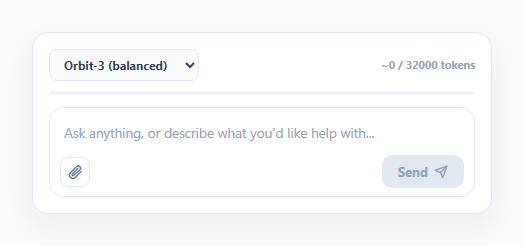
Prompt composer UIs for LLM products typically need three things visible at once: how much context budget is left, which model is selected (since limits differ by model), and a clear way to send. This snippet builds all three from a single textarea's input event, without any external tokenizer library.
A simple, clearly-labeled token estimate
estimateTokens() uses the common rough heuristic of roughly 4 characters per token — Math.ceil(text.length / 4) — which is not exact but is a reasonable approximation for English text and is explicitly labeled with a "~" prefix in the UI so it always reads as an estimate rather than a precise count.
Auto-growing textarea
autoGrow() resets the textarea's height to auto and then sets it to its scrollHeight (capped at 200px, after which it becomes scrollable), which is the standard technique for a textarea that grows with content without any external autosize library.
A limit that changes with the model picker
The model <select>'s option values are themselves the token limits (8000, 32000, 128000) for each fake model tier. getLimit() just reads and parses the current option's value, so switching models immediately recalculates the percentage and re-renders the meter against the new ceiling — no separate lookup table needed.
A progress bar that changes color near the limit
updateMeter() computes the percentage of the limit used and applies one of three colors to both the label text and the bar fill: indigo under 70%, amber from 70–90%, and red at 90% and above — giving an at-a-glance warning before the user actually exceeds the model's context window.
Step by step
How to Use
- 1Load the snippetClick "AI Prompt Composer with Token Meter" in the sidebar to load its HTML, CSS, and JS into the editor panels. The preview updates instantly.
- 2Edit the codeModify any panel — HTML, CSS, or JS. The preview refreshes as you type. Use Reset in each panel header to restore the original.
- 3Preview on devicesClick the Mobile (375px), Tablet (768px), or Desktop buttons in the preview header to check responsiveness.
- 4Export in your formatClick "HTML" to download a standalone file, "JSX" for a React component, "Tailwind" for a React + Tailwind CSS component, "Tailwind HTML" for a standalone HTML file with Tailwind CDN, "Vue" for a Vue 3 SFC with <template>/<script setup>/<style scoped>, or "Angular" for a standalone Angular .component.ts file. "Copy all" copies the full code to clipboard.
- 5Save your versionClick "Save as", type a name, and press Enter. Your snippet saves to IndexedDB and appears in the Saved tab.
Real-world uses
Common Use Cases
Got questions?
Frequently Asked Questions
No — it uses a simple heuristic (roughly one token per 4 characters) and is explicitly labeled with a "~" prefix as an estimate. Real tokenizers vary by model and split text differently, so treat this as a rough guide, not an exact count.
Each option in the model dropdown has its token limit as its value attribute. getLimit() reads that value, so switching models immediately recalculates the percentage-used and re-colors the bar against the newly selected ceiling.
It is disabled whenever the textarea's trimmed value is empty, and re-enabled as soon as any non-whitespace text is typed, checked on every input event.
Yes — replace the body of estimateTokens() with a call to a real tokenizer (e.g. a client-side BPE tokenizer for your target model) and the rest of the meter, coloring, and limit logic will work unchanged.