Source Code
<div class="lmc-wrap">
  <div class="lmc-scroll">
    <table class="lmc-table">
      <thead>
        <tr>
          <th class="lmc-attr-col">Attribute</th>
          <th>Fast</th>
          <th class="lmc-recommended-col">
            <span class="lmc-rec-badge">Recommended</span>
            Balanced
          </th>
          <th>Advanced</th>
        </tr>
      </thead>
      <tbody>
        <tr>
          <td class="lmc-attr-col">Context window</td>
          <td>32K tokens</td>
          <td class="lmc-recommended-col">128K tokens</td>
          <td>1M tokens</td>
        </tr>
        <tr>
          <td class="lmc-attr-col">Speed</td>
          <td><span class="lmc-dots"><span class="lmc-dot lmc-on"></span><span class="lmc-dot lmc-on"></span><span class="lmc-dot lmc-on"></span><span class="lmc-dot"></span><span class="lmc-dot"></span></span></td>
          <td class="lmc-recommended-col"><span class="lmc-dots"><span class="lmc-dot lmc-on"></span><span class="lmc-dot lmc-on"></span><span class="lmc-dot"></span><span class="lmc-dot"></span><span class="lmc-dot"></span></span></td>
          <td><span class="lmc-dots"><span class="lmc-dot lmc-on"></span><span class="lmc-dot"></span><span class="lmc-dot"></span><span class="lmc-dot"></span><span class="lmc-dot"></span></span></td>
        </tr>
        <tr>
          <td class="lmc-attr-col">Relative cost</td>
          <td><span class="lmc-cost">$</span><span class="lmc-cost lmc-off">$</span><span class="lmc-cost lmc-off">$</span></td>
          <td class="lmc-recommended-col"><span class="lmc-cost">$</span><span class="lmc-cost">$</span><span class="lmc-cost lmc-off">$</span></td>
          <td><span class="lmc-cost">$</span><span class="lmc-cost">$</span><span class="lmc-cost">$</span></td>
        </tr>
        <tr>
          <td class="lmc-attr-col">Best for</td>
          <td class="lmc-strength">Quick replies, autocomplete, high-volume tasks</td>
          <td class="lmc-recommended-col lmc-strength">Everyday chat, drafting, and general reasoning</td>
          <td class="lmc-strength">Deep analysis, long documents, complex reasoning</td>
        </tr>
      </tbody>
    </table>
  </div>
</div>
* { box-sizing: border-box; margin: 0; padding: 0; }
body { font-family: system-ui, -apple-system, sans-serif; background: #f8fafc; min-height: 100vh; display: flex; align-items: center; justify-content: center; padding: 24px; }
.lmc-wrap { width: 100%; max-width: 640px; }
.lmc-scroll { overflow-x: auto; }
.lmc-table { width: 100%; border-collapse: separate; border-spacing: 0; background: #fff; border-radius: 16px; overflow: hidden; box-shadow: 0 12px 30px rgba(30,41,59,0.06); min-width: 520px; }
.lmc-table th, .lmc-table td { padding: 14px 16px; text-align: center; font-size: 12.5px; border-bottom: 1px solid #f1f5f9; }
.lmc-table thead th { background: #f8fafc; font-weight: 800; color: #1e293b; font-size: 13px; border-bottom: 1px solid #e2e8f0; position: relative; }
.lmc-attr-col { text-align: left !important; color: #64748b; font-weight: 700; width: 28%; }
.lmc-table tbody tr:last-child td { border-bottom: none; }
.lmc-recommended-col {
background: #f5f4ff; position: relative; border-left: 2px solid #6366f1; border-right: 2px solid #6366f1;
}
thead .lmc-recommended-col { border-top: 2px solid #6366f1; }
tbody tr:last-child .lmc-recommended-col { border-bottom: 2px solid #6366f1; }
.lmc-rec-badge {
display: block; font-size: 9.5px; font-weight: 800; text-transform: uppercase; letter-spacing: 0.05em;
color: #6366f1; background: #eef2ff; padding: 3px 8px; border-radius: 999px; margin: 0 auto 6px; width: fit-content;
}
.lmc-dots { display: inline-flex; gap: 3px; }
.lmc-dot { width: 8px; height: 8px; border-radius: 50%; background: #e2e8f0; display: inline-block; }
.lmc-dot.lmc-on { background: #6366f1; }
.lmc-cost { font-weight: 800; color: #1e293b; font-size: 14px; }
.lmc-cost.lmc-off { color: #e2e8f0; }
.lmc-strength { color: #475569; text-align: left; line-height: 1.5; font-size: 12px; }// Purely presentational comparison table — no dynamic behavior required,
// but we add a light hover-highlight on rows for readability on larger screens.
const table = document.querySelector('.lmc-table');
if (table) {
const rows = table.querySelectorAll('tbody tr');
rows.forEach((row) => {
row.addEventListener('mouseenter', () => {
row.style.background = '#fafbff';
});
row.addEventListener('mouseleave', () => {
row.style.background = '';
});
});
}Learn Coding Visually
Learn to code with interactive, live-preview playgrounds — HTML, CSS, JavaScript, React & more.
 HTML Playground42 lessons · Click-based · Live preview
 CSS PlaygroundLearn CSS with a live editor
 JavaScript Playground60 lessons · DOM · Async · Canvas
 React PlaygroundLearn React with a live code editor
 GSAP PlaygroundLearn GSAP animation interactively
 SVG Playground44 lessons · shapes · paths · animation
 SCSS Playground45 lessons · Sass modules · tokens
 Tailwind PlaygroundLearn Tailwind CSS with a live editor
 Bootstrap 5 Playground50 lessons · live preview
AI Model Comparison Table — Free HTML CSS JS Snippet
AI Model Comparison Table · Tables · Plain HTML, CSS & JS · Live preview
What's included
Features
About this UI Snippet
AI Model Comparison Table — Compare AI Model Tiers by Speed, Cost & Context
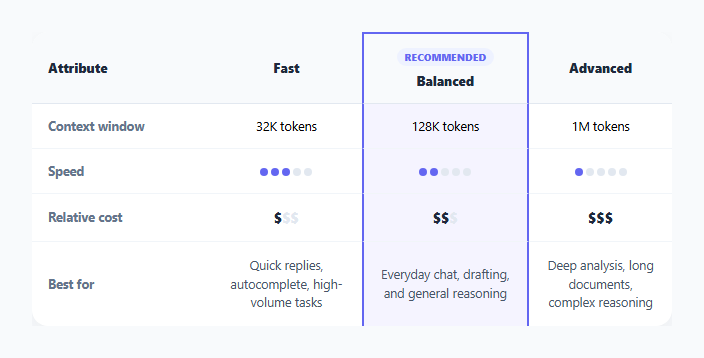
Products that offer multiple AI model tiers (a fast/cheap option, a balanced default, and a slower/more capable option) usually need a compact way to help users pick one. This snippet lays out three generic tiers — Fast, Balanced, and Advanced — as columns against four attributes as rows, using visual encodings instead of dense text wherever a number alone would be harder to scan.
Dots and dollar signs instead of raw numbers
Rather than printing "Speed: 8/10", the speed row renders five small dot spans per model, with a variable number carrying the .lmc-on class to appear filled versus the rest staying an empty gray — a quick visual bar built from plain <span> elements and one CSS class, no chart library involved. Cost uses the same idea with dollar-sign characters, styling unused signs a faint gray so "$" vs "$$$" reads at a glance as relative cost tier.
One column visually promoted as Recommended
The Balanced column gets a small uppercase "Recommended" badge in its header cell and a distinct light-indigo background plus a 2px indigo border running down both sides of that column (applied via the .lmc-recommended-col class on every cell in that column, including the top and bottom border pieces on the header and last row) — drawing the eye to one clear default choice without needing JavaScript to compute or highlight anything.
Static markup, minimal JS
Because the content here is a fixed comparison rather than dynamic data, the table is authored directly in HTML with no data-driven rendering step. The included JS is intentionally light — just a row hover highlight for readability — so the snippet is trivial to adapt by editing the table cells directly.
Step by step
How to Use
- 1Load the snippetClick "AI Model Comparison Table" in the sidebar to load its HTML, CSS, and JS into the editor panels. The preview updates instantly.
- 2Edit the codeModify any panel — HTML, CSS, or JS. The preview refreshes as you type. Use Reset in each panel header to restore the original.
- 3Preview on devicesClick the Mobile (375px), Tablet (768px), or Desktop buttons in the preview header to check responsiveness.
- 4Export in your formatClick "HTML" to download a standalone file, "JSX" for a React component, "Tailwind" for a React + Tailwind CSS component, "Tailwind HTML" for a standalone HTML file with Tailwind CDN, "Vue" for a Vue 3 SFC with <template>/<script setup>/<style scoped>, or "Angular" for a standalone Angular .component.ts file. "Copy all" copies the full code to clipboard.
- 5Save your versionClick "Save as", type a name, and press Enter. Your snippet saves to IndexedDB and appears in the Saved tab.
Real-world uses
Common Use Cases
Got questions?
Frequently Asked Questions
No — Fast, Balanced, and Advanced are generic placeholder tier names. Replace them, and the values in each row, with your own actual model names and specs.
Each cell renders five small <span> "dot" elements; a subset of them carry the .lmc-on class to appear filled indigo while the rest stay a light gray, forming a simple visual bar without any chart library.
Move the lmc-recommended-col class (and the "Recommended" badge markup in the header) from the current column's cells to the cells of whichever column should be highlighted instead.
Yes — the table sits inside a horizontally scrollable container with a minimum width, so on narrow screens it can be scrolled sideways rather than being crushed illegibly.