Learn Coding Visually
Learn to code with interactive, live-preview playgrounds — HTML, CSS, JavaScript, React & more.
 HTML Playground42 lessons · Click-based · Live preview
 CSS PlaygroundLearn CSS with a live editor
 JavaScript Playground60 lessons · DOM · Async · Canvas
 React PlaygroundLearn React with a live code editor
 GSAP PlaygroundLearn GSAP animation interactively
 SVG Playground44 lessons · shapes · paths · animation
 SCSS Playground45 lessons · Sass modules · tokens
 Tailwind PlaygroundLearn Tailwind CSS with a live editor
 Bootstrap 5 Playground50 lessons · live preview
Country Selector — Searchable Flag Dropdown Snippet
Country Selector · Forms · Plain HTML, CSS & JS · Live preview
What's included
Features
<select>.opacity: 0 and a small transform with a top origin, so it appears to grow out of the trigger.filterCountries matches the query against both the country name and its +code, so "44" finds the UK and "ind" finds India..empty class and .cs-list.empty + .cs-none reveals the no-results message without extra JS.selectCountry marks the chosen option with .selected, rendering a check via ::after and tinting the row.<li data-name code> markup means rendering all ~200 countries from an array is a drop-in change with no filter rewrite.About this UI Snippet
Country Selector — Searchable Flag Dropdown With Dial Codes & Live Filtering
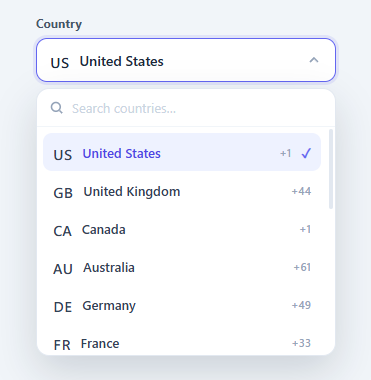
A native <select> of 200 countries is a usability nightmare — endless scrolling, no search, no flags. A proper country selector is a custom dropdown with a search box, recognisable flag icons, dial codes, and instant filtering. This snippet implements one in plain HTML, CSS, and vanilla JavaScript: a trigger button showing the chosen country, a panel with a search field, a scrollable list filtered live by name or dial code, a selected check, and the expected dismissal behaviours (click-outside and Escape).
Trigger and animated panel
The trigger button displays the current flag and country name with a caret that rotates when open. Opening toggles an .open class on the wrapper; the panel transitions from opacity: 0 and a slight translateY/scale to fully visible with its transform origin at the top, so it appears to drop and grow out of the trigger. The trigger's aria-expanded is kept in sync for assistive tech.
Live search by name or code
When the panel opens, the search field is cleared, the list is reset, and focus moves to the input after a short delay (so the open animation does not eat the focus). filterCountries lowercases the query and, for each option, checks whether the country name *or* the dial code contains it — so typing "44" finds the United Kingdom and "ind" finds India. Non-matching options get a .hidden class. The function also counts matches and toggles an .empty class on the list; a CSS sibling selector (.cs-list.empty + .cs-none) reveals a "No countries match" message with zero extra JavaScript.
Selection and dismissal
selectCountry clears the previous selection, marks the clicked option with a .selected class (which renders a check via ::after), copies the flag and name up to the trigger, and closes the panel. Dismissal is handled with two document-level listeners: a click that closes the panel when the target is outside the wrapper (using wrap.contains), and a keydown that closes on Escape. The search input stops click propagation so typing in it never bubbles up to the outside-click handler and closes the panel.
Built to scale to real data
Sixteen countries are included as a working example, but the markup is uniform — each option is a <li> with a data-name, a flag, a name, and a code — so rendering the full ISO country list from an array is a drop-in change, and the filter scales without modification. Pair this selector with a phone input for international numbers, a checkout payment form address step, or a multi-select dropdown for multi-country pickers.
Build with AI
Build, Understand, Optimize, and Extend It With AI
You don't have to trace the filter-and-empty-state logic by hand to see how little JavaScript it actually takes. Paste this snippet's HTML, CSS, and JS into an AI coding assistant like Claude and ask it to explain exactly how filterCountries matching against both the country name and the dial code lets a single search box serve two different lookup patterns, and how the CSS sibling selector reveals the "no matches" message without any JavaScript branching for that state. The same assistant can help optimize it — for instance asking whether filtering by iterating every option's dataset and querySelector on each keystroke would still perform well against a full 200-country list, or whether the filter should instead work off a plain JS array with the DOM rendered from it. It's also useful for extending the selector: ask it to add full keyboard arrow-key navigation through the visible options, group countries by region with sticky section headers, or store a proper ISO code per country instead of relying on the display name for form submission. Treat the code less like a finished artifact and more like a starting point for a conversation.
Prompt to recreate it
Copy this into your AI assistant of choice to build the effect from scratch, or as a jumping-off point for your own variant:
Build a searchable country selector dropdown in plain HTML, CSS, and JavaScript with flags and dial codes — no dropdown library, no frameworks.

Requirements:
- A trigger button showing the currently selected country's flag and name plus a caret icon that rotates when the dropdown is open, with aria-haspopup and aria-expanded kept in sync with the open state.
- Opening the dropdown must animate a panel in from a collapsed, transparent, slightly-offset state to fully visible using only opacity and transform (translateY plus scale) with a top transform-origin, so it visually grows out of the trigger.
- The panel must contain a search text input at the top and a scrollable list of country options below it, where each option carries the country's name, flag, and dial code in its markup.
- On opening, the search input must be cleared, the list reset to show everything, and the input focused after a short delay so the open animation isn't interrupted by an immediate focus jump.
- A single filter function must run on every keystroke, matching the query case-insensitively against both the country's name and its dial code, so searching a number like a country code finds the right country just like searching part of its name.
- Options that don't match must be hidden via a class rather than removed from the DOM, and the filter function must also detect when zero options match and toggle a class on the list container so a "no countries match" message appears purely through a CSS sibling selector, with no additional JavaScript needed to show or hide that message.
- Selecting an option must update the trigger's flag and name, mark that option as selected (with a visible check indicator) while clearing any previous selection, and close the dropdown.
- Provide three ways to close the dropdown: clicking outside the whole component (verified against the actual click target, not just any click), pressing Escape, and selecting an option — and make sure clicks inside the search input never propagate up and trigger the outside-click close handler.
Want to tighten it up first? Run this prompt through the AI Prompt Studio to score it across 8 quality dimensions, catch anti-patterns, and tune the wording for Claude, ChatGPT, or Gemini before you paste it in.
Step by step
How to Use
- 1Paste HTML, CSS, and JSA "Country" field shows the United States with its flag; clicking it opens a dropdown that drops and scales out of the trigger.
- 2Search by nameType "ger" — the list instantly narrows to Germany. The search field is auto-focused when the panel opens.
- 3Search by dial codeType "44" — the United Kingdom appears, because the filter matches dial codes as well as names.
- 4Select a countryClick an option — its flag and name copy up to the trigger, a check marks it in the list, and the panel closes.
- 5See the empty stateType gibberish — the list hides every option and a "No countries match" message shows via a CSS sibling selector.
- 6Dismiss itClick anywhere outside the dropdown or press Escape to close it without changing the selection.
Real-world uses
Common Use Cases
Got questions?
Frequently Asked Questions
Render the <li> options from an array of { name, flag, code } objects (an ISO country dataset is widely available). The filter reads data-name and the .cs-code text, so as long as each option follows the same markup, search works with no changes — even for 200+ entries, since hidden rows are just display:none.
selectCountry already copies the name to the trigger. Add a hidden input and set its value there (e.g. an ISO code from el.dataset.iso), or read document.getElementById('csCurrent').textContent on submit. Storing an ISO code on each option is best — display names change, codes do not.
Add a keydown handler on the search input: ArrowDown/ArrowUp to move a .highlighted class through the visible (non-hidden) options, Enter to select the highlighted one, and Escape to close (already handled). Ensure the highlighted option scrolls into view with scrollIntoView({ block: 'nearest' }) as you navigate.
Flag emojis rely on regional-indicator support in the OS/font; Windows notably renders them as two-letter codes. For guaranteed flags across platforms, swap the emoji for a small SVG/PNG flag sprite or an icon font, keeping the rest of the component identical. The search and selection logic does not depend on the flag.
In React, hold open, query, and selected in useState, derive the visible list by filtering the array on query, and add a click-outside effect with a ref. In Vue, use refs and a computed filtered list with v-model on the search. In Angular, track state on the component and use a pipe or getter for filtering. The panel animation and styles port unchanged.