Learn Coding Visually
Learn to code with interactive, live-preview playgrounds — HTML, CSS, JavaScript, React & more.
 HTML Playground42 lessons · Click-based · Live preview
 CSS PlaygroundLearn CSS with a live editor
 JavaScript Playground60 lessons · DOM · Async · Canvas
 React PlaygroundLearn React with a live code editor
 GSAP PlaygroundLearn GSAP animation interactively
 SVG Playground44 lessons · shapes · paths · animation
 SCSS Playground45 lessons · Sass modules · tokens
 Tailwind PlaygroundLearn Tailwind CSS with a live editor
 Bootstrap 5 Playground50 lessons · live preview
Phone Number Input — Free HTML CSS JS Snippet
Phone Number Input · Forms · Plain HTML, CSS & JS · Live preview
What's included
Features
About this UI Snippet
Phone Number Input — Country Code Selector, Auto-Format Mask, Validation & International Preview
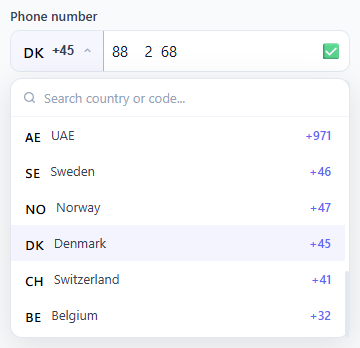
Collecting phone numbers in web forms is deceptively complex. A plain <input type="tel"> accepts any text, has no formatting, shows no country code, and gives users zero feedback on whether their number is valid. This snippet provides a complete, production-ready phone number input: a flag + dial code selector button on the left, a searchable country dropdown with 20+ countries, a live auto-formatting mask that reshapes digits as the user types, a validation indicator that turns green when the number reaches the correct length, a live international number preview below the field, and a one-click copy button — all in plain HTML, CSS, and vanilla JavaScript with zero dependencies.
Country data model and format patterns
Each country in the countries array has six fields: code (ISO 3166-1 alpha-2), name, dial (E.164 prefix like "+44"), flag (flag emoji rendered natively by the OS), pattern (a mask string using # as digit placeholders, e.g. "(###) ###-####" for US), and maxLen (the exact digit count for a valid number in that country, excluding the country code). This separation of the mask from the validation length makes it easy to add more countries: just append an entry to the array.
The formatPhone mask engine
formatPhone(digits, pattern) works by iterating through the pattern string character by character. Each # character is replaced with the next available digit from the stripped input. Non-# characters (spaces, dashes, parentheses) are kept as literal separators. A trailing .replace() strips any separator characters left dangling at the end when the user has only typed a few digits — this keeps the field clean during partial entry. The function is called on every keystroke via handleInput(), which first strips all non-digit characters and enforces the maxLen ceiling before passing digits to the formatter.
Validation indicator
The validate(digits) function compares digits.length to selectedCountry.maxLen. An exact match shows ✅; any non-empty but shorter count shows âÂÅ’. The status icon sits inside the input row on the right, so the visual signal is always visible without disrupting the layout. Because maxLen changes when the country changes, validation automatically recalibrates when the user switches country — a common oversight in hand-rolled phone inputs.
Searchable country dropdown
The dropdown includes a search input that filters the country list in real time via filterCountries(query). The filter checks all three searchable axes: country name (so "United" matches US and UK), dial code (so "44" or "+44" matches UK), and ISO country code (so "DE" matches Germany). Results rerender immediately into the scrollable country-list container via renderList(). The container has max-height: 220px and overflow-y: auto with a slim custom scrollbar. The currently selected country gets a tinted .selected background on every render so the user always knows their active selection.
International number preview and copy
Below the input, the full E.164-style international number is assembled in real time: dial code + a space-separated version of the raw digits. This gives users confidence they have entered the right number for cross-border use. The copy button uses the navigator.clipboard.writeText() API to write the number without spaces (clean E.164 format). After copying, the button label changes to "Copied!" for 1.8 seconds before resetting — the standard micro-interaction for clipboard feedback.
Click-outside close and accessibility
A single document click listener checks e.target.closest('#phone-wrap'). Any click outside the component calls closeDropdown(). The country trigger button has aria-haspopup="listbox" and aria-expanded toggling with the open state. The dropdown has role="listbox" and each country item has role="option" with aria-selected. The search input receives focus automatically when the dropdown opens so keyboard users can immediately type to filter.
Build with AI
Build, Understand, Optimize, and Extend It With AI
You don't have to trace the mask engine character by character on your own. Paste this snippet's HTML, CSS, and JS into an AI coding assistant like Claude and ask it to explain exactly how formatPhone walks a pattern string like "(###) ###-####" and substitutes digits for each hash character while preserving literal separators, and how validate recalibrates automatically when selectedCountry.maxLen changes after switching countries. The same assistant can help optimize it, for example checking whether the filterCountries search across name, dial code, and ISO code could be debounced for a much longer country list, or whether the flag emoji generation function handles every edge case correctly. It's also useful for extending the effect: ask it to auto-detect the user's country from navigator.language or an IP geolocation API, add a hidden form field that syncs the E.164 value for standard form submission, or persist the last-selected country in localStorage. Treat the code less like a finished artifact and more like a starting point for a conversation.
Prompt to recreate it
Copy this into your AI assistant of choice to build the effect from scratch, or as a jumping-off point for your own variant:
Build an international phone number input in plain HTML, CSS, and vanilla JavaScript with no dependencies — a country selector button, a searchable dropdown, live input masking, and validation.

Requirements:
- A data array of countries, each with an ISO code, display name, E.164 dial code, a format pattern string using hash characters as digit placeholders (for example "(###) ###-####"), and a maxLen giving the exact number of subscriber digits expected for that country.
- A trigger button showing the selected country's flag and dial code that opens a dropdown containing a text search box and a scrollable list of countries; the search must filter simultaneously by country name substring, dial code digits, and ISO code.
- A mask-formatting function that takes the raw digits the user has typed and the selected country's pattern string, replacing each hash character in the pattern with the next available digit in order while keeping all non-hash characters (spaces, dashes, parentheses) as literal separators, and stripping any trailing separator left over when there aren't enough digits yet to fill the whole pattern.
- On every keystroke, strip non-digit characters from the raw input, cap the digit count at the selected country's maxLen, reformat through the mask function, and update a validation indicator that shows a distinct success state only when the digit count exactly equals maxLen.
- When the user switches country from the dropdown, immediately re-run the mask and validation against the already-typed digits using the new country's pattern and maxLen, and update the placeholder to reflect the new format.
- Below the input, continuously render a live international-format preview (dial code plus space-grouped digits) and a copy-to-clipboard button that copies the number in clean E.164 format (dial code plus digits, no spaces) using the async Clipboard API with an execCommand fallback.
- Close the dropdown when a click occurs outside the whole component, and give the trigger button and dropdown list proper ARIA roles (aria-haspopup, aria-expanded, role="listbox", role="option", aria-selected).
Want to tighten it up first? Run this prompt through the AI Prompt Studio to score it across 8 quality dimensions, catch anti-patterns, and tune the wording for Claude, ChatGPT, or Gemini before you paste it in.
Step by step
How to Use
- 1Click the flag button to open the country selectorThe dropdown opens with a scale+opacity animation and the search field receives focus automatically. Scroll through the list of 20+ countries or type a country name, dial code, or ISO code in the search box to filter.
- 2Select your country to set the dial code and formatClicking a country closes the dropdown, updates the flag and dial code in the trigger button, and changes the input placeholder to the local format mask. If a number is already entered, it is immediately re-formatted to match the new country pattern.
- 3Type your phone number — it formats automaticallyDigits are masked into the country pattern as you type. For example, US formats as (555) 123-4567 and UK as 7911 123 456. Non-digit characters are stripped automatically; you only need to type digits.
- 4Watch the validation indicatorA green ✅ appears on the right of the input when you have entered exactly the right number of digits for the selected country. A red âÂÅ’ shows while the number is still incomplete or too short. This gives instant feedback without requiring form submission.
- 5Check the international number previewBelow the input, the full international format updates in real time: for example, +1 555 123 4567. This shows users exactly what number will be stored, including the country code, reducing data entry errors in international forms.
- 6Click Copy to copy the international number to the clipboardThe copy button writes the number in E.164 format (no spaces, e.g. +15551234567) to the clipboard. Use this value for backend storage, SMS APIs, or CRM systems. The button label changes to "Copied!" for 1.8 seconds as confirmation.
Real-world uses
Common Use Cases
Got questions?
Frequently Asked Questions
Add a hidden input inside your form: <input type="hidden" name="phone" id="phone-value">. In handleInput(), after updating the display, add: document.getElementById("phone-value").value = selectedCountry.dial + document.getElementById("phone-input").value.replace(/\D/g,""). This stores the full E.164 number in the hidden field for standard form submission. For fetch/XHR submissions, read document.getElementById("intl-number").textContent.replace(/\s/g,"") directly.
Use the browser's navigator.language to get a locale string like "en-US" or "de-DE". Extract the region code: const region = navigator.language.split("-")[1]. Then call selectCountry(region) on init. For more accurate geolocation, call a free IP-geolocation API (ipapi.co/json or ip-api.com/json) which returns a country_code field you can pass directly to selectCountry(). Note: IP geolocation is not 100% accurate so always let users change the country.
Append an entry to the countries array at the top of the JS: { code: "MX", name: "Mexico", dial: "+52", flag: "🇲🇽", pattern: "## #### ####", maxLen: 10 }. The flag field uses Unicode regional indicator characters — any standard flag emoji works. The pattern uses # as digit placeholder with any separator characters (spaces, dashes, parentheses) you want shown. Set maxLen to the number of subscriber digits in that country excluding the country code.
Click "JSX" to download a React version. Manage selectedCountry and phoneValue with useState. Compute intlNumber as a derived string in the render. Move the countries array outside the component so it is not recreated on each render. For the dropdown, use a useRef on the wrapper div and add a useEffect with a document mousedown listener that calls closeDropdown when the click target is not inside the ref — the React equivalent of the click-outside pattern used here.