You Might Also Like
Learn Coding Visually
Learn to code with interactive, live-preview playgrounds — HTML, CSS, JavaScript, React & more.
 HTML Playground42 lessons · Click-based · Live preview
 CSS PlaygroundLearn CSS with a live editor
 JavaScript Playground60 lessons · DOM · Async · Canvas
 React PlaygroundLearn React with a live code editor
 GSAP PlaygroundLearn GSAP animation interactively
 SVG Playground44 lessons · shapes · paths · animation
 SCSS Playground45 lessons · Sass modules · tokens
 Tailwind PlaygroundLearn Tailwind CSS with a live editor
 Bootstrap 5 Playground50 lessons · live preview
Address Validation Form — Free Real-Time Shipping Address UI
Address Validation Form · Forms · Plain HTML, CSS & JS · Live preview
What's included
Features
About this UI Snippet
Address Validation Form — Real-Time Checks Plus a Verification Suggestion
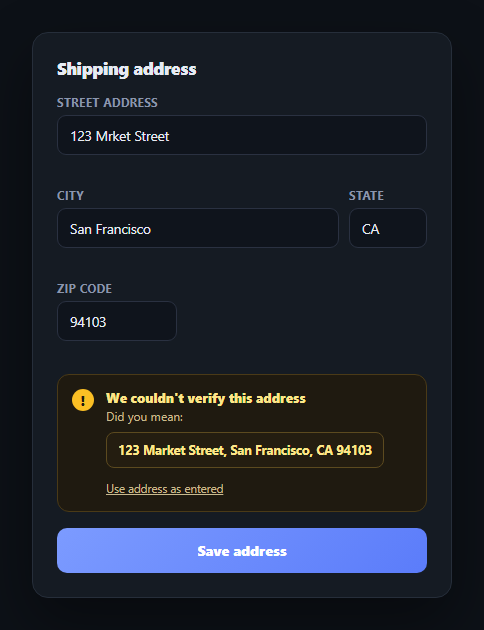
Bad shipping addresses are one of the most expensive UX failures in e-commerce — a typo that isn't caught until a package bounces costs real money. This snippet builds the two-layer defense real checkout forms use: real-time per-field validation as the user types, plus a simulated "we couldn't verify this address, did you mean" suggestion card mimicking what a real address-verification API (Smarty, Lob, Google's Address Validation API) would return. It complements inline validation form and address autocomplete in a full checkout flow.
One function, three consistent states
setFieldState(key, state, message) is the single place that touches a field's visual state — it clears any previous valid/invalid class, applies the new one, and sets the message text together, in one call. This guarantees a field's border color and its message text can never contradict each other, a common bug when validation styling and message text are updated by separate code paths.
Validating on both input and blur
Each field validates on every keystroke (input) and again on blur — validating on input gives immediate feedback as the user types (particularly useful for catching a malformed ZIP before they move on), while validating on blur catches the case where a field is left empty after the user tabs away without typing anything.
Format checks with real regular expressions
The ZIP field is checked against /^\d{5}(-\d{4})?$/, accepting both 5-digit and ZIP+4 formats, and the state field against /^[A-Za-z]{2}$/ for a 2-letter code. These are deliberately simple, honest regex checks — they verify *format*, not that the ZIP or state code actually exists, which is exactly the distinction a real form should make clear to the user (format-valid isn't the same as address-verified).
The suggestion card is a distinct failure mode
Even a form where every field individually validates can still fail address *verification* — the format-valid but unverifiable case is what the "did you mean" suggestion card handles. It's deliberately visually distinct (an amber warning tone) from the red invalid-field state, because a suggested correction is a different kind of problem than a missing or malformed field: the form doesn't know the address is wrong, only that it can't confirm it's right.
Two ways out of the suggestion
The card offers both "use the suggested address" (which repopulates and revalidates every field) and "use address as entered" (which respects the user's insistence and proceeds anyway) — a real verification flow should never trap the user behind a suggestion they don't want to accept. Wire looksUnverifiable() to a real geocoding/address-verification API call, and replace the hardcoded suggested address with whatever the API actually returns.
Build with AI
Build, Understand, Optimize, and Extend It With AI
You don't have to work out the validation-state consistency or the suggestion-card UX pattern on your own. Paste this snippet's HTML, CSS, and JS into an AI coding assistant like Claude and ask it to explain exactly why routing every field's color and message change through a single setFieldState() function prevents the two from ever disagreeing, and why the amber "did you mean" suggestion state is kept visually and logically distinct from the red per-field invalid state rather than conflated into one error type. The same assistant can help optimize it — asking whether validating on both input and blur is redundant for any field type, or whether the ZIP and state regex checks should be loosened or tightened for international address support. It's also useful for extending the form: ask it to wire looksUnverifiable() to a real address-verification API with async loading states, add support for international address formats with a country selector, or add a "save this address for next time" checkbox with its own persistence logic. Treat the code less like a finished artifact and more like a starting point for a conversation.
Prompt to recreate it
Copy this into your AI assistant of choice to build the effect from scratch, or as a jumping-off point for your own variant:
Build an "address validation form" in plain HTML, CSS, and JavaScript with no library or CDN dependency.

Requirements:
- A shipping address form with street, city, state, and ZIP fields, each showing a real-time inline validation message (green checkmark for valid, red error text for invalid) that updates as the user types and again when a field loses focus, so both an in-progress typo and a field left empty entirely are both caught.
- Route every field's border-color class and its message text through one single shared function (not separate code paths) so a field's visual valid/invalid state and its displayed message can never contradict each other.
- Real format-checking regular expressions for ZIP (5 digits, optionally followed by a 4-digit extension) and state (a 2-letter code) — the validation should honestly check format/shape only, not claim to confirm the ZIP or state actually exists.
- On submit, if every field passes its own format validation but the street address matches a simulated "looks like a typo" pattern (representing what a real address-verification API would flag), show a distinct "we couldn't verify this address, did you mean: [suggested address]" card that is visually different from the red per-field error state (e.g. a warning/amber tone, not red) — this represents a different kind of problem (unverifiable, not structurally invalid).
- The suggestion card must offer two ways forward: a button that accepts the suggested address (auto-filling and revalidating every field) and a separate button to proceed with the address exactly as the user entered it — the form must never trap the user behind the suggestion with no way to continue on their own terms.
- After a successful submit (either by accepting the suggestion, dismissing it, or when no suggestion was triggered), show a brief success confirmation on the submit button before it reverts to its normal label.
Want to tighten it up first? Run this prompt through the AI Prompt Studio to score it across 8 quality dimensions, catch anti-patterns, and tune the wording for Claude, ChatGPT, or Gemini before you paste it in.
Step by step
How to Use
- 1Paste HTML, CSS, and JSA shipping address form renders pre-filled with a deliberate street typo ("Mrket").
- 2Edit a fieldEach field validates on every keystroke and on blur, showing a green check or a red error inline.
- 3Submit the formSince every field is format-valid but the street has a typo pattern, a "did you mean" suggestion card appears.
- 4Accept or dismiss the suggestionPick the suggested address to auto-fill and revalidate every field, or dismiss to proceed as entered.
- 5Watch the save confirmationThe submit button briefly confirms "Address saved" before reverting.
- 6Connect a real APIReplace looksUnverifiable() with a call to an address-verification service, using its actual suggested address.
Real-world uses
Common Use Cases
Got questions?
Frequently Asked Questions
setFieldState(key, state, message) is the single function that ever touches a field's valid/invalid class and its message text — it clears any previous state class before applying the new one and setting the message, in one call. Because no other code path modifies these independently, a field's border color and its message can never contradict each other.
Validating on input gives immediate feedback as the user types, which is especially useful for a field like ZIP where a malformed pattern should be caught before the user moves on. Validating again on blur catches the separate case of a required field being left empty entirely — a user who tabs through a field without typing anything never fires an input event, so blur is needed to catch that.
The red invalid state means a field fails a structural check the form can verify itself (empty, wrong ZIP format, not a 2-letter state code). The amber suggestion card represents a different kind of uncertainty: every field is structurally valid, but the form (or a real address-verification API) still can't confirm the address actually exists as entered. Keeping these visually distinct avoids implying a suggested correction is the same severity as a missing field.
Replace looksUnverifiable() with an async call to a service like Smarty, Lob, or Google's Address Validation API, sent on submit once all fields pass local format validation. Use whatever corrected/standardized address the API returns as the suggestion card's content instead of the hardcoded "123 Market Street" fallback, and handle the API's own confidence levels (verified, partially verified, unverifiable) as distinct UI states if needed.
Hold each field's value and validation state (valid/invalid/none plus message) in component state, updating it in onChange and onBlur handlers that mirror validateField()'s logic. Represent the suggestion card's visibility and its suggested-address content as state too, so picking the suggestion becomes a single state update that repopulates and revalidates every field's state object at once.