You Might Also Like
Learn Coding Visually
Learn to code with interactive, live-preview playgrounds — HTML, CSS, JavaScript, React & more.
 HTML Playground42 lessons · Click-based · Live preview
 CSS PlaygroundLearn CSS with a live editor
 JavaScript Playground60 lessons · DOM · Async · Canvas
 React PlaygroundLearn React with a live code editor
 GSAP PlaygroundLearn GSAP animation interactively
 SVG Playground44 lessons · shapes · paths · animation
 SCSS Playground45 lessons · Sass modules · tokens
 Tailwind PlaygroundLearn Tailwind CSS with a live editor
 Bootstrap 5 Playground50 lessons · live preview
Gas Fee Estimator — Free Slow/Normal/Fast Network Fee UI
Gas Fee Estimator · Forms · Plain HTML, CSS & JS · Live preview
What's included
Features
About this UI Snippet
Gas Fee Estimator — Speed Tiers Plus a Custom Gwei Slider
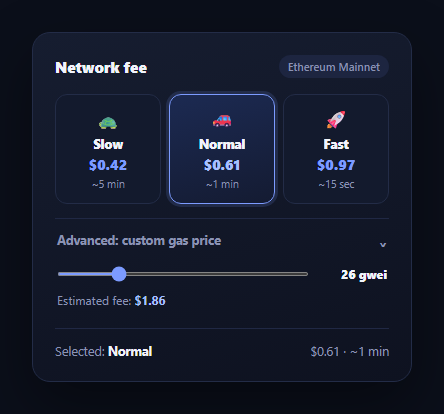
Every crypto wallet or dApp that submits a transaction needs to show the user what it will cost and how long it might take — the gas fee estimator is that widget. This snippet builds the now-standard pattern: three tappable speed tiers (Slow, Normal, Fast) each showing a USD fee and a wait estimate, plus an "advanced" disclosure that reveals a raw gwei slider for users who want manual control.
Tiers as buttons, not radios
Each tier is a plain <button> carrying its gwei price and wait estimate as data-* attributes, grouped visually with role="radiogroup". Clicking one toggles an .active class across the group and updates a summary line at the bottom — deliberately simple state, since the whole point of the tier row is a single, obvious selection rather than a form that needs native radio semantics for keyboard grouping.
One formula computes every fee
feeForGwei(gwei) converts a gwei price into a USD estimate using a fixed gas limit (21,000, a standard ETH transfer) and a reference ETH/USD rate: gwei * 1e-9 * gasLimit * ethUsd. Both the preset tiers' displayed fees and the custom slider's live fee run through conceptually the same math, so switching between presets and manual entry never shows two different pricing models.
The advanced disclosure follows the button pattern properly
The "Advanced: custom gas price" toggle is a real button with aria-expanded and aria-controls pointing at the panel it reveals, and the panel itself uses the hidden attribute rather than a CSS-only display hack — so assistive technology and the DOM agree on whether the content exists right now. A rotating chevron gives a lightweight visual cue that mirrors the aria-expanded state.
Custom slider deselects the presets
Dragging the gwei slider intentionally clears the .active class from all three tier buttons and relabels the summary as "Custom" — because once a user overrides the gas price manually, showing a preset as still "selected" would misrepresent what's actually about to be submitted. This is a small but important correctness detail: the UI should never claim two conflicting fees are both the current choice.
Tuning it for a real network
Swap the hardcoded ETH_USD rate for a live price (pair with the crypto price ticker card), and replace the static tier gwei values with real estimates from your RPC provider's fee-suggestion endpoint (most return low/medium/high percentiles). The summary line and custom-fee math will pick up new numbers automatically since they always recompute from whatever gwei value is current.
Build with AI
Build, Understand, Optimize, and Extend It With AI
You don't have to work out the fee math or the disclosure accessibility pattern from scratch. Paste this snippet's HTML, CSS, and JS into an AI coding assistant like Claude and ask it to explain exactly how feeForGwei() turns a gwei price into a USD estimate, and why using the same formula for both the preset tiers and the custom slider avoids the two ever disagreeing on pricing. The same assistant can help optimize it — asking whether the advanced panel's aria-expanded and hidden attribute handling covers all the accessibility bases, or whether the preset-to-custom deselection logic needs a debounce if the slider is dragged rapidly. It's also useful for extending the widget: ask it to add a live gwei feed from a real RPC provider, show an estimated confirmation-time range instead of a single number, or add a "priority fee" versus "base fee" breakdown for EIP-1559 chains. Treat the code less like a finished artifact and more like a starting point for a conversation.
Prompt to recreate it
Copy this into your AI assistant of choice to build the effect from scratch, or as a jumping-off point for your own variant:
Build a "gas fee estimator" widget in plain HTML, CSS, and JavaScript with no library.

Requirements:
- Three tappable speed-tier buttons (Slow, Normal, Fast), each carrying its own gas price (in gwei) and estimated wait time as data attributes, showing a computed USD fee and the wait time. Clicking a tier highlights it as selected and clears the highlight from the others.
- A single shared fee formula (gwei price times a fixed gas-limit constant times a reference ETH/USD rate) must compute both the three presets' displayed fees and any custom fee, so preset and manual pricing can never disagree.
- An "Advanced: custom gas price" disclosure toggle built as a real button with aria-expanded and aria-controls pointing at the panel it reveals; the panel itself must be hidden using the HTML hidden attribute (not just a CSS display trick) so it is correctly hidden from assistive technology, with a small rotating chevron icon reflecting the open/closed state.
- Inside the advanced panel, a range slider for a raw gwei value with a live-updating USD fee readout that recalculates through the exact same fee formula as the presets.
- When the user drags the custom slider, the three preset tier buttons must lose their selected/active state and a summary line must switch to reflect "Custom" pricing — the UI should never show a preset as selected while a different custom fee is also displayed.
- A summary line at the bottom that always reflects whichever fee (preset or custom) is currently the active selection, including its wait-time estimate when known.
Want to tighten it up first? Run this prompt through the AI Prompt Studio to score it across 8 quality dimensions, catch anti-patterns, and tune the wording for Claude, ChatGPT, or Gemini before you paste it in.
Step by step
How to Use
- 1Paste HTML, CSS, and JSThree speed tiers render with Normal pre-selected.
- 2Click a tierThe chosen tier highlights and the summary line at the bottom updates.
- 3Open "Advanced"Click the toggle to reveal a raw gwei slider with a live USD estimate.
- 4Drag the sliderThe presets deselect and the summary switches to "Custom" with the live fee.
- 5Swap in real ratesReplace the tier gwei values and ETH_USD with live figures from your provider.
- 6Wire the submit actionRead the active tier's gwei (or the slider's value) when the user confirms a transaction.
Real-world uses
Common Use Cases
Got questions?
Frequently Asked Questions
feeForGwei(gwei) converts the gwei price into ETH using a fixed gas limit representing the transaction type (21,000 for a standard transfer), then multiplies by a reference ETH/USD rate: gwei * 1e-9 * gasLimit * ethUsd. Both the three preset tiers and the custom slider run through this same formula, so there is never a mismatch between preset and manual pricing.
Once the user manually overrides the gas price, none of the three presets accurately represents what will be submitted. The slider's input handler clears the active class from every tier button and relabels the summary "Custom" so the UI never implies two different fees are simultaneously selected.
Replace the static data-gwei values on each tier button and the ETH_USD constant with live figures. Most RPC providers and gas APIs (Etherscan gas oracle, blocknative, etc.) return low/medium/high gwei suggestions — map those to the Slow/Normal/Fast tiers on load or on an interval, and update ETH_USD from a price feed like the crypto price ticker card.
Yes. The toggle button carries aria-expanded (kept in sync with true/false) and aria-controls pointing at the panel's id. The panel itself is hidden with the hidden attribute rather than a CSS-only display trick, so screen readers correctly treat its contents as absent until expanded, matching what sighted users see.
Hold selectedTier (or null when custom) and gweiValue in component state. Derive the fee for each tier and the custom slider from the same feeForGwei-equivalent function, and drive the active class and hidden panel from state rather than direct DOM manipulation. The CSS ports unchanged.