Source Code
<div class="wrap">
  <div class="header">
    <div>
      <h1 class="title">API Keys</h1>
      <p class="subtitle">Manage your API access tokens. Keep them secret — never share in public repos.</p>
    </div>
    <button class="create-btn" onclick="createKey()">
      <svg width="14" height="14" viewBox="0 0 24 24" fill="none" stroke="currentColor" stroke-width="2.5"><line x1="12" y1="5" x2="12" y2="19"/><line x1="5" y1="12" x2="19" y2="12"/></svg>
      New Key
    </button>
  </div>
  <div class="keys-list" id="keysList">
    <div class="key-row" data-key="sk_live_A4f9Kd2mNp8rTx1vYw3zQb5e">
      <div class="key-info">
        <div class="key-name">Production Key</div>
        <div class="key-meta"><span class="env-chip live">Live</span><span class="key-date">Created Jan 12, 2024</span><span class="key-last">Last used 2h ago</span></div>
      </div>
      <div class="key-val">
        <code class="key-code" data-shown="false">sk_live_••••••••••••••••••••••Qb5e</code>
        <button class="icon-btn" onclick="toggleKey(this)" title="Show key">
          <svg class="eye-off" width="15" height="15" viewBox="0 0 24 24" fill="none" stroke="currentColor" stroke-width="2"><path d="M17.94 17.94A10.07 10.07 0 0 1 12 20c-7 0-11-8-11-8a18.45 18.45 0 0 1 5.06-5.94"/><path d="M9.9 4.24A9.12 9.12 0 0 1 12 4c7 0 11 8 11 8a18.5 18.5 0 0 1-2.16 3.19"/><line x1="1" y1="1" x2="23" y2="23"/></svg>
          <svg class="eye-on" width="15" height="15" viewBox="0 0 24 24" fill="none" stroke="currentColor" stroke-width="2" style="display:none"><path d="M1 12s4-8 11-8 11 8 11 8-4 8-11 8-11-8-11-8z"/><circle cx="12" cy="12" r="3"/></svg>
        </button>
        <button class="icon-btn" onclick="copyKey(this)" title="Copy">
          <svg width="15" height="15" viewBox="0 0 24 24" fill="none" stroke="currentColor" stroke-width="2"><rect x="9" y="9" width="13" height="13" rx="2"/><path d="M5 15H4a2 2 0 0 1-2-2V4a2 2 0 0 1 2-2h9a2 2 0 0 1 2 2v1"/></svg>
        </button>
      </div>
      <div class="key-actions">
        <div class="perms"><span class="perm">read</span><span class="perm">write</span></div>
        <button class="revoke-btn" onclick="revokeKey(this)">Revoke</button>
      </div>
    </div>
    <div class="key-row" data-key="sk_test_C7h1Lm4nPq6sUv9xZa2dRg8f">
      <div class="key-info">
        <div class="key-name">Test Environment</div>
        <div class="key-meta"><span class="env-chip test">Test</span><span class="key-date">Created Mar 4, 2024</span><span class="key-last">Last used 3d ago</span></div>
      </div>
      <div class="key-val">
        <code class="key-code" data-shown="false">sk_test_••••••••••••••••••••••Rg8f</code>
        <button class="icon-btn" onclick="toggleKey(this)" title="Show key">
          <svg class="eye-off" width="15" height="15" viewBox="0 0 24 24" fill="none" stroke="currentColor" stroke-width="2"><path d="M17.94 17.94A10.07 10.07 0 0 1 12 20c-7 0-11-8-11-8a18.45 18.45 0 0 1 5.06-5.94"/><path d="M9.9 4.24A9.12 9.12 0 0 1 12 4c7 0 11 8 11 8a18.5 18.5 0 0 1-2.16 3.19"/><line x1="1" y1="1" x2="23" y2="23"/></svg>
          <svg class="eye-on" width="15" height="15" viewBox="0 0 24 24" fill="none" stroke="currentColor" stroke-width="2" style="display:none"><path d="M1 12s4-8 11-8 11 8 11 8-4 8-11 8-11-8-11-8z"/><circle cx="12" cy="12" r="3"/></svg>
        </button>
        <button class="icon-btn" onclick="copyKey(this)" title="Copy">
          <svg width="15" height="15" viewBox="0 0 24 24" fill="none" stroke="currentColor" stroke-width="2"><rect x="9" y="9" width="13" height="13" rx="2"/><path d="M5 15H4a2 2 0 0 1-2-2V4a2 2 0 0 1 2-2h9a2 2 0 0 1 2 2v1"/></svg>
        </button>
      </div>
      <div class="key-actions">
        <div class="perms"><span class="perm">read</span></div>
        <button class="revoke-btn" onclick="revokeKey(this)">Revoke</button>
      </div>
    </div>
    <div class="key-row" data-key="sk_live_Ef3jMo7qRt0wXc5yBn1pHi6k">
      <div class="key-info">
        <div class="key-name">CI/CD Pipeline</div>
        <div class="key-meta"><span class="env-chip live">Live</span><span class="key-date">Created May 1, 2024</span><span class="key-last">Last used 5m ago</span></div>
      </div>
      <div class="key-val">
        <code class="key-code" data-shown="false">sk_live_••••••••••••••••••••••Hi6k</code>
        <button class="icon-btn" onclick="toggleKey(this)" title="Show key">
          <svg class="eye-off" width="15" height="15" viewBox="0 0 24 24" fill="none" stroke="currentColor" stroke-width="2"><path d="M17.94 17.94A10.07 10.07 0 0 1 12 20c-7 0-11-8-11-8a18.45 18.45 0 0 1 5.06-5.94"/><path d="M9.9 4.24A9.12 9.12 0 0 1 12 4c7 0 11 8 11 8a18.5 18.5 0 0 1-2.16 3.19"/><line x1="1" y1="1" x2="23" y2="23"/></svg>
          <svg class="eye-on" width="15" height="15" viewBox="0 0 24 24" fill="none" stroke="currentColor" stroke-width="2" style="display:none"><path d="M1 12s4-8 11-8 11 8 11 8-4 8-11 8-11-8-11-8z"/><circle cx="12" cy="12" r="3"/></svg>
        </button>
        <button class="icon-btn" onclick="copyKey(this)" title="Copy">
          <svg width="15" height="15" viewBox="0 0 24 24" fill="none" stroke="currentColor" stroke-width="2"><rect x="9" y="9" width="13" height="13" rx="2"/><path d="M5 15H4a2 2 0 0 1-2-2V4a2 2 0 0 1 2-2h9a2 2 0 0 1 2 2v1"/></svg>
        </button>
      </div>
      <div class="key-actions">
        <div class="perms"><span class="perm">read</span><span class="perm">write</span><span class="perm admin">admin</span></div>
        <button class="revoke-btn" onclick="revokeKey(this)">Revoke</button>
      </div>
    </div>
  </div>
  <div class="empty" id="emptyState" style="display:none">
    <svg width="40" height="40" viewBox="0 0 24 24" fill="none" stroke="#94a3b8" stroke-width="1.5"><rect x="3" y="11" width="18" height="11" rx="2"/><path d="M7 11V7a5 5 0 0 1 10 0v4"/></svg>
    <p>No API keys yet</p>
    <button class="create-btn" onclick="createKey()">Create your first key</button>
  </div>
  <div class="info-bar">
    <svg width="14" height="14" viewBox="0 0 24 24" fill="none" stroke="currentColor" stroke-width="2"><circle cx="12" cy="12" r="10"/><line x1="12" y1="8" x2="12" y2="12"/><line x1="12" y1="16" x2="12.01" y2="16"/></svg>
    Revoking a key cannot be undone. Any apps using a revoked key will lose access immediately.
  </div>
</div>
* { box-sizing: border-box; margin: 0; padding: 0; }
body { font-family: system-ui, sans-serif; background: #f8fafc; min-height: 100vh; padding: 32px 20px; }
.wrap { max-width: 760px; margin: 0 auto; }
.header { display: flex; justify-content: space-between; align-items: flex-start; margin-bottom: 24px; gap: 16px; }
.title { font-size: 20px; font-weight: 800; color: #0f172a; margin-bottom: 4px; }
.subtitle { font-size: 13px; color: #64748b; max-width: 480px; }
.create-btn { display: flex; align-items: center; gap: 6px; background: #1e293b; color: #fff; border: none; padding: 10px 16px; border-radius: 10px; font-size: 14px; font-weight: 700; cursor: pointer; white-space: nowrap; transition: background 0.15s; flex-shrink: 0; }
.create-btn:hover { background: #0f172a; }
.keys-list { background: #fff; border: 1px solid #e2e8f0; border-radius: 16px; overflow: hidden; margin-bottom: 16px; }
.key-row { padding: 18px 20px; border-bottom: 1px solid #f1f5f9; display: flex; align-items: center; gap: 16px; flex-wrap: wrap; transition: background 0.1s; }
.key-row:last-child { border-bottom: none; }
.key-row:hover { background: #fafafa; }
.key-info { min-width: 180px; flex: 1; }
.key-name { font-size: 14px; font-weight: 700; color: #1e293b; margin-bottom: 4px; }
.key-meta { display: flex; align-items: center; gap: 10px; flex-wrap: wrap; }
.env-chip { font-size: 10px; font-weight: 700; padding: 2px 8px; border-radius: 20px; text-transform: uppercase; letter-spacing: 0.5px; }
.env-chip.live { background: rgba(34,197,94,0.1); color: #16a34a; }
.env-chip.test { background: rgba(245,158,11,0.1); color: #b45309; }
.key-date, .key-last { font-size: 11px; color: #94a3b8; }
.key-val { display: flex; align-items: center; gap: 6px; flex: 1; min-width: 200px; }
.key-code { font-family: 'Courier New', monospace; font-size: 13px; color: #475569; background: #f8fafc; border: 1px solid #e2e8f0; border-radius: 8px; padding: 6px 10px; flex: 1; overflow: hidden; text-overflow: ellipsis; white-space: nowrap; }
.icon-btn { background: none; border: 1px solid #e2e8f0; color: #94a3b8; width: 30px; height: 30px; border-radius: 8px; cursor: pointer; display: flex; align-items: center; justify-content: center; transition: all 0.15s; flex-shrink: 0; }
.icon-btn:hover { border-color: #cbd5e1; color: #475569; background: #f8fafc; }
.icon-btn.copied { border-color: #16a34a; color: #16a34a; background: rgba(34,197,94,0.05); }
.key-actions { display: flex; align-items: center; gap: 10px; flex-shrink: 0; }
.perms { display: flex; gap: 4px; }
.perm { font-size: 10px; font-weight: 600; padding: 2px 7px; border-radius: 6px; background: rgba(14,165,233,0.08); color: #0369a1; }
.perm.admin { background: rgba(239,68,68,0.08); color: #dc2626; }
.revoke-btn { background: none; border: 1px solid #fecaca; color: #ef4444; padding: 6px 12px; border-radius: 8px; font-size: 12px; font-weight: 600; cursor: pointer; transition: all 0.15s; }
.revoke-btn:hover { background: #fee2e2; }
.empty { text-align: center; padding: 48px 20px; background: #fff; border: 1px solid #e2e8f0; border-radius: 16px; margin-bottom: 16px; }
.empty p { font-size: 14px; color: #94a3b8; margin: 12px 0 20px; }
.info-bar { display: flex; align-items: center; gap: 8px; background: rgba(245,158,11,0.08); border: 1px solid rgba(245,158,11,0.2); border-radius: 10px; padding: 12px 16px; font-size: 12px; color: #92400e; }function toggleKey(btn) {
var code = btn.parentElement.querySelector('.key-code');
var eyeOff = btn.querySelector('.eye-off');
var eyeOn = btn.querySelector('.eye-on');
var isShown = code.dataset.shown === 'true';
var row = btn.closest('.key-row');
var fullKey = row.dataset.key;
var masked = fullKey.slice(0, 8) + Array(fullKey.length - 12).join('•') + fullKey.slice(-4);
code.textContent = isShown ? masked : fullKey;
code.dataset.shown = isShown ? 'false' : 'true';
eyeOff.style.display = isShown ? '' : 'none';
eyeOn.style.display = isShown ? 'none' : '';
}
function copyKey(btn) {
var row = btn.closest('.key-row');
var text = row.dataset.key;
function showCopied() {
btn.classList.add('copied');
var icon = btn.querySelector('svg');
icon.innerHTML = '<polyline points="20 6 9 17 4 12" stroke="currentColor" stroke-width="2.5" stroke-linecap="round"/>';
setTimeout(function() {
btn.classList.remove('copied');
icon.innerHTML = '<rect x="9" y="9" width="13" height="13" rx="2"/><path d="M5 15H4a2 2 0 0 1-2-2V4a2 2 0 0 1 2-2h9a2 2 0 0 1 2 2v1"/>';
}, 2000);
}
if (navigator.clipboard && navigator.clipboard.writeText) {
navigator.clipboard.writeText(text).then(showCopied).catch(function() { fallbackCopy(text, showCopied); });
} else {
fallbackCopy(text, showCopied);
}
}
function fallbackCopy(text, cb) {
var ta = document.createElement('textarea');
ta.value = text;
ta.style.cssText = 'position:fixed;opacity:0;top:0;left:0';
document.body.appendChild(ta);
ta.focus();
ta.select();
try { document.execCommand('copy'); cb(); } catch(e) {}
document.body.removeChild(ta);
}
function revokeKey(btn) {
if (!confirm('Revoke this API key? This cannot be undone.')) return;
var row = btn.closest('.key-row');
row.style.opacity = '0.4';
row.style.pointerEvents = 'none';
setTimeout(function() {
row.remove();
var list = document.getElementById('keysList');
if (!list.querySelector('.key-row')) {
list.style.display = 'none';
document.getElementById('emptyState').style.display = '';
}
}, 400);
}
function createKey() {
var name = prompt('Key name (e.g. Staging, Mobile App):');
if (!name) return;
var chars = 'ABCDEFGHIJKLMNOPQRSTUVWXYZabcdefghijklmnopqrstuvwxyz0123456789';
var rand = Array.from({length: 24}, function() { return chars[Math.floor(Math.random() * chars.length)]; }).join('');
var full = 'sk_test_' + rand;
var masked = 'sk_test_' + Array(24).join('•') + rand.slice(-4);
var row = document.createElement('div');
row.className = 'key-row';
row.dataset.key = full;
row.innerHTML = '<div class="key-info"><div class="key-name">' + name + '</div><div class="key-meta"><span class="env-chip test">Test</span><span class="key-date">Created just now</span><span class="key-last">Never used</span></div></div><div class="key-val"><code class="key-code" data-shown="false">' + masked + '</code><button class="icon-btn" onclick="toggleKey(this)" title="Show key"><svg class="eye-off" width="15" height="15" viewBox="0 0 24 24" fill="none" stroke="currentColor" stroke-width="2"><path d="M17.94 17.94A10.07 10.07 0 0 1 12 20c-7 0-11-8-11-8a18.45 18.45 0 0 1 5.06-5.94"/><path d="M9.9 4.24A9.12 9.12 0 0 1 12 4c7 0 11 8 11 8a18.5 18.5 0 0 1-2.16 3.19"/><line x1="1" y1="1" x2="23" y2="23"/></svg><svg class="eye-on" width="15" height="15" viewBox="0 0 24 24" fill="none" stroke="currentColor" stroke-width="2" style="display:none"><path d="M1 12s4-8 11-8 11 8 11 8-4 8-11 8-11-8-11-8z"/><circle cx="12" cy="12" r="3"/></svg></button><button class="icon-btn" onclick="copyKey(this)" title="Copy"><svg width="15" height="15" viewBox="0 0 24 24" fill="none" stroke="currentColor" stroke-width="2"><rect x="9" y="9" width="13" height="13" rx="2"/><path d="M5 15H4a2 2 0 0 1-2-2V4a2 2 0 0 1 2-2h9a2 2 0 0 1 2 2v1"/></svg></button></div><div class="key-actions"><div class="perms"><span class="perm">read</span></div><button class="revoke-btn" onclick="revokeKey(this)">Revoke</button></div>';
var list = document.getElementById('keysList');
list.style.display = '';
document.getElementById('emptyState').style.display = 'none';
list.appendChild(row);
row.scrollIntoView({ behavior: 'smooth', block: 'nearest' });
}Learn Coding Visually
Learn to code with interactive, live-preview playgrounds — HTML, CSS, JavaScript, React & more.
 HTML Playground42 lessons · Click-based · Live preview
 CSS PlaygroundLearn CSS with a live editor
 JavaScript Playground60 lessons · DOM · Async · Canvas
 React PlaygroundLearn React with a live code editor
 GSAP PlaygroundLearn GSAP animation interactively
 SVG Playground44 lessons · shapes · paths · animation
 SCSS Playground45 lessons · Sass modules · tokens
 Tailwind PlaygroundLearn Tailwind CSS with a live editor
 Bootstrap 5 Playground50 lessons · live preview
API Key Manager — Free HTML CSS JS Snippet
API Key Manager · Dashboards · Plain HTML, CSS & JS · Live preview
What's included
Features
About this UI Snippet
API Key Manager — Show/Hide Toggle, Copy, Revoke, and Create New Keys
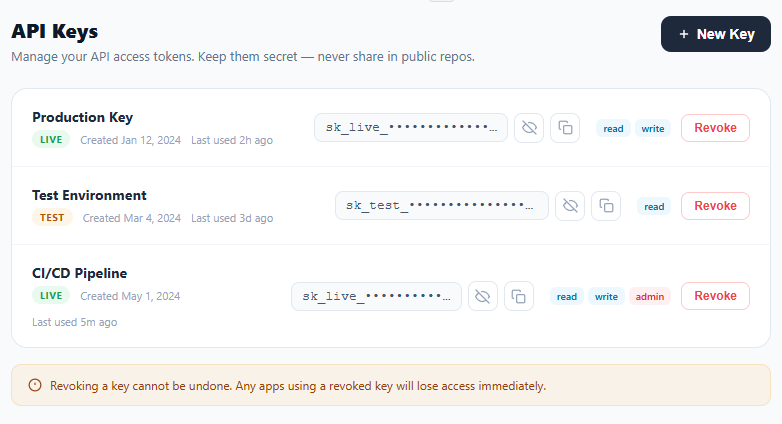
An API key manager is a standard component in any developer-facing SaaS product, authentication service, or platform dashboard. It lets users create, view, copy, and revoke API access tokens from one place. This snippet provides a complete API key manager with masked key display, show/hide toggle with eye icon, copy to clipboard with checkmark feedback, revoke with confirmation dialog, create new key prompt, environment chips (Live/Test), permission badges (read/write/admin), and an empty state when all keys are revoked.
The masked key display
Each key is stored in data-key on the .key-row — never in the visible DOM by default. The .key-code element shows a masked version: the first 8 characters + bullet characters + the last 4 characters. This is the industry-standard partial masking pattern used by Stripe, Vercel, and AWS. toggleKey() reads the full key from data-key and alternates between the masked and full string.
The show/hide toggle
toggleKey() swaps the eye-off and eye-on SVG icons by toggling their display properties. code.dataset.shown tracks the current state (false = masked). The full key is always available in the row's data-key attribute — it never leaves the DOM element, so no server round-trip is needed to reveal it. In production, you would NOT store the full key in the DOM — instead, fetch it from the API on demand.
Copy to clipboard
copyKey() uses navigator.clipboard.writeText() to copy the full key. On success, the copy icon morphs to a checkmark (by replacing the SVG innerHTML) and .copied class adds a green tint. After 2 seconds, the icon reverts. This pattern is identical to the copy button snippet but embedded in the key row.
Revoke and empty state
revokeKey() shows a confirm() dialog before removing the row. On confirm, the row fades to 0.4 opacity with pointer-events: none before DOM removal (visual confirmation the action is in progress). After removal, if no .key-row elements remain, the keys list hides and the .empty empty state appears.
Security considerations for production
The snippet stores the full key in a data-key DOM attribute for demonstration. In a real application, never embed full API keys in the HTML. The recommended pattern: on key creation, return the full key in the API POST response and display it once in a modal with a "Copy and close" button. Store only a hashed (bcrypt or SHA-256) version in the database, along with a short prefix (sk_live_Qb5e) for identification. On subsequent page loads, only fetch the masked prefix from the API — the full key is never retrievable again. This is the same pattern used by Stripe, GitHub, and Vercel.
Key expiry and rotation UI
A production API key manager should support expiry dates and key rotation. Add an "Expires" column to each key row with a date picker for optional expiry. Show a warning badge on keys expiring within 7 days. The "Rotate" action (instead of Revoke) generates a new key, briefly shows both old and new keys active simultaneously for a transition window, then automatically revokes the old key after the window. This zero-downtime rotation pattern prevents service interruption during credential updates.
Build with AI
Build, Understand, Optimize, and Extend It With AI
Instead of manually tracing every string slice, paste this snippet's HTML, CSS, and JS into an AI coding assistant like Claude and ask it to walk through exactly how toggleKey() rebuilds the masked string from data-key and why the full key is safe to leave sitting in a data attribute in this demo but not in a real product. The same assistant is useful for optimizing it — ask whether generating the masked prefix once at row-creation time (instead of recomputing it in toggleKey() on every click) would matter at scale, or whether the innerHTML string built in createKey() should be swapped for real DOM node creation to avoid re-parsing markup on every new key. It's also a good extension partner: ask it to add key expiry dates with a warning badge, wire createKey() and revokeKey() to real POST and DELETE endpoints with hashed server-side storage, or add a one-time "copy this key, it won't be shown again" modal on creation. Treat the code less like a finished artifact and more like a starting point for a conversation.
Prompt to recreate it
Copy this into your AI assistant of choice to build the effect from scratch, or as a jumping-off point for your own variant:
Build an "API key manager" list in plain HTML, CSS, and JavaScript — no framework, no build step.

Requirements:
- Each key is a row storing its full secret value in a data-key attribute on the row element, never rendered as visible text by default.
- Display a masked version built by string slicing: the first 8 characters of the key, followed by a run of bullet characters, followed by the last 4 characters, so the prefix (e.g. sk_live_) stays recognizable while the middle is hidden.
- A show/hide button per row toggles between the masked and full key text, swapping between an eye and an eye-off SVG icon, and tracks its current shown/hidden state in a data attribute on the code element (not a separate JS variable per row).
- A copy button uses navigator.clipboard.writeText on the full key value (regardless of whether it's currently shown or masked), with a fallback to a hidden off-screen textarea plus document.execCommand for browsers without clipboard API support, and swaps its icon to a checkmark with a green tint for 2 seconds after a successful copy.
- A revoke button must call confirm() before doing anything, then fade the row's opacity down and disable its pointer-events, remove the row from the DOM after a short delay, and if no key rows remain, hide the list container and show an empty state panel with a "create your first key" call to action.
- A "New Key" button prompts for a name, generates a random alphanumeric key string, appends a new row built with the same masked-display and action-button structure as the existing rows, and scrolls the new row into view.
Want to tighten it up first? Run this prompt through the AI Prompt Studio to score it across 8 quality dimensions, catch anti-patterns, and tune the wording for Claude, ChatGPT, or Gemini before you paste it in.
Step by step
How to Use
- 1Click the eye icon to reveal a keyEach row shows a masked key (sk_live_••••...Qb5e). Click the eye button to toggle between masked and full key display. The icon switches between eye-off and eye-on variants.
- 2Copy a key to clipboardClick the copy icon next to any key. The icon turns green with a checkmark for 2 seconds to confirm. The full key is copied regardless of whether it is masked or shown.
- 3Revoke a keyClick Revoke on any key row. A confirmation dialog appears. On confirm, the row fades and is removed. If all keys are revoked, the empty state appears.
- 4Create a new keyClick the New Key button. Enter a name in the prompt. A new test key row is added at the bottom with a randomly generated key.
- 5Add permission scopesEdit the .perms div in each key row to add read/write/admin chips. Wire these to a modal where users select scopes when creating a key.
- 6Export for your frameworkClick "JSX" for a React component with key state management, masked display, and clipboard integration. Click "Vue" for a Vue 3 SFC.
Real-world uses
Common Use Cases
Got questions?
Frequently Asked Questions
For a demo, yes. In production, no — never embed live API keys in the DOM. The standard pattern: on key creation, show the full key once in a modal ("Save this — it won't appear again"), then store only a hashed/masked version in your database. On subsequent page loads, only fetch the masked version. Reveal requests must go to a secure endpoint with auth.
In the browser: crypto.getRandomValues(new Uint8Array(32)) gives 32 cryptographically random bytes. Convert to hex: Array.from(bytes, b => b.toString(16).padStart(2,"0")).join(""). On the server (Node.js): crypto.randomBytes(32).toString("hex") or "base64url". Never use Math.random() for security-sensitive tokens.
Manage keys as const [keys, setKeys] = useState(initialKeys). Each key object: { id, name, masked, full, env, perms, createdAt }. Render a KeyRow component per key with show/hide state in useState(false). revokeKey filters the array: setKeys(keys.filter(k => k.id !== id)). createKey appends a new key object from an API call.
The full key lives in a data-key attribute on the .key-row, never in the visible text. The masked form is built with string slicing — the first 8 characters, a run of bullet characters, then the last 4: fullKey.slice(0, 8) + "•".repeat(n) + fullKey.slice(-4) — which preserves the recognisable sk_live_ prefix while hiding the secret middle. toggleKey() swaps the .key-code element's textContent between the masked and full value, tracks the current state in code.dataset.shown, and switches the eye / eye-off icons to match.
revokeKey() first gates on confirm("Revoke this API key? This cannot be undone."), then plays a soft exit: the row's opacity drops to 0.4 with pointer-events disabled, and after 400ms the row is removed from the DOM. If no .key-row remains, the list is hidden and the #emptyState panel is shown instead, so the UI never ends on a blank list. In production, call your DELETE /keys/:id endpoint before the animation and only remove the row on a successful response — keep the confirm step, because key revocation is irreversible.