You Might Also Like
Learn Coding Visually
Learn to code with interactive, live-preview playgrounds — HTML, CSS, JavaScript, React & more.
 HTML Playground42 lessons · Click-based · Live preview
 CSS PlaygroundLearn CSS with a live editor
 JavaScript Playground60 lessons · DOM · Async · Canvas
 React PlaygroundLearn React with a live code editor
 GSAP PlaygroundLearn GSAP animation interactively
 SVG Playground44 lessons · shapes · paths · animation
 SCSS Playground45 lessons · Sass modules · tokens
 Tailwind PlaygroundLearn Tailwind CSS with a live editor
 Bootstrap 5 Playground50 lessons · live preview
BroadcastChannel Cross-Tab Sync — Free Demo With Live Log
BroadcastChannel Cross-Tab Sync · Dashboards · Plain HTML, CSS & JS · Live preview
What's included
Features
About this UI Snippet
BroadcastChannel Cross-Tab Sync — Real Messages Between Tabs
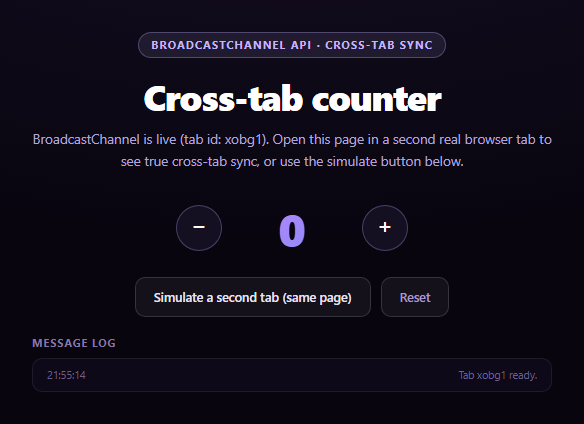
BroadcastChannel is the browser's native publish/subscribe channel between same-origin browsing contexts — tabs, windows, iframes, and workers can all join a channel by name and send each other messages with postMessage, with no server round-trip involved. This snippet demonstrates it with the simplest possible payload: a shared counter that stays in sync everywhere the page is open.
How the sync actually works
Every instance of the page opens new BroadcastChannel('bcs-demo-counter'). Clicking + or − updates the local count and calls channel.postMessage({ type, value, tabId }); every *other* open instance receives that message in its channel.onmessage handler (a channel never receives its own messages) and updates its own count to match. There's no polling and no server — the browser delivers the message directly to every other same-origin context subscribed to that channel name, typically within milliseconds.
Why one tab can't prove this on its own
The whole point of BroadcastChannel is *cross*-tab communication, so a single open tab can't visually demonstrate it — you need a second real tab open to the same page to see a message arrive from outside. This snippet makes that obvious with instructions right in the UI, but also includes a same-page "simulate a second tab" button, which opens a genuinely independent second BroadcastChannel instance inside the same document. The browser treats it identically to a second tab — it's a separate object with its own onmessage handler — so you can watch a message actually leave one channel instance and arrive at another without opening a second window.
A live log of both directions
Every send and every receive is written to a timestamped log, labeled with which "tab" it came from, so the direction of each message is never ambiguous — useful for actually seeing the asynchronous, fire-and-forget nature of postMessage.
Fallback for unsupported browsers
BroadcastChannel is broadly supported in evergreen browsers but missing from a handful of older or embedded webviews. When 'BroadcastChannel' in window is false, the snippet falls back to the classic localStorage storage-event trick: writing to localStorage in one tab fires a storage event in every *other* same-origin tab (never the writer), which is a well-known, near-universally-supported way to achieve the same cross-tab notification. The status text always states plainly which mode is active. Pair this with a web locks tab coordinator for a fuller multi-tab coordination toolkit, or a live visitor counter for a related shared-state dashboard idea.
Build with AI
Build, Understand, Optimize, and Extend It With AI
Paste this snippet's HTML, CSS, and JS into an AI coding assistant like Claude and ask it to explain why BroadcastChannel messages are never delivered back to the sending instance, and how that self-exclusion behavior shapes the way state has to be updated locally (immediately, on send) versus remotely (only via onmessage). It's also useful for reasoning about the fallback — ask why the storage event is a reasonable substitute for BroadcastChannel specifically, and what payload differences (JSON string vs structured-clone object) the two approaches require. For extensions, ask it to add a "who's currently connected" presence list using periodic ping/pong messages over the same channel, or to sync a more complex shared object (like a shopping cart) instead of a single number. Treat the code less like a finished artifact and more like a starting point for a conversation.
Prompt to recreate it
Copy this into your AI assistant of choice to build the effect from scratch, or as a jumping-off point for your own variant:
Build a "BroadcastChannel cross-tab sync" demo in plain HTML, CSS, and JavaScript using the real browser BroadcastChannel API — no libraries.

Requirements:
- A shared counter with increment, decrement, and reset buttons. Every open tab/instance of the page must open new BroadcastChannel('some-channel-name') and post a message ({ type, value, tabId }) whenever the local count changes, so every OTHER open instance receives it via channel.onmessage and updates its own displayed count to match.
- A visible, timestamped log of every message sent and received, labeled with which "tab" or source it involved, so the direction and timing of cross-tab messages is clear.
- CRITICAL: since a single tab cannot demonstrate cross-tab messaging on its own (a channel never receives its own posted messages), include a "simulate a second tab" button that creates a SECOND, independent BroadcastChannel instance within the same page (on the same channel name) with its own onmessage handler, so the demo can visibly show a message being sent from one channel instance and received by another without requiring the user to open a real second browser tab. Clear instructions in the UI should also tell the user they can open a second real tab to see genuine cross-tab sync.
- CRITICAL fallback: feature-detect 'BroadcastChannel' in window. If unsupported, fall back to a localStorage-based cross-tab sync using the window 'storage' event (which fires in other same-origin tabs, never the writing tab, when localStorage changes) so the demo still functions across tabs, with a status message clearly stating that the fallback mechanism is active instead of BroadcastChannel.
- Status text should always state which sync mechanism (real BroadcastChannel vs storage-event fallback) is currently active.
Want to tighten it up first? Run this prompt through the AI Prompt Studio to score it across 8 quality dimensions, catch anti-patterns, and tune the wording for Claude, ChatGPT, or Gemini before you paste it in.
Step by step
How to Use
- 1Paste HTML, CSS, and JSA counter with +/− buttons renders.
- 2Open the page in a second tabSame URL, same origin.
- 3Click + or − in either tabThe count updates in both tabs instantly.
- 4Watch the message logSent and received messages are both logged.
- 5No second tab handy?Click "Simulate a second tab" to see the flow on one page.
- 6ResetBroadcasts a reset to every open instance.
Real-world uses
Common Use Cases
Got questions?
Frequently Asked Questions
BroadcastChannel is specifically for communication BETWEEN separate browsing contexts, and a channel never receives its own posted messages — only other instances subscribed to the same channel name do. A single tab has only one instance, so there's no "other side" to receive anything. Opening a second tab to the same page, or using the built-in "simulate a second tab" button, creates that second instance.
It creates a second, fully independent BroadcastChannel object on the same channel name within the same page. The browser treats this exactly like a second tab's channel — it has its own onmessage handler and receives messages posted by the first instance (and vice versa) — so you can observe real cross-instance delivery without leaving the page.
The snippet checks `BroadcastChannel` in window at load and, if false, switches to a localStorage-based fallback: writing a value to localStorage fires a storage event in every other same-origin tab (but never the tab that wrote it), which has been supported far longer than BroadcastChannel and achieves the same cross-tab notification, just with a slightly different payload shape.
No — BroadcastChannel is strictly same-origin, matching the page's full origin (protocol, host, and port). It cannot be used to message a different domain or even a different port on the same host; for cross-origin communication you would need something like postMessage on a window reference or a server-mediated channel instead.
Create the BroadcastChannel instance once in a mount effect (store it in a ref so it survives re-renders), post messages from your event handlers, and update component state from the onmessage callback. Close the channel with channel.close() in the cleanup function to avoid leaking a listener when the component unmounts.