You Might Also Like
Learn Coding Visually
Learn to code with interactive, live-preview playgrounds — HTML, CSS, JavaScript, React & more.
 HTML Playground42 lessons · Click-based · Live preview
 CSS PlaygroundLearn CSS with a live editor
 JavaScript Playground60 lessons · DOM · Async · Canvas
 React PlaygroundLearn React with a live code editor
 GSAP PlaygroundLearn GSAP animation interactively
 SVG Playground44 lessons · shapes · paths · animation
 SCSS Playground45 lessons · Sass modules · tokens
 Tailwind PlaygroundLearn Tailwind CSS with a live editor
 Bootstrap 5 Playground50 lessons · live preview
Goal Progress Ring — Free Editable Circular Progress Snippet
Goal Progress Ring · Dashboards · Plain HTML, CSS & JS · Live preview
What's included
Features
About this UI Snippet
Goal Progress Ring — Live-Editable Circular Progress Toward a Target
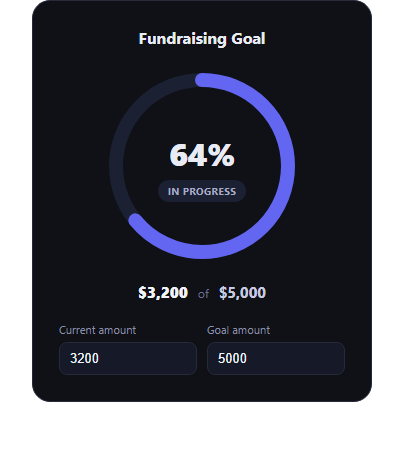
The goal progress ring is the fundraising and target-tracking widget that turns "$3,200 of $5,000 raised" into an instantly readable circle — the ring's fill proportion communicates progress before anyone reads a single number. This snippet builds a fully interactive version in plain HTML, CSS, and JavaScript using an SVG stroke-dashoffset ring.
How the ring fill actually works
The ring is an SVG circle with stroke-dasharray set to its full circumference (2 * Math.PI * 86 \u2248 540.35) and stroke-dashoffset animated to control how much of that dash is visible. update() computes ratio = current / goal (capped at 1 so overachieving a goal doesn't overflow the ring), then sets offset = CIRCUMFERENCE * (1 - ratio) — at ratio 0 the full circumference is offset (empty ring), at ratio 1 the offset is 0 (fully filled ring). The CSS transition on stroke-dashoffset makes every change animate smoothly rather than snapping.
Live-editable inputs
Two number inputs — current amount and goal amount — drive everything. Typing in either fires update() on the input event, so the ring fill, the center percentage, and the "$X of $Y" labels all recompute and animate in real time as you type, not just on blur or submit.
Celebratory completion state
When current >= goal, the ring's stroke color and the status badge both switch to green and the badge text changes to "Goal reached!" — a clear but restrained celebration (color and copy change, no confetti or overlay) that keeps the widget usable as a persistent dashboard element rather than a one-time animation.
Currency formatting
formatCurrency() uses toLocaleString('en-US') so amounts render with proper thousands separators regardless of how large the input numbers get.
Customizing it
Swap dollar amounts for any unit (steps, subscribers, pages read), change the ring's color or thickness, or make the inputs read-only and drive the ring from a live API value instead. Pair it with gradient stat ring, progress circle steps, or activity rings for a fuller goals dashboard.
Build with AI
Build, Understand, Optimize, and Extend It With AI
SVG progress rings look simple but the stroke-dasharray/dashoffset math trips people up constantly, so it's worth pasting this snippet's HTML, CSS, and JS into an AI coding assistant like Claude and asking it to walk through exactly why circumference = 2 * Math.PI * radius has to match the SVG circle's actual r attribute, why the ring is rotated -90deg in CSS (so progress starts at 12 o'clock instead of 3 o'clock), and why dashoffset = circumference * (1 - ratio) is the correct formula rather than dashoffset = circumference * ratio. It's also a good prompt for extending the widget: ask it to add a smooth count-up animation on the center percentage number (not just the ring) as the value changes, to support multiple concentric rings for tracking several goals at once, or to add an aria-live region so screen reader users get an announcement when the goal is reached.
Prompt to recreate it
Copy this into your AI assistant of choice to build the effect from scratch, or as a jumping-off point for your own variant:
Build a "goal progress ring" in plain HTML, CSS, and JavaScript using SVG — no dependencies, no CDN.

Requirements:
- An SVG circle ring (a background track circle plus a foreground fill circle) where the fill circle's progress is controlled via stroke-dasharray (set to the circle's circumference) and stroke-dashoffset (computed from the current progress ratio), with a CSS transition so changes animate smoothly. Rotate the SVG so progress starts at the top (12 o'clock), not the default 3 o'clock start point.
- Two number inputs: "current amount" and "goal amount". On every input event on either field, recompute the ratio (current / goal, capped at a maximum of 1 so it never over-fills) and update: the ring's stroke-dashoffset, a large percentage readout in the center of the ring, and "$X of $Y" style labels showing the formatted current and goal amounts.
- Format the amounts with thousands separators (e.g. via toLocaleString).
- When current reaches or exceeds goal, switch the ring's stroke color and a status badge to a distinct "complete" color/style with updated text (e.g. "Goal reached!") — no confetti or celebratory animation overlay, just a clear color and copy change.
- Dark-theme friendly, centered layout, all values driven from the two inputs.
Want to tighten it up first? Run this prompt through the AI Prompt Studio to score it across 8 quality dimensions, catch anti-patterns, and tune the wording for Claude, ChatGPT, or Gemini before you paste it in.
Step by step
How to Use
- 1Paste HTML, CSS, and JSThe ring renders filled to the default current/goal ratio.
- 2Edit the current-amount inputThe ring fill, percentage, and label update live.
- 3Edit the goal-amount inputThe ratio recalculates against the new target.
- 4Reach or exceed the goalThe ring and badge switch to a green complete state.
- 5Swap the unitChange formatCurrency() to format steps, points, or any metric.
Real-world uses
Common Use Cases
Got questions?
Frequently Asked Questions
It uses SVG stroke-dasharray set to the circle's full circumference and stroke-dashoffset to hide part of that dash. The JS computes ratio = current / goal, then sets offset = circumference * (1 - ratio) — an offset of 0 shows the full ring, an offset equal to the circumference shows none of it. A CSS transition animates the offset change smoothly.
The ratio is capped at 1 with Math.min(current / goal, 1), so the ring never fills past a full circle even if someone enters a current amount greater than the goal. The percentage and complete state still reflect the real numbers — the badge switches to "Goal reached!" as soon as current >= goal.
No — by design it's restrained: the ring's stroke color and the status badge both switch to green with updated copy ("Goal reached!"), with no confetti or animated overlay. That keeps it usable as a persistent dashboard widget rather than a one-time celebration effect that gets stale on repeat views.
Yes — replace formatCurrency() with whatever formatting your unit needs (or none at all), and update the input labels and title text. The ring-fill math (ratio, dashoffset) is unit-agnostic and works the same for any two numbers.
Move current and goal into component state, compute ratio and offset the same way in a derived value, and bind stroke-dashoffset as an inline style or SVG attribute bound to that computed value instead of writing to the DOM directly on input events.