You Might Also Like
Learn Coding Visually
Learn to code with interactive, live-preview playgrounds — HTML, CSS, JavaScript, React & more.
 HTML Playground42 lessons · Click-based · Live preview
 CSS PlaygroundLearn CSS with a live editor
 JavaScript Playground60 lessons · DOM · Async · Canvas
 React PlaygroundLearn React with a live code editor
 GSAP PlaygroundLearn GSAP animation interactively
 SVG Playground44 lessons · shapes · paths · animation
 SCSS Playground45 lessons · Sass modules · tokens
 Tailwind PlaygroundLearn Tailwind CSS with a live editor
 Bootstrap 5 Playground50 lessons · live preview
Active Sessions / Device List — Free Security Settings Panel
Active Sessions / Device List · Dashboards · Plain HTML, CSS & JS · Live preview
What's included
Features
About this UI Snippet
Active Sessions / Device List — Manage Where You're Signed In
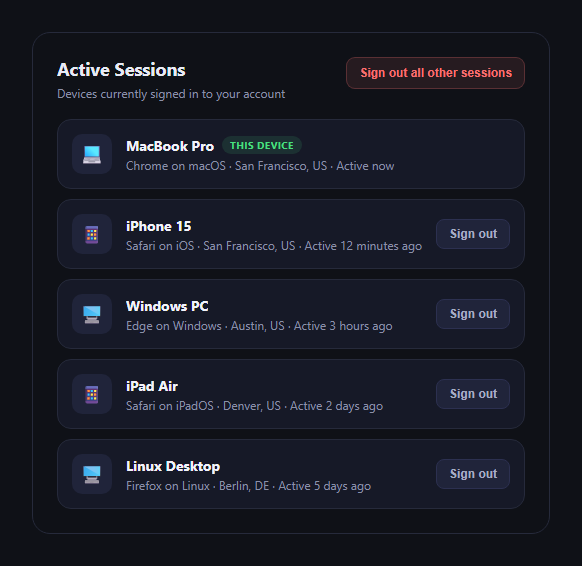
The active sessions panel is the security-settings staple that lists every device currently signed in to an account, so users can spot anything unfamiliar and shut it down. This snippet builds one in plain HTML, CSS, and JavaScript, driven by a single sessions array.
Reading each row
Every session shows a device-type icon, the device and browser name, location, and a relative last-active time — the same information real account-security pages (Google, GitHub, Slack) surface so users can recognize their own devices and spot ones they don't. The current device gets a distinct green "This device" badge and no sign-out button, since you can't sign yourself out of the session you're viewing the list from.
Per-row sign-out
Every non-current row has its own "Sign out" button. Clicking it adds a sdl-removing class that fades and slides the row out, then removes that session from the underlying sessions array after the transition completes and re-renders — so the state (not just the DOM) is genuinely updated, which matters if you re-render the list for any other reason.
Bulk "sign out all other sessions"
The header's bulk action animates out every row except the current device's, then filters the sessions array down to just { current: true } — the same pattern real security pages use to let a user immediately invalidate every session but their own after, say, a suspected compromise.
Why this matters for security UX
Session lists are a core part of account security hygiene, and the interaction details matter: never letting a user accidentally sign out their own active session, making the "this device" identity unambiguous, and giving a fast bulk path for the "I think something's wrong" moment.
Customizing it
Wire the sign-out actions to real API calls (revoke the session token server-side before removing it from state), add IP addresses or session-start timestamps, or add a confirmation dialog before the bulk sign-out. Pair it with a settings panel, passkey login, or API key manager for a complete account-security suite.
Build with AI
Build, Understand, Optimize, and Extend It With AI
Session-management UIs carry real security stakes, so it's worth pasting this snippet's HTML, CSS, and JS into an AI coding assistant like Claude and asking it to review the sign-out flow specifically: does the current device correctly stay protected from any code path, does the animate-then-remove timing risk a race if a user clicks sign-out twice quickly, and what changes would be needed to make the local state removal reflect a real optimistic-update-with-rollback pattern against a backend API. It's also useful for hardening the UX: ask the assistant to add a confirmation modal before the bulk "sign out all other sessions" action, to show a relative-time library-backed "last active" that updates live instead of a static string, or to add a visual warning badge on sessions from unfamiliar locations by comparing against the user's typical login geography.
Prompt to recreate it
Copy this into your AI assistant of choice to build the effect from scratch, or as a jumping-off point for your own variant:
Build an "active sessions / device list" security settings panel in plain HTML, CSS, and JavaScript — no dependencies, no CDN.

Requirements:
- Render a list of session rows from a data array, each with: a device-type icon/emoji, device name, browser name, location, and a relative "last active" time string.
- Mark exactly one session as the current device with a distinct badge (e.g. "This device"), and never render a sign-out button on that row — a user must not be able to sign themselves out of the session they're currently viewing from.
- Every other row gets its own "Sign out" button. Clicking it should animate the row out (fade + slight slide) and THEN remove that session from the underlying data array and re-render, not just hide it visually.
- Add a "Sign out all other sessions" bulk action in the header that animates out every non-current row and then filters the data array down to just the current session.
- Style it as a clean security-settings card: dark theme, one row per session, clear visual hierarchy between device name, badge, and metadata.
Want to tighten it up first? Run this prompt through the AI Prompt Studio to score it across 8 quality dimensions, catch anti-patterns, and tune the wording for Claude, ChatGPT, or Gemini before you paste it in.
Step by step
How to Use
- 1Paste HTML, CSS, and JSThe session list renders with the current device badged.
- 2Click "Sign out" on a rowThat row fades out and is removed from the list.
- 3Click "Sign out all other sessions"Every row except the current device animates out.
- 4Swap in real session dataReplace the sessions array with your API response.
- 5Wire sign-out to your backendCall your revoke-session endpoint before removing from state.
Real-world uses
Common Use Cases
Got questions?
Frequently Asked Questions
No — the current session (marked current: true in the data) never renders a "Sign out" button, so there's no path to sign out of the session you're currently using from this panel alone.
It animates first: a sdl-removing class fades and slides the row out over about 220ms, then the session is filtered out of the underlying array and the list re-renders. This keeps the visual removal smooth while still genuinely updating state, not just hiding a DOM node.
It animates out every row except the current device, then replaces the sessions array with only the entries where current is true. In a real implementation, you'd call your backend's bulk-revoke endpoint at the same time so the sessions are actually invalidated server-side, not just removed from the local UI.
Replace the static sessions array with data fetched from your sessions API, and inside signOut(id) and the bulk handler, call your revoke-session endpoint (e.g. DELETE /api/sessions/:id) before or alongside updating local state, handling failures by reverting the optimistic removal.
Move sessions into component state, render rows with a list/map over that state, and trigger the fade-out via a CSS transition tied to a per-row "removing" flag before actually filtering the array — the same two-phase animate-then-remove pattern used here.