You Might Also Like
Learn Coding Visually
Learn to code with interactive, live-preview playgrounds — HTML, CSS, JavaScript, React & more.
 HTML Playground42 lessons · Click-based · Live preview
 CSS PlaygroundLearn CSS with a live editor
 JavaScript Playground60 lessons · DOM · Async · Canvas
 React PlaygroundLearn React with a live code editor
 GSAP PlaygroundLearn GSAP animation interactively
 SVG Playground44 lessons · shapes · paths · animation
 SCSS Playground45 lessons · Sass modules · tokens
 Tailwind PlaygroundLearn Tailwind CSS with a live editor
 Bootstrap 5 Playground50 lessons · live preview
Network Information Badge — Free navigator.connection Live Status
Network Information Badge · Dashboards · Plain HTML, CSS & JS · Live preview
What's included
Features
About this UI Snippet
Network Information Badge — Real Connection Data Where the Browser Allows It
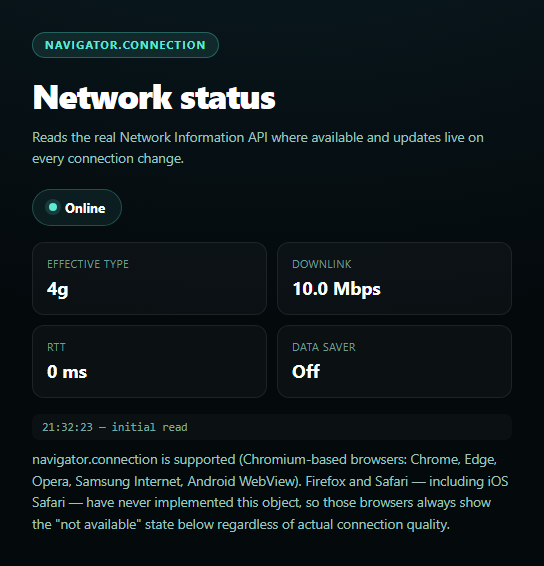
This badge reads genuine connection quality data from navigator.connection and updates live as the network changes — while being upfront that this API is a Chromium-only feature with real, permanent browser support gaps.
Four real signals, one object
navigator.connection (the NetworkInformation interface) exposes effectiveType (a bucketed estimate — 'slow-2g', '2g', '3g', or '4g' — derived from recent round-trip time and downlink measurements, not the literal radio technology), downlink (an estimated effective bandwidth in Mbps), rtt (estimated round-trip time in milliseconds), and saveData (whether the user has requested reduced data usage at the OS or browser level). This snippet reads and displays all four.
Live updates via a real event
connection.addEventListener('change', ...) fires whenever any of those four values shifts — switching from wifi to cellular, a cellular connection degrading from 4g to 3g effective type, or the user toggling Data Saver mid-session. The badge's log panel timestamps every change so you can watch the values move in real time rather than only reading a one-time snapshot.
A real, permanent support gap — not a temporary bug
navigator.connection is supported across Chromium-based browsers (Chrome, Edge, Opera, Samsung Internet, Android WebView) but Firefox and Safari — including iOS Safari — have never implemented it, and there's no signal either has near-term plans to. This isn't a progressive-enhancement timing issue; on those browsers, navigator.connection is simply undefined forever. The snippet's fallback copy says this plainly rather than implying the feature is "loading" or "coming soon."
Online/offline still works everywhere
Regardless of navigator.connection support, the badge separately tracks basic connectivity via navigator.onLine and the standard online/offline window events — universally supported — so even on Firefox or Safari the badge still reflects real connectivity state, just without the richer quality metrics.
Pair this with an uptime status page or status dashboard for a fuller connectivity-aware operations UI.
Build with AI
Build, Understand, Optimize, and Extend It With AI
Paste this snippet's HTML, CSS, and JS into an AI coding assistant like Claude and ask it to explain why effectiveType is a heuristic bucket derived from measured RTT and downlink rather than a literal report of the radio/connection technology, and why that distinction matters for building adaptive-loading logic. It's also useful for reasoning about the browser support gap — ask why Firefox and Safari have never implemented navigator.connection and what privacy or fingerprinting concerns have been cited as part of that reasoning historically, since it's a genuinely informative angle on browser API design trade-offs. For extensions, ask it to add adaptive behavior (e.g. skip loading a high-res hero image when saveData is true or effectiveType is 'slow-2g'), or to build a small chart plotting downlink/rtt over time from the event log. Treat the code less like a finished artifact and more like a starting point for a conversation.
Prompt to recreate it
Copy this into your AI assistant of choice to build the effect from scratch, or as a jumping-off point for your own variant:
Build a "network information badge" dashboard widget in plain HTML, CSS, and JavaScript using the real Network Information API (navigator.connection) — no libraries.

Requirements:
- A status badge (colored dot + text) showing online/offline state, plus a stat grid showing four values: effectiveType ('slow-2g'/'2g'/'3g'/'4g'), downlink (Mbps), rtt (ms), and saveData (on/off).
- Feature-detect with something like `var connection = navigator.connection || navigator.mozConnection || navigator.webkitConnection` and a boolean hasConnectionAPI, since this is a Chromium-only feature (Chrome, Edge, Opera, Samsung Internet, Android WebView) that Firefox and Safari, including iOS Safari, have never implemented and likely never will — treat this as a permanent, expected gap, not a temporary unsupported state, and say so plainly in the UI copy rather than implying it might work later.
- When hasConnectionAPI is true, attach a 'change' event listener on the connection object that re-reads and re-renders all four stats live, and appends a timestamped line to a small scrolling event log every time it fires.
- CRITICAL: regardless of whether navigator.connection is supported, separately track basic connectivity using navigator.onLine and the window 'online'/'offline' events (universally supported across all browsers) so the badge's online/offline dot always works correctly even in Firefox or Safari where the richer connection object is unavailable — do not let the two concerns (basic online/offline vs. detailed connection quality) be conflated into a single supported/unsupported check.
- Show "n/a" or "not available" (not blank or an error) for effectiveType/downlink/rtt/saveData specifically when the Network Information API is unsupported, and include a note explaining clearly that this is expected in Firefox/Safari, not a bug.
- Log an initial "initial read" entry to the event log on load in addition to the live change events, so the log never starts empty.
Want to tighten it up first? Run this prompt through the AI Prompt Studio to score it across 8 quality dimensions, catch anti-patterns, and tune the wording for Claude, ChatGPT, or Gemini before you paste it in.
Step by step
How to Use
- 1Paste HTML, CSS, and JSA live connection badge and stat grid render.
- 2Check the stat grideffectiveType, downlink, RTT, and saveData populate where supported.
- 3Throttle your networkIn Chrome DevTools, simulate 3G — the badge updates via the change event.
- 4Toggle Data SaversaveData flips and a change event logs it.
- 5Go offlineThe dot turns red via the offline window event.
- 6Test in Firefox or SafariThe badge falls back to onLine-only tracking with clear copy.
Real-world uses
Common Use Cases
Got questions?
Frequently Asked Questions
Because navigator.connection (the Network Information API) is a Chromium-only feature — supported in Chrome, Edge, Opera, Samsung Internet, and Android WebView, but never implemented in Firefox or Safari, including iOS Safari. This isn't a bug or a loading state; on those browsers navigator.connection is permanently undefined, so the badge correctly shows "not available" for effectiveType, downlink, rtt, and saveData while still tracking basic online/offline state through universally-supported window events.
It's a bucketed estimate ('slow-2g', '2g', '3g', or '4g') that the browser derives from recent observed round-trip time and downlink measurements — not a report of the literal radio technology in use. A wifi connection with high latency and low throughput can report as '3g' effectiveType even though it's not cellular at all; the value describes experienced quality, not the underlying network type.
Whenever the browser's internal estimate of effectiveType, downlink, rtt, or saveData shifts meaningfully — switching networks (wifi to cellular), a connection degrading or improving, or the user toggling their OS/browser Data Saver setting. It's not on a fixed timer; it's driven by the browser's own network-quality heuristics, so frequency varies by platform and real conditions.
No. navigator.onLine and the window online/offline events are universally supported across all major browsers and only report whether the device has any network connectivity at all — a simple boolean. navigator.connection is the much richer, Chromium-only API providing effectiveType, downlink, rtt, and saveData. This badge uses both: onLine for guaranteed cross-browser basic connectivity, and connection for detailed quality where available.
Read navigator.connection once on mount, store its current values in component state, and attach the 'change' listener (plus window 'online'/'offline' listeners) in the same effect, removing all three in cleanup. Since navigator.connection itself is a live object (not a snapshot), re-reading its properties inside the change handler — rather than relying on stale closured values — keeps the displayed numbers accurate.