You Might Also Like
Learn Coding Visually
Learn to code with interactive, live-preview playgrounds — HTML, CSS, JavaScript, React & more.
 HTML Playground42 lessons · Click-based · Live preview
 CSS PlaygroundLearn CSS with a live editor
 JavaScript Playground60 lessons · DOM · Async · Canvas
 React PlaygroundLearn React with a live code editor
 GSAP PlaygroundLearn GSAP animation interactively
 SVG Playground44 lessons · shapes · paths · animation
 SCSS Playground45 lessons · Sass modules · tokens
 Tailwind PlaygroundLearn Tailwind CSS with a live editor
 Bootstrap 5 Playground50 lessons · live preview
Web Locks API Tab Coordinator — Free navigator.locks Demo
Web Locks API Tab Coordinator · Dashboards · Plain HTML, CSS & JS · Live preview
What's included
Features
About this UI Snippet
Web Locks API Tab Coordinator — Real Cross-Tab Queuing, Demonstrated In-Page
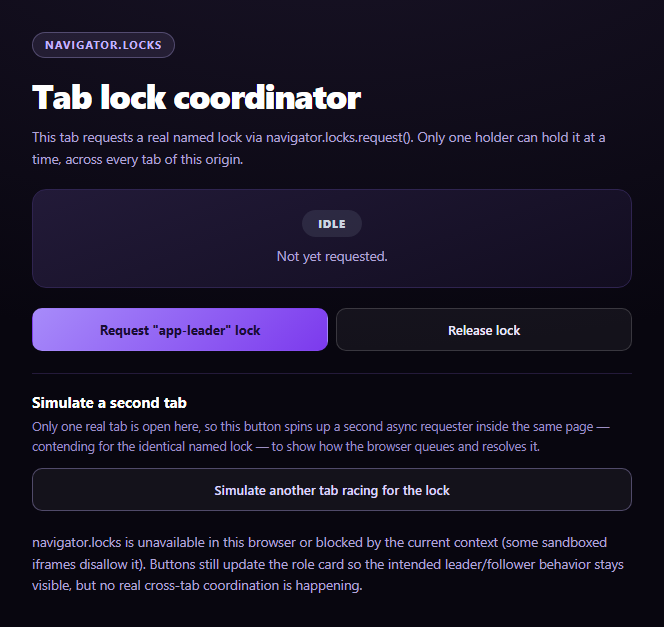
The Web Locks API lets any number of tabs, iframes, and workers from the same origin coordinate around a named resource without a server round-trip. This snippet uses the genuine navigator.locks.request() primitive to elect a "leader" and demonstrates real queuing behavior — including a second lock requester run in-process to simulate what a second real browser tab would experience.
A lock is a callback, not a boolean
navigator.locks.request(name, callback) doesn't return "did I get it" — it invokes your callback only once the lock is granted, and the lock is held for exactly as long as the promise your callback returns stays pending. This snippet's primary requester returns a new Promise it never resolves itself, stashing the resolve function so the "Release lock" button can trigger it later — a common pattern for holding a lock open across explicit UI-driven duration rather than a fixed task.
Why "simulate another tab" is honest, not faked
A single embedded preview can't spawn a genuine second browsing context, so instead of drawing a fake animation, this snippet calls navigator.locks.request() a second, independent time for the identical lock name from an async function on the same page. Because the Web Locks API's queue is keyed purely by lock name within an origin — not by which script or context requested it — the browser's real lock manager queues this second request exactly as it would a genuine second tab. What you see in the log is real queuing, demonstrated in-process rather than cross-window.
Real cross-tab behavior, one click away
The note explicitly tells you how to see the non-simulated version: open the same page in an actual second browser tab and click "Request" in both. Because navigator.locks coordinates at the origin level (not the tab level), the second tab's request will genuinely queue behind the first's held lock — no simulation involved at that point.
ifAvailable for non-blocking checks
The simulated requester passes { ifAvailable: false } explicitly to make clear the default (blocking, queued) behavior is intentional here — contrast with { ifAvailable: true }, which would resolve immediately with a null lock instead of waiting, useful for a "try to become leader, don't wait" pattern.
Pair this with a status dashboard for a broader ops-monitoring UI, or an uptime status page for another dashboards-category piece.
Build with AI
Build, Understand, Optimize, and Extend It With AI
Paste this snippet's HTML, CSS, and JS into an AI coding assistant like Claude and ask it to explain how navigator.locks.request()'s callback-holds-the-lock-until-its-promise-resolves design differs from more familiar mutex APIs, and why stashing the callback's resolve function lets a UI button release the lock on demand rather than after a fixed duration. It's also useful for reasoning about the "simulate another tab" approach — ask why calling request() a second time for the same lock name from the same page produces genuinely real queuing behavior rather than a faked animation, since the Web Locks API queues by name at the origin level regardless of which script issued the request. For extensions, ask it to add a lock mode ('exclusive' vs 'shared') comparison, demonstrate the signal option for aborting a queued request, or build a small leader-election helper hook. Treat the code less like a finished artifact and more like a starting point for a conversation.
Prompt to recreate it
Copy this into your AI assistant of choice to build the effect from scratch, or as a jumping-off point for your own variant:
Build a "Web Locks API tab coordinator" demo in plain HTML, CSS, and JavaScript using the real navigator.locks API — no libraries.

Requirements:
- A role-status card showing one of three states: idle, waiting (lock requested but not yet granted), and leader (lock currently held by this context), plus "Request lock", "Release lock", and "Simulate another tab" buttons.
- Feature-detect with navigator.locks && typeof navigator.locks.request === 'function' before use, since the API can be absent or blocked in some contexts (e.g. certain sandboxed iframes).
- The primary "Request lock" flow must call navigator.locks.request(lockName, callback) where the callback returns a new Promise that is NOT resolved immediately — instead, stash its resolve function in an outer-scope variable so a separate "Release lock" button can call it later, demonstrating that a lock is held for as long as the callback's returned promise stays pending, not for a fixed duration.
- CRITICAL: implement "Simulate another tab" not as a fake animation but as a second, independent call to navigator.locks.request() for the exact same lock name, invoked from an async function within the same page. Explain in code comments and UI copy that because the Web Locks API's queue is keyed by lock name at the origin level (not by which script or tab issued the request), this in-page second requester genuinely queues behind the first one exactly as a real second browser tab would — making the demonstration real, not simulated, even though only one browser tab is actually open.
- A visible, timestamp-ordered log area that prints each acquire/queue/release event from both the primary requester and the simulated second requester, so the queuing and resolution order is observable.
- Also demonstrate the { ifAvailable: true } option somewhere (even just in a code comment or a secondary button) to show the non-blocking "check without waiting" variant, and explain the contrast with the default blocking/queuing behavior.
- UI copy should tell the user how to observe genuinely real cross-tab (not just in-page-simulated) behavior: opening the same page in a second actual browser tab and requesting the lock there too.
Want to tighten it up first? Run this prompt through the AI Prompt Studio to score it across 8 quality dimensions, catch anti-patterns, and tune the wording for Claude, ChatGPT, or Gemini before you paste it in.
Step by step
How to Use
- 1Paste HTML, CSS, and JSAn idle role card and lock controls render.
- 2Click "Request app-leader lock"This tab genuinely acquires the named Web Lock.
- 3Click "Simulate another tab"A second in-page requester queues behind the held lock.
- 4Click "Release lock"The queued simulated requester immediately acquires it.
- 5Watch the logEach acquire/release event prints with a real timest-ordered trace.
- 6Open a second real tabRepeat "Request" there for genuine cross-tab queuing.
Real-world uses
Common Use Cases
Got questions?
Frequently Asked Questions
It coordinates access to a named resource across every tab, iframe, and dedicated/shared worker that shares the same origin. Only one exclusive holder of a given lock name can run its callback at a time; every other request() call for that same name queues (FIFO by default) until the holder's callback promise resolves. It requires no server, cookie, or localStorage polling — the browser's own lock manager tracks it.
It calls navigator.locks.request() a second, independent time for the identical lock name from an async function running on the same page. The Web Locks API's queue is keyed by lock name within the origin, not by which script requested it, so the browser's real lock manager queues this second call exactly as it would a genuine second tab — the log output you see is real queuing behavior, just demonstrated in-process instead of across two windows.
Open this same page in a second, real browser tab and click "Request app-leader lock" in both. Because navigator.locks coordinates at the origin level rather than the tab level, the second tab's request will genuinely queue behind whichever tab is currently holding the lock — no in-page simulation is involved at that point, and releasing the lock in one tab will unblock the other.
It's the default behavior made explicit: the request queues and waits if the lock isn't immediately available, rather than resolving right away with a null lock. Passing { ifAvailable: true } instead would make request() resolve immediately — with a null lock argument if unavailable — useful for a "become leader only if nobody else already is" check that never blocks.
Call navigator.locks.request() inside a mount effect or event handler, stash the callback's resolve function in a ref (not component state, since it's not meant to trigger re-renders) if you need to release the lock from another handler, and always resolve it in a cleanup/unmount effect so an unmounting component doesn't hold a lock indefinitely.