You Might Also Like
Learn Coding Visually
Learn to code with interactive, live-preview playgrounds — HTML, CSS, JavaScript, React & more.
 HTML Playground42 lessons · Click-based · Live preview
 CSS PlaygroundLearn CSS with a live editor
 JavaScript Playground60 lessons · DOM · Async · Canvas
 React PlaygroundLearn React with a live code editor
 GSAP PlaygroundLearn GSAP animation interactively
 SVG Playground44 lessons · shapes · paths · animation
 SCSS Playground45 lessons · Sass modules · tokens
 Tailwind PlaygroundLearn Tailwind CSS with a live editor
 Bootstrap 5 Playground50 lessons · live preview
Package Tracking Route — Free Shipment Progress Map Widget
Package Tracking Route · Dashboards · Plain HTML, CSS & JS · Live preview
What's included
Features
About this UI Snippet
Package Tracking Route — A Shipment Map With a Status Timeline
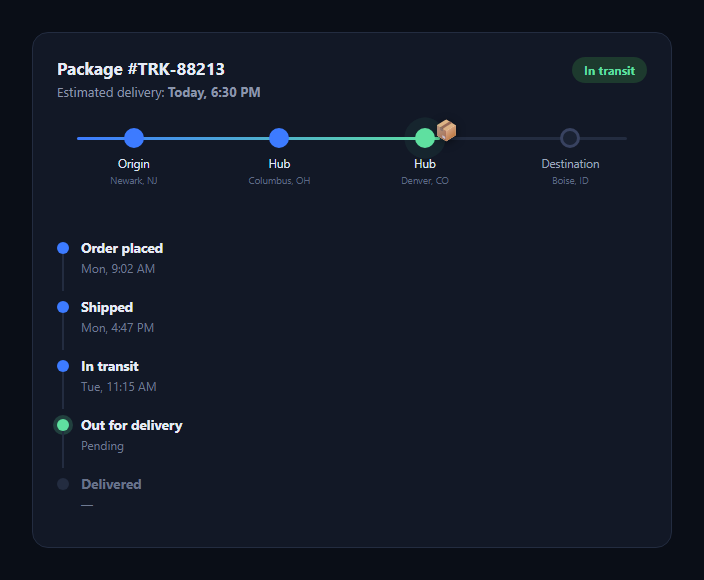
The package tracking route is the visual carriers and e-commerce order pages use to show a shipment's journey at a glance — origin, one or more transit hubs, and destination laid out on a horizontal line, with the package marked at its current position, backed by a chronological status list. This snippet builds it in plain HTML, CSS, and JavaScript.
Nodes on a line, not a real map
Rather than embedding a real map (which needs an API key and geodata), the route is four .pt-node elements spaced with justify-content: space-between over an absolutely positioned .pt-line. This keeps the widget dependency-free while still communicating "this is a journey with stops" clearly.
A fill that shows progress
.pt-line-fill is a second line, layered on top of the track, whose width is driven by the current node's data-pct attribute (a 0–100 position along the route). It's the same pattern as a progress bar, just applied along the route instead of a straight bar — everything before the current hub reads as "done."
The package marker floats above the line
The 📦 emoji is absolutely positioned and its left is set in JavaScript to match data-pct from the node marked .pt-node--current, so moving the package to a new stage is a one-line change (update the class and the script re-reads the new position on next run). A CSS transition on left animates the move.
A pulsing "current" dot
The current-hub dot uses a box-shadow keyframe animation that expands and fades — a common "live" indicator pattern — so the eye is drawn to where the package actually is without needing a live map.
Status timeline below
A vertical list mirrors the five standard shipment states — Order placed, Shipped, In transit, Out for delivery, Delivered — each with a timestamp. Completed steps get a filled dot and a connecting line in the brand blue; the active step gets a green glow; future steps stay dim, giving a clear "here's what's happened and what's next" read.
Customizing it
Add more transit hubs by inserting nodes with their own data-pct, wire the JS to update from a real tracking API response, or swap the emoji for an SVG truck/plane icon per leg. Pair it with a delivery ETA card or order tracking timeline.
Build with AI
Build, Understand, Optimize, and Extend It With AI
Paste this snippet's HTML, CSS, and JS into an AI coding assistant like Claude and ask it to explain how the data-pct attribute on the current node drives both the package marker's position and the progress-fill line's width, and why this approach avoids needing a real map API. It can help you wire the widget to a real tracking webhook or polling endpoint, add more transit hubs dynamically from an array of stops, or replace the emoji marker with an animated SVG icon that changes per transport leg (truck, plane, ship). It's also useful for adding a "respects prefers-reduced-motion" variant that disables the pulse and transition animations.
Prompt to recreate it
Copy this into your AI assistant of choice to build the effect from scratch, or as a jumping-off point for your own variant:
Build a "package tracking route" widget in plain HTML, CSS, and JavaScript (no dependencies, no map library).

Requirements:
- A horizontal row of stop nodes (origin, one or more transit hubs, destination) evenly spaced along a connecting line, each with a small label (city/hub name).
- A second "fill" line layered on the track whose width represents progress along the route, driven by a numeric 0–100 position value stored as a data attribute on whichever node is marked as the current stop.
- A package icon/marker that is absolutely positioned above the line and whose horizontal position is set by JavaScript from that same current-stop data attribute, with a CSS transition so moving it animates smoothly.
- A subtle pulsing visual indicator (CSS keyframe animation, e.g. an expanding box-shadow) on the current stop's dot to draw attention to where the package is right now, but make sure the actual status is also conveyed in text (not only via the animation) for accessibility.
- Below the route, a vertical status timeline listing the standard shipment states (Order placed, Shipped, In transit, Out for delivery, Delivered) each with a timestamp, visually distinguishing completed steps, the currently active step, and future steps.
- Write the JS so that updating which stop is "current" (and re-running one repositioning function) is enough to move the marker and refill the line — do not hardcode pixel positions.
Want to tighten it up first? Run this prompt through the AI Prompt Studio to score it across 8 quality dimensions, catch anti-patterns, and tune the wording for Claude, ChatGPT, or Gemini before you paste it in.
Step by step
How to Use
- 1Paste HTML, CSS, and JSThe route, timeline, and header render.
- 2Mark the current nodeAdd the pt-node--current class to a stop.
- 3Set data-pctA 0–100 value positions the package on the line.
- 4Update the timelineToggle pt-done / pt-active as status changes.
- 5Wire to your APICall placePackage() after updating the DOM.
Real-world uses
Common Use Cases
Got questions?
Frequently Asked Questions
No. It's a stylized horizontal route made of positioned nodes and a fill line, not a real map with tiles or coordinates. This keeps it dependency-free and fast — swap in a real map library if you need actual geography.
Remove the pt-node--current class from the old node and add it to the new one (with its own data-pct), then call placePackage() again — it reads the currently marked node and repositions the marker and the fill line.
Insert another .pt-node element between existing ones with a data-pct value between its neighbors, matching the flexbox spacing. The line and fill automatically span the full width regardless of node count.
Yes — after fetching a shipment status, toggle the pt-done/pt-active classes on the timeline items, move the pt-node--current class to the matching route node with the right data-pct, and call placePackage() to sync the visual position.
The animation is purely decorative and doesn't convey information on its own — the "In transit" badge and timeline text carry the actual status, so screen reader users get the same information without relying on the animation.