You Might Also Like
Learn Coding Visually
Learn to code with interactive, live-preview playgrounds — HTML, CSS, JavaScript, React & more.
 HTML Playground42 lessons · Click-based · Live preview
 CSS PlaygroundLearn CSS with a live editor
 JavaScript Playground60 lessons · DOM · Async · Canvas
 React PlaygroundLearn React with a live code editor
 GSAP PlaygroundLearn GSAP animation interactively
 SVG Playground44 lessons · shapes · paths · animation
 SCSS Playground45 lessons · Sass modules · tokens
 Tailwind PlaygroundLearn Tailwind CSS with a live editor
 Bootstrap 5 Playground50 lessons · live preview
Delivery ETA Card — Free Countdown & Progress Courier Card
Delivery ETA Card · Cards · Plain HTML, CSS & JS · Live preview
What's included
Features
About this UI Snippet
Delivery ETA Card — A Compact Countdown Card for the Last Mile
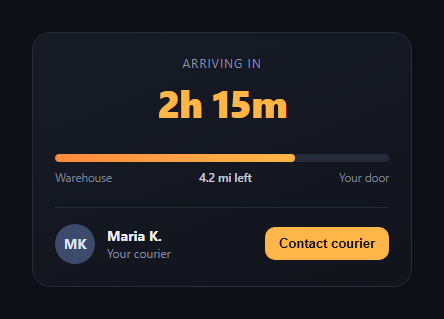
The delivery ETA card is the small, glanceable card food-delivery and courier apps show once an order is out for delivery — a countdown, a progress bar, and a way to reach the driver, all in one compact block. This snippet builds it in plain HTML, CSS, and JavaScript.
Countdown as the headline
The top of the card is a large, tabular-numeral countdown ("2h 15m") formatted by a small format() helper that switches between "Nh Nm" and "Nm" once the hour count hits zero. font-variant-numeric: tabular-nums keeps the digits from jittering in width as they change.
Progress tied to the same countdown
The progress bar's fill width and the "X mi left" label are both derived from the same remainingSeconds / totalSeconds ratio the countdown uses — so the bar, the distance label, and the time all stay mathematically consistent instead of being three separately animated pieces that can drift apart.
Avatar-initial courier identity
Rather than loading a photo, the courier is represented by a colored circle with their initials ("MK") — a lightweight, always-available identity pattern that avoids broken image states and loads instantly.
A contact action with feedback
The "Contact courier" button doesn't navigate away; it shows a small toast ("Calling Maria K. …") that fades in and back out, giving the user confirmation the tap registered — the same micro-interaction pattern used across delivery apps for in-card actions.
A self-contained demo timer
The JavaScript uses setInterval to advance the countdown for demonstration purposes (each tick represents a simulated minute). In production you'd replace this with a value computed from your delivery-tracking backend or recalculated from a real ETA timestamp on each poll.
Customizing it
Swap the countdown source for a real ETA timestamp, replace the avatar initials with a photo with a graceful fallback, or add a small map thumbnail. Pair it with a package tracking route or order tracking timeline.
Build with AI
Build, Understand, Optimize, and Extend It With AI
Paste this snippet's HTML, CSS, and JS into an AI coding assistant like Claude and ask it to explain why deriving the progress-bar width and the distance-remaining label from the same ratio as the countdown prevents the three pieces of UI from drifting out of sync. It can help you replace the local setInterval demo timer with logic that recomputes the ETA from a real timestamp on each server poll (so the countdown stays accurate even if the tab was backgrounded), or help you add a small live map thumbnail or a "courier is nearby" push notification trigger when the countdown crosses a threshold.
Prompt to recreate it
Copy this into your AI assistant of choice to build the effect from scratch, or as a jumping-off point for your own variant:
Build a "delivery ETA card" in plain HTML, CSS, and JavaScript (no dependencies).

Requirements:
- A large, prominent countdown showing time remaining (e.g. "2h 15m") using tabular/monospaced numerals so the width doesn't jitter as digits change, formatted by a helper function that switches format once the hour count reaches zero.
- A progress bar (track + fill) representing how much of the delivery distance/time has elapsed, plus a "X mi left" style label — both the fill width and the distance label must be computed from the exact same underlying ratio as the countdown, not updated independently, so they can never drift out of sync with each other.
- A courier/driver identity row using an avatar built from initials in a colored circle (no image dependency), with a name and a small "Your courier" caption.
- A "Contact courier" button that, on click, shows a small toast/confirmation message that fades in and back out after a couple seconds, rather than navigating away.
- Drive the countdown with a simple interval-based demo timer that decrements a remaining-seconds value and updates the countdown, progress fill, and distance label together in one function each tick, so it's obvious where to plug in a real ETA timestamp later.
- Keep the whole card compact enough to fit in a sidebar or modal, and make sure the progress fill has a smooth CSS transition rather than jumping.
Want to tighten it up first? Run this prompt through the AI Prompt Studio to score it across 8 quality dimensions, catch anti-patterns, and tune the wording for Claude, ChatGPT, or Gemini before you paste it in.
Step by step
How to Use
- 1Paste HTML, CSS, and JSThe card renders with a starting countdown.
- 2Watch it count downThe demo timer advances every few seconds.
- 3Watch the progress barFill and distance stay in sync with the timer.
- 4Click "Contact courier"A toast confirms the action.
- 5Wire to real dataReplace remainingSeconds with a live ETA.
Real-world uses
Common Use Cases
Got questions?
Frequently Asked Questions
No — the demo advances remainingSeconds locally via setInterval to show the pattern. In production, recompute remainingSeconds from a real ETA timestamp each time you poll or receive a push update, rather than trusting client-side elapsed time alone.
Both are derived from the same elapsedRatio value (1 - remainingSeconds / totalSeconds) inside a single tick() function, so there's one source of truth instead of three independently updated elements that could drift apart.
Initials in a colored circle render instantly with no network request and never show a broken-image icon. It's a common fallback pattern — you can layer a real <img> on top with an onerror handler that falls back to the initials if you want photos when available.
In this snippet it shows a toast as a placeholder for the real action. In production, wire the click handler to open a masked-number call, an in-app chat thread, or a deep link, and keep the toast (or a similar confirmation) as feedback that the tap registered.
Move remainingSeconds into component state, replace the setInterval-based tick with your framework's timer/effect pattern (recomputing from a real ETA when available), and bind the fill width, countdown text, and distance label to that state. The CSS ports unchanged.