You Might Also Like
Learn Coding Visually
Learn to code with interactive, live-preview playgrounds — HTML, CSS, JavaScript, React & more.
 HTML Playground42 lessons · Click-based · Live preview
 CSS PlaygroundLearn CSS with a live editor
 JavaScript Playground60 lessons · DOM · Async · Canvas
 React PlaygroundLearn React with a live code editor
 GSAP PlaygroundLearn GSAP animation interactively
 SVG Playground44 lessons · shapes · paths · animation
 SCSS Playground45 lessons · Sass modules · tokens
 Tailwind PlaygroundLearn Tailwind CSS with a live editor
 Bootstrap 5 Playground50 lessons · live preview
Color Palette Extractor — Free Canvas Pixel-Sampling Snippet
Color Palette Extractor · Cards · Plain HTML, CSS & JS · Live preview
What's included
Features
About this UI Snippet
Color Palette Extractor — Real Pixel Sampling With Canvas getImageData
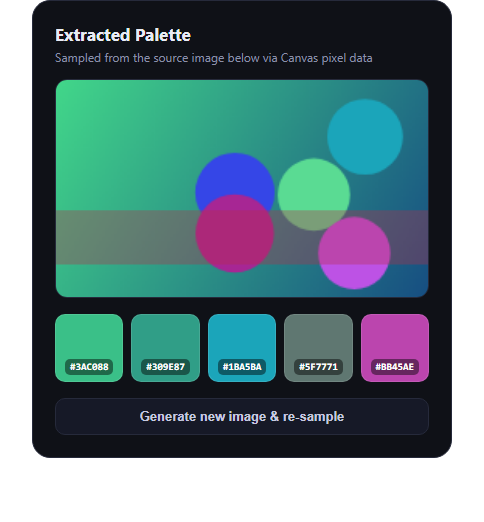
The color palette extractor pulls a small set of representative colors out of an image — the tool behind "extract colors from this photo" features in design apps. This snippet builds a simplified but genuine version: it paints a randomized scene to an offscreen-style canvas, then samples real pixel data at five points with getImageData, so every swatch is an actual color pulled from rendered pixels rather than a hardcoded palette.
A real scene, not a static image
paintScene() draws a randomized linear gradient, five randomly placed and colored circles, and a translucent diagonal band onto the visible canvas each time it runs. Because the hues, positions, and sizes are randomized on every call, the canvas contains genuinely different pixel data run to run — there's no way to fake the extraction with a fixed color list, since the source pixels themselves change.
Real getImageData sampling
samplePalette() reads five fixed-proportion coordinates spread across the canvas and calls ctx.getImageData(x, y, 1, 1).data at each one — the same browser API real color-picker and eyedropper tools use to read raw RGBA values from rendered pixels. Each result is converted to a hex string with rgbToHex(). Nothing here simulates the sampling; it reads whatever pixels actually ended up at those coordinates after painting.
Click-to-copy swatches
Each of the five swatches shows its sampled hex code and copies it to the clipboard via the Clipboard API when clicked, with a small toast confirming the copy — the same interaction pattern as color swatch but driven by extraction instead of manual input.
Regenerate to see it work
The "Generate new image & re-sample" button repaints the canvas with fresh random colors and re-samples, so you can watch the five hex values change in lockstep with the new pixels — visible proof the palette comes from the canvas, not a script constant.
Customizing it
Swap paintScene() for drawing an actual uploaded image via drawImage() and the same getImageData sampling works unchanged; adjust the sample point coordinates, add more swatches, or build a k-means-style dominant-color extractor for production use. Pair it with a gradient picker or color wheel picker for a full color-tools panel.
Build with AI
Build, Understand, Optimize, and Extend It With AI
Canvas pixel sampling has a few sharp edges — coordinate rounding, secure-context requirements for clipboard access, tainted canvases from cross-origin images — so it's worth pasting this snippet's HTML, CSS, and JS into an AI coding assistant like Claude and asking it to explain exactly how getImageData(x, y, 1, 1).data turns canvas coordinates into a real RGBA pixel read, and why that's genuinely different from just picking colors out of a predefined array. It's also a good jumping-off point for leveling the extractor up: ask the assistant to replace the five fixed sample points with a proper dominant-color clustering algorithm (like k-means over a downsampled image), to handle CORS/tainted-canvas errors gracefully when the source is a user-uploaded photo from a different origin, or to add a "copy all as CSS variables" button that exports the whole palette at once.
Prompt to recreate it
Copy this into your AI assistant of choice to build the effect from scratch, or as a jumping-off point for your own variant:
Build a "color palette extractor" in plain HTML, CSS, and JavaScript using the Canvas 2D API — no libraries, no CDN.

Requirements:
- Render a <canvas> and draw a scene onto it (a gradient plus a few randomly positioned/colored shapes is fine) so the canvas has genuinely varied pixel data, regenerated with new random values each time a "regenerate" button is clicked.
- Implement a REAL sampling function that reads actual pixel data from the canvas using ctx.getImageData(x, y, 1, 1).data at 5 different coordinate points spread across the canvas, and converts each sampled RGB value to a hex string. Do not hardcode the resulting colors or fake the sampling — the swatches must reflect whatever pixels are actually on the canvas.
- Render the 5 sampled colors as swatches below the canvas, each showing its hex code.
- Make each swatch clickable to copy its hex code to the clipboard (Clipboard API), with a brief toast/confirmation on copy.
- Add a "generate new image & re-sample" button that repaints the canvas with new random colors/shapes and re-runs the sampling, so a viewer can visibly confirm the swatches change when the underlying pixels change.
- Keep it dependency-free and dark-theme friendly.
Want to tighten it up first? Run this prompt through the AI Prompt Studio to score it across 8 quality dimensions, catch anti-patterns, and tune the wording for Claude, ChatGPT, or Gemini before you paste it in.
Step by step
How to Use
- 1Paste HTML, CSS, and JSA source canvas renders with 5 sampled swatches below it.
- 2Click a swatchIts hex code copies to the clipboard with a toast.
- 3Click "Generate new image"The canvas repaints and re-samples 5 new real colors.
- 4Swap in a real imageReplace paintScene() with drawImage() on an uploaded file.
- 5Tune sample pointsEdit the points array in samplePalette() for different coverage.
Real-world uses
Common Use Cases
Got questions?
Frequently Asked Questions
They're really sampled. paintScene() draws a randomized gradient and shapes to the canvas, then samplePalette() calls the browser's native ctx.getImageData(x, y, 1, 1).data at five coordinates — the same API real eyedropper tools use — and converts each actual pixel's RGB values to hex. Regenerating changes the underlying pixels and the swatches change with them.
Yes — draw the image onto the canvas with ctx.drawImage(img, 0, 0, W, H) instead of calling paintScene(), then call samplePalette() as-is. Since it reads whatever pixels are on the canvas, it works identically on a real photo.
Five fixed points spread across the canvas keeps the demo simple and fast while still genuinely reading real pixel data. A production-grade extractor would typically cluster all pixels (e.g. with k-means) to find dominant colors rather than sampling fixed coordinates — a good next step to build on top of this.
The Clipboard API (navigator.clipboard.writeText) requires a secure context (HTTPS or localhost) in most browsers. The snippet falls back gracefully by still showing the toast if the clipboard call fails, but the actual copy needs a secure context to succeed.
Keep the canvas as a ref, run paintScene() and samplePalette() inside a mount effect (or on file upload), and store the returned hex array in state to render swatches. The Canvas 2D API calls themselves are framework-agnostic and port unchanged.