You Might Also Like
Learn Coding Visually
Learn to code with interactive, live-preview playgrounds — HTML, CSS, JavaScript, React & more.
 HTML Playground42 lessons · Click-based · Live preview
 CSS PlaygroundLearn CSS with a live editor
 JavaScript Playground60 lessons · DOM · Async · Canvas
 React PlaygroundLearn React with a live code editor
 GSAP PlaygroundLearn GSAP animation interactively
 SVG Playground44 lessons · shapes · paths · animation
 SCSS Playground45 lessons · Sass modules · tokens
 Tailwind PlaygroundLearn Tailwind CSS with a live editor
 Bootstrap 5 Playground50 lessons · live preview
ResizeObserver Live Card — Free Real-Time Size Tracking Demo
ResizeObserver Live Card · Cards · Plain HTML, CSS & JS · Live preview
What's included
Features
About this UI Snippet
ResizeObserver Live Card — Dimensions That Stay Correct, Automatically
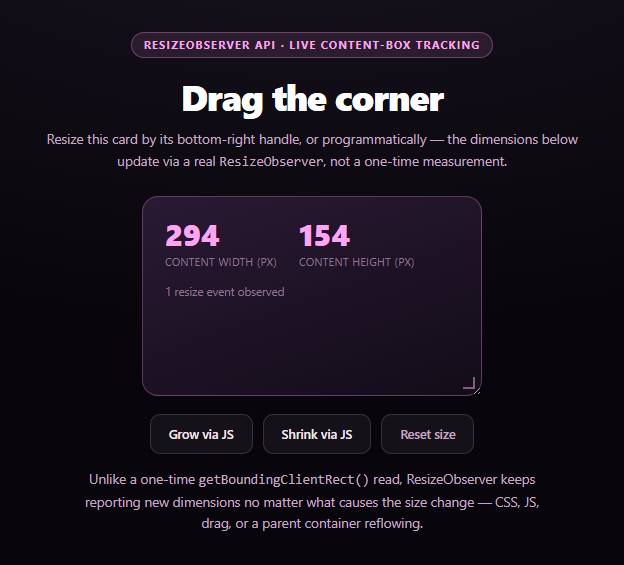
This card reports its own width and height using a real ResizeObserver, and stays correct no matter what makes it change size — dragging its CSS resize: both handle, clicking the JS buttons that set style.width/style.height directly, or a parent layout reflowing around it. That "any cause" guarantee is the entire reason ResizeObserver exists.
The one-time-read trap
element.getBoundingClientRect() is accurate the instant it runs, but it's a snapshot — it never updates itself. Code that relies on it has to know, in advance, every possible reason the element might resize (a CSS class change, a user drag, a sibling's height changing in a flex row, a web font finishing its load and reflowing text) and manually re-call getBoundingClientRect() after each one. Miss a cause, and the reported size silently goes stale.
What ResizeObserver actually watches
new ResizeObserver(callback) and observer.observe(element) sets up a genuine, ongoing watch: the callback fires with fresh measurements every time the observed element's box actually changes size, regardless of cause. This card reads entry.contentBoxSize (falling back to entry.contentRect for older Chromium releases that only supported it) to report the content box specifically — dimensions with padding and border excluded, which is usually what "how much room is inside this element" actually means.
Every resize source, one code path
The demo wires up three different ways to resize the card — the native CSS resize handle (drag), two buttons that set inline styles (JS), and a reset button — and every single one flows through the *same* ResizeObserver callback with no special-casing. The running event counter climbing regardless of which method triggered it is the point: the observer doesn't care how the size changed, only that it did.
The rare fallback
ResizeObserver has shipped in every major evergreen browser for years, so an unsupported context is genuinely rare — but this snippet still feature-detects 'ResizeObserver' in window and falls back to a manual re-measurement on window resize and on each button click, with a clear note that this fallback can't catch every resize cause (a lone drag-handle resize, for instance, wouldn't be caught without also resizing the window). Pair this with a scroll reveal grid for layout-aware entrance animation, or a network information badge for another live-capability readout.
Build with AI
Build, Understand, Optimize, and Extend It With AI
Paste this snippet's HTML, CSS, and JS into an AI coding assistant like Claude and ask it to explain why ResizeObserver is preferred over a manual getBoundingClientRect() re-measurement strategy, specifically walking through which resize causes a naive window-resize-only listener would miss (like a CSS-only padding change or a sibling reflowing a flex container) that ResizeObserver still catches. It's also useful for reasoning about contentBoxSize versus contentRect — ask why the array check exists and what it's compensating for across browser versions. For extensions, ask it to add a second observed element to demonstrate the callback receiving multiple entries in one batch, or to throttle the callback with requestAnimationFrame for a case where it drives expensive canvas redraws. Treat the code less like a finished artifact and more like a starting point for a conversation.
Prompt to recreate it
Copy this into your AI assistant of choice to build the effect from scratch, or as a jumping-off point for your own variant:
Build a "ResizeObserver live card" in plain HTML, CSS, and JavaScript using the real browser ResizeObserver API — no libraries.

Requirements:
- A card element with CSS resize: both (and overflow: auto, since resize requires it) so the user can drag its bottom-right corner to resize it, plus two buttons that programmatically change the card's inline width/height styles (grow/shrink) and a reset button.
- Use new ResizeObserver(callback) and observer.observe(cardElement) to read the card's live content-box dimensions inside the callback — read entry.contentBoxSize (handling both the array and non-array shape across browser versions) falling back to entry.contentRect.width/height for older engines — and display the rounded width/height in the UI, updating on every callback firing.
- A running counter of how many times the ResizeObserver callback has fired, so the demo visibly proves the observer reacts to ALL of the resize causes offered (drag handle, both JS buttons, and reset), not just one of them, without any manual re-measurement calls scattered through the button handlers.
- CRITICAL fallback: feature-detect 'ResizeObserver' in window. If unsupported, fall back to reading getBoundingClientRect() once on load, again on the window resize event, and again after each button click, with a clearly labeled note explaining this is a manual fallback that can't detect every possible resize cause (e.g. a drag-handle-only resize with no window resize).
- Include a brief code comment or on-page note contrasting ResizeObserver's "fires for any cause" behavior against a one-time getBoundingClientRect() read.
Want to tighten it up first? Run this prompt through the AI Prompt Studio to score it across 8 quality dimensions, catch anti-patterns, and tune the wording for Claude, ChatGPT, or Gemini before you paste it in.
Step by step
How to Use
- 1Paste HTML, CSS, and JSA resizable card with a live dimension readout renders.
- 2Drag the bottom-right cornerWidth/height update live via ResizeObserver.
- 3Click "Grow via JS"A programmatic style change is observed too.
- 4Watch the event counterIncrements for every resize cause, not just drag.
- 5Reset the sizeConfirms the observer keeps firing on repeated changes.
- 6Read contentBoxSizeUnderstand content-box vs border-box measurement.
Real-world uses
Common Use Cases
Got questions?
Frequently Asked Questions
getBoundingClientRect() returns the element's size at the exact moment you call it and never updates again on its own — you'd have to manually re-call it after every possible resize cause. ResizeObserver instead sets up an ongoing subscription: its callback fires automatically every time the observed element's box actually changes, regardless of what caused it, so you never have to enumerate resize causes yourself.
It reports the content box — the element's inner content area with padding, border, and scrollbar excluded — which is usually the most useful number for layout decisions like "how much room do I have to lay out my content." Some older Chromium versions only exposed entry.contentRect instead of the array-based contentBoxSize, so this snippet checks for both.
Yes. It observes the box itself, not any particular API that changed it, so a CSS class toggle that changes padding, a media query that changes layout, a parent flex/grid container reflowing, or even a web font finishing its load and changing text height, will all trigger the callback exactly like a JS-driven style change would.
Yes — it has shipped in every major evergreen browser (Chrome, Firefox, Safari, Edge) for several years and has near-universal support today. This snippet still feature-detects it and falls back to a manual re-measurement on window resize and button clicks for the rare unsupported context, while noting that fallback can't catch every possible resize cause.
Create the ResizeObserver instance in a mount effect, call observe() on a DOM ref, and update component state from inside the callback (throttling with requestAnimationFrame if you're driving expensive layout work from it). Disconnect the observer in the cleanup function on unmount to avoid a memory leak.