You Might Also Like
Learn Coding Visually
Learn to code with interactive, live-preview playgrounds — HTML, CSS, JavaScript, React & more.
 HTML Playground42 lessons · Click-based · Live preview
 CSS PlaygroundLearn CSS with a live editor
 JavaScript Playground60 lessons · DOM · Async · Canvas
 React PlaygroundLearn React with a live code editor
 GSAP PlaygroundLearn GSAP animation interactively
 SVG Playground44 lessons · shapes · paths · animation
 SCSS Playground45 lessons · Sass modules · tokens
 Tailwind PlaygroundLearn Tailwind CSS with a live editor
 Bootstrap 5 Playground50 lessons · live preview
Offer Letter Preview Card — Free Compensation Breakdown UI
Offer Letter Preview Card · Cards · Plain HTML, CSS & JS · Live preview
What's included
Features
About this UI Snippet
Offer Letter Preview Card — Compensation Breakdown & Response Actions
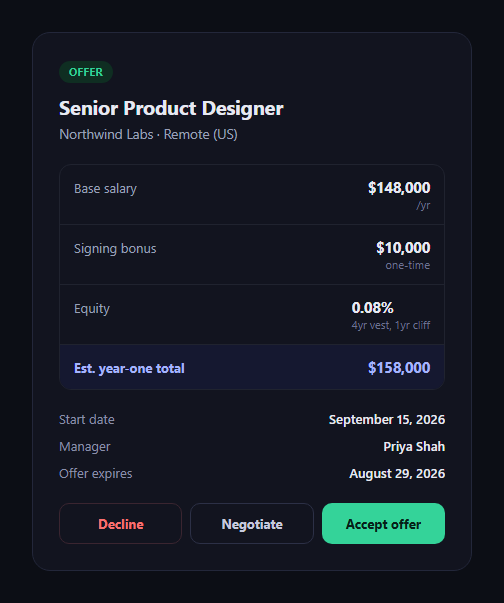
The offer letter preview card is the moment a candidate reads and responds to a job offer: role, compensation line items, key dates, and three distinct actions. This snippet builds it in plain HTML, CSS, and JavaScript.
Compensation as itemized rows, not one number
A <dl> lists base salary, signing bonus, and equity as separate rows, each with a secondary label (/yr, one-time, vesting terms) under the figure — then a visually distinct total row summarizes estimated year-one value. Breaking compensation into parts is what makes an offer legible instead of a single opaque number.
Three actions, three outcomes
Accept, Decline, and Negotiate are not decorative — each button carries a data-action, and a shared click handler looks up a distinct message per action from a messages object, then swaps the action row for a result panel styled uniquely per outcome (green for accept, red for decline, indigo for negotiate). One handler, three genuinely different end states.
A real, visible state change
Clicking any action hides the button row entirely and reveals #olpResult with outcome-specific text and color — so "acting on" the card isn't just a button press with no visible consequence, the card visibly resolves into whichever path was chosen.
Metadata that matters to a decision
Start date, hiring manager, and offer expiration are surfaced as their own row, separate from compensation — the practical details a candidate needs alongside the numbers to actually decide.
Customizing it
Wire each action to a real API call (e-signature for accept, a negotiation form for negotiate), add a countdown to the expiration date, or support multiple compensation currencies. Pair it with a job listing card for the original posting, or a candidate pipeline kanban for the recruiter's side of the same process.
Build with AI
Build, Understand, Optimize, and Extend It With AI
Rather than guessing how to keep three different button outcomes maintainable, paste this snippet's HTML, CSS, and JS into an AI coding assistant like Claude and ask it to explain how the shared click handler uses each button's data-action attribute together with a messages lookup object to avoid three near-duplicate event handlers, and why swapping the action row for a distinct result panel communicates a state change more clearly than simply disabling the clicked button. The same assistant is useful for extending the card into a real flow — ask it to wire the Accept button to an e-signature API call with a loading state while the request is in flight, add a live countdown to the offer's expiration date, or restructure the compensation breakdown to support multiple currencies or hourly contractor terms instead of an annual salary.
Prompt to recreate it
Copy this into your AI assistant of choice to build the effect from scratch, or as a jumping-off point for your own variant:
Build an "offer letter preview card" in plain HTML, CSS, and JavaScript — no frameworks, no dependencies.

Requirements:
- A card showing a job title, company/location subtitle, and an itemized compensation breakdown as a definition list: base salary, signing bonus, and equity, each with its figure and a small secondary note (e.g. "/yr", "one-time", vesting terms) — plus a visually distinct total row summarizing estimated year-one value.
- A metadata section showing start date, hiring manager, and offer expiration date as separate rows.
- Three action buttons: Accept, Decline, and Negotiate, each carrying a data-action attribute, all wired to a single shared click handler (not three separate near-duplicate handlers) that looks up a distinct outcome message per action from a lookup object.
- Clicking any action button must hide the entire action-button row and reveal a separate result panel showing the outcome-specific message, with the result panel's background/text color also differing per action (e.g. green for accept, red for decline, indigo/blue for negotiate) — this must be a real, visible state change, not just a disabled button or a console log.
- Keep it in a dark theme with clear visual hierarchy between the compensation total and its line items, and make sure the JavaScript only references classnames/ids/data attributes that exist in the HTML you write.
Want to tighten it up first? Run this prompt through the AI Prompt Studio to score it across 8 quality dimensions, catch anti-patterns, and tune the wording for Claude, ChatGPT, or Gemini before you paste it in.
Step by step
How to Use
- 1Paste the HTML, CSS, and JSAn offer card with compensation breakdown and actions render.
- 2Review the comp rowsBase, bonus, and equity each show a value and a note.
- 3Click Accept, Decline, or NegotiateThe action row is replaced by a result panel.
- 4Compare outcomesEach action produces its own message and color.
- 5Edit the compensation figuresChange the dl rows for a different offer.
- 6Wire an action to your backendSend the real request inside its click handler.
Real-world uses
Common Use Cases
Got questions?
Frequently Asked Questions
Each button carries a data-action attribute ("accept", "decline", or "negotiate"). The shared click handler reads that attribute, looks up the corresponding text in a messages object, and applies a matching modifier class (olp-result--accept, --decline, or --negotiate) to the result panel — so a single function drives three visually and textually distinct end states instead of three near-duplicate handlers.
Hiding the entire action row and revealing a dedicated result panel makes the state change unambiguous — there's no risk of a disabled-but-still-visible button being misread as "still pending." It also frees the space for a message that explains what happens next, which a disabled button can't communicate on its own.
Inside the click handler's accept branch, instead of (or in addition to) swapping in the result panel immediately, fire your API call or open an e-signature modal first, and only show the success result panel once that call resolves. You could show a loading state on the button while the request is in flight, then reveal the result panel on success or an error message on failure.
Compute the difference between the current date and the expiration date shown in the metadata row, format it as "expires in N days," and update that text (or re-render it) on an interval or on page load. You could also swap the metadata row's styling to a warning color once the offer is within, say, 48 hours of expiring.
Model the offer as a data object (role, company, compensation line items, dates) and render the dl rows from it. Hold the response action in component state (null until clicked), conditionally render either the action buttons or the result panel based on that state, and call your real API from the click handler before updating state to reflect success. The compensation and metadata layout is plain CSS and ports unchanged.