You Might Also Like
Learn Coding Visually
Learn to code with interactive, live-preview playgrounds — HTML, CSS, JavaScript, React & more.
 HTML Playground42 lessons · Click-based · Live preview
 CSS PlaygroundLearn CSS with a live editor
 JavaScript Playground60 lessons · DOM · Async · Canvas
 React PlaygroundLearn React with a live code editor
 GSAP PlaygroundLearn GSAP animation interactively
 SVG Playground44 lessons · shapes · paths · animation
 SCSS Playground45 lessons · Sass modules · tokens
 Tailwind PlaygroundLearn Tailwind CSS with a live editor
 Bootstrap 5 Playground50 lessons · live preview
Page Visibility API Indicator — Free visibilitychange Demo
Page Visibility API Indicator · Dashboards · Plain HTML, CSS & JS · Live preview
What's included
Features
About this UI Snippet
Page Visibility API Indicator — Real Tab Visibility, Logged Live
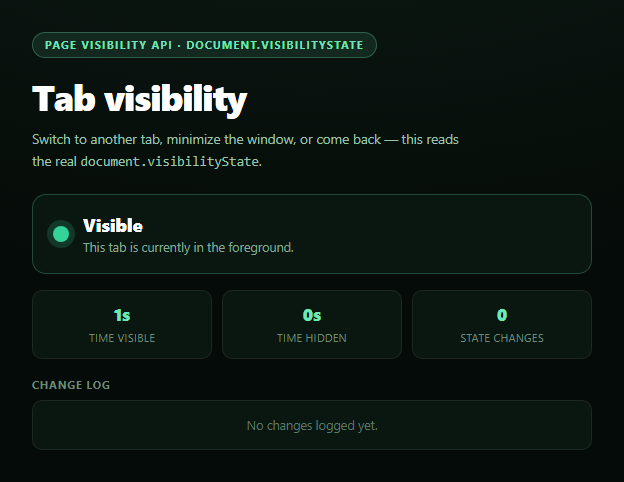
This snippet reads the browser's actual Page Visibility API — document.visibilityState and the visibilitychange event — to show, in real time, whether the current tab is in the foreground or has been switched away from, minimized, or covered. It's the exact mechanism behind why a video pauses when you switch tabs or a dashboard stops polling in the background.
Why not blur/focus?
It's tempting to reach for window blur/focus events instead, but those fire for reasons that have nothing to do with tab visibility — clicking into a browser extension popup, opening dev tools, or focus moving to another window on some platforms can all fire blur while the tab is still fully visible on screen. document.visibilityState is more precise: it reports 'visible', 'hidden', and (on some platforms) 'prerender', driven by whether the tab's content is actually being rendered to the user, and visibilitychange fires exactly when that changes — including tab switches, window minimizing, and screen locking.
What real apps do with this
Video players pause playback and mute audio processing when hidden; dashboards and live feeds stop polling APIs to save bandwidth and battery; games pause their update loop; analytics tools log accurate "time on page" instead of counting background time. This snippet demonstrates the pattern directly: it accumulates separate visible-time and hidden-time counters using Date.now() deltas measured between visibilitychange events, so the numbers are a real elapsed-time record, not an estimate.
A live, capped change log
Every transition appends a timestamped entry to a log capped at 25 rows (oldest entries are trimmed), so you can watch a session's visibility history accumulate — useful for demonstrating to teammates exactly when and how often a page loses focus during a real usage session.
Handling unsupported browsers
The Page Visibility API has been standard for well over a decade, so unsupported browsers are effectively nonexistent today — but the snippet still checks typeof document.hidden !== 'undefined' before wiring the listener, and falls back to a clearly labeled static "always visible" message rather than silently doing nothing if the check ever fails. Pair this with a screen wake lock toggle to build a full "pause when backgrounded" media control, or a network information badge for a broader environment-awareness dashboard.
Build with AI
Build, Understand, Optimize, and Extend It With AI
Paste this snippet's HTML, CSS, and JS into an AI coding assistant like Claude and ask it to explain why document.visibilityState and the visibilitychange event are the correct tool for detecting tab backgrounding, versus window blur/focus events which can produce false positives from in-page focus changes. It's also useful for reasoning about the time-accounting logic — ask it to walk through why the visible/hidden millisecond counters are computed from Date.now() deltas between change events rather than from a running setInterval poll, and what drift or inaccuracy the polling approach would introduce. For extensions, ask it to add a "pause video" or "pause polling" callback hook that fires alongside the existing log entries, or to persist the change log to localStorage across page reloads. Treat the code less like a finished artifact and more like a starting point for a conversation.
Prompt to recreate it
Copy this into your AI assistant of choice to build the effect from scratch, or as a jumping-off point for your own variant:
Build a "page visibility indicator" in plain HTML, CSS, and JavaScript using the real browser Page Visibility API — no libraries.

Requirements:
- A status card showing document.visibilityState ("visible" or "hidden") with a colored dot (green for visible, red for hidden) and a short explanatory sentence, updated by listening for the visibilitychange event on document — not window blur/focus.
- Three running stats: total time visible, total time hidden, and a count of total visibility state changes during the session. Compute the time totals from real Date.now() millisecond deltas measured between successive visibilitychange events (and a live-updating current-visible-time tick via setInterval while visible), not from polling estimates.
- A capped, timestamped change log (newest entry first, capped around 25 rows) that records every visibilitychange transition with a human-readable time and whether the tab became visible or hidden.
- Feature-detect the API by checking typeof document.hidden !== 'undefined' before wiring the listener; if unsupported, show a clearly labeled fallback message stating the API is unavailable and the indicator is showing a static "always visible" state, rather than silently doing nothing.
- Explain in a code comment why visibilitychange is preferred over blur/focus for this purpose (avoiding false positives from in-page focus shifts like opening dev tools or an extension popup).
Want to tighten it up first? Run this prompt through the AI Prompt Studio to score it across 8 quality dimensions, catch anti-patterns, and tune the wording for Claude, ChatGPT, or Gemini before you paste it in.
Step by step
How to Use
- 1Paste HTML, CSS, and JSThe indicator renders showing "visible".
- 2Switch to another tabThe dot turns red and state flips to "hidden".
- 3Come backState flips back; the change log records both events.
- 4Watch the countersVisible-time and hidden-time accumulate from real deltas.
- 5Minimize the windowSame hidden state, confirming it's not just a tab check.
- 6Wire it to real workGate polling/video/animation on document.visibilityState.
Real-world uses
Common Use Cases
Got questions?
Frequently Asked Questions
document.visibilityState reports "hidden" when the tab is switched away from, the browser window is minimized, or on some platforms when the screen is locked — essentially any time the page's content is not being rendered to the user. It reports "visible" only when the tab is actually on screen and in the foreground.
blur and focus fire for reasons unrelated to tab visibility, like clicking into a browser extension popup or opening developer tools, which can trigger a false "hidden" reading while the tab is still fully visible. document.visibilityState and visibilitychange are purpose-built for this exact question and don't have those false positives.
Each time visibilitychange fires, the code takes Date.now() and computes the elapsed milliseconds since the last change, adding that delta to whichever counter (visible or hidden) matches the state that just ended. This is a real accumulated elapsed-time measurement, not a polling-based estimate, so it stays accurate regardless of how long each state lasts.
Common patterns: pause video/audio playback and disconnect visualizer loops, stop or slow down polling intervals for live data, pause requestAnimationFrame-driven animations or games, and skip sending analytics "heartbeat" pings. Resume all of it in the visible branch of the same visibilitychange handler.
Register the visibilitychange listener in a mount effect and remove it on unmount. Store visibilityState, the time counters, and the log entries in component state (or a ref for the raw timers to avoid re-render overhead), updating state from inside the handler exactly as the vanilla version updates the DOM directly.