You Might Also Like
Learn Coding Visually
Learn to code with interactive, live-preview playgrounds — HTML, CSS, JavaScript, React & more.
 HTML Playground42 lessons · Click-based · Live preview
 CSS PlaygroundLearn CSS with a live editor
 JavaScript Playground60 lessons · DOM · Async · Canvas
 React PlaygroundLearn React with a live code editor
 GSAP PlaygroundLearn GSAP animation interactively
 SVG Playground44 lessons · shapes · paths · animation
 SCSS Playground45 lessons · Sass modules · tokens
 Tailwind PlaygroundLearn Tailwind CSS with a live editor
 Bootstrap 5 Playground50 lessons · live preview
Live Visitor Counter — Real-Time Viewer Count UI
Live Visitor Counter · Dashboards · Plain HTML, CSS & JS · Live preview
What's included
Features
About this UI Snippet
Live Visitor Counter — Random-Walk Count, Pulsing Dot & Per-Update Bump
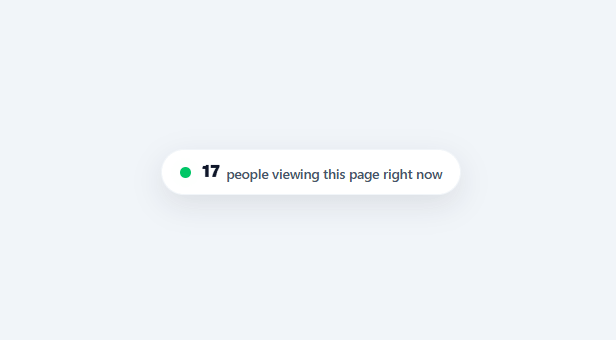
"23 people are viewing this right now" is a small but effective urgency cue used across e-commerce and ticketing sites — it signals active demand without the harder sell of a discount or a deadline. This snippet builds a believable live-counter widget: a pulsing presence dot, a count that drifts realistically rather than mechanically, and a tiny bump animation marking every change.
A random walk, not random noise
Rather than picking a fresh random number on every tick (which would jump around with no continuity and immediately look fake), step() nudges the *existing* count by ±1, occasionally ±2 on a 15% chance for a slightly bigger jump, clamped with Math.max(4, …) so it never drops to an unbelievable near-zero. This random-walk approach — each new value derived from the last, not generated independently — is what makes the number feel like it's tracking something real instead of visibly randomizing.
Irregular timing reads as more real than a fixed interval
Each update schedules the *next* one with setTimeout(step, 2200 + Math.random() * 2600) — a randomized 2.2–4.8 second gap — rather than a fixed setInterval. A perfectly regular tick is one of the easiest "this is fake" tells for any live-data widget; irregular timing, even though it's still simulated, matches how real, independent visitor arrivals and departures would actually look.
A pulsing dot built from one extra layer
The presence indicator is two stacked elements at the same position: a solid dot and a ::before pseudo-element of the same color that scales up to 2.6× while fading out on a 1.8-second loop — the classic CSS "ping" effect, requiring no JavaScript and no extra real DOM node beyond the one dot <span>.
A bump animation that announces the change without text noise
Every time the count updates, its number element gets a .bump class removed and immediately re-added (with a forced reflow via void countEl.offsetWidth so the animation retriggers even on consecutive updates) — a quick upward nudge-and-settle that draws the eye to the new value for an instant without a distracting color flash or a layout-shifting size change.
Use real data once you have it
This widget is built to demonstrate the interaction, not to manufacture demand — once connected to genuine concurrent-viewer data from real analytics, the exact same rendering and animation logic applies unchanged; only the source of the number differs. Treat the random-walk version as a placeholder for development and design review, not as something to ship in front of real visitors.
Build with AI
Build, Understand, Optimize, and Extend It With AI
You do not need to reconstruct the believability tricks in step() by intuition alone. Paste this snippet's HTML, CSS, and JS into an AI coding assistant like Claude and ask it to explain precisely why the count is nudged by ±1 from its previous value instead of being re-randomized from scratch each tick, and why setTimeout with a randomized 2200 to 4800ms gap reads as more realistic than a fixed setInterval. The same assistant can help optimize it, for example asking whether the recursive setTimeout chain could leak if the component unmounts mid-wait, and how to guard against that. It is also useful for extending the widget: ask it to swap the random walk for a real WebSocket-driven concurrent-viewer count, add a small trend arrow when the count has been rising for several updates in a row, or scope the counter per product id on a multi-product page. Treat the code less like a finished artifact and more like a starting point for a conversation.
Prompt to recreate it
Copy this into your AI assistant of choice to build the effect from scratch, or as a jumping-off point for your own variant:
Build a "live visitor counter" pill widget in plain HTML, CSS, and JavaScript with no libraries.

Requirements:
- A pill-shaped card containing a pulsing presence dot and a text line reading "<count> people viewing this page right now", where the count switches to singular "person" when it equals exactly 1.
- The presence dot must be built from exactly one extra layer (a pseudo-element), not an additional DOM node, that scales up while fading out on a continuous loop to create a CSS "ping" ripple effect.
- The count must update via a random walk: each tick nudges the existing count by -1 or +1, with roughly a 15% chance of nudging by -2 or +2 instead for occasional bigger jumps, and the count must never be allowed to drop below a fixed floor value (e.g. 4).
- Do not use setInterval for the update loop. Each update must schedule the next one with setTimeout using a randomized delay (e.g. somewhere between 2.2 and 4.8 seconds), so the timing itself looks organic rather than mechanically regular.
- Every time the count changes, briefly apply a small upward bump-and-settle animation to the number by removing and immediately re-adding its animation class with a forced reflow in between, so the bump retriggers even on consecutive updates.
- Structure the update function so that swapping the random-walk logic for a value read from a real analytics feed (WebSocket or polling) requires changing only the source of the new count, not the rendering, bump-animation, or label pluralization logic.
Want to tighten it up first? Run this prompt through the AI Prompt Studio to score it across 8 quality dimensions, catch anti-patterns, and tune the wording for Claude, ChatGPT, or Gemini before you paste it in.
Step by step
How to Use
- 1Paste HTML, CSS, and JSA pill-shaped counter renders with a pulsing green dot and a starting count between 23 and 34.
- 2Watch it driftEvery few seconds (an irregular 2.2–4.8s gap), the count nudges up or down by 1 or 2, with a small bump animation marking each change.
- 3Notice the floorThe count never drops below 4, however many consecutive decreases occur in a row.
- 4Check the singular/plural labelIf the count ever reaches exactly 1, the label automatically switches from "people" to "person."
- 5Adjust the starting range or drift sizeChange the initial count formula or the ±1/±2 delta logic in step() to tune how active or volatile the counter feels.
- 6Connect a real visitor countReplace the random-walk step() logic with a value from your real-time analytics (a WebSocket or short-poll endpoint), keeping the same bump-animation update call.
Real-world uses
Common Use Cases
Got questions?
Frequently Asked Questions
Replace the random-walk logic in step() with a value from your analytics provider — either a WebSocket pushing live concurrent-viewer counts, or a short-poll fetch every few seconds — and call the same textContent/bump-class update with the real number instead of the simulated delta.
Many regions and platforms (and several countries' advertising/consumer-protection rules) treat fabricated scarcity or demand signals as a deceptive practice if presented as real data — use simulated numbers only for demos, mockups, or prototypes, and connect this to genuine analytics before shipping it to real users.
Check the current time (or fetch a server-provided value) before starting the step() loop, and conditionally hide the whole .lvc-card element (or skip rendering it) outside your desired active window.
Key your real visitor-count data by product id and pass the relevant count into this component's update logic per product card, rendering one counter instance per product rather than one global page-level counter.
In React, keep count in useState and run the randomized setTimeout loop inside useEffect with cleanup on unmount; in Vue, use ref()/onUnmounted for the same timer cleanup; in Angular, use a component field with ngOnDestroy. The random-walk and bump-animation-retrigger logic is plain JavaScript and ports directly.