Learn Coding Visually
Learn to code with interactive, live-preview playgrounds — HTML, CSS, JavaScript, React & more.
 HTML Playground42 lessons · Click-based · Live preview
 CSS PlaygroundLearn CSS with a live editor
 JavaScript Playground60 lessons · DOM · Async · Canvas
 React PlaygroundLearn React with a live code editor
 GSAP PlaygroundLearn GSAP animation interactively
 SVG Playground44 lessons · shapes · paths · animation
 SCSS Playground45 lessons · Sass modules · tokens
 Tailwind PlaygroundLearn Tailwind CSS with a live editor
 Bootstrap 5 Playground50 lessons · live preview
Free Shipping Progress Bar — Cart Upsell HTML CSS
Free Shipping Progress Bar · Dashboards · Plain HTML, CSS & JS · Live preview
What's included
Features
About this UI Snippet
Free Shipping Progress Bar — Cart Threshold Upsell with Live Progress
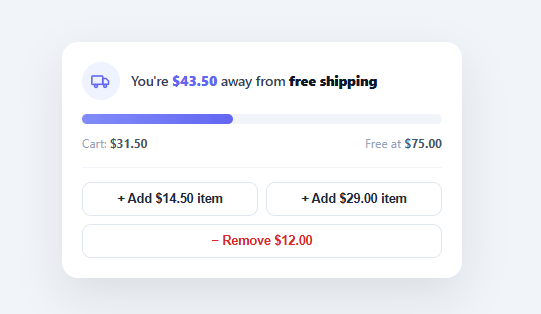
"You're $12.50 away from free shipping" is one of the most reliable average-order-value boosters in e-commerce — a small, honest nudge that turns a shipping fee into a goal worth adding one more item to reach. This snippet builds the complete pattern in plain HTML, CSS, and vanilla JavaScript: a progress bar that fills as the cart total rises, a message that always tells the shopper exactly how much more they need, and a celebratory unlocked state once they cross the threshold.
A message that adapts to three states
The headline text isn't static — it rewrites itself based on where the cart sits relative to the threshold. At an empty cart it frames the opportunity ("Add $75.00 to unlock free shipping"); partway there it counts down the exact gap ("You're $12.50 away from free shipping"); and once qualified it celebrates ("🎉 You've unlocked free shipping!"). Showing the precise remaining amount is what makes the pattern work — a vague "spend more for free shipping" gives the shopper no concrete target, while "$12.50 away" reads as an achievable, specific goal, often less than the shipping fee they'd otherwise pay.
Progress that fills and then transforms
The bar's fill width is the cart total as a percentage of the threshold, capped at 100% so an over-threshold cart doesn't overflow. Crossing the line isn't just "100% full" — the fill gradient shifts from indigo to green, the truck icon's badge turns green, and a flag emoji pops in at the end of the track with a spring animation, so qualifying *feels* like an accomplishment rather than a quiet state change. Every transition uses width and transform only on fixed-size elements, so the animation stays smooth and survives conversion to every framework export.
Driven by the real cart total
In this demo, buttons add and remove mock items to drive the bar, but the only input that matters is the running cart subtotal — cart. In a real store you call render() whenever the cart changes (an item added, removed, or quantity adjusted), passing the current subtotal. The component is deliberately a pure function of that one number: there's no internal cart state to keep in sync, which makes it trivial to drop into an existing cart, a slide-out drawer, or a sticky header bar.
Honest by design
The pattern only works if the math is real. The threshold and the remaining amount are computed directly from the live total, never faked, and the "remove item" button demonstrates that the bar tracks backward correctly too — drop below the threshold and it returns to the countdown message and indigo fill. A free-shipping bar that lies (showing "almost there!" regardless of the cart) erodes the exact trust it's meant to build.
Where to place it
This component fits anywhere the cart total is visible: the top of a cart page, inside a mini cart or slide-out drawer, in a sticky site-header bar, or in the order summary at checkout. Because it's compact and self-contained, the same instance can even live in multiple places, each calling render() from the shared cart total.
Build with AI
Build, Understand, Optimize, and Extend It With AI
You don't have to trace the render function's branching by hand. Paste this snippet's HTML, CSS, and JS into an AI coding assistant like Claude and ask it to explain exactly why render() is written as a pure function of the single cart variable with no internal state of its own, and why the fill percentage is explicitly capped at 100 with Math.min even though the cart total itself can keep growing past the threshold. The same assistant can help optimize it — ask whether the three-branch message logic (empty, in-progress, qualified) could be simplified without losing the exact wording nuance for each state, or whether the demo's data-add buttons approach is the cleanest way to wire this into a real cart's add/remove events. It's also useful for extending the bar: have it support a multi-tier threshold system ("free shipping at $75, free gift at $125"), animate the dollar amount counting down instead of jumping, or add a subtle shake on the flag when it first pops in. Treat the code less like a finished artifact and more like a starting point for a conversation.
Prompt to recreate it
Copy this into your AI assistant of choice to build the effect from scratch, or as a jumping-off point for your own variant:
Build a "free shipping progress bar" cart upsell widget in plain HTML, CSS, and JavaScript — no libraries, and the component must be a pure function of a single cart-total number so it can be dropped into any real cart later.

Requirements:
- A card showing a status icon, an adaptive message line, a progress bar track with a fill, a small flag/celebration icon positioned at the end of the track, and a footer showing the current cart total and the free-shipping threshold amount.
- Write a single render function that takes no arguments beyond reading one shared "cart" variable representing the subtotal, and derives everything else from it and a THRESHOLD constant — there must be no other mutable state driving the display.
- The fill bar's width must be the cart total as a percentage of the threshold, explicitly capped at 100% so a cart that exceeds the threshold never overflows the track.
- The message text must have exactly three variants driven by the cart value: when the cart is at or below zero, invite the user to add the full threshold amount; when the cart is between zero and the threshold, state the exact remaining dollar amount needed, computed as threshold minus cart, formatted as currency; when the cart meets or exceeds the threshold, show a celebratory "unlocked" message.
- Crossing the threshold must trigger a visible transformation, not just a value change: the fill's gradient color must switch from one color scheme to another, an icon badge must recolor to match, and the flag element must animate in from scale zero to scale one with a springy easing, only once qualified.
- Include demo buttons that add or subtract fixed dollar amounts from the cart variable and re-run the render function, including at least one "remove" button, to prove the bar correctly reverses back to the countdown message and original colors when the cart drops back below the threshold.
- Format every dollar amount with exactly two decimal places.
Want to tighten it up first? Run this prompt through the AI Prompt Studio to score it across 8 quality dimensions, catch anti-patterns, and tune the wording for Claude, ChatGPT, or Gemini before you paste it in.
Step by step
How to Use
- 1Paste HTML, CSS, and JSA free-shipping progress card renders at $0, showing how much to add to unlock free shipping at $75.
- 2Add itemsClick the "+ Add" demo buttons — the bar fills, the cart total rises, and the message counts down the remaining amount.
- 3Cross the thresholdAdd enough to reach $75 — the bar turns green, a flag pops in, and the message celebrates "free shipping unlocked".
- 4Remove an itemClick "− Remove" to drop below the threshold and watch the bar track backward to the countdown state.
- 5Set your own thresholdChange the THRESHOLD constant to your store's free-shipping minimum — every message and the fill recalculate from it.
- 6Connect your real cartCall render() whenever the cart changes, setting the cart variable to the live subtotal from your cart state or API.
Real-world uses
Common Use Cases
Got questions?
Frequently Asked Questions
The component is a pure function of one number — the cart subtotal. Set the cart variable to your live subtotal and call render() whenever the cart changes (item added, removed, or quantity updated). If your cart is in a store or context, subscribe to it and re-render on change; the bar has no internal cart state to keep in sync.
Match whatever your shipping policy actually enforces — most stores qualify free shipping on the post-discount subtotal (excluding tax and shipping itself). Compute the same value here that your backend uses to grant free shipping, or the bar will promise something checkout won't honor.
Track multiple thresholds in an array, find the next unmet one, and render progress toward it with its own message; once passed, advance to the next tier. The fill percentage is computed against the current target threshold rather than a single fixed value.
It's one of the most consistently effective average-order-value tactics in e-commerce because it gives a concrete, often-small target ("$12.50 away") that's frequently less than the shipping fee itself — but it only works if the math is real. A bar that always says "almost there" regardless of the cart erodes trust; compute the gap honestly from the live total.
In React, pass the cart subtotal as a prop and derive the percentage, state, and message with useMemo, re-rendering on cart change; in Vue, use a computed over the cart total; in Angular, use an @Input and getters. The threshold math and message logic are plain JavaScript and need no changes.