Learn Coding Visually
Learn to code with interactive, live-preview playgrounds — HTML, CSS, JavaScript, React & more.
 HTML Playground42 lessons · Click-based · Live preview
 CSS PlaygroundLearn CSS with a live editor
 JavaScript Playground60 lessons · DOM · Async · Canvas
 React PlaygroundLearn React with a live code editor
 GSAP PlaygroundLearn GSAP animation interactively
 SVG Playground44 lessons · shapes · paths · animation
 SCSS Playground45 lessons · Sass modules · tokens
 Tailwind PlaygroundLearn Tailwind CSS with a live editor
 Bootstrap 5 Playground50 lessons · live preview
Promo Code Input — Apply Coupon HTML CSS JS
Promo Code Input · Forms · Plain HTML, CSS & JS · Live preview
What's included
Features
About this UI Snippet
Promo Code Input — Coupon Validation, Discount Types & Live Order Total
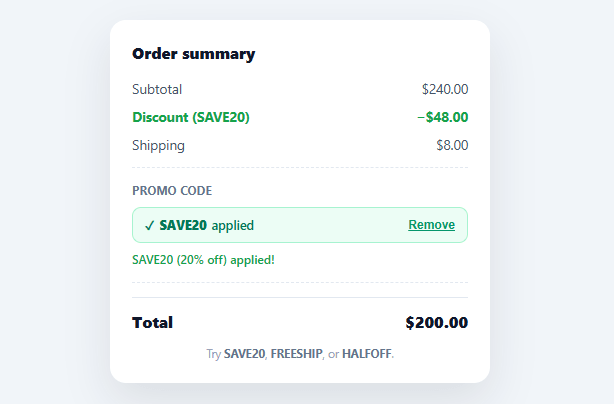
Almost every checkout has a "promo code" or "discount code" field, and it's deceptively easy to get wrong: codes need validating, different coupon types calculate differently, the order total must update without a page reload, and the user needs clear feedback whether a code worked or not. This snippet builds a complete, correct promo-code experience in plain HTML, CSS, and vanilla JavaScript — supporting percentage, fixed-amount, and free-shipping coupons, with an applied state, a remove control, and a live-recalculating total.
Three coupon types, one calculation function
Real stores run more than one kind of discount, so discountAmount() handles three: percent (20% off the subtotal), fixed (a flat $10 off, clamped so it never exceeds the subtotal and produces a negative price), and shipping (offsets the shipping line for free delivery). Each code in the CODES map declares its type and value, so adding a new coupon is a one-line data change, not new logic. The total always recomputes as subtotal + shipping − discount, floored at zero.
Validation that explains itself
Submitting a code runs through ordered checks, each with a specific message rather than a generic failure: an empty field ("Enter a promo code first"), a code that's already applied ("That code is already applied"), and an unrecognised code ("'BOGUS' is not a valid code"). Invalid input also flashes a red border on the field. This specificity matters at checkout — a shopper who typed a code from an email needs to know whether they fat-fingered it or it simply expired, not just that "something went wrong."
Case- and whitespace-insensitive matching
Codes are normalised with trim().toUpperCase() before lookup, and the input is visually uppercased via CSS, so "save20", " SAVE20 ", and "Save20" all resolve to the same coupon. This removes the single most common reason a valid code "doesn't work" — invisible whitespace or a lowercase letter — without the user ever having to think about it.
Applied and remove states
A successfully applied code hides the input and shows a green confirmation chip ("✓ SAVE20 applied") with a Remove link. Removing it restores the input, clears the discount line, recomputes the total, and refocuses the field — so a shopper can swap one code for a better one without confusion. The discount line itself only appears when a code is active, and its label adapts ("Discount (SAVE20)" vs "Free shipping") to match the coupon type.
Where the real validation lives
Client-side code-matching is for instant feedback only — it must never be the source of truth, because anyone can read the CODES map in the page source. In production the field still gives immediate UX, but the authoritative check (does this code exist, is it expired, is it limited to this customer, does it stack) happens server-side when the order is priced and again when it's placed. The FAQs cover wiring the front end to that real validation endpoint while keeping this snippet's instant-feedback feel.
Build with AI
Build, Understand, Optimize, and Extend It With AI
You don't have to trace every validation branch by hand. Paste this snippet's HTML, CSS, and JS into an AI coding assistant like Claude and ask it to explain exactly how discountAmount handles the three coupon types differently, or why the fixed-discount branch clamps its value with Math.min against the subtotal instead of letting the total go negative. The same assistant can help optimize it too, for instance checking whether recalc's repeated getElementById lookups should be cached once at load, or whether the client-side CODES map is exposing more of the discount logic than it should before the code even reaches your server. It's equally useful for extending the field: ask it to add a minimum-order condition to certain codes, support stacking two non-conflicting coupons, or wire the submit handler to a real async validation endpoint with a loading state. Treat the code less like a finished artifact and more like a starting point for a conversation.
Prompt to recreate it
Copy this into your AI assistant of choice to build the effect from scratch, or as a jumping-off point for your own variant:
Build a checkout "promo code input" in plain HTML, CSS, and JavaScript with no framework and no libraries.

Requirements:
- An order summary showing a subtotal line, a shipping line, a conditionally-shown discount line, and a total line that always equals subtotal plus shipping minus any active discount, floored at zero.
- A data structure mapping promo code strings to an object describing a discount type (percent, fixed, or shipping) and a numeric value; adding a new valid code must require only adding an entry to this map, no new branching logic.
- A single calculation function that, given the active code, returns the discount amount: percent multiplies the subtotal by a fraction, fixed returns a flat amount clamped so it never exceeds the subtotal, and shipping returns an amount that offsets the shipping line.
- A form with a text input and an Apply button. On submit, normalize the entered code by trimming whitespace and uppercasing it before checking it against the map, so "save20", " SAVE20 ", and "Save20" all match the same entry.
- Distinct, specific validation messages for each failure case: an empty submitted value, a code that is already the currently-applied one, and a code that does not exist in the map — each with its own message text, plus a visual invalid state on the input field.
- On a successful apply, hide the input form and show a confirmation chip naming the applied code with a Remove control; clicking Remove must clear the applied code, restore the form, refocus the input, and recompute the total — and the discount line's label must adapt based on the coupon type (e.g. reading "Free shipping" for a shipping-type code versus "Discount (CODE)" for the others).
Want to tighten it up first? Run this prompt through the AI Prompt Studio to score it across 8 quality dimensions, catch anti-patterns, and tune the wording for Claude, ChatGPT, or Gemini before you paste it in.
Step by step
How to Use
- 1Paste HTML, CSS, and JSAn order summary renders with a subtotal, shipping, total, and a promo-code field. Try SAVE20, FREESHIP, or HALFOFF.
- 2Apply a valid codeEnter SAVE20 and click Apply — a discount line appears, the total drops, and a green "applied" chip replaces the field.
- 3See validation errorsEnter a made-up code or leave it blank — a specific red message explains exactly what's wrong, and the field flags invalid.
- 4Remove an applied codeClick Remove on the applied chip — the discount clears, the total restores, and the input comes back focused for a new code.
- 5Add your own couponsAdd entries to the CODES map with a type (percent / fixed / shipping) and value — no new logic needed.
- 6Validate codes server-sideReplace the client-side CODES lookup with a fetch to your coupon-validation endpoint, keeping the same applied/error UI states.
Real-world uses
Common Use Cases
Got questions?
Frequently Asked Questions
Replace the client-side CODES lookup in the submit handler with a fetch to your coupon-validation endpoint, passing the entered code and the cart contents; the server returns whether it's valid plus the discount type and amount. Show a "Checking…" state during the request, then the applied chip on success or the inline error on failure — the rest of the UI stays the same.
Anyone can read the CODES map in your page source, so client-side matching is purely for instant feedback. The authoritative check — does the code exist, is it expired, is it usage-limited or customer-specific, can it stack with other offers — must run server-side when the order is priced and again when it's placed, or the discount can be forged. Keep the client check for UX, never for enforcement.
Track applied as an array instead of a single value, render one chip per code, and sum their discounts in recalc() — but enforce your stacking rules (which combinations are allowed, caps on total discount) server-side. Most stores deliberately disallow stacking, which the single-code model here already enforces.
Give each code optional conditions (minSubtotal, eligibleProductIds) in its data, and check them before applying — if the cart doesn't qualify, show a specific message ("SAVE20 requires a $100 minimum") rather than silently applying a $0 discount. The same conditions must be re-validated server-side at checkout.
In React, hold the applied code and message in useState and derive the total with useMemo; in Vue, use ref()/computed(); in Angular, use a component field with a getter. The discount-type calculation is plain JavaScript, and the apply/remove handlers map directly to event handlers in each framework — swap the CODES lookup for an async validation call.