Learn Coding Visually
Learn to code with interactive, live-preview playgrounds — HTML, CSS, JavaScript, React & more.
 HTML Playground42 lessons · Click-based · Live preview
 CSS PlaygroundLearn CSS with a live editor
 JavaScript Playground60 lessons · DOM · Async · Canvas
 React PlaygroundLearn React with a live code editor
 GSAP PlaygroundLearn GSAP animation interactively
 SVG Playground44 lessons · shapes · paths · animation
 SCSS Playground45 lessons · Sass modules · tokens
 Tailwind PlaygroundLearn Tailwind CSS with a live editor
 Bootstrap 5 Playground50 lessons · live preview
Exit Intent Popup — Mouse-Leave Offer HTML CSS JS
Exit Intent Popup · Modals · Plain HTML, CSS & JS · Live preview
What's included
Features
About this UI Snippet
Exit Intent Popup — Mouse-Leave Detection, Discount Offer & Email Capture
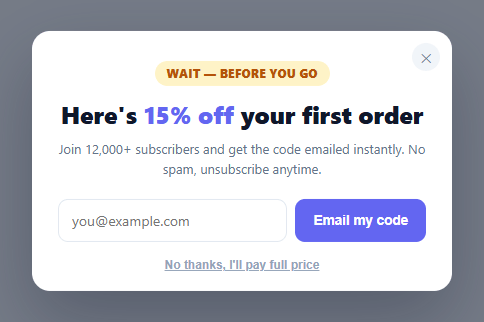
An exit-intent popup is the conversion tactic that catches a visitor in the act of leaving — the moment their cursor races toward the browser's close button or back arrow — and offers one last reason to stay: a discount code, a lead-magnet download, or a newsletter signup. This snippet builds the complete pattern in plain HTML, CSS, and vanilla JavaScript: exit detection, a discount modal with email capture and validation, a success state, and the fire-once discipline that keeps it from becoming an annoyance.
How exit-intent detection actually works
The trigger is a single mouseout listener on document. When the pointer leaves through the *top* of the viewport — e.clientY <= 0 with no relatedTarget (meaning it exited the window rather than moving onto another element) — the user is reaching for the tab bar, the URL bar, or the close button, which is the strongest available signal of an imminent exit. Checking the top edge specifically (rather than any edge) avoids false fires when someone's cursor merely drifts to a side scrollbar or off the bottom. This is a desktop-only signal by nature; there's no cursor on touch devices, so mobile needs a different trigger (covered in the FAQs).
Fire exactly once, then stay quiet
Nothing erodes trust faster than a popup that reappears every time the mouse twitches toward the top of the screen. Two flags enforce restraint: shown prevents a second appearance in the same page view, and armed is cleared the instant it fires or is dismissed. A production build extends this with sessionStorage (or a cookie with a multi-day expiry) so the popup doesn't fire again on the next page load or the visitor's next session — the commented hook is right there in openPopup(). The goal is one well-timed ask, not a recurring interruption.
Email capture with real validation
The offer is gated behind an email field so the discount becomes a lead, not just a giveaway. Submitting validates the address against a pragmatic regex (catching the common typos without claiming full RFC compliance), shows an inline error for an invalid entry, and on success swaps the form for a confirmation state showing the actual code (WELCOME15) before auto-closing. In a real build, the submit handler is where you'd POST the email to your ESP and tag the lead with the offer source.
The decline link matters
Beneath the form sits a deliberately plain "No thanks, I'll pay full price" link. A negative-framing decline (sometimes called a "confirm-shaming" opt-out, used tastefully here) gives the user a clear, friction-free way out — which both respects their choice and, research consistently shows, slightly increases conversion by making the value of the offer explicit at the moment of refusal. It routes through the same closePopup() as the ✕ button, the backdrop click, and the Escape key, so every dismissal path is consistent.
Smooth, accessible presentation
The modal is role="dialog" with aria-modal="true", animates in with opacity and transform only (a slight scale-and-rise, never height), and dims the page behind a backdrop — keeping it crash-safe across every framework export and giving keyboard users an Escape route.
Build with AI
Build, Understand, Optimize, and Extend It With AI
You don't have to just trust that the exit-intent detection is reliable. Paste this snippet's HTML, CSS, and JS into an AI coding assistant like Claude and ask it to explain exactly why the mouseout check requires both e.clientY less than or equal to zero and a null relatedTarget, and what false-positive scenario the relatedTarget check is specifically guarding against. The same assistant can help optimize it — ask whether the shown and armed boolean pair could be collapsed into one state value without losing any of the current guard logic, and how the commented-out sessionStorage line should actually be wired in alongside a check at the top of openPopup. It's also useful for extending the popup: ask it to add a scroll-depth or time-on-page fallback trigger for touch devices where mouseout never fires, an A/B-testable second offer variant, or a countdown timer inside the modal that adds urgency to the discount code. Treat the code less like a finished artifact and more like a starting point for a conversation.
Prompt to recreate it
Copy this into your AI assistant of choice to build the effect from scratch, or as a jumping-off point for your own variant:
Build an exit-intent popup in plain HTML, CSS, and JavaScript that detects a user about to leave the page and offers a discount — no library.

Requirements:
- A document-level mouseout listener that only counts as exit intent when the cursor leaves through the very top edge of the viewport (clientY less than or equal to 0) and relatedTarget is null (meaning the pointer left the window entirely, not just moved onto another element) — not any generic mouseout anywhere on the page.
- Two independent boolean flags that gate the popup: one that has permanently been set once the popup has shown this page view, and one that gets cleared as soon as the popup fires or is dismissed, so it can never reopen itself after being shown once.
- A modal with a backdrop that fades in with opacity, animates in with a subtle scale-and-rise transform (never animating height), contains an email input gated behind an offer, and includes a plainly-worded decline link as an alternative to the primary email form, both routing to the exact same single close function.
- Client-side email format validation on submit using a regex check, displaying an inline error message for an invalid address and blocking submission, while a valid address swaps the form out for a success confirmation showing the actual discount code before auto-closing after a few seconds.
- Every dismissal path — a close button, a backdrop click, an Escape keypress, and the decline link — must call the same single close function so behavior stays consistent no matter how the user leaves.
- Add a commented-out or explained hook for persisting the "already shown" state to sessionStorage (or a longer-lived cookie) so the popup does not reappear on the next page load within the same session, and describe what check needs to run before opening to respect that persisted flag.
Want to tighten it up first? Run this prompt through the AI Prompt Studio to score it across 8 quality dimensions, catch anti-patterns, and tune the wording for Claude, ChatGPT, or Gemini before you paste it in.
Step by step
How to Use
- 1Paste HTML, CSS, and JSA page renders with a hint and a "Simulate exit intent" button (since a cursor can't always leave an embedded preview frame).
- 2Trigger the exit intentMove your mouse up out of the top of the page toward the tab bar — or click "Simulate exit intent" — and the discount modal appears.
- 3See the fire-once behaviorDismiss the modal and try again — it won't re-fire, because it's armed to show only once per page view.
- 4Submit an emailEnter an invalid email to see the inline error; enter a valid one to see the success state revealing the WELCOME15 code.
- 5Persist across pagesUncomment the sessionStorage line in openPopup() (and check it before firing) so the popup stays quiet on later pages and visits.
- 6Connect your email serviceIn the form submit handler, POST the captured email to your ESP (Mailchimp, Klaviyo, ConvertKit) and tag the lead with the offer source.
Real-world uses
Common Use Cases
Got questions?
Frequently Asked Questions
On fire, write a flag to sessionStorage (one popup per browsing session) or a cookie with a multi-day expiry (one per N days), and check that flag at the top of openPopup() before showing anything. The commented sessionStorage line in the code is the exact hook — uncomment it and add the matching guard.
No — touch devices have no cursor, so there's no mouse-leave signal. Mobile alternatives include firing on a fast upward scroll (reaching for the address bar), after a time-on-page or scroll-depth threshold, or on a history back-button (popstate) attempt. Detect touch with a coarse-pointer media query and swap triggers accordingly.
Used tastefully, yes — a clear opt-out respects the user and often lifts conversion by making the offer's value explicit at the moment of refusal. Avoid manipulative or guilt-heavy wording; the point is an honest, friction-free exit, not coercion. Keep it visually subordinate to the primary action.
In the form submit handler, after validation passes, POST the email to your ESP's API (Mailchimp, Klaviyo, ConvertKit, HubSpot) with a tag identifying the offer and source, then show the success state on a successful response and the inline error on failure — keep the optimistic UI so the user gets instant feedback.
In React, attach the mouseout listener in a useEffect (cleaning up on unmount) and hold the open/shown/armed state in useState or a ref; in Vue, use onMounted/onUnmounted with ref(); in Angular, use HostListener('document:mouseout') and component fields. The detection and fire-once logic are framework-agnostic.