Learn Coding Visually
Learn to code with interactive, live-preview playgrounds — HTML, CSS, JavaScript, React & more.
 HTML Playground42 lessons · Click-based · Live preview
 CSS PlaygroundLearn CSS with a live editor
 JavaScript Playground60 lessons · DOM · Async · Canvas
 React PlaygroundLearn React with a live code editor
 GSAP PlaygroundLearn GSAP animation interactively
 SVG Playground44 lessons · shapes · paths · animation
 SCSS Playground45 lessons · Sass modules · tokens
 Tailwind PlaygroundLearn Tailwind CSS with a live editor
 Bootstrap 5 Playground50 lessons · live preview
Social Proof Popup — Rotating Purchase Notification
Social Proof Popup · Modals · Plain HTML, CSS & JS · Live preview
What's included
Features
About this UI Snippet
Social Proof Popup — Auto-Cycling Purchase Toasts with a Persistent Dismiss
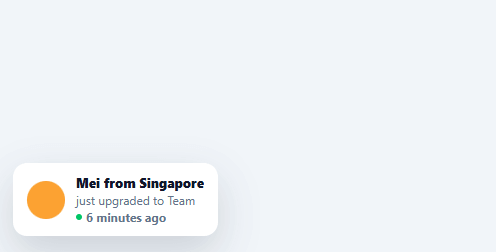
The small "Sarah from Austin just bought the Pro plan" bubble that drifts in near the corner of a landing page is a well-known conversion pattern — seeing recent, specific activity from real-seeming people builds more trust than a generic testimonial block. This snippet builds the complete rotating toast: a queue of events, automatic cycling on a timer, and a dismiss action that respects the user's choice for the rest of the session.
A queue of events, not a single static message
EVENTS is an array of { name, action, avatar, mins } objects, and cycle() advances through them in order (wrapping back to the start via rotateIndex % EVENTS.length), showing one at a time on a repeating interval. A single static "someone just bought this" message loses credibility the longer it sits on screen unchanged — rotating through several distinct, named events is what makes the pattern read as ongoing real activity rather than a fixed banner.
Generated avatar colors, not external images
Each event's avatar is a solid-color square generated on the fly as a tiny inline SVG, base64-encoded into a data: URI (avatarUri()) — no image hosting or placeholder service required, and no failed network request if the page is previewed offline. Swap this for a real photo URL per event once you have one; the <img> tag and its sizing don't need to change.
A relative timestamp that looks credible
Each event carries a mins value rendered as "X minutes ago" with a small pulsing-dot-style green indicator beside it — deliberately *not* a live-incrementing counter, since constantly ticking "1 minute ago" → "2 minutes ago" while a single toast is displayed would be more work for very little added believability; a fixed plausible time per event reads naturally without that complexity.
Dismiss means dismiss, for the whole session
Clicking the ✕ button doesn't just hide the current toast — it sets a dismissedManually flag that cycle() checks before showing anything, and clears the rotation interval outright. Once a user has explicitly said "stop showing me this," the pattern should respect that permanently rather than popping back up a few seconds later with the next event in the queue, which would undo the very trust the pattern is trying to build.
Where this pattern earns its keep, and where it backfires
Social proof works because specificity reads as truth — a named city and a named action feel real in a way "people love this!" never does. But the same specificity makes a fabricated or stale feed obvious the moment a visitor notices the same three names looping every visit, which is why real implementations should draw from an actually-updating event source rather than running a fixed demo list indefinitely in production.
Build with AI
Build, Understand, Optimize, and Extend It With AI
You don't have to trace the rotation-and-dismissal state machine by hand. Paste this snippet's HTML, CSS, and JS into an AI coding assistant like Claude and ask it to explain exactly why avatarUri() base64-encodes a tiny inline SVG rather than pointing at a placeholder image service, or why dismissedManually is checked inside cycle() rather than simply calling clearInterval once and trusting that alone. The same assistant can help optimize it, for instance checking whether the two independent timers (hideTimer for auto-hide, cycleTimer for rotation) could ever race and show a toast for less than its intended duration if a click happens at just the wrong moment. It is just as useful for extending the pattern: ask it to persist the dismissal in localStorage so it survives a page reload within a cooldown window, replace the fixed mins values with real createdAt timestamps computed live, or fetch the EVENTS queue from a real backend endpoint instead of a hardcoded array. Treat the code less like a finished artifact and more like a starting point for a conversation.
Prompt to recreate it
Copy this into your AI assistant of choice to build the effect from scratch, or as a jumping-off point for your own variant:
Build a rotating "social proof" purchase notification toast in plain HTML, CSS, and JavaScript — no libraries, no external image requests.

Requirements:
- A fixed-position toast in a page corner, hidden by default via opacity and transform (not display:none), that becomes visible by toggling a single CSS class so the transition animates smoothly.
- A JavaScript array of multiple distinct event objects (name, action text, an accent color, and a relative "minutes ago" number) — not a single static message — that the toast cycles through in order, wrapping back to the start once it reaches the end.
- Generate each event's avatar as a solid-color circle without any external image request or placeholder service: build a tiny inline SVG string colored per event, base64-encode it, and assign it as the image element's src via a data: URI.
- Each shown toast must automatically hide itself after a fixed duration (a few seconds) even if the user takes no action, using its own independent timer separate from the rotation timer that advances to the next event.
- A close button that, when clicked, immediately hides the current toast AND permanently stops the rotation from ever showing another event for the rest of the page session — clicking dismiss must not just hide the current one while leaving the next one queued to appear later.
- The rotation must not start immediately on page load; delay the first appearance by a couple of seconds, then continue on a longer repeating interval (e.g. every several seconds) for subsequent events.
- Confirm in a comment why respecting an explicit dismissal permanently, rather than resuming rotation after a pause, is the more trustworthy design choice for this kind of notification.
Want to tighten it up first? Run this prompt through the AI Prompt Studio to score it across 8 quality dimensions, catch anti-patterns, and tune the wording for Claude, ChatGPT, or Gemini before you paste it in.
Step by step
How to Use
- 1Paste HTML, CSS, and JSAfter a short delay, a toast slides in near the bottom-left corner showing a purchase event with a colored avatar.
- 2Watch it auto-cycleEvery 8 seconds, the toast hides and a new event from the EVENTS queue appears in its place.
- 3Hover the toastA small ✕ dismiss button fades in at the top-right corner of the toast.
- 4Click dismissThe toast hides immediately and the rotation stops permanently for the rest of the session — it won't reappear with the next event.
- 5Edit the eventsChange any entry's name, action, avatar color, or mins value in the EVENTS array to customize the rotation content.
- 6Connect real activity dataReplace the static EVENTS array with recent orders/signups fetched from your backend, keeping the same showEvent()/cycle() rotation logic.
Real-world uses
Common Use Cases
Got questions?
Frequently Asked Questions
Fetch recent events from your backend (e.g. the last N orders or signups) on page load, map them into the { name, action, avatar, mins } shape EVENTS uses, and assign the result to EVENTS before the cycle() rotation starts — for fresher data, refetch periodically and merge new events into the queue.
An explicit dismiss is the strongest possible signal that a user doesn't want to see this pattern — popping the next event back up moments later would directly undo the trust the dismiss action was supposed to build. Respecting it for the whole session is the more honest choice, even though it costs you the remaining impressions.
In the close button's click handler, write a flag (and optionally a timestamp) to localStorage; on page load, check that flag before starting the cycle() rotation at all, and skip scheduling it entirely if the user dismissed it within your chosen cooldown window (e.g. the last 24 hours).
Store an actual createdAt timestamp per event instead of a fixed mins number, and compute the relative label ("3 minutes ago") at the moment showEvent() runs using a small time-formatting helper, so the displayed time reflects how long ago the event actually happened rather than a value baked into the data.
In React, keep the current event and visibility in useState and run the rotation interval inside useEffect with cleanup on unmount; in Vue, use ref()/onUnmounted for the same interval cleanup; in Angular, use a component field with ngOnDestroy. The dismissedManually flag and cycle logic are plain JavaScript and need no framework-specific changes.