Snackbar with Undo — HTML CSS JS Snippet

Snackbar with Undo · Modals · Plain HTML, CSS & JS · Live preview

Share & Support

What's included

Features

Instant, reversible delete
The row is removed immediately for a responsive feel, while a pending object retains everything needed to undo before the window closes.
Exact-position restore
deleteItem stores the nextElementSibling, so undo uses insertBefore to return the row to its precise slot — not the end of the list.
Compositor-smooth countdown
The progress bar animates with transform: scaleX, a GPU-friendly transform, so the countdown stays smooth even under load.
Reflow-restarted animation
Removing the run class, reading offsetWidth, and re-adding it restarts the countdown on every snackbar, even back-to-back deletes.
Single-pending commit model
Deleting again calls finalize first, committing the prior delete and re-targeting the snackbar — no lost or ambiguous undo state.
Auto-commit on expiry
A setTimeout fires finalize when the window ends, making the delete permanent without any extra confirmation.
Restore highlight
Undone rows replay an sb-restore keyframe so users can see exactly which item returned.
Accessible live region
The snackbar is role="status" with aria-live="polite", so screen readers announce the deletion and the undo option.

About this UI Snippet

Snackbar with Undo — Deferred Delete, Countdown Progress Bar & Exact-Position Restore
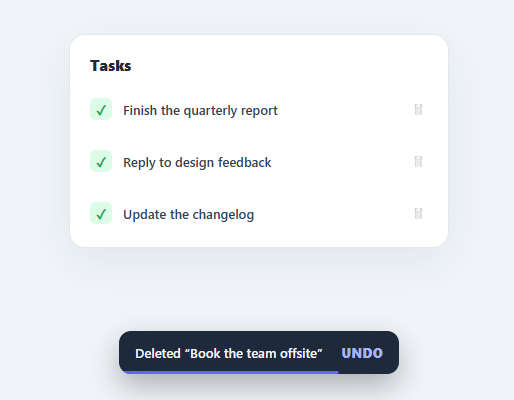
Screenshot of the Snackbar with Undo snippet rendered live

"Undo" is one of the kindest patterns in UI design. Instead of interrupting users with a "Are you sure?" confirmation dialog for every delete, you let the action happen instantly and offer a brief window to reverse it. That is the undo snackbar — popularised by Gmail and Material Design — and it makes destructive actions feel safe without nagging. This snippet implements the full pattern in plain HTML, CSS, and vanilla JavaScript: an instant delete, a snackbar with an animated countdown bar, an Undo that restores the item to its exact original position, and automatic commit when the window expires.

Deferred, reversible delete

The key insight is that the delete is *visually* immediate but *logically* deferred. deleteItem removes the row from the DOM straight away (so the list updates instantly) but stores everything needed to put it back in a pending object: the detached node itself, its former parent, and crucially its nextElementSibling — the element it sat before. That sibling reference is what lets undo restore the row to its precise original slot, not just append it to the end.

Countdown progress bar

The snackbar shows an sb-progress bar that scales from full to zero over the 4-second window using a pure-CSS transform: scaleX keyframe — a transform animation that runs on the compositor and stays smooth. Each time a snackbar appears, the bar's animation is restarted by removing the class, forcing a reflow with void offsetWidth, and re-adding it, so the countdown always plays fresh even on rapid successive deletes. The bar gives users a visible sense of how long they have to act.

Exact-position restore

undo clears the pending timer and reinserts the stored node: if the original next sibling still exists in the parent, it uses insertBefore to drop the row back exactly where it was; otherwise it appends. The restored row plays an sb-restore highlight animation so users can see what came back. After undo, pending is cleared so the action cannot be reversed twice.

Commit on expiry or on the next action

If the user does nothing, the setTimeout fires finalize, which simply clears pending — the node was already removed, so the delete becomes permanent. The same finalize is called at the start of deleteItem, so if you delete a second item while a snackbar is still showing, the first delete commits immediately and the snackbar re-targets the new item. This single-pending model avoids the bug where overlapping deletes lose track of what to undo.

Pair this with a swipe-to-delete list for the delete gesture, a toast notification system for non-undoable messages, or a todo widget as the list.

Step by step

How to Use

  1. 1
    Paste HTML, CSS, and JSA "Tasks" card appears with four rows, each with a trash icon that shows on hover.
  2. 2
    Delete a taskClick a trash icon — the row vanishes instantly and a dark snackbar slides up from the bottom reading "Deleted …".
  3. 3
    Watch the countdownA thin purple bar shrinks across the bottom of the snackbar over four seconds, showing your window to undo.
  4. 4
    Click UndoHit Undo before the bar empties — the task reappears in its exact original position with a brief highlight.
  5. 5
    Let it expireDo nothing and the bar runs out — the snackbar slides away and the delete becomes permanent.
  6. 6
    Delete several quicklyDelete another task while a snackbar is showing — the previous delete commits immediately and the snackbar re-targets the new item.

Real-world uses

Common Use Cases

Email and task list deletes
The classic Gmail-style undo for archiving or deleting. Use it on a todo widget or any list of removable rows.
Swipe-to-delete confirmation
Pair the undo snackbar with a swipe-to-delete list so a swipe removes the row and the snackbar offers a safety net.
Bulk actions with safety
Offer "Undo" after archiving, moving, or marking many items, sparing users a confirmation dialog for every action.
Settings and destructive toggles
When a user turns off a feature or removes an integration, an undo snackbar reverses it within a grace period.
Cart and wishlist removals
Remove an item from a cart with an instant "Undo" instead of a modal; complements an order summary or mini cart.
General action feedback
Use the same snackbar shell (without undo) for non-reversible confirmations alongside a full toast notification system.

Got questions?

Frequently Asked Questions

Keep the optimistic UI: remove the row immediately and store pending. Fire the real DELETE request inside finalize (on expiry/commit), not in deleteItem — that way Undo simply cancels the timer and no request is ever sent. If you prefer to delete on the server first, send the request in deleteItem and a restore request in undo; the optimistic approach avoids the extra round-trip.

An index can drift if other rows are added or removed while the snackbar is showing. A reference to the next sibling node restores the item relative to its actual neighbour, and undo checks that the sibling still belongs to the parent before using insertBefore, falling back to append — so restore stays correct even if the list changed.

Edit the DURATION constant (milliseconds) and the 4s in the sb-count CSS keyframe to match — the JS timer and the visual bar must use the same duration. Four to six seconds is the usual range: long enough to react, short enough not to block the workflow.

This snippet keeps a single pending slot: each new delete commits the previous one immediately and shows a fresh snackbar for the newest item. If you need to undo multiple deletes, change pending to a stack/array, render a count ("3 items deleted"), and restore them in reverse order on undo.

In React, keep the list in state and a pending item with its index in a ref; remove on delete, restore by splicing back on undo, and use a useEffect timeout to commit. In Vue, manage the list with ref and a setTimeout in the delete method. In Angular, hold the list and pending item on the component. The countdown bar and slide-in CSS port unchanged.

Snackbar with Undo — Export as HTML, React, Vue, Angular & Tailwind

HTML
<!DOCTYPE html>
<html lang="en">
<head>
  <meta charset="UTF-8" />
  <meta name="viewport" content="width=device-width, initial-scale=1.0" />
  <title>Snackbar with Undo</title>
  <style>
    *{box-sizing:border-box;margin:0;padding:0}
    body{font-family:system-ui,-apple-system,sans-serif;background:#f1f5f9;min-height:100vh;display:flex;align-items:center;justify-content:center;padding:24px}
    .sb-stage{position:relative;width:100%;max-width:380px;min-height:340px;display:flex;align-items:flex-start}
    .sb-card{background:#fff;border:1px solid #e2e8f0;border-radius:16px;padding:8px;width:100%;box-shadow:0 14px 44px rgba(15,23,42,.07)}
    .sb-head{font-size:15px;font-weight:800;color:#1e293b;padding:12px 12px 8px}
    
    .sb-list{display:flex;flex-direction:column}
    .sb-item{display:flex;align-items:center;gap:11px;padding:12px;border-radius:10px;transition:background .15s}
    .sb-item:hover{background:#f8fafc}
    .sb-item.restored{animation:sb-restore .4s ease}
    @keyframes sb-restore{from{opacity:0;transform:translateX(-12px);background:#eef2ff}to{opacity:1;transform:translateX(0)}}
    .sb-check{width:22px;height:22px;border-radius:6px;background:#dcfce7;color:#16a34a;font-size:13px;font-weight:800;display:flex;align-items:center;justify-content:center;flex-shrink:0}
    .sb-text{flex:1;font-size:13px;font-weight:600;color:#334155}
    .sb-del{background:none;border:none;font-size:15px;cursor:pointer;opacity:.4;transition:opacity .15s,transform .1s;padding:4px}
    .sb-item:hover .sb-del{opacity:.85}
    .sb-del:hover{opacity:1}
    .sb-del:active{transform:scale(.88)}
    
    .sb-empty{display:none;text-align:center;color:#94a3b8;font-size:13px;padding:40px 0}
    .sb-list:empty + .sb-empty{display:block}
    
    .sb-snackbar{position:absolute;left:50%;bottom:0;transform:translate(-50%,140%);display:flex;align-items:center;gap:14px;background:#1e293b;color:#f1f5f9;padding:13px 16px;border-radius:12px;font-size:13px;font-weight:600;box-shadow:0 12px 30px rgba(0,0,0,.3);opacity:0;transition:transform .3s cubic-bezier(.2,.9,.3,1),opacity .3s;overflow:hidden;min-width:280px}
    .sb-snackbar.show{transform:translate(-50%,0);opacity:1}
    .sb-msg{flex:1;white-space:nowrap;overflow:hidden;text-overflow:ellipsis}
    .sb-undo{background:none;border:none;color:#a5b4fc;font-size:13px;font-weight:800;cursor:pointer;font-family:inherit;text-transform:uppercase;letter-spacing:.03em;flex-shrink:0}
    .sb-undo:hover{color:#c7d2fe}
    .sb-progress{position:absolute;left:0;bottom:0;height:3px;width:100%;background:#6366f1;transform-origin:left}
    .sb-progress.run{animation:sb-count 4s linear forwards}
    @keyframes sb-count{from{transform:scaleX(1)}to{transform:scaleX(0)}}
  </style>
</head>
<body>
  <div class="sb-stage">
    <div class="sb-card">
      <div class="sb-head">Tasks</div>
      <div class="sb-list" id="sbList">
        <div class="sb-item"><span class="sb-check">✓</span><span class="sb-text">Finish the quarterly report</span><button class="sb-del" onclick="deleteItem(this)" aria-label="Delete">🗑</button></div>
        <div class="sb-item"><span class="sb-check">✓</span><span class="sb-text">Reply to design feedback</span><button class="sb-del" onclick="deleteItem(this)" aria-label="Delete">🗑</button></div>
        <div class="sb-item"><span class="sb-check">✓</span><span class="sb-text">Book the team offsite</span><button class="sb-del" onclick="deleteItem(this)" aria-label="Delete">🗑</button></div>
        <div class="sb-item"><span class="sb-check">✓</span><span class="sb-text">Update the changelog</span><button class="sb-del" onclick="deleteItem(this)" aria-label="Delete">🗑</button></div>
      </div>
      <div class="sb-empty" id="sbEmpty">All clear — no tasks left.</div>
    </div>
  
    <div class="sb-snackbar" id="snackbar" role="status" aria-live="polite">
      <span class="sb-msg"></span>
      <button class="sb-undo" onclick="undo()">Undo</button>
      <span class="sb-progress"></span>
    </div>
  </div>
  <script>
    var pending = null;
    var timer = null;
    var DURATION = 4000;
    
    function deleteItem(btn) {
      finalize();
      var row = btn.closest('.sb-item');
      pending = {
        node: row,
        next: row.nextElementSibling,
        parent: row.parentNode,
        label: row.querySelector('.sb-text').textContent
      };
      row.classList.remove('restored');
      row.remove();
      showSnack(pending.label);
    }
    
    function showSnack(label) {
      var s = document.getElementById('snackbar');
      s.querySelector('.sb-msg').textContent = 'Deleted “' + label + '”';
      s.classList.add('show');
      var bar = s.querySelector('.sb-progress');
      bar.classList.remove('run');
      void bar.offsetWidth;
      bar.classList.add('run');
      clearTimeout(timer);
      timer = setTimeout(finalize, DURATION);
    }
    
    function undo() {
      if (!pending) return;
      clearTimeout(timer);
      if (pending.next && pending.next.parentNode === pending.parent) pending.parent.insertBefore(pending.node, pending.next);
      else pending.parent.appendChild(pending.node);
      pending.node.classList.add('restored');
      pending = null;
      hideSnack();
    }
    
    function finalize() {
      if (!pending) return;
      pending = null;
      hideSnack();
    }
    
    function hideSnack() {
      document.getElementById('snackbar').classList.remove('show');
    }
  </script>
</body>
</html>
Tailwind
<!DOCTYPE html>
<html lang="en">
<head>
  <meta charset="UTF-8" />
  <meta name="viewport" content="width=device-width, initial-scale=1.0" />
  <title>Snackbar with Undo</title>
  <!-- Tailwind CSS v3+ — arbitrary value classes (e.g. bg-[#0f172a]) are valid -->
  <script src="https://cdn.tailwindcss.com"></script>
  <style>
    @keyframes sb-restore{from{opacity:0;transform:translateX(-12px);background:#eef2ff}to{opacity:1;transform:translateX(0)}}

    @keyframes sb-count{from{transform:scaleX(1)}to{transform:scaleX(0)}}

    * {
      box-sizing:border-box;margin:0;padding:0
    }

    body {
      font-family:system-ui,-apple-system,sans-serif;background:#f1f5f9;min-height:100vh;display:flex;align-items:center;justify-content:center;padding:24px
    }

    .sb-item.restored {
      animation:sb-restore .4s ease
    }

    .sb-item:hover .sb-del {
      opacity:.85
    }

    .sb-list:empty + .sb-empty {
      display:block
    }

    .sb-snackbar.show {
      transform:translate(-50%,0);opacity:1
    }

    .sb-progress.run {
      animation:sb-count 4s linear forwards
    }
  </style>
</head>
<body>
  <div class="relative w-full max-w-[380px] min-h-[340px] flex items-start">
    <div class="bg-[#fff] border border-[#e2e8f0] rounded-2xl p-2 w-full shadow-[0_14px_44px_rgba(15,23,42,.07)]">
      <div class="text-[15px] font-extrabold text-[#1e293b] pt-3 px-3 pb-2">Tasks</div>
      <div class="sb-list flex flex-col" id="sbList">
        <div class="sb-item flex items-center gap-[11px] p-3 rounded-[10px] [transition:background_.15s] hover:bg-[#f8fafc]"><span class="w-[22px] h-[22px] rounded-md bg-[#dcfce7] text-[#16a34a] text-[13px] font-extrabold flex items-center justify-center shrink-0">✓</span><span class="sb-text flex-1 text-[13px] font-semibold text-[#334155]">Finish the quarterly report</span><button class="sb-del bg-transparent border-0 text-[15px] cursor-pointer opacity-40 [transition:opacity_.15s,transform_.1s] p-1 hover:opacity-100 active:[transform:scale(.88)]" onclick="deleteItem(this)" aria-label="Delete">🗑</button></div>
        <div class="sb-item flex items-center gap-[11px] p-3 rounded-[10px] [transition:background_.15s] hover:bg-[#f8fafc]"><span class="w-[22px] h-[22px] rounded-md bg-[#dcfce7] text-[#16a34a] text-[13px] font-extrabold flex items-center justify-center shrink-0">✓</span><span class="sb-text flex-1 text-[13px] font-semibold text-[#334155]">Reply to design feedback</span><button class="sb-del bg-transparent border-0 text-[15px] cursor-pointer opacity-40 [transition:opacity_.15s,transform_.1s] p-1 hover:opacity-100 active:[transform:scale(.88)]" onclick="deleteItem(this)" aria-label="Delete">🗑</button></div>
        <div class="sb-item flex items-center gap-[11px] p-3 rounded-[10px] [transition:background_.15s] hover:bg-[#f8fafc]"><span class="w-[22px] h-[22px] rounded-md bg-[#dcfce7] text-[#16a34a] text-[13px] font-extrabold flex items-center justify-center shrink-0">✓</span><span class="sb-text flex-1 text-[13px] font-semibold text-[#334155]">Book the team offsite</span><button class="sb-del bg-transparent border-0 text-[15px] cursor-pointer opacity-40 [transition:opacity_.15s,transform_.1s] p-1 hover:opacity-100 active:[transform:scale(.88)]" onclick="deleteItem(this)" aria-label="Delete">🗑</button></div>
        <div class="sb-item flex items-center gap-[11px] p-3 rounded-[10px] [transition:background_.15s] hover:bg-[#f8fafc]"><span class="w-[22px] h-[22px] rounded-md bg-[#dcfce7] text-[#16a34a] text-[13px] font-extrabold flex items-center justify-center shrink-0">✓</span><span class="sb-text flex-1 text-[13px] font-semibold text-[#334155]">Update the changelog</span><button class="sb-del bg-transparent border-0 text-[15px] cursor-pointer opacity-40 [transition:opacity_.15s,transform_.1s] p-1 hover:opacity-100 active:[transform:scale(.88)]" onclick="deleteItem(this)" aria-label="Delete">🗑</button></div>
      </div>
      <div class="sb-empty hidden text-center text-[#94a3b8] text-[13px] py-10 px-0" id="sbEmpty">All clear — no tasks left.</div>
    </div>
  
    <div class="sb-snackbar absolute left-1/2 bottom-0 [transform:translate(-50%,140%)] flex items-center gap-3.5 bg-[#1e293b] text-[#f1f5f9] py-[13px] px-4 rounded-xl text-[13px] font-semibold shadow-[0_12px_30px_rgba(0,0,0,.3)] opacity-0 [transition:transform_.3s_cubic-bezier(.2,.9,.3,1),opacity_.3s] overflow-hidden min-w-[280px]" id="snackbar" role="status" aria-live="polite">
      <span class="sb-msg flex-1 whitespace-nowrap overflow-hidden text-ellipsis"></span>
      <button class="bg-transparent border-0 text-[#a5b4fc] text-[13px] font-extrabold cursor-pointer font-[inherit] uppercase tracking-[.03em] shrink-0 hover:text-[#c7d2fe]" onclick="undo()">Undo</button>
      <span class="sb-progress absolute left-0 bottom-0 h-[3px] w-full bg-[#6366f1] [transform-origin:left]"></span>
    </div>
  </div>
  <script>
    var pending = null;
    var timer = null;
    var DURATION = 4000;
    
    function deleteItem(btn) {
      finalize();
      var row = btn.closest('.sb-item');
      pending = {
        node: row,
        next: row.nextElementSibling,
        parent: row.parentNode,
        label: row.querySelector('.sb-text').textContent
      };
      row.classList.remove('restored');
      row.remove();
      showSnack(pending.label);
    }
    
    function showSnack(label) {
      var s = document.getElementById('snackbar');
      s.querySelector('.sb-msg').textContent = 'Deleted “' + label + '”';
      s.classList.add('show');
      var bar = s.querySelector('.sb-progress');
      bar.classList.remove('run');
      void bar.offsetWidth;
      bar.classList.add('run');
      clearTimeout(timer);
      timer = setTimeout(finalize, DURATION);
    }
    
    function undo() {
      if (!pending) return;
      clearTimeout(timer);
      if (pending.next && pending.next.parentNode === pending.parent) pending.parent.insertBefore(pending.node, pending.next);
      else pending.parent.appendChild(pending.node);
      pending.node.classList.add('restored');
      pending = null;
      hideSnack();
    }
    
    function finalize() {
      if (!pending) return;
      pending = null;
      hideSnack();
    }
    
    function hideSnack() {
      document.getElementById('snackbar').classList.remove('show');
    }
  </script>
</body>
</html>
React
import React, { useEffect } from 'react';

// CSS — optionally move to SnackbarWithUndo.module.css
const css = `
*{box-sizing:border-box;margin:0;padding:0}
body{font-family:system-ui,-apple-system,sans-serif;background:#f1f5f9;min-height:100vh;display:flex;align-items:center;justify-content:center;padding:24px}
.sb-stage{position:relative;width:100%;max-width:380px;min-height:340px;display:flex;align-items:flex-start}
.sb-card{background:#fff;border:1px solid #e2e8f0;border-radius:16px;padding:8px;width:100%;box-shadow:0 14px 44px rgba(15,23,42,.07)}
.sb-head{font-size:15px;font-weight:800;color:#1e293b;padding:12px 12px 8px}

.sb-list{display:flex;flex-direction:column}
.sb-item{display:flex;align-items:center;gap:11px;padding:12px;border-radius:10px;transition:background .15s}
.sb-item:hover{background:#f8fafc}
.sb-item.restored{animation:sb-restore .4s ease}
@keyframes sb-restore{from{opacity:0;transform:translateX(-12px);background:#eef2ff}to{opacity:1;transform:translateX(0)}}
.sb-check{width:22px;height:22px;border-radius:6px;background:#dcfce7;color:#16a34a;font-size:13px;font-weight:800;display:flex;align-items:center;justify-content:center;flex-shrink:0}
.sb-text{flex:1;font-size:13px;font-weight:600;color:#334155}
.sb-del{background:none;border:none;font-size:15px;cursor:pointer;opacity:.4;transition:opacity .15s,transform .1s;padding:4px}
.sb-item:hover .sb-del{opacity:.85}
.sb-del:hover{opacity:1}
.sb-del:active{transform:scale(.88)}

.sb-empty{display:none;text-align:center;color:#94a3b8;font-size:13px;padding:40px 0}
.sb-list:empty + .sb-empty{display:block}

.sb-snackbar{position:absolute;left:50%;bottom:0;transform:translate(-50%,140%);display:flex;align-items:center;gap:14px;background:#1e293b;color:#f1f5f9;padding:13px 16px;border-radius:12px;font-size:13px;font-weight:600;box-shadow:0 12px 30px rgba(0,0,0,.3);opacity:0;transition:transform .3s cubic-bezier(.2,.9,.3,1),opacity .3s;overflow:hidden;min-width:280px}
.sb-snackbar.show{transform:translate(-50%,0);opacity:1}
.sb-msg{flex:1;white-space:nowrap;overflow:hidden;text-overflow:ellipsis}
.sb-undo{background:none;border:none;color:#a5b4fc;font-size:13px;font-weight:800;cursor:pointer;font-family:inherit;text-transform:uppercase;letter-spacing:.03em;flex-shrink:0}
.sb-undo:hover{color:#c7d2fe}
.sb-progress{position:absolute;left:0;bottom:0;height:3px;width:100%;background:#6366f1;transform-origin:left}
.sb-progress.run{animation:sb-count 4s linear forwards}
@keyframes sb-count{from{transform:scaleX(1)}to{transform:scaleX(0)}}
`;

export default function SnackbarWithUndo() {
  // Auto-generated escape hatch: the original snippet's vanilla JS runs once
  // after mount and queries the rendered DOM. For idiomatic React, lift this
  // into state + handlers.
  useEffect(() => {
    const _listeners = [];
    const _originalAddEventListener = EventTarget.prototype.addEventListener;
    EventTarget.prototype.addEventListener = function(type, listener, options) {
      _listeners.push({ target: this, type, listener, options });
      return _originalAddEventListener.call(this, type, listener, options);
    };
    var pending = null;
    var timer = null;
    var DURATION = 4000;
    
    function deleteItem(btn) {
      finalize();
      var row = btn.closest('.sb-item');
      pending = {
        node: row,
        next: row.nextElementSibling,
        parent: row.parentNode,
        label: row.querySelector('.sb-text').textContent
      };
      row.classList.remove('restored');
      row.remove();
      showSnack(pending.label);
    }
    
    function showSnack(label) {
      var s = document.getElementById('snackbar');
      s.querySelector('.sb-msg').textContent = 'Deleted “' + label + '”';
      s.classList.add('show');
      var bar = s.querySelector('.sb-progress');
      bar.classList.remove('run');
      void bar.offsetWidth;
      bar.classList.add('run');
      clearTimeout(timer);
      timer = setTimeout(finalize, DURATION);
    }
    
    function undo() {
      if (!pending) return;
      clearTimeout(timer);
      if (pending.next && pending.next.parentNode === pending.parent) pending.parent.insertBefore(pending.node, pending.next);
      else pending.parent.appendChild(pending.node);
      pending.node.classList.add('restored');
      pending = null;
      hideSnack();
    }
    
    function finalize() {
      if (!pending) return;
      pending = null;
      hideSnack();
    }
    
    function hideSnack() {
      document.getElementById('snackbar').classList.remove('show');
    }
    // Cleanup: restore addEventListener and remove all listeners
    return () => {
      EventTarget.prototype.addEventListener = _originalAddEventListener;
      for (const { target, type, listener, options } of _listeners) {
        target.removeEventListener(type, listener, options);
      }
    };

    // Expose handlers used by inline JSX events to the global scope
    if (typeof deleteItem === 'function') window.deleteItem = deleteItem;
    if (typeof undo === 'function') window.undo = undo;
  }, []);

  return (
    <>
      <style>{css}</style>
      <div className="sb-stage">
        <div className="sb-card">
          <div className="sb-head">Tasks</div>
          <div className="sb-list" id="sbList">
            <div className="sb-item"><span className="sb-check">✓</span><span className="sb-text">Finish the quarterly report</span><button className="sb-del" onClick={(event) => { deleteItem(event.currentTarget) }} aria-label="Delete">🗑</button></div>
            <div className="sb-item"><span className="sb-check">✓</span><span className="sb-text">Reply to design feedback</span><button className="sb-del" onClick={(event) => { deleteItem(event.currentTarget) }} aria-label="Delete">🗑</button></div>
            <div className="sb-item"><span className="sb-check">✓</span><span className="sb-text">Book the team offsite</span><button className="sb-del" onClick={(event) => { deleteItem(event.currentTarget) }} aria-label="Delete">🗑</button></div>
            <div className="sb-item"><span className="sb-check">✓</span><span className="sb-text">Update the changelog</span><button className="sb-del" onClick={(event) => { deleteItem(event.currentTarget) }} aria-label="Delete">🗑</button></div>
          </div>
          <div className="sb-empty" id="sbEmpty">All clear — no tasks left.</div>
        </div>
      
        <div className="sb-snackbar" id="snackbar" role="status" aria-live="polite">
          <span className="sb-msg"></span>
          <button className="sb-undo" onClick={(event) => { undo() }}>Undo</button>
          <span className="sb-progress"></span>
        </div>
      </div>
    </>
  );
}
React + Tailwind
import React, { useEffect } from 'react';
// Requires Tailwind CSS v3+ — https://tailwindcss.com/docs/installation
// Arbitrary value classes (e.g. bg-[#0f172a]) are valid Tailwind v3+

export default function SnackbarWithUndo() {
  // Auto-generated escape hatch: the original snippet's vanilla JS runs once
  // after mount and queries the rendered DOM. For idiomatic React, lift this
  // into state + handlers.
  useEffect(() => {
    const _listeners = [];
    const _originalAddEventListener = EventTarget.prototype.addEventListener;
    EventTarget.prototype.addEventListener = function(type, listener, options) {
      _listeners.push({ target: this, type, listener, options });
      return _originalAddEventListener.call(this, type, listener, options);
    };
    var pending = null;
    var timer = null;
    var DURATION = 4000;
    
    function deleteItem(btn) {
      finalize();
      var row = btn.closest('.sb-item');
      pending = {
        node: row,
        next: row.nextElementSibling,
        parent: row.parentNode,
        label: row.querySelector('.sb-text').textContent
      };
      row.classList.remove('restored');
      row.remove();
      showSnack(pending.label);
    }
    
    function showSnack(label) {
      var s = document.getElementById('snackbar');
      s.querySelector('.sb-msg').textContent = 'Deleted “' + label + '”';
      s.classList.add('show');
      var bar = s.querySelector('.sb-progress');
      bar.classList.remove('run');
      void bar.offsetWidth;
      bar.classList.add('run');
      clearTimeout(timer);
      timer = setTimeout(finalize, DURATION);
    }
    
    function undo() {
      if (!pending) return;
      clearTimeout(timer);
      if (pending.next && pending.next.parentNode === pending.parent) pending.parent.insertBefore(pending.node, pending.next);
      else pending.parent.appendChild(pending.node);
      pending.node.classList.add('restored');
      pending = null;
      hideSnack();
    }
    
    function finalize() {
      if (!pending) return;
      pending = null;
      hideSnack();
    }
    
    function hideSnack() {
      document.getElementById('snackbar').classList.remove('show');
    }
    // Cleanup: restore addEventListener and remove all listeners
    return () => {
      EventTarget.prototype.addEventListener = _originalAddEventListener;
      for (const { target, type, listener, options } of _listeners) {
        target.removeEventListener(type, listener, options);
      }
    };

    // Expose handlers used by inline JSX events to the global scope
    if (typeof deleteItem === 'function') window.deleteItem = deleteItem;
    if (typeof undo === 'function') window.undo = undo;
  }, []);

  return (
    <>
      <style>{`
@keyframes sb-restore{from{opacity:0;transform:translateX(-12px);background:#eef2ff}to{opacity:1;transform:translateX(0)}}

@keyframes sb-count{from{transform:scaleX(1)}to{transform:scaleX(0)}}

* {
  box-sizing:border-box;margin:0;padding:0
}

body {
  font-family:system-ui,-apple-system,sans-serif;background:#f1f5f9;min-height:100vh;display:flex;align-items:center;justify-content:center;padding:24px
}

.sb-item.restored {
  animation:sb-restore .4s ease
}

.sb-item:hover .sb-del {
  opacity:.85
}

.sb-list:empty + .sb-empty {
  display:block
}

.sb-snackbar.show {
  transform:translate(-50%,0);opacity:1
}

.sb-progress.run {
  animation:sb-count 4s linear forwards
}
      `}</style>
      <div className="relative w-full max-w-[380px] min-h-[340px] flex items-start">
        <div className="bg-[#fff] border border-[#e2e8f0] rounded-2xl p-2 w-full shadow-[0_14px_44px_rgba(15,23,42,.07)]">
          <div className="text-[15px] font-extrabold text-[#1e293b] pt-3 px-3 pb-2">Tasks</div>
          <div className="sb-list flex flex-col" id="sbList">
            <div className="sb-item flex items-center gap-[11px] p-3 rounded-[10px] [transition:background_.15s] hover:bg-[#f8fafc]"><span className="w-[22px] h-[22px] rounded-md bg-[#dcfce7] text-[#16a34a] text-[13px] font-extrabold flex items-center justify-center shrink-0">✓</span><span className="sb-text flex-1 text-[13px] font-semibold text-[#334155]">Finish the quarterly report</span><button className="sb-del bg-transparent border-0 text-[15px] cursor-pointer opacity-40 [transition:opacity_.15s,transform_.1s] p-1 hover:opacity-100 active:[transform:scale(.88)]" onClick={(event) => { deleteItem(event.currentTarget) }} aria-label="Delete">🗑</button></div>
            <div className="sb-item flex items-center gap-[11px] p-3 rounded-[10px] [transition:background_.15s] hover:bg-[#f8fafc]"><span className="w-[22px] h-[22px] rounded-md bg-[#dcfce7] text-[#16a34a] text-[13px] font-extrabold flex items-center justify-center shrink-0">✓</span><span className="sb-text flex-1 text-[13px] font-semibold text-[#334155]">Reply to design feedback</span><button className="sb-del bg-transparent border-0 text-[15px] cursor-pointer opacity-40 [transition:opacity_.15s,transform_.1s] p-1 hover:opacity-100 active:[transform:scale(.88)]" onClick={(event) => { deleteItem(event.currentTarget) }} aria-label="Delete">🗑</button></div>
            <div className="sb-item flex items-center gap-[11px] p-3 rounded-[10px] [transition:background_.15s] hover:bg-[#f8fafc]"><span className="w-[22px] h-[22px] rounded-md bg-[#dcfce7] text-[#16a34a] text-[13px] font-extrabold flex items-center justify-center shrink-0">✓</span><span className="sb-text flex-1 text-[13px] font-semibold text-[#334155]">Book the team offsite</span><button className="sb-del bg-transparent border-0 text-[15px] cursor-pointer opacity-40 [transition:opacity_.15s,transform_.1s] p-1 hover:opacity-100 active:[transform:scale(.88)]" onClick={(event) => { deleteItem(event.currentTarget) }} aria-label="Delete">🗑</button></div>
            <div className="sb-item flex items-center gap-[11px] p-3 rounded-[10px] [transition:background_.15s] hover:bg-[#f8fafc]"><span className="w-[22px] h-[22px] rounded-md bg-[#dcfce7] text-[#16a34a] text-[13px] font-extrabold flex items-center justify-center shrink-0">✓</span><span className="sb-text flex-1 text-[13px] font-semibold text-[#334155]">Update the changelog</span><button className="sb-del bg-transparent border-0 text-[15px] cursor-pointer opacity-40 [transition:opacity_.15s,transform_.1s] p-1 hover:opacity-100 active:[transform:scale(.88)]" onClick={(event) => { deleteItem(event.currentTarget) }} aria-label="Delete">🗑</button></div>
          </div>
          <div className="sb-empty hidden text-center text-[#94a3b8] text-[13px] py-10 px-0" id="sbEmpty">All clear — no tasks left.</div>
        </div>
      
        <div className="sb-snackbar absolute left-1/2 bottom-0 [transform:translate(-50%,140%)] flex items-center gap-3.5 bg-[#1e293b] text-[#f1f5f9] py-[13px] px-4 rounded-xl text-[13px] font-semibold shadow-[0_12px_30px_rgba(0,0,0,.3)] opacity-0 [transition:transform_.3s_cubic-bezier(.2,.9,.3,1),opacity_.3s] overflow-hidden min-w-[280px]" id="snackbar" role="status" aria-live="polite">
          <span className="sb-msg flex-1 whitespace-nowrap overflow-hidden text-ellipsis"></span>
          <button className="bg-transparent border-0 text-[#a5b4fc] text-[13px] font-extrabold cursor-pointer font-[inherit] uppercase tracking-[.03em] shrink-0 hover:text-[#c7d2fe]" onClick={(event) => { undo() }}>Undo</button>
          <span className="sb-progress absolute left-0 bottom-0 h-[3px] w-full bg-[#6366f1] [transform-origin:left]"></span>
        </div>
      </div>
    </>
  );
}
Vue
<template>
  <div class="sb-stage">
    <div class="sb-card">
      <div class="sb-head">Tasks</div>
      <div class="sb-list" id="sbList">
        <div class="sb-item"><span class="sb-check">✓</span><span class="sb-text">Finish the quarterly report</span><button class="sb-del" @click="deleteItem($event.currentTarget)" aria-label="Delete">🗑</button></div>
        <div class="sb-item"><span class="sb-check">✓</span><span class="sb-text">Reply to design feedback</span><button class="sb-del" @click="deleteItem($event.currentTarget)" aria-label="Delete">🗑</button></div>
        <div class="sb-item"><span class="sb-check">✓</span><span class="sb-text">Book the team offsite</span><button class="sb-del" @click="deleteItem($event.currentTarget)" aria-label="Delete">🗑</button></div>
        <div class="sb-item"><span class="sb-check">✓</span><span class="sb-text">Update the changelog</span><button class="sb-del" @click="deleteItem($event.currentTarget)" aria-label="Delete">🗑</button></div>
      </div>
      <div class="sb-empty" id="sbEmpty">All clear — no tasks left.</div>
    </div>
  
    <div class="sb-snackbar" id="snackbar" role="status" aria-live="polite">
      <span class="sb-msg"></span>
      <button class="sb-undo" @click="undo()">Undo</button>
      <span class="sb-progress"></span>
    </div>
  </div>
</template>

<script setup>
import { onMounted } from 'vue';

var pending = null;
var timer = null;
var DURATION = 4000;
function deleteItem(btn) {
  finalize();
  var row = btn.closest('.sb-item');
  pending = {
    node: row,
    next: row.nextElementSibling,
    parent: row.parentNode,
    label: row.querySelector('.sb-text').textContent
  };
  row.classList.remove('restored');
  row.remove();
  showSnack(pending.label);
}
function showSnack(label) {
  var s = document.getElementById('snackbar');
  s.querySelector('.sb-msg').textContent = 'Deleted “' + label + '”';
  s.classList.add('show');
  var bar = s.querySelector('.sb-progress');
  bar.classList.remove('run');
  void bar.offsetWidth;
  bar.classList.add('run');
  clearTimeout(timer);
  timer = setTimeout(finalize, DURATION);
}
function undo() {
  if (!pending) return;
  clearTimeout(timer);
  if (pending.next && pending.next.parentNode === pending.parent) pending.parent.insertBefore(pending.node, pending.next);
  else pending.parent.appendChild(pending.node);
  pending.node.classList.add('restored');
  pending = null;
  hideSnack();
}
function finalize() {
  if (!pending) return;
  pending = null;
  hideSnack();
}
function hideSnack() {
  document.getElementById('snackbar').classList.remove('show');
}

</script>

<style scoped>
*{box-sizing:border-box;margin:0;padding:0}
body{font-family:system-ui,-apple-system,sans-serif;background:#f1f5f9;min-height:100vh;display:flex;align-items:center;justify-content:center;padding:24px}
.sb-stage{position:relative;width:100%;max-width:380px;min-height:340px;display:flex;align-items:flex-start}
.sb-card{background:#fff;border:1px solid #e2e8f0;border-radius:16px;padding:8px;width:100%;box-shadow:0 14px 44px rgba(15,23,42,.07)}
.sb-head{font-size:15px;font-weight:800;color:#1e293b;padding:12px 12px 8px}

.sb-list{display:flex;flex-direction:column}
.sb-item{display:flex;align-items:center;gap:11px;padding:12px;border-radius:10px;transition:background .15s}
.sb-item:hover{background:#f8fafc}
.sb-item.restored{animation:sb-restore .4s ease}
@keyframes sb-restore{from{opacity:0;transform:translateX(-12px);background:#eef2ff}to{opacity:1;transform:translateX(0)}}
.sb-check{width:22px;height:22px;border-radius:6px;background:#dcfce7;color:#16a34a;font-size:13px;font-weight:800;display:flex;align-items:center;justify-content:center;flex-shrink:0}
.sb-text{flex:1;font-size:13px;font-weight:600;color:#334155}
.sb-del{background:none;border:none;font-size:15px;cursor:pointer;opacity:.4;transition:opacity .15s,transform .1s;padding:4px}
.sb-item:hover .sb-del{opacity:.85}
.sb-del:hover{opacity:1}
.sb-del:active{transform:scale(.88)}

.sb-empty{display:none;text-align:center;color:#94a3b8;font-size:13px;padding:40px 0}
.sb-list:empty + .sb-empty{display:block}

.sb-snackbar{position:absolute;left:50%;bottom:0;transform:translate(-50%,140%);display:flex;align-items:center;gap:14px;background:#1e293b;color:#f1f5f9;padding:13px 16px;border-radius:12px;font-size:13px;font-weight:600;box-shadow:0 12px 30px rgba(0,0,0,.3);opacity:0;transition:transform .3s cubic-bezier(.2,.9,.3,1),opacity .3s;overflow:hidden;min-width:280px}
.sb-snackbar.show{transform:translate(-50%,0);opacity:1}
.sb-msg{flex:1;white-space:nowrap;overflow:hidden;text-overflow:ellipsis}
.sb-undo{background:none;border:none;color:#a5b4fc;font-size:13px;font-weight:800;cursor:pointer;font-family:inherit;text-transform:uppercase;letter-spacing:.03em;flex-shrink:0}
.sb-undo:hover{color:#c7d2fe}
.sb-progress{position:absolute;left:0;bottom:0;height:3px;width:100%;background:#6366f1;transform-origin:left}
.sb-progress.run{animation:sb-count 4s linear forwards}
@keyframes sb-count{from{transform:scaleX(1)}to{transform:scaleX(0)}}
</style>
Angular
// @ts-nocheck
// Note: vanilla JS DOM manipulation is preserved as-is inside ngAfterViewInit().
// For idiomatic Angular, replace document.getElementById() with @ViewChild() refs
// and move state into component properties with two-way binding.
import { Component, AfterViewInit, ViewEncapsulation } from '@angular/core';
import { CommonModule } from '@angular/common';

@Component({
  selector: 'app-snackbar-with-undo',
  standalone: true,
  imports: [CommonModule],
  encapsulation: ViewEncapsulation.None,
  template: `
    <div class="sb-stage">
      <div class="sb-card">
        <div class="sb-head">Tasks</div>
        <div class="sb-list" id="sbList">
          <div class="sb-item"><span class="sb-check">✓</span><span class="sb-text">Finish the quarterly report</span><button class="sb-del" (click)="deleteItem($event.currentTarget)" aria-label="Delete">🗑</button></div>
          <div class="sb-item"><span class="sb-check">✓</span><span class="sb-text">Reply to design feedback</span><button class="sb-del" (click)="deleteItem($event.currentTarget)" aria-label="Delete">🗑</button></div>
          <div class="sb-item"><span class="sb-check">✓</span><span class="sb-text">Book the team offsite</span><button class="sb-del" (click)="deleteItem($event.currentTarget)" aria-label="Delete">🗑</button></div>
          <div class="sb-item"><span class="sb-check">✓</span><span class="sb-text">Update the changelog</span><button class="sb-del" (click)="deleteItem($event.currentTarget)" aria-label="Delete">🗑</button></div>
        </div>
        <div class="sb-empty" id="sbEmpty">All clear — no tasks left.</div>
      </div>
    
      <div class="sb-snackbar" id="snackbar" role="status" aria-live="polite">
        <span class="sb-msg"></span>
        <button class="sb-undo" (click)="undo()">Undo</button>
        <span class="sb-progress"></span>
      </div>
    </div>
  `,
  styles: [`
    *{box-sizing:border-box;margin:0;padding:0}
    body{font-family:system-ui,-apple-system,sans-serif;background:#f1f5f9;min-height:100vh;display:flex;align-items:center;justify-content:center;padding:24px}
    .sb-stage{position:relative;width:100%;max-width:380px;min-height:340px;display:flex;align-items:flex-start}
    .sb-card{background:#fff;border:1px solid #e2e8f0;border-radius:16px;padding:8px;width:100%;box-shadow:0 14px 44px rgba(15,23,42,.07)}
    .sb-head{font-size:15px;font-weight:800;color:#1e293b;padding:12px 12px 8px}
    
    .sb-list{display:flex;flex-direction:column}
    .sb-item{display:flex;align-items:center;gap:11px;padding:12px;border-radius:10px;transition:background .15s}
    .sb-item:hover{background:#f8fafc}
    .sb-item.restored{animation:sb-restore .4s ease}
    @keyframes sb-restore{from{opacity:0;transform:translateX(-12px);background:#eef2ff}to{opacity:1;transform:translateX(0)}}
    .sb-check{width:22px;height:22px;border-radius:6px;background:#dcfce7;color:#16a34a;font-size:13px;font-weight:800;display:flex;align-items:center;justify-content:center;flex-shrink:0}
    .sb-text{flex:1;font-size:13px;font-weight:600;color:#334155}
    .sb-del{background:none;border:none;font-size:15px;cursor:pointer;opacity:.4;transition:opacity .15s,transform .1s;padding:4px}
    .sb-item:hover .sb-del{opacity:.85}
    .sb-del:hover{opacity:1}
    .sb-del:active{transform:scale(.88)}
    
    .sb-empty{display:none;text-align:center;color:#94a3b8;font-size:13px;padding:40px 0}
    .sb-list:empty + .sb-empty{display:block}
    
    .sb-snackbar{position:absolute;left:50%;bottom:0;transform:translate(-50%,140%);display:flex;align-items:center;gap:14px;background:#1e293b;color:#f1f5f9;padding:13px 16px;border-radius:12px;font-size:13px;font-weight:600;box-shadow:0 12px 30px rgba(0,0,0,.3);opacity:0;transition:transform .3s cubic-bezier(.2,.9,.3,1),opacity .3s;overflow:hidden;min-width:280px}
    .sb-snackbar.show{transform:translate(-50%,0);opacity:1}
    .sb-msg{flex:1;white-space:nowrap;overflow:hidden;text-overflow:ellipsis}
    .sb-undo{background:none;border:none;color:#a5b4fc;font-size:13px;font-weight:800;cursor:pointer;font-family:inherit;text-transform:uppercase;letter-spacing:.03em;flex-shrink:0}
    .sb-undo:hover{color:#c7d2fe}
    .sb-progress{position:absolute;left:0;bottom:0;height:3px;width:100%;background:#6366f1;transform-origin:left}
    .sb-progress.run{animation:sb-count 4s linear forwards}
    @keyframes sb-count{from{transform:scaleX(1)}to{transform:scaleX(0)}}
  `]
})
export class SnackbarWithUndoComponent implements AfterViewInit {
  ngAfterViewInit(): void {
    var pending = null;
    var timer = null;
    var DURATION = 4000;
    
    function deleteItem(btn) {
      finalize();
      var row = btn.closest('.sb-item');
      pending = {
        node: row,
        next: row.nextElementSibling,
        parent: row.parentNode,
        label: row.querySelector('.sb-text').textContent
      };
      row.classList.remove('restored');
      row.remove();
      showSnack(pending.label);
    }
    
    function showSnack(label) {
      var s = document.getElementById('snackbar');
      s.querySelector('.sb-msg').textContent = 'Deleted “' + label + '”';
      s.classList.add('show');
      var bar = s.querySelector('.sb-progress');
      bar.classList.remove('run');
      void bar.offsetWidth;
      bar.classList.add('run');
      clearTimeout(timer);
      timer = setTimeout(finalize, DURATION);
    }
    
    function undo() {
      if (!pending) return;
      clearTimeout(timer);
      if (pending.next && pending.next.parentNode === pending.parent) pending.parent.insertBefore(pending.node, pending.next);
      else pending.parent.appendChild(pending.node);
      pending.node.classList.add('restored');
      pending = null;
      hideSnack();
    }
    
    function finalize() {
      if (!pending) return;
      pending = null;
      hideSnack();
    }
    
    function hideSnack() {
      document.getElementById('snackbar').classList.remove('show');
    }

    // Bind inline-handler functions to the component so the template can call them
    Object.assign(this, { deleteItem, showSnack, undo, finalize, hideSnack });
  }
}