Mini Cart Dropdown — Free HTML CSS JS Snippet

Mini Cart · Cards · Plain HTML, CSS & JS · Live preview

Share & Support

What's included

Features

.open class toggle: display none/flex switch for dropdown visibility
position: absolute anchored right: 0 with z-index: 100 layering
Gradient thumbnail divs: no image dependencies, scalable to any product
Qty stepper: Math.max(1) guard ensures quantity never drops to zero
data-price attribute: unit price stored in DOM for state-free calculation
btn.closest(".cart-item") remove: clean DOM traversal without IDs
Free shipping badge with SVG truck icon and green accent
Subtotal/total recalculated on every qty change and item removal
Checkout and continue shopping CTAs with distinct visual hierarchy

About this UI Snippet

Mini Cart Dropdown — Item List, Quantity Stepper, Subtotal & Checkout UI
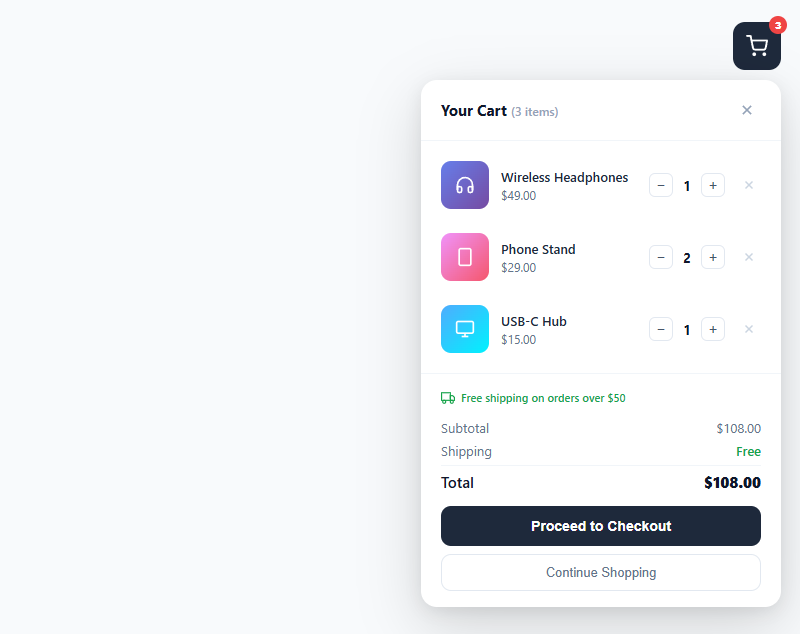
Screenshot of the Mini Cart snippet rendered live

A mini cart (also called a cart flyout) is a compact shopping cart summary that appears on click, anchored to the cart icon in the header. It lets users review items, adjust quantities, and proceed to checkout without navigating away from the current page. This snippet provides a complete mini cart dropdown with gradient product thumbnails, quantity steppers, remove buttons, a free shipping indicator, subtotal/total calculations, and a button that leads to the checkout form.

The dropdown toggle and positioning

The cart dropdown uses position: absolute anchored to the .cart-wrap container. It is display: none by default and switches to display: flex on toggle via the .open class. On toggle, the JS adds or removes .open from the dropdown element. .cart-wrap uses position: relative as the containing block. The right: 0 keeps the dropdown flush with the cart button on the right side.

Quantity stepper controls

Each .cart-item has a .qty-ctrl row with two buttons and a span showing the quantity. changeQty() increments or decrements the span text, enforcing Math.max(1, ...) so quantity never drops below 1. After every change, updateSummary() re-reads all item quantities and prices from the DOM — each .cart-item has a data-price attribute holding the unit price as a float string.

Remove item flow

btn.closest('.cart-item') traverses up the DOM to the containing item row and removes the entire element. updateSummary() then re-counts remaining items, updates the badge count and item count in the header, and recalculates the total.

Price calculation without state

getTotal() iterates all .cart-item elements, reading parseFloat(item.dataset.price) and multiplying by the qty span. This data-attribute approach avoids a separate JS state object for the demo. In production, keep a cart array in memory (or localStorage) and recalculate from that rather than reading the DOM.

Accessibility and keyboard support

The cart button is a native button element, giving it automatic keyboard focus and Enter/Space activation. The close button inside the dropdown is also a button, so keyboard users can Tab into the dropdown and close it without a mouse. For a production implementation, add aria-expanded="true/false" to the cart button and aria-modal="true" with role="dialog" to the dropdown so screen readers announce the panel state correctly. Trap focus inside the dropdown when open using a focusTrap utility so Tab does not cycle behind the overlay.

Animation and transition considerations

The current snippet uses a hard display: none / display: flex toggle. To animate the dropdown open and close, replace the display switch with an opacity and transform transition: set opacity: 0; transform: translateY(-8px); pointer-events: none on the closed state, and opacity: 1; transform: translateY(0); pointer-events: auto on .open. CSS transitions on these properties create a smooth slide-down effect without JavaScript animation loops.

Step by step

How to Use

  1. 1
    Click the cart button to open the dropdownThe dark cart icon button in the top-right shows the item count badge. Click it to open the dropdown. Click it again or the × button to close.
  2. 2
    Adjust item quantitiesClick the + or − buttons next to any item. The quantity updates and the subtotal and total recalculate immediately. Quantity cannot go below 1.
  3. 3
    Remove an itemClick the × icon at the right edge of any item row to remove it. The item count badge and totals update automatically.
  4. 4
    Add your own itemsDuplicate a .cart-item div and update the data-price attribute, gradient background colors, SVG icon, item name, and price text. JS auto-picks up the new item.
  5. 5
    Close on outside clickAdd document.addEventListener("click", e => { if (!e.target.closest(".cart-wrap")) document.getElementById("cartDropdown").classList.remove("open"); }); to close the dropdown when clicking outside.
  6. 6
    Export for your frameworkClick "JSX" for a React component with useState cart management. Click "Vue" for a Vue 3 SFC with reactive cart array.

Real-world uses

Common Use Cases

E-commerce cart flyout on product listing pages
The mini cart lets shoppers adjust quantities and review their order without leaving the listing page. Connect the cart count badge to a cart state array and update it every time an Add to Cart button is clicked. Persist the cart in localStorage and restore it on page load.
SaaS subscription plan add-on selector summary
Use the mini cart pattern for subscription add-ons — show selected plans, seats, and billing cycle with a live subtotal. The quantity stepper maps cleanly to licence seat counts or usage units per add-on.
Event ticketing quantity selector and order summary
Each cart item becomes a ticket type: General Admission, VIP, Early Bird. The qty stepper controls seat count. The checkout button proceeds to the payment form with the order summary pre-filled.
Wire to Stripe Checkout or a headless commerce API
Store cart state in a React useState or Zustand store. On checkout click, POST the cart array to a Stripe Checkout session endpoint or Commerce.js cart API. The mini cart becomes a controlled component fed from that store.
Study dropdown positioning and DOM-based state patterns
The snippet demonstrates position: absolute anchoring, click-toggle UI patterns, and data-attribute state storage — foundational patterns in vanilla JS commerce UIs that predate React. Understanding these helps debug framework cart implementations.
Internal tools item selector and procurement UI
Adapt the cart for an internal procurement request tool: employees select supplies or software licences from a catalog, adjust quantities, and submit. The checkout button becomes Submit Request and fires a POST to an internal approval API.

Got questions?

Frequently Asked Questions

Add a click listener on document: document.addEventListener("click", e => { if (!e.target.closest(".cart-wrap")) document.getElementById("cartDropdown").classList.remove("open"); }); closest(".cart-wrap") returns null if the click originated outside the cart wrapper — the if block then removes .open. Also add a keydown listener for Escape: document.addEventListener("keydown", e => { if (e.key === "Escape") document.getElementById("cartDropdown").classList.remove("open"); }); to support keyboard users who expect Escape to dismiss overlays. After dismissing, return focus to the cart button so keyboard navigation is not lost: document.querySelector(".cart-btn").focus().

Maintain a cart array: let cart = JSON.parse(localStorage.getItem("cart") || "[]"). After every add/remove/qty change, call localStorage.setItem("cart", JSON.stringify(cart)). On DOMContentLoaded, call renderCart() to rebuild .cart-items from the saved array instead of the hardcoded HTML. Each cart item object should store id, name, price, qty, and an optional imageUrl or gradient string. renderCart() iterates the array and creates .cart-item elements dynamically using innerHTML or DOM createElement, then calls updateSummary() to set the badge count and totals. If cart is empty after loading, show an empty state inside the dropdown rather than a blank items area.

Manage cart as const [cart, setCart] = useState([]). Render a MiniCart component that maps cart items to CartItem rows. Each CartItem receives price, qty, onQtyChange(delta), and onRemove props. Compute subtotal with cart.reduce((sum, item) => sum + item.price * item.qty, 0). Use a Zustand store for global cart state so the cart icon in the header and the mini cart dropdown both read from the same source. Persist to localStorage with a Zustand middleware: { persist } from "zustand/middleware", passing the cart slice with a "cart" key so it survives page reloads.

Each .cart-item stores its unit price in a data-price attribute, and the current quantity lives in the .qty element's text. getTotal() loops over every .cart-item and sums parseFloat(item.dataset.price) * parseInt(qty). updateSummary() then writes the aggregate quantity to the #cartCount badge on the cart button, the row count to #itemCount in the header, and the formatted money values to #subtotal and #total with toFixed(2). Every interaction — plus, minus, or remove — simply calls updateSummary() again, so the DOM itself is the single source of truth and there is no separate state object to keep in sync.

Pick a threshold (say 75) and extend updateSummary(): const remaining = Math.max(0, 75 - getTotal()). If remaining is 0, show "You've unlocked free shipping!"; otherwise show "Add $" + remaining.toFixed(2) + " more for free shipping". For the bar itself, add a thin track div under the cart header and set its fill width to Math.min(100, getTotal() / 75 * 100) + "%" with a CSS transition on width so it animates as quantities change. Because updateSummary() already runs on every cart mutation, the bar stays correct for free.

Mini Cart — Export as HTML, React, Vue, Angular & Tailwind

HTML
<!DOCTYPE html>
<html lang="en">
<head>
  <meta charset="UTF-8" />
  <meta name="viewport" content="width=device-width, initial-scale=1.0" />
  <title>Mini Cart</title>
  <style>
    * { box-sizing: border-box; margin: 0; padding: 0; }
    body { font-family: system-ui, sans-serif; background: #f8fafc; min-height: 100vh; display: flex; align-items: flex-start; justify-content: flex-end; padding: 24px; }
    .page { position: relative; }
    .cart-btn { position: relative; background: #1e293b; border: none; color: #fff; width: 48px; height: 48px; border-radius: 12px; cursor: pointer; display: flex; align-items: center; justify-content: center; transition: background 0.15s; }
    .cart-btn:hover { background: #0f172a; }
    .cart-count { position: absolute; top: -6px; right: -6px; background: #ef4444; color: #fff; font-size: 10px; font-weight: 800; min-width: 18px; height: 18px; border-radius: 9px; display: flex; align-items: center; justify-content: center; padding: 0 4px; }
    .cart-dropdown { position: absolute; right: 0; top: 58px; width: 360px; background: #fff; border-radius: 16px; box-shadow: 0 20px 60px rgba(0,0,0,0.15), 0 4px 16px rgba(0,0,0,0.08); display: none; flex-direction: column; overflow: hidden; z-index: 100; }
    .cart-dropdown.open { display: flex; }
    .cart-head { display: flex; align-items: center; justify-content: space-between; padding: 16px 20px; border-bottom: 1px solid #f1f5f9; }
    .cart-title { font-size: 15px; font-weight: 700; color: #0f172a; }
    .cart-title span { font-size: 12px; font-weight: 500; color: #94a3b8; }
    .close-btn { background: none; border: none; cursor: pointer; color: #94a3b8; width: 28px; height: 28px; border-radius: 8px; display: flex; align-items: center; justify-content: center; transition: all 0.15s; }
    .close-btn:hover { background: #f1f5f9; color: #64748b; }
    .cart-items { overflow-y: auto; max-height: 300px; padding: 8px 0; }
    .cart-item { display: flex; align-items: center; gap: 12px; padding: 12px 20px; transition: background 0.1s; }
    .cart-item:hover { background: #fafafa; }
    .item-img { width: 48px; height: 48px; border-radius: 10px; flex-shrink: 0; display: flex; align-items: center; justify-content: center; }
    .item-info { flex: 1; min-width: 0; }
    .item-name { font-size: 13px; font-weight: 600; color: #1e293b; white-space: nowrap; overflow: hidden; text-overflow: ellipsis; }
    .item-price { font-size: 12px; color: #64748b; margin-top: 2px; }
    .qty-ctrl { display: flex; align-items: center; gap: 6px; flex-shrink: 0; }
    .qty-btn { width: 24px; height: 24px; border: 1px solid #e2e8f0; background: #fff; border-radius: 6px; font-size: 14px; cursor: pointer; display: flex; align-items: center; justify-content: center; color: #475569; transition: all 0.1s; }
    .qty-btn:hover { background: #f1f5f9; border-color: #cbd5e1; }
    .qty { font-size: 13px; font-weight: 700; color: #0f172a; min-width: 16px; text-align: center; }
    .remove-btn { background: none; border: none; cursor: pointer; color: #cbd5e1; width: 24px; height: 24px; border-radius: 6px; display: flex; align-items: center; justify-content: center; transition: all 0.15s; flex-shrink: 0; }
    .remove-btn:hover { background: #fee2e2; color: #ef4444; }
    .cart-footer { padding: 16px 20px; border-top: 1px solid #f1f5f9; }
    .free-ship { font-size: 11px; color: #16a34a; display: flex; align-items: center; gap: 6px; margin-bottom: 14px; font-weight: 600; }
    .totals { margin-bottom: 14px; display: flex; flex-direction: column; gap: 6px; }
    .tot-row { display: flex; justify-content: space-between; font-size: 13px; color: #64748b; }
    .tot-row.total-row { font-size: 15px; color: #0f172a; font-weight: 600; padding-top: 6px; border-top: 1px solid #f1f5f9; }
    .free-tag { color: #16a34a; font-weight: 600; }
    .checkout-btn { width: 100%; background: #1e293b; color: #fff; border: none; padding: 12px; border-radius: 10px; font-size: 14px; font-weight: 700; cursor: pointer; margin-bottom: 8px; transition: background 0.15s; }
    .checkout-btn:hover { background: #0f172a; }
    .continue-btn { width: 100%; background: none; border: 1px solid #e2e8f0; color: #64748b; padding: 10px; border-radius: 10px; font-size: 13px; cursor: pointer; transition: all 0.15s; }
    .continue-btn:hover { background: #f8fafc; color: #1e293b; }
  </style>
</head>
<body>
  <div class="page">
    <div class="cart-wrap">
      <button class="cart-btn" onclick="toggleCart()">
        <svg width="22" height="22" viewBox="0 0 24 24" fill="none" stroke="currentColor" stroke-width="2" stroke-linecap="round" stroke-linejoin="round"><circle cx="9" cy="21" r="1"/><circle cx="20" cy="21" r="1"/><path d="M1 1h4l2.68 13.39a2 2 0 0 0 2 1.61h9.72a2 2 0 0 0 2-1.61L23 6H6"/></svg>
        <span class="cart-count" id="cartCount">3</span>
      </button>
      <div class="cart-dropdown" id="cartDropdown">
        <div class="cart-head">
          <span class="cart-title">Your Cart <span id="itemCount">(3 items)</span></span>
          <button class="close-btn" onclick="toggleCart()">
            <svg width="16" height="16" viewBox="0 0 24 24" fill="none" stroke="currentColor" stroke-width="2.5"><line x1="18" y1="6" x2="6" y2="18"/><line x1="6" y1="6" x2="18" y2="18"/></svg>
          </button>
        </div>
        <div class="cart-items" id="cartItems">
          <div class="cart-item" data-price="49.00">
            <div class="item-img" style="background:linear-gradient(135deg,#667eea,#764ba2)">
              <svg width="20" height="20" viewBox="0 0 24 24" fill="none" stroke="white" stroke-width="2"><path d="M3 18v-6a9 9 0 0 1 18 0v6"/><path d="M21 19a2 2 0 0 1-2 2h-1a2 2 0 0 1-2-2v-3a2 2 0 0 1 2-2h3zM3 19a2 2 0 0 0 2 2h1a2 2 0 0 0 2-2v-3a2 2 0 0 0-2-2H3z"/></svg>
            </div>
            <div class="item-info">
              <div class="item-name">Wireless Headphones</div>
              <div class="item-price">$49.00</div>
            </div>
            <div class="qty-ctrl">
              <button class="qty-btn" onclick="changeQty(this,-1)">&#x2212;</button>
              <span class="qty">1</span>
              <button class="qty-btn" onclick="changeQty(this,1)">+</button>
            </div>
            <button class="remove-btn" onclick="removeItem(this)" title="Remove">
              <svg width="14" height="14" viewBox="0 0 24 24" fill="none" stroke="currentColor" stroke-width="2.5"><line x1="18" y1="6" x2="6" y2="18"/><line x1="6" y1="6" x2="18" y2="18"/></svg>
            </button>
          </div>
          <div class="cart-item" data-price="29.00">
            <div class="item-img" style="background:linear-gradient(135deg,#f093fb,#f5576c)">
              <svg width="20" height="20" viewBox="0 0 24 24" fill="none" stroke="white" stroke-width="2"><rect x="5" y="2" width="14" height="20" rx="2"/><line x1="12" y1="18" x2="12.01" y2="18"/></svg>
            </div>
            <div class="item-info">
              <div class="item-name">Phone Stand</div>
              <div class="item-price">$29.00</div>
            </div>
            <div class="qty-ctrl">
              <button class="qty-btn" onclick="changeQty(this,-1)">&#x2212;</button>
              <span class="qty">2</span>
              <button class="qty-btn" onclick="changeQty(this,1)">+</button>
            </div>
            <button class="remove-btn" onclick="removeItem(this)" title="Remove">
              <svg width="14" height="14" viewBox="0 0 24 24" fill="none" stroke="currentColor" stroke-width="2.5"><line x1="18" y1="6" x2="6" y2="18"/><line x1="6" y1="6" x2="18" y2="18"/></svg>
            </button>
          </div>
          <div class="cart-item" data-price="15.00">
            <div class="item-img" style="background:linear-gradient(135deg,#4facfe,#00f2fe)">
              <svg width="20" height="20" viewBox="0 0 24 24" fill="none" stroke="white" stroke-width="2"><rect x="2" y="3" width="20" height="14" rx="2"/><line x1="8" y1="21" x2="16" y2="21"/><line x1="12" y1="17" x2="12" y2="21"/></svg>
            </div>
            <div class="item-info">
              <div class="item-name">USB-C Hub</div>
              <div class="item-price">$15.00</div>
            </div>
            <div class="qty-ctrl">
              <button class="qty-btn" onclick="changeQty(this,-1)">&#x2212;</button>
              <span class="qty">1</span>
              <button class="qty-btn" onclick="changeQty(this,1)">+</button>
            </div>
            <button class="remove-btn" onclick="removeItem(this)" title="Remove">
              <svg width="14" height="14" viewBox="0 0 24 24" fill="none" stroke="currentColor" stroke-width="2.5"><line x1="18" y1="6" x2="6" y2="18"/><line x1="6" y1="6" x2="18" y2="18"/></svg>
            </button>
          </div>
        </div>
        <div class="cart-footer">
          <div class="free-ship">
            <svg width="14" height="14" viewBox="0 0 24 24" fill="none" stroke="currentColor" stroke-width="2"><rect x="1" y="3" width="15" height="13"/><path d="M16 8h4l3 3v5h-7V8z"/><circle cx="5.5" cy="18.5" r="2.5"/><circle cx="18.5" cy="18.5" r="2.5"/></svg>
            Free shipping on orders over $50
          </div>
          <div class="totals">
            <div class="tot-row"><span>Subtotal</span><span id="subtotal">$108.00</span></div>
            <div class="tot-row"><span>Shipping</span><span class="free-tag">Free</span></div>
            <div class="tot-row total-row"><span>Total</span><strong id="total">$108.00</strong></div>
          </div>
          <button class="checkout-btn">Proceed to Checkout</button>
          <button class="continue-btn" onclick="toggleCart()">Continue Shopping</button>
        </div>
      </div>
    </div>
  </div>
  <script>
    function toggleCart() {
      document.getElementById('cartDropdown').classList.toggle('open');
    }
    
    function getTotal() {
      let total = 0;
      document.querySelectorAll('.cart-item').forEach(function(item) {
        var price = parseFloat(item.dataset.price);
        var qty = parseInt(item.querySelector('.qty').textContent);
        total += price * qty;
      });
      return total;
    }
    
    function updateSummary() {
      var items = document.querySelectorAll('.cart-item');
      var totalQty = 0;
      items.forEach(function(item) {
        totalQty += parseInt(item.querySelector('.qty').textContent);
      });
      document.getElementById('cartCount').textContent = totalQty;
      document.getElementById('itemCount').textContent = '(' + items.length + ' item' + (items.length !== 1 ? 's' : '') + ')';
      var total = getTotal();
      document.getElementById('subtotal').textContent = '$' + total.toFixed(2);
      document.getElementById('total').textContent = '$' + total.toFixed(2);
    }
    
    function changeQty(btn, delta) {
      var ctrl = btn.parentElement;
      var qtyEl = ctrl.querySelector('.qty');
      qtyEl.textContent = Math.max(1, parseInt(qtyEl.textContent) + delta);
      updateSummary();
    }
    
    function removeItem(btn) {
      btn.closest('.cart-item').remove();
      updateSummary();
    }
  </script>
</body>
</html>
Tailwind
<!DOCTYPE html>
<html lang="en">
<head>
  <meta charset="UTF-8" />
  <meta name="viewport" content="width=device-width, initial-scale=1.0" />
  <title>Mini Cart</title>
  <!-- Tailwind CSS v3+ — arbitrary value classes (e.g. bg-[#0f172a]) are valid -->
  <script src="https://cdn.tailwindcss.com"></script>
  <style>
    * {
      box-sizing: border-box; margin: 0; padding: 0;
    }

    body {
      font-family: system-ui, sans-serif; background: #f8fafc; min-height: 100vh; display: flex; align-items: flex-start; justify-content: flex-end; padding: 24px;
    }

    .cart-dropdown.open {
      display: flex;
    }

    .cart-title span {
      font-size: 12px; font-weight: 500; color: #94a3b8;
    }

    .tot-row.total-row {
      font-size: 15px; color: #0f172a; font-weight: 600; padding-top: 6px; border-top: 1px solid #f1f5f9;
    }
  </style>
</head>
<body>
  <div class="relative">
    <div class="cart-wrap">
      <button class="relative bg-[#1e293b] border-0 text-[#fff] w-12 h-12 rounded-xl cursor-pointer flex items-center justify-center [transition:background_0.15s] hover:bg-[#0f172a]" onclick="toggleCart()">
        <svg width="22" height="22" viewBox="0 0 24 24" fill="none" stroke="currentColor" stroke-width="2" stroke-linecap="round" stroke-linejoin="round"><circle cx="9" cy="21" r="1"/><circle cx="20" cy="21" r="1"/><path d="M1 1h4l2.68 13.39a2 2 0 0 0 2 1.61h9.72a2 2 0 0 0 2-1.61L23 6H6"/></svg>
        <span class="absolute -top-1.5 -right-1.5 bg-[#ef4444] text-[#fff] text-xs font-extrabold min-w-[18px] h-[18px] rounded-[9px] flex items-center justify-center py-0 px-1" id="cartCount">3</span>
      </button>
      <div class="cart-dropdown absolute right-0 top-[58px] w-[360px] bg-[#fff] rounded-2xl shadow-[0_20px_60px_rgba(0,0,0,0.15),_0_4px_16px_rgba(0,0,0,0.08)] hidden flex-col overflow-hidden z-[100]" id="cartDropdown">
        <div class="flex items-center justify-between py-4 px-5 border-b border-b-[#f1f5f9]">
          <span class="cart-title text-[15px] font-bold text-[#0f172a]">Your Cart <span id="itemCount">(3 items)</span></span>
          <button class="bg-transparent border-0 cursor-pointer text-[#94a3b8] w-7 h-7 rounded-lg flex items-center justify-center [transition:all_0.15s] hover:bg-[#f1f5f9] hover:text-[#64748b]" onclick="toggleCart()">
            <svg width="16" height="16" viewBox="0 0 24 24" fill="none" stroke="currentColor" stroke-width="2.5"><line x1="18" y1="6" x2="6" y2="18"/><line x1="6" y1="6" x2="18" y2="18"/></svg>
          </button>
        </div>
        <div class="overflow-y-auto max-h-[300px] py-2 px-0" id="cartItems">
          <div class="cart-item flex items-center gap-3 py-3 px-5 [transition:background_0.1s] hover:bg-[#fafafa]" data-price="49.00">
            <div class="w-12 h-12 rounded-[10px] shrink-0 flex items-center justify-center" style="background:linear-gradient(135deg,#667eea,#764ba2)">
              <svg width="20" height="20" viewBox="0 0 24 24" fill="none" stroke="white" stroke-width="2"><path d="M3 18v-6a9 9 0 0 1 18 0v6"/><path d="M21 19a2 2 0 0 1-2 2h-1a2 2 0 0 1-2-2v-3a2 2 0 0 1 2-2h3zM3 19a2 2 0 0 0 2 2h1a2 2 0 0 0 2-2v-3a2 2 0 0 0-2-2H3z"/></svg>
            </div>
            <div class="flex-1 min-w-0">
              <div class="text-[13px] font-semibold text-[#1e293b] whitespace-nowrap overflow-hidden text-ellipsis">Wireless Headphones</div>
              <div class="text-xs text-[#64748b] mt-0.5">$49.00</div>
            </div>
            <div class="flex items-center gap-1.5 shrink-0">
              <button class="w-6 h-6 border border-[#e2e8f0] bg-[#fff] rounded-md text-sm cursor-pointer flex items-center justify-center text-[#475569] [transition:all_0.1s] hover:bg-[#f1f5f9] hover:border-[#cbd5e1]" onclick="changeQty(this,-1)">&#x2212;</button>
              <span class="qty text-[13px] font-bold text-[#0f172a] min-w-[16px] text-center">1</span>
              <button class="w-6 h-6 border border-[#e2e8f0] bg-[#fff] rounded-md text-sm cursor-pointer flex items-center justify-center text-[#475569] [transition:all_0.1s] hover:bg-[#f1f5f9] hover:border-[#cbd5e1]" onclick="changeQty(this,1)">+</button>
            </div>
            <button class="bg-transparent border-0 cursor-pointer text-[#cbd5e1] w-6 h-6 rounded-md flex items-center justify-center [transition:all_0.15s] shrink-0 hover:bg-[#fee2e2] hover:text-[#ef4444]" onclick="removeItem(this)" title="Remove">
              <svg width="14" height="14" viewBox="0 0 24 24" fill="none" stroke="currentColor" stroke-width="2.5"><line x1="18" y1="6" x2="6" y2="18"/><line x1="6" y1="6" x2="18" y2="18"/></svg>
            </button>
          </div>
          <div class="cart-item flex items-center gap-3 py-3 px-5 [transition:background_0.1s] hover:bg-[#fafafa]" data-price="29.00">
            <div class="w-12 h-12 rounded-[10px] shrink-0 flex items-center justify-center" style="background:linear-gradient(135deg,#f093fb,#f5576c)">
              <svg width="20" height="20" viewBox="0 0 24 24" fill="none" stroke="white" stroke-width="2"><rect x="5" y="2" width="14" height="20" rx="2"/><line x1="12" y1="18" x2="12.01" y2="18"/></svg>
            </div>
            <div class="flex-1 min-w-0">
              <div class="text-[13px] font-semibold text-[#1e293b] whitespace-nowrap overflow-hidden text-ellipsis">Phone Stand</div>
              <div class="text-xs text-[#64748b] mt-0.5">$29.00</div>
            </div>
            <div class="flex items-center gap-1.5 shrink-0">
              <button class="w-6 h-6 border border-[#e2e8f0] bg-[#fff] rounded-md text-sm cursor-pointer flex items-center justify-center text-[#475569] [transition:all_0.1s] hover:bg-[#f1f5f9] hover:border-[#cbd5e1]" onclick="changeQty(this,-1)">&#x2212;</button>
              <span class="qty text-[13px] font-bold text-[#0f172a] min-w-[16px] text-center">2</span>
              <button class="w-6 h-6 border border-[#e2e8f0] bg-[#fff] rounded-md text-sm cursor-pointer flex items-center justify-center text-[#475569] [transition:all_0.1s] hover:bg-[#f1f5f9] hover:border-[#cbd5e1]" onclick="changeQty(this,1)">+</button>
            </div>
            <button class="bg-transparent border-0 cursor-pointer text-[#cbd5e1] w-6 h-6 rounded-md flex items-center justify-center [transition:all_0.15s] shrink-0 hover:bg-[#fee2e2] hover:text-[#ef4444]" onclick="removeItem(this)" title="Remove">
              <svg width="14" height="14" viewBox="0 0 24 24" fill="none" stroke="currentColor" stroke-width="2.5"><line x1="18" y1="6" x2="6" y2="18"/><line x1="6" y1="6" x2="18" y2="18"/></svg>
            </button>
          </div>
          <div class="cart-item flex items-center gap-3 py-3 px-5 [transition:background_0.1s] hover:bg-[#fafafa]" data-price="15.00">
            <div class="w-12 h-12 rounded-[10px] shrink-0 flex items-center justify-center" style="background:linear-gradient(135deg,#4facfe,#00f2fe)">
              <svg width="20" height="20" viewBox="0 0 24 24" fill="none" stroke="white" stroke-width="2"><rect x="2" y="3" width="20" height="14" rx="2"/><line x1="8" y1="21" x2="16" y2="21"/><line x1="12" y1="17" x2="12" y2="21"/></svg>
            </div>
            <div class="flex-1 min-w-0">
              <div class="text-[13px] font-semibold text-[#1e293b] whitespace-nowrap overflow-hidden text-ellipsis">USB-C Hub</div>
              <div class="text-xs text-[#64748b] mt-0.5">$15.00</div>
            </div>
            <div class="flex items-center gap-1.5 shrink-0">
              <button class="w-6 h-6 border border-[#e2e8f0] bg-[#fff] rounded-md text-sm cursor-pointer flex items-center justify-center text-[#475569] [transition:all_0.1s] hover:bg-[#f1f5f9] hover:border-[#cbd5e1]" onclick="changeQty(this,-1)">&#x2212;</button>
              <span class="qty text-[13px] font-bold text-[#0f172a] min-w-[16px] text-center">1</span>
              <button class="w-6 h-6 border border-[#e2e8f0] bg-[#fff] rounded-md text-sm cursor-pointer flex items-center justify-center text-[#475569] [transition:all_0.1s] hover:bg-[#f1f5f9] hover:border-[#cbd5e1]" onclick="changeQty(this,1)">+</button>
            </div>
            <button class="bg-transparent border-0 cursor-pointer text-[#cbd5e1] w-6 h-6 rounded-md flex items-center justify-center [transition:all_0.15s] shrink-0 hover:bg-[#fee2e2] hover:text-[#ef4444]" onclick="removeItem(this)" title="Remove">
              <svg width="14" height="14" viewBox="0 0 24 24" fill="none" stroke="currentColor" stroke-width="2.5"><line x1="18" y1="6" x2="6" y2="18"/><line x1="6" y1="6" x2="18" y2="18"/></svg>
            </button>
          </div>
        </div>
        <div class="py-4 px-5 border-t border-t-[#f1f5f9]">
          <div class="text-[11px] text-[#16a34a] flex items-center gap-1.5 mb-3.5 font-semibold">
            <svg width="14" height="14" viewBox="0 0 24 24" fill="none" stroke="currentColor" stroke-width="2"><rect x="1" y="3" width="15" height="13"/><path d="M16 8h4l3 3v5h-7V8z"/><circle cx="5.5" cy="18.5" r="2.5"/><circle cx="18.5" cy="18.5" r="2.5"/></svg>
            Free shipping on orders over $50
          </div>
          <div class="mb-3.5 flex flex-col gap-1.5">
            <div class="tot-row flex justify-between text-[13px] text-[#64748b]"><span>Subtotal</span><span id="subtotal">$108.00</span></div>
            <div class="tot-row flex justify-between text-[13px] text-[#64748b]"><span>Shipping</span><span class="text-[#16a34a] font-semibold">Free</span></div>
            <div class="tot-row flex justify-between text-[13px] text-[#64748b] total-row"><span>Total</span><strong id="total">$108.00</strong></div>
          </div>
          <button class="w-full bg-[#1e293b] text-[#fff] border-0 p-3 rounded-[10px] text-sm font-bold cursor-pointer mb-2 [transition:background_0.15s] hover:bg-[#0f172a]">Proceed to Checkout</button>
          <button class="w-full bg-transparent border border-[#e2e8f0] text-[#64748b] p-2.5 rounded-[10px] text-[13px] cursor-pointer [transition:all_0.15s] hover:bg-[#f8fafc] hover:text-[#1e293b]" onclick="toggleCart()">Continue Shopping</button>
        </div>
      </div>
    </div>
  </div>
  <script>
    function toggleCart() {
      document.getElementById('cartDropdown').classList.toggle('open');
    }
    
    function getTotal() {
      let total = 0;
      document.querySelectorAll('.cart-item').forEach(function(item) {
        var price = parseFloat(item.dataset.price);
        var qty = parseInt(item.querySelector('.qty').textContent);
        total += price * qty;
      });
      return total;
    }
    
    function updateSummary() {
      var items = document.querySelectorAll('.cart-item');
      var totalQty = 0;
      items.forEach(function(item) {
        totalQty += parseInt(item.querySelector('.qty').textContent);
      });
      document.getElementById('cartCount').textContent = totalQty;
      document.getElementById('itemCount').textContent = '(' + items.length + ' item' + (items.length !== 1 ? 's' : '') + ')';
      var total = getTotal();
      document.getElementById('subtotal').textContent = '$' + total.toFixed(2);
      document.getElementById('total').textContent = '$' + total.toFixed(2);
    }
    
    function changeQty(btn, delta) {
      var ctrl = btn.parentElement;
      var qtyEl = ctrl.querySelector('.qty');
      qtyEl.textContent = Math.max(1, parseInt(qtyEl.textContent) + delta);
      updateSummary();
    }
    
    function removeItem(btn) {
      btn.closest('.cart-item').remove();
      updateSummary();
    }
  </script>
</body>
</html>
React
import React, { useEffect } from 'react';

// CSS — optionally move to MiniCart.module.css
const css = `
* { box-sizing: border-box; margin: 0; padding: 0; }
body { font-family: system-ui, sans-serif; background: #f8fafc; min-height: 100vh; display: flex; align-items: flex-start; justify-content: flex-end; padding: 24px; }
.page { position: relative; }
.cart-btn { position: relative; background: #1e293b; border: none; color: #fff; width: 48px; height: 48px; border-radius: 12px; cursor: pointer; display: flex; align-items: center; justify-content: center; transition: background 0.15s; }
.cart-btn:hover { background: #0f172a; }
.cart-count { position: absolute; top: -6px; right: -6px; background: #ef4444; color: #fff; font-size: 10px; font-weight: 800; min-width: 18px; height: 18px; border-radius: 9px; display: flex; align-items: center; justify-content: center; padding: 0 4px; }
.cart-dropdown { position: absolute; right: 0; top: 58px; width: 360px; background: #fff; border-radius: 16px; box-shadow: 0 20px 60px rgba(0,0,0,0.15), 0 4px 16px rgba(0,0,0,0.08); display: none; flex-direction: column; overflow: hidden; z-index: 100; }
.cart-dropdown.open { display: flex; }
.cart-head { display: flex; align-items: center; justify-content: space-between; padding: 16px 20px; border-bottom: 1px solid #f1f5f9; }
.cart-title { font-size: 15px; font-weight: 700; color: #0f172a; }
.cart-title span { font-size: 12px; font-weight: 500; color: #94a3b8; }
.close-btn { background: none; border: none; cursor: pointer; color: #94a3b8; width: 28px; height: 28px; border-radius: 8px; display: flex; align-items: center; justify-content: center; transition: all 0.15s; }
.close-btn:hover { background: #f1f5f9; color: #64748b; }
.cart-items { overflow-y: auto; max-height: 300px; padding: 8px 0; }
.cart-item { display: flex; align-items: center; gap: 12px; padding: 12px 20px; transition: background 0.1s; }
.cart-item:hover { background: #fafafa; }
.item-img { width: 48px; height: 48px; border-radius: 10px; flex-shrink: 0; display: flex; align-items: center; justify-content: center; }
.item-info { flex: 1; min-width: 0; }
.item-name { font-size: 13px; font-weight: 600; color: #1e293b; white-space: nowrap; overflow: hidden; text-overflow: ellipsis; }
.item-price { font-size: 12px; color: #64748b; margin-top: 2px; }
.qty-ctrl { display: flex; align-items: center; gap: 6px; flex-shrink: 0; }
.qty-btn { width: 24px; height: 24px; border: 1px solid #e2e8f0; background: #fff; border-radius: 6px; font-size: 14px; cursor: pointer; display: flex; align-items: center; justify-content: center; color: #475569; transition: all 0.1s; }
.qty-btn:hover { background: #f1f5f9; border-color: #cbd5e1; }
.qty { font-size: 13px; font-weight: 700; color: #0f172a; min-width: 16px; text-align: center; }
.remove-btn { background: none; border: none; cursor: pointer; color: #cbd5e1; width: 24px; height: 24px; border-radius: 6px; display: flex; align-items: center; justify-content: center; transition: all 0.15s; flex-shrink: 0; }
.remove-btn:hover { background: #fee2e2; color: #ef4444; }
.cart-footer { padding: 16px 20px; border-top: 1px solid #f1f5f9; }
.free-ship { font-size: 11px; color: #16a34a; display: flex; align-items: center; gap: 6px; margin-bottom: 14px; font-weight: 600; }
.totals { margin-bottom: 14px; display: flex; flex-direction: column; gap: 6px; }
.tot-row { display: flex; justify-content: space-between; font-size: 13px; color: #64748b; }
.tot-row.total-row { font-size: 15px; color: #0f172a; font-weight: 600; padding-top: 6px; border-top: 1px solid #f1f5f9; }
.free-tag { color: #16a34a; font-weight: 600; }
.checkout-btn { width: 100%; background: #1e293b; color: #fff; border: none; padding: 12px; border-radius: 10px; font-size: 14px; font-weight: 700; cursor: pointer; margin-bottom: 8px; transition: background 0.15s; }
.checkout-btn:hover { background: #0f172a; }
.continue-btn { width: 100%; background: none; border: 1px solid #e2e8f0; color: #64748b; padding: 10px; border-radius: 10px; font-size: 13px; cursor: pointer; transition: all 0.15s; }
.continue-btn:hover { background: #f8fafc; color: #1e293b; }
`;

export default function MiniCart() {
  // Auto-generated escape hatch: the original snippet's vanilla JS runs once
  // after mount and queries the rendered DOM. For idiomatic React, lift this
  // into state + handlers.
  useEffect(() => {
    const _listeners = [];
    const _originalAddEventListener = EventTarget.prototype.addEventListener;
    EventTarget.prototype.addEventListener = function(type, listener, options) {
      _listeners.push({ target: this, type, listener, options });
      return _originalAddEventListener.call(this, type, listener, options);
    };
    function toggleCart() {
      document.getElementById('cartDropdown').classList.toggle('open');
    }
    
    function getTotal() {
      let total = 0;
      document.querySelectorAll('.cart-item').forEach(function(item) {
        var price = parseFloat(item.dataset.price);
        var qty = parseInt(item.querySelector('.qty').textContent);
        total += price * qty;
      });
      return total;
    }
    
    function updateSummary() {
      var items = document.querySelectorAll('.cart-item');
      var totalQty = 0;
      items.forEach(function(item) {
        totalQty += parseInt(item.querySelector('.qty').textContent);
      });
      document.getElementById('cartCount').textContent = totalQty;
      document.getElementById('itemCount').textContent = '(' + items.length + ' item' + (items.length !== 1 ? 's' : '') + ')';
      var total = getTotal();
      document.getElementById('subtotal').textContent = '$' + total.toFixed(2);
      document.getElementById('total').textContent = '$' + total.toFixed(2);
    }
    
    function changeQty(btn, delta) {
      var ctrl = btn.parentElement;
      var qtyEl = ctrl.querySelector('.qty');
      qtyEl.textContent = Math.max(1, parseInt(qtyEl.textContent) + delta);
      updateSummary();
    }
    
    function removeItem(btn) {
      btn.closest('.cart-item').remove();
      updateSummary();
    }
    // Cleanup: restore addEventListener and remove all listeners
    return () => {
      EventTarget.prototype.addEventListener = _originalAddEventListener;
      for (const { target, type, listener, options } of _listeners) {
        target.removeEventListener(type, listener, options);
      }
    };

    // Expose handlers used by inline JSX events to the global scope
    if (typeof toggleCart === 'function') window.toggleCart = toggleCart;
    if (typeof changeQty === 'function') window.changeQty = changeQty;
    if (typeof removeItem === 'function') window.removeItem = removeItem;
  }, []);

  return (
    <>
      <style>{css}</style>
      <div className="page">
        <div className="cart-wrap">
          <button className="cart-btn" onClick={(event) => { toggleCart() }}>
            <svg width="22" height="22" viewBox="0 0 24 24" fill="none" stroke="currentColor" strokeWidth="2" strokeLinecap="round" stroke-linejoin="round"><circle cx="9" cy="21" r="1"/><circle cx="20" cy="21" r="1"/><path d="M1 1h4l2.68 13.39a2 2 0 0 0 2 1.61h9.72a2 2 0 0 0 2-1.61L23 6H6"/></svg>
            <span className="cart-count" id="cartCount">3</span>
          </button>
          <div className="cart-dropdown" id="cartDropdown">
            <div className="cart-head">
              <span className="cart-title">Your Cart <span id="itemCount">(3 items)</span></span>
              <button className="close-btn" onClick={(event) => { toggleCart() }}>
                <svg width="16" height="16" viewBox="0 0 24 24" fill="none" stroke="currentColor" strokeWidth="2.5"><line x1="18" y1="6" x2="6" y2="18"/><line x1="6" y1="6" x2="18" y2="18"/></svg>
              </button>
            </div>
            <div className="cart-items" id="cartItems">
              <div className="cart-item" data-price="49.00">
                <div className="item-img" style={{ background: 'linear-gradient(135deg,#667eea,#764ba2)' }}>
                  <svg width="20" height="20" viewBox="0 0 24 24" fill="none" stroke="white" strokeWidth="2"><path d="M3 18v-6a9 9 0 0 1 18 0v6"/><path d="M21 19a2 2 0 0 1-2 2h-1a2 2 0 0 1-2-2v-3a2 2 0 0 1 2-2h3zM3 19a2 2 0 0 0 2 2h1a2 2 0 0 0 2-2v-3a2 2 0 0 0-2-2H3z"/></svg>
                </div>
                <div className="item-info">
                  <div className="item-name">Wireless Headphones</div>
                  <div className="item-price">$49.00</div>
                </div>
                <div className="qty-ctrl">
                  <button className="qty-btn" onClick={(event) => { changeQty(event.currentTarget,-1) }}>&#x2212;</button>
                  <span className="qty">1</span>
                  <button className="qty-btn" onClick={(event) => { changeQty(event.currentTarget,1) }}>+</button>
                </div>
                <button className="remove-btn" onClick={(event) => { removeItem(event.currentTarget) }} title="Remove">
                  <svg width="14" height="14" viewBox="0 0 24 24" fill="none" stroke="currentColor" strokeWidth="2.5"><line x1="18" y1="6" x2="6" y2="18"/><line x1="6" y1="6" x2="18" y2="18"/></svg>
                </button>
              </div>
              <div className="cart-item" data-price="29.00">
                <div className="item-img" style={{ background: 'linear-gradient(135deg,#f093fb,#f5576c)' }}>
                  <svg width="20" height="20" viewBox="0 0 24 24" fill="none" stroke="white" strokeWidth="2"><rect x="5" y="2" width="14" height="20" rx="2"/><line x1="12" y1="18" x2="12.01" y2="18"/></svg>
                </div>
                <div className="item-info">
                  <div className="item-name">Phone Stand</div>
                  <div className="item-price">$29.00</div>
                </div>
                <div className="qty-ctrl">
                  <button className="qty-btn" onClick={(event) => { changeQty(event.currentTarget,-1) }}>&#x2212;</button>
                  <span className="qty">2</span>
                  <button className="qty-btn" onClick={(event) => { changeQty(event.currentTarget,1) }}>+</button>
                </div>
                <button className="remove-btn" onClick={(event) => { removeItem(event.currentTarget) }} title="Remove">
                  <svg width="14" height="14" viewBox="0 0 24 24" fill="none" stroke="currentColor" strokeWidth="2.5"><line x1="18" y1="6" x2="6" y2="18"/><line x1="6" y1="6" x2="18" y2="18"/></svg>
                </button>
              </div>
              <div className="cart-item" data-price="15.00">
                <div className="item-img" style={{ background: 'linear-gradient(135deg,#4facfe,#00f2fe)' }}>
                  <svg width="20" height="20" viewBox="0 0 24 24" fill="none" stroke="white" strokeWidth="2"><rect x="2" y="3" width="20" height="14" rx="2"/><line x1="8" y1="21" x2="16" y2="21"/><line x1="12" y1="17" x2="12" y2="21"/></svg>
                </div>
                <div className="item-info">
                  <div className="item-name">USB-C Hub</div>
                  <div className="item-price">$15.00</div>
                </div>
                <div className="qty-ctrl">
                  <button className="qty-btn" onClick={(event) => { changeQty(event.currentTarget,-1) }}>&#x2212;</button>
                  <span className="qty">1</span>
                  <button className="qty-btn" onClick={(event) => { changeQty(event.currentTarget,1) }}>+</button>
                </div>
                <button className="remove-btn" onClick={(event) => { removeItem(event.currentTarget) }} title="Remove">
                  <svg width="14" height="14" viewBox="0 0 24 24" fill="none" stroke="currentColor" strokeWidth="2.5"><line x1="18" y1="6" x2="6" y2="18"/><line x1="6" y1="6" x2="18" y2="18"/></svg>
                </button>
              </div>
            </div>
            <div className="cart-footer">
              <div className="free-ship">
                <svg width="14" height="14" viewBox="0 0 24 24" fill="none" stroke="currentColor" strokeWidth="2"><rect x="1" y="3" width="15" height="13"/><path d="M16 8h4l3 3v5h-7V8z"/><circle cx="5.5" cy="18.5" r="2.5"/><circle cx="18.5" cy="18.5" r="2.5"/></svg>
                Free shipping on orders over $50
              </div>
              <div className="totals">
                <div className="tot-row"><span>Subtotal</span><span id="subtotal">$108.00</span></div>
                <div className="tot-row"><span>Shipping</span><span className="free-tag">Free</span></div>
                <div className="tot-row total-row"><span>Total</span><strong id="total">$108.00</strong></div>
              </div>
              <button className="checkout-btn">Proceed to Checkout</button>
              <button className="continue-btn" onClick={(event) => { toggleCart() }}>Continue Shopping</button>
            </div>
          </div>
        </div>
      </div>
    </>
  );
}
React + Tailwind
import React, { useEffect } from 'react';
// Requires Tailwind CSS v3+ — https://tailwindcss.com/docs/installation
// Arbitrary value classes (e.g. bg-[#0f172a]) are valid Tailwind v3+

export default function MiniCart() {
  // Auto-generated escape hatch: the original snippet's vanilla JS runs once
  // after mount and queries the rendered DOM. For idiomatic React, lift this
  // into state + handlers.
  useEffect(() => {
    const _listeners = [];
    const _originalAddEventListener = EventTarget.prototype.addEventListener;
    EventTarget.prototype.addEventListener = function(type, listener, options) {
      _listeners.push({ target: this, type, listener, options });
      return _originalAddEventListener.call(this, type, listener, options);
    };
    function toggleCart() {
      document.getElementById('cartDropdown').classList.toggle('open');
    }
    
    function getTotal() {
      let total = 0;
      document.querySelectorAll('.cart-item').forEach(function(item) {
        var price = parseFloat(item.dataset.price);
        var qty = parseInt(item.querySelector('.qty').textContent);
        total += price * qty;
      });
      return total;
    }
    
    function updateSummary() {
      var items = document.querySelectorAll('.cart-item');
      var totalQty = 0;
      items.forEach(function(item) {
        totalQty += parseInt(item.querySelector('.qty').textContent);
      });
      document.getElementById('cartCount').textContent = totalQty;
      document.getElementById('itemCount').textContent = '(' + items.length + ' item' + (items.length !== 1 ? 's' : '') + ')';
      var total = getTotal();
      document.getElementById('subtotal').textContent = '$' + total.toFixed(2);
      document.getElementById('total').textContent = '$' + total.toFixed(2);
    }
    
    function changeQty(btn, delta) {
      var ctrl = btn.parentElement;
      var qtyEl = ctrl.querySelector('.qty');
      qtyEl.textContent = Math.max(1, parseInt(qtyEl.textContent) + delta);
      updateSummary();
    }
    
    function removeItem(btn) {
      btn.closest('.cart-item').remove();
      updateSummary();
    }
    // Cleanup: restore addEventListener and remove all listeners
    return () => {
      EventTarget.prototype.addEventListener = _originalAddEventListener;
      for (const { target, type, listener, options } of _listeners) {
        target.removeEventListener(type, listener, options);
      }
    };

    // Expose handlers used by inline JSX events to the global scope
    if (typeof toggleCart === 'function') window.toggleCart = toggleCart;
    if (typeof changeQty === 'function') window.changeQty = changeQty;
    if (typeof removeItem === 'function') window.removeItem = removeItem;
  }, []);

  return (
    <>
      <style>{`
* {
  box-sizing: border-box; margin: 0; padding: 0;
}

body {
  font-family: system-ui, sans-serif; background: #f8fafc; min-height: 100vh; display: flex; align-items: flex-start; justify-content: flex-end; padding: 24px;
}

.cart-dropdown.open {
  display: flex;
}

.cart-title span {
  font-size: 12px; font-weight: 500; color: #94a3b8;
}

.tot-row.total-row {
  font-size: 15px; color: #0f172a; font-weight: 600; padding-top: 6px; border-top: 1px solid #f1f5f9;
}
      `}</style>
      <div className="relative">
        <div className="cart-wrap">
          <button className="relative bg-[#1e293b] border-0 text-[#fff] w-12 h-12 rounded-xl cursor-pointer flex items-center justify-center [transition:background_0.15s] hover:bg-[#0f172a]" onClick={(event) => { toggleCart() }}>
            <svg width="22" height="22" viewBox="0 0 24 24" fill="none" stroke="currentColor" strokeWidth="2" strokeLinecap="round" stroke-linejoin="round"><circle cx="9" cy="21" r="1"/><circle cx="20" cy="21" r="1"/><path d="M1 1h4l2.68 13.39a2 2 0 0 0 2 1.61h9.72a2 2 0 0 0 2-1.61L23 6H6"/></svg>
            <span className="absolute -top-1.5 -right-1.5 bg-[#ef4444] text-[#fff] text-xs font-extrabold min-w-[18px] h-[18px] rounded-[9px] flex items-center justify-center py-0 px-1" id="cartCount">3</span>
          </button>
          <div className="cart-dropdown absolute right-0 top-[58px] w-[360px] bg-[#fff] rounded-2xl shadow-[0_20px_60px_rgba(0,0,0,0.15),_0_4px_16px_rgba(0,0,0,0.08)] hidden flex-col overflow-hidden z-[100]" id="cartDropdown">
            <div className="flex items-center justify-between py-4 px-5 border-b border-b-[#f1f5f9]">
              <span className="cart-title text-[15px] font-bold text-[#0f172a]">Your Cart <span id="itemCount">(3 items)</span></span>
              <button className="bg-transparent border-0 cursor-pointer text-[#94a3b8] w-7 h-7 rounded-lg flex items-center justify-center [transition:all_0.15s] hover:bg-[#f1f5f9] hover:text-[#64748b]" onClick={(event) => { toggleCart() }}>
                <svg width="16" height="16" viewBox="0 0 24 24" fill="none" stroke="currentColor" strokeWidth="2.5"><line x1="18" y1="6" x2="6" y2="18"/><line x1="6" y1="6" x2="18" y2="18"/></svg>
              </button>
            </div>
            <div className="overflow-y-auto max-h-[300px] py-2 px-0" id="cartItems">
              <div className="cart-item flex items-center gap-3 py-3 px-5 [transition:background_0.1s] hover:bg-[#fafafa]" data-price="49.00">
                <div className="w-12 h-12 rounded-[10px] shrink-0 flex items-center justify-center" style={{ background: 'linear-gradient(135deg,#667eea,#764ba2)' }}>
                  <svg width="20" height="20" viewBox="0 0 24 24" fill="none" stroke="white" strokeWidth="2"><path d="M3 18v-6a9 9 0 0 1 18 0v6"/><path d="M21 19a2 2 0 0 1-2 2h-1a2 2 0 0 1-2-2v-3a2 2 0 0 1 2-2h3zM3 19a2 2 0 0 0 2 2h1a2 2 0 0 0 2-2v-3a2 2 0 0 0-2-2H3z"/></svg>
                </div>
                <div className="flex-1 min-w-0">
                  <div className="text-[13px] font-semibold text-[#1e293b] whitespace-nowrap overflow-hidden text-ellipsis">Wireless Headphones</div>
                  <div className="text-xs text-[#64748b] mt-0.5">$49.00</div>
                </div>
                <div className="flex items-center gap-1.5 shrink-0">
                  <button className="w-6 h-6 border border-[#e2e8f0] bg-[#fff] rounded-md text-sm cursor-pointer flex items-center justify-center text-[#475569] [transition:all_0.1s] hover:bg-[#f1f5f9] hover:border-[#cbd5e1]" onClick={(event) => { changeQty(event.currentTarget,-1) }}>&#x2212;</button>
                  <span className="qty text-[13px] font-bold text-[#0f172a] min-w-[16px] text-center">1</span>
                  <button className="w-6 h-6 border border-[#e2e8f0] bg-[#fff] rounded-md text-sm cursor-pointer flex items-center justify-center text-[#475569] [transition:all_0.1s] hover:bg-[#f1f5f9] hover:border-[#cbd5e1]" onClick={(event) => { changeQty(event.currentTarget,1) }}>+</button>
                </div>
                <button className="bg-transparent border-0 cursor-pointer text-[#cbd5e1] w-6 h-6 rounded-md flex items-center justify-center [transition:all_0.15s] shrink-0 hover:bg-[#fee2e2] hover:text-[#ef4444]" onClick={(event) => { removeItem(event.currentTarget) }} title="Remove">
                  <svg width="14" height="14" viewBox="0 0 24 24" fill="none" stroke="currentColor" strokeWidth="2.5"><line x1="18" y1="6" x2="6" y2="18"/><line x1="6" y1="6" x2="18" y2="18"/></svg>
                </button>
              </div>
              <div className="cart-item flex items-center gap-3 py-3 px-5 [transition:background_0.1s] hover:bg-[#fafafa]" data-price="29.00">
                <div className="w-12 h-12 rounded-[10px] shrink-0 flex items-center justify-center" style={{ background: 'linear-gradient(135deg,#f093fb,#f5576c)' }}>
                  <svg width="20" height="20" viewBox="0 0 24 24" fill="none" stroke="white" strokeWidth="2"><rect x="5" y="2" width="14" height="20" rx="2"/><line x1="12" y1="18" x2="12.01" y2="18"/></svg>
                </div>
                <div className="flex-1 min-w-0">
                  <div className="text-[13px] font-semibold text-[#1e293b] whitespace-nowrap overflow-hidden text-ellipsis">Phone Stand</div>
                  <div className="text-xs text-[#64748b] mt-0.5">$29.00</div>
                </div>
                <div className="flex items-center gap-1.5 shrink-0">
                  <button className="w-6 h-6 border border-[#e2e8f0] bg-[#fff] rounded-md text-sm cursor-pointer flex items-center justify-center text-[#475569] [transition:all_0.1s] hover:bg-[#f1f5f9] hover:border-[#cbd5e1]" onClick={(event) => { changeQty(event.currentTarget,-1) }}>&#x2212;</button>
                  <span className="qty text-[13px] font-bold text-[#0f172a] min-w-[16px] text-center">2</span>
                  <button className="w-6 h-6 border border-[#e2e8f0] bg-[#fff] rounded-md text-sm cursor-pointer flex items-center justify-center text-[#475569] [transition:all_0.1s] hover:bg-[#f1f5f9] hover:border-[#cbd5e1]" onClick={(event) => { changeQty(event.currentTarget,1) }}>+</button>
                </div>
                <button className="bg-transparent border-0 cursor-pointer text-[#cbd5e1] w-6 h-6 rounded-md flex items-center justify-center [transition:all_0.15s] shrink-0 hover:bg-[#fee2e2] hover:text-[#ef4444]" onClick={(event) => { removeItem(event.currentTarget) }} title="Remove">
                  <svg width="14" height="14" viewBox="0 0 24 24" fill="none" stroke="currentColor" strokeWidth="2.5"><line x1="18" y1="6" x2="6" y2="18"/><line x1="6" y1="6" x2="18" y2="18"/></svg>
                </button>
              </div>
              <div className="cart-item flex items-center gap-3 py-3 px-5 [transition:background_0.1s] hover:bg-[#fafafa]" data-price="15.00">
                <div className="w-12 h-12 rounded-[10px] shrink-0 flex items-center justify-center" style={{ background: 'linear-gradient(135deg,#4facfe,#00f2fe)' }}>
                  <svg width="20" height="20" viewBox="0 0 24 24" fill="none" stroke="white" strokeWidth="2"><rect x="2" y="3" width="20" height="14" rx="2"/><line x1="8" y1="21" x2="16" y2="21"/><line x1="12" y1="17" x2="12" y2="21"/></svg>
                </div>
                <div className="flex-1 min-w-0">
                  <div className="text-[13px] font-semibold text-[#1e293b] whitespace-nowrap overflow-hidden text-ellipsis">USB-C Hub</div>
                  <div className="text-xs text-[#64748b] mt-0.5">$15.00</div>
                </div>
                <div className="flex items-center gap-1.5 shrink-0">
                  <button className="w-6 h-6 border border-[#e2e8f0] bg-[#fff] rounded-md text-sm cursor-pointer flex items-center justify-center text-[#475569] [transition:all_0.1s] hover:bg-[#f1f5f9] hover:border-[#cbd5e1]" onClick={(event) => { changeQty(event.currentTarget,-1) }}>&#x2212;</button>
                  <span className="qty text-[13px] font-bold text-[#0f172a] min-w-[16px] text-center">1</span>
                  <button className="w-6 h-6 border border-[#e2e8f0] bg-[#fff] rounded-md text-sm cursor-pointer flex items-center justify-center text-[#475569] [transition:all_0.1s] hover:bg-[#f1f5f9] hover:border-[#cbd5e1]" onClick={(event) => { changeQty(event.currentTarget,1) }}>+</button>
                </div>
                <button className="bg-transparent border-0 cursor-pointer text-[#cbd5e1] w-6 h-6 rounded-md flex items-center justify-center [transition:all_0.15s] shrink-0 hover:bg-[#fee2e2] hover:text-[#ef4444]" onClick={(event) => { removeItem(event.currentTarget) }} title="Remove">
                  <svg width="14" height="14" viewBox="0 0 24 24" fill="none" stroke="currentColor" strokeWidth="2.5"><line x1="18" y1="6" x2="6" y2="18"/><line x1="6" y1="6" x2="18" y2="18"/></svg>
                </button>
              </div>
            </div>
            <div className="py-4 px-5 border-t border-t-[#f1f5f9]">
              <div className="text-[11px] text-[#16a34a] flex items-center gap-1.5 mb-3.5 font-semibold">
                <svg width="14" height="14" viewBox="0 0 24 24" fill="none" stroke="currentColor" strokeWidth="2"><rect x="1" y="3" width="15" height="13"/><path d="M16 8h4l3 3v5h-7V8z"/><circle cx="5.5" cy="18.5" r="2.5"/><circle cx="18.5" cy="18.5" r="2.5"/></svg>
                Free shipping on orders over $50
              </div>
              <div className="mb-3.5 flex flex-col gap-1.5">
                <div className="tot-row flex justify-between text-[13px] text-[#64748b]"><span>Subtotal</span><span id="subtotal">$108.00</span></div>
                <div className="tot-row flex justify-between text-[13px] text-[#64748b]"><span>Shipping</span><span className="text-[#16a34a] font-semibold">Free</span></div>
                <div className="tot-row flex justify-between text-[13px] text-[#64748b] total-row"><span>Total</span><strong id="total">$108.00</strong></div>
              </div>
              <button className="w-full bg-[#1e293b] text-[#fff] border-0 p-3 rounded-[10px] text-sm font-bold cursor-pointer mb-2 [transition:background_0.15s] hover:bg-[#0f172a]">Proceed to Checkout</button>
              <button className="w-full bg-transparent border border-[#e2e8f0] text-[#64748b] p-2.5 rounded-[10px] text-[13px] cursor-pointer [transition:all_0.15s] hover:bg-[#f8fafc] hover:text-[#1e293b]" onClick={(event) => { toggleCart() }}>Continue Shopping</button>
            </div>
          </div>
        </div>
      </div>
    </>
  );
}
Vue
<template>
  <div class="page">
    <div class="cart-wrap">
      <button class="cart-btn" @click="toggleCart()">
        <svg width="22" height="22" viewBox="0 0 24 24" fill="none" stroke="currentColor" stroke-width="2" stroke-linecap="round" stroke-linejoin="round"><circle cx="9" cy="21" r="1"/><circle cx="20" cy="21" r="1"/><path d="M1 1h4l2.68 13.39a2 2 0 0 0 2 1.61h9.72a2 2 0 0 0 2-1.61L23 6H6"/></svg>
        <span class="cart-count" id="cartCount">3</span>
      </button>
      <div class="cart-dropdown" id="cartDropdown">
        <div class="cart-head">
          <span class="cart-title">Your Cart <span id="itemCount">(3 items)</span></span>
          <button class="close-btn" @click="toggleCart()">
            <svg width="16" height="16" viewBox="0 0 24 24" fill="none" stroke="currentColor" stroke-width="2.5"><line x1="18" y1="6" x2="6" y2="18"/><line x1="6" y1="6" x2="18" y2="18"/></svg>
          </button>
        </div>
        <div class="cart-items" id="cartItems">
          <div class="cart-item" data-price="49.00">
            <div class="item-img" style="background:linear-gradient(135deg,#667eea,#764ba2)">
              <svg width="20" height="20" viewBox="0 0 24 24" fill="none" stroke="white" stroke-width="2"><path d="M3 18v-6a9 9 0 0 1 18 0v6"/><path d="M21 19a2 2 0 0 1-2 2h-1a2 2 0 0 1-2-2v-3a2 2 0 0 1 2-2h3zM3 19a2 2 0 0 0 2 2h1a2 2 0 0 0 2-2v-3a2 2 0 0 0-2-2H3z"/></svg>
            </div>
            <div class="item-info">
              <div class="item-name">Wireless Headphones</div>
              <div class="item-price">$49.00</div>
            </div>
            <div class="qty-ctrl">
              <button class="qty-btn" @click="changeQty($event.currentTarget,-1)">&#x2212;</button>
              <span class="qty">1</span>
              <button class="qty-btn" @click="changeQty($event.currentTarget,1)">+</button>
            </div>
            <button class="remove-btn" @click="removeItem($event.currentTarget)" title="Remove">
              <svg width="14" height="14" viewBox="0 0 24 24" fill="none" stroke="currentColor" stroke-width="2.5"><line x1="18" y1="6" x2="6" y2="18"/><line x1="6" y1="6" x2="18" y2="18"/></svg>
            </button>
          </div>
          <div class="cart-item" data-price="29.00">
            <div class="item-img" style="background:linear-gradient(135deg,#f093fb,#f5576c)">
              <svg width="20" height="20" viewBox="0 0 24 24" fill="none" stroke="white" stroke-width="2"><rect x="5" y="2" width="14" height="20" rx="2"/><line x1="12" y1="18" x2="12.01" y2="18"/></svg>
            </div>
            <div class="item-info">
              <div class="item-name">Phone Stand</div>
              <div class="item-price">$29.00</div>
            </div>
            <div class="qty-ctrl">
              <button class="qty-btn" @click="changeQty($event.currentTarget,-1)">&#x2212;</button>
              <span class="qty">2</span>
              <button class="qty-btn" @click="changeQty($event.currentTarget,1)">+</button>
            </div>
            <button class="remove-btn" @click="removeItem($event.currentTarget)" title="Remove">
              <svg width="14" height="14" viewBox="0 0 24 24" fill="none" stroke="currentColor" stroke-width="2.5"><line x1="18" y1="6" x2="6" y2="18"/><line x1="6" y1="6" x2="18" y2="18"/></svg>
            </button>
          </div>
          <div class="cart-item" data-price="15.00">
            <div class="item-img" style="background:linear-gradient(135deg,#4facfe,#00f2fe)">
              <svg width="20" height="20" viewBox="0 0 24 24" fill="none" stroke="white" stroke-width="2"><rect x="2" y="3" width="20" height="14" rx="2"/><line x1="8" y1="21" x2="16" y2="21"/><line x1="12" y1="17" x2="12" y2="21"/></svg>
            </div>
            <div class="item-info">
              <div class="item-name">USB-C Hub</div>
              <div class="item-price">$15.00</div>
            </div>
            <div class="qty-ctrl">
              <button class="qty-btn" @click="changeQty($event.currentTarget,-1)">&#x2212;</button>
              <span class="qty">1</span>
              <button class="qty-btn" @click="changeQty($event.currentTarget,1)">+</button>
            </div>
            <button class="remove-btn" @click="removeItem($event.currentTarget)" title="Remove">
              <svg width="14" height="14" viewBox="0 0 24 24" fill="none" stroke="currentColor" stroke-width="2.5"><line x1="18" y1="6" x2="6" y2="18"/><line x1="6" y1="6" x2="18" y2="18"/></svg>
            </button>
          </div>
        </div>
        <div class="cart-footer">
          <div class="free-ship">
            <svg width="14" height="14" viewBox="0 0 24 24" fill="none" stroke="currentColor" stroke-width="2"><rect x="1" y="3" width="15" height="13"/><path d="M16 8h4l3 3v5h-7V8z"/><circle cx="5.5" cy="18.5" r="2.5"/><circle cx="18.5" cy="18.5" r="2.5"/></svg>
            Free shipping on orders over $50
          </div>
          <div class="totals">
            <div class="tot-row"><span>Subtotal</span><span id="subtotal">$108.00</span></div>
            <div class="tot-row"><span>Shipping</span><span class="free-tag">Free</span></div>
            <div class="tot-row total-row"><span>Total</span><strong id="total">$108.00</strong></div>
          </div>
          <button class="checkout-btn">Proceed to Checkout</button>
          <button class="continue-btn" @click="toggleCart()">Continue Shopping</button>
        </div>
      </div>
    </div>
  </div>
</template>

<script setup>
import { onMounted } from 'vue';

function toggleCart() {
  document.getElementById('cartDropdown').classList.toggle('open');
}
function getTotal() {
  let total = 0;
  document.querySelectorAll('.cart-item').forEach(function(item) {
    var price = parseFloat(item.dataset.price);
    var qty = parseInt(item.querySelector('.qty').textContent);
    total += price * qty;
  });
  return total;
}
function updateSummary() {
  var items = document.querySelectorAll('.cart-item');
  var totalQty = 0;
  items.forEach(function(item) {
    totalQty += parseInt(item.querySelector('.qty').textContent);
  });
  document.getElementById('cartCount').textContent = totalQty;
  document.getElementById('itemCount').textContent = '(' + items.length + ' item' + (items.length !== 1 ? 's' : '') + ')';
  var total = getTotal();
  document.getElementById('subtotal').textContent = '$' + total.toFixed(2);
  document.getElementById('total').textContent = '$' + total.toFixed(2);
}
function changeQty(btn, delta) {
  var ctrl = btn.parentElement;
  var qtyEl = ctrl.querySelector('.qty');
  qtyEl.textContent = Math.max(1, parseInt(qtyEl.textContent) + delta);
  updateSummary();
}
function removeItem(btn) {
  btn.closest('.cart-item').remove();
  updateSummary();
}

</script>

<style scoped>
* { box-sizing: border-box; margin: 0; padding: 0; }
body { font-family: system-ui, sans-serif; background: #f8fafc; min-height: 100vh; display: flex; align-items: flex-start; justify-content: flex-end; padding: 24px; }
.page { position: relative; }
.cart-btn { position: relative; background: #1e293b; border: none; color: #fff; width: 48px; height: 48px; border-radius: 12px; cursor: pointer; display: flex; align-items: center; justify-content: center; transition: background 0.15s; }
.cart-btn:hover { background: #0f172a; }
.cart-count { position: absolute; top: -6px; right: -6px; background: #ef4444; color: #fff; font-size: 10px; font-weight: 800; min-width: 18px; height: 18px; border-radius: 9px; display: flex; align-items: center; justify-content: center; padding: 0 4px; }
.cart-dropdown { position: absolute; right: 0; top: 58px; width: 360px; background: #fff; border-radius: 16px; box-shadow: 0 20px 60px rgba(0,0,0,0.15), 0 4px 16px rgba(0,0,0,0.08); display: none; flex-direction: column; overflow: hidden; z-index: 100; }
.cart-dropdown.open { display: flex; }
.cart-head { display: flex; align-items: center; justify-content: space-between; padding: 16px 20px; border-bottom: 1px solid #f1f5f9; }
.cart-title { font-size: 15px; font-weight: 700; color: #0f172a; }
.cart-title span { font-size: 12px; font-weight: 500; color: #94a3b8; }
.close-btn { background: none; border: none; cursor: pointer; color: #94a3b8; width: 28px; height: 28px; border-radius: 8px; display: flex; align-items: center; justify-content: center; transition: all 0.15s; }
.close-btn:hover { background: #f1f5f9; color: #64748b; }
.cart-items { overflow-y: auto; max-height: 300px; padding: 8px 0; }
.cart-item { display: flex; align-items: center; gap: 12px; padding: 12px 20px; transition: background 0.1s; }
.cart-item:hover { background: #fafafa; }
.item-img { width: 48px; height: 48px; border-radius: 10px; flex-shrink: 0; display: flex; align-items: center; justify-content: center; }
.item-info { flex: 1; min-width: 0; }
.item-name { font-size: 13px; font-weight: 600; color: #1e293b; white-space: nowrap; overflow: hidden; text-overflow: ellipsis; }
.item-price { font-size: 12px; color: #64748b; margin-top: 2px; }
.qty-ctrl { display: flex; align-items: center; gap: 6px; flex-shrink: 0; }
.qty-btn { width: 24px; height: 24px; border: 1px solid #e2e8f0; background: #fff; border-radius: 6px; font-size: 14px; cursor: pointer; display: flex; align-items: center; justify-content: center; color: #475569; transition: all 0.1s; }
.qty-btn:hover { background: #f1f5f9; border-color: #cbd5e1; }
.qty { font-size: 13px; font-weight: 700; color: #0f172a; min-width: 16px; text-align: center; }
.remove-btn { background: none; border: none; cursor: pointer; color: #cbd5e1; width: 24px; height: 24px; border-radius: 6px; display: flex; align-items: center; justify-content: center; transition: all 0.15s; flex-shrink: 0; }
.remove-btn:hover { background: #fee2e2; color: #ef4444; }
.cart-footer { padding: 16px 20px; border-top: 1px solid #f1f5f9; }
.free-ship { font-size: 11px; color: #16a34a; display: flex; align-items: center; gap: 6px; margin-bottom: 14px; font-weight: 600; }
.totals { margin-bottom: 14px; display: flex; flex-direction: column; gap: 6px; }
.tot-row { display: flex; justify-content: space-between; font-size: 13px; color: #64748b; }
.tot-row.total-row { font-size: 15px; color: #0f172a; font-weight: 600; padding-top: 6px; border-top: 1px solid #f1f5f9; }
.free-tag { color: #16a34a; font-weight: 600; }
.checkout-btn { width: 100%; background: #1e293b; color: #fff; border: none; padding: 12px; border-radius: 10px; font-size: 14px; font-weight: 700; cursor: pointer; margin-bottom: 8px; transition: background 0.15s; }
.checkout-btn:hover { background: #0f172a; }
.continue-btn { width: 100%; background: none; border: 1px solid #e2e8f0; color: #64748b; padding: 10px; border-radius: 10px; font-size: 13px; cursor: pointer; transition: all 0.15s; }
.continue-btn:hover { background: #f8fafc; color: #1e293b; }
</style>
Angular
// @ts-nocheck
// Note: vanilla JS DOM manipulation is preserved as-is inside ngAfterViewInit().
// For idiomatic Angular, replace document.getElementById() with @ViewChild() refs
// and move state into component properties with two-way binding.
import { Component, AfterViewInit, ViewEncapsulation } from '@angular/core';
import { CommonModule } from '@angular/common';

@Component({
  selector: 'app-mini-cart',
  standalone: true,
  imports: [CommonModule],
  encapsulation: ViewEncapsulation.None,
  template: `
    <div class="page">
      <div class="cart-wrap">
        <button class="cart-btn" (click)="toggleCart()">
          <svg width="22" height="22" viewBox="0 0 24 24" fill="none" stroke="currentColor" stroke-width="2" stroke-linecap="round" stroke-linejoin="round"><circle cx="9" cy="21" r="1"/><circle cx="20" cy="21" r="1"/><path d="M1 1h4l2.68 13.39a2 2 0 0 0 2 1.61h9.72a2 2 0 0 0 2-1.61L23 6H6"/></svg>
          <span class="cart-count" id="cartCount">3</span>
        </button>
        <div class="cart-dropdown" id="cartDropdown">
          <div class="cart-head">
            <span class="cart-title">Your Cart <span id="itemCount">(3 items)</span></span>
            <button class="close-btn" (click)="toggleCart()">
              <svg width="16" height="16" viewBox="0 0 24 24" fill="none" stroke="currentColor" stroke-width="2.5"><line x1="18" y1="6" x2="6" y2="18"/><line x1="6" y1="6" x2="18" y2="18"/></svg>
            </button>
          </div>
          <div class="cart-items" id="cartItems">
            <div class="cart-item" data-price="49.00">
              <div class="item-img" style="background:linear-gradient(135deg,#667eea,#764ba2)">
                <svg width="20" height="20" viewBox="0 0 24 24" fill="none" stroke="white" stroke-width="2"><path d="M3 18v-6a9 9 0 0 1 18 0v6"/><path d="M21 19a2 2 0 0 1-2 2h-1a2 2 0 0 1-2-2v-3a2 2 0 0 1 2-2h3zM3 19a2 2 0 0 0 2 2h1a2 2 0 0 0 2-2v-3a2 2 0 0 0-2-2H3z"/></svg>
              </div>
              <div class="item-info">
                <div class="item-name">Wireless Headphones</div>
                <div class="item-price">$49.00</div>
              </div>
              <div class="qty-ctrl">
                <button class="qty-btn" (click)="changeQty($event.currentTarget,-1)">&#x2212;</button>
                <span class="qty">1</span>
                <button class="qty-btn" (click)="changeQty($event.currentTarget,1)">+</button>
              </div>
              <button class="remove-btn" (click)="removeItem($event.currentTarget)" title="Remove">
                <svg width="14" height="14" viewBox="0 0 24 24" fill="none" stroke="currentColor" stroke-width="2.5"><line x1="18" y1="6" x2="6" y2="18"/><line x1="6" y1="6" x2="18" y2="18"/></svg>
              </button>
            </div>
            <div class="cart-item" data-price="29.00">
              <div class="item-img" style="background:linear-gradient(135deg,#f093fb,#f5576c)">
                <svg width="20" height="20" viewBox="0 0 24 24" fill="none" stroke="white" stroke-width="2"><rect x="5" y="2" width="14" height="20" rx="2"/><line x1="12" y1="18" x2="12.01" y2="18"/></svg>
              </div>
              <div class="item-info">
                <div class="item-name">Phone Stand</div>
                <div class="item-price">$29.00</div>
              </div>
              <div class="qty-ctrl">
                <button class="qty-btn" (click)="changeQty($event.currentTarget,-1)">&#x2212;</button>
                <span class="qty">2</span>
                <button class="qty-btn" (click)="changeQty($event.currentTarget,1)">+</button>
              </div>
              <button class="remove-btn" (click)="removeItem($event.currentTarget)" title="Remove">
                <svg width="14" height="14" viewBox="0 0 24 24" fill="none" stroke="currentColor" stroke-width="2.5"><line x1="18" y1="6" x2="6" y2="18"/><line x1="6" y1="6" x2="18" y2="18"/></svg>
              </button>
            </div>
            <div class="cart-item" data-price="15.00">
              <div class="item-img" style="background:linear-gradient(135deg,#4facfe,#00f2fe)">
                <svg width="20" height="20" viewBox="0 0 24 24" fill="none" stroke="white" stroke-width="2"><rect x="2" y="3" width="20" height="14" rx="2"/><line x1="8" y1="21" x2="16" y2="21"/><line x1="12" y1="17" x2="12" y2="21"/></svg>
              </div>
              <div class="item-info">
                <div class="item-name">USB-C Hub</div>
                <div class="item-price">$15.00</div>
              </div>
              <div class="qty-ctrl">
                <button class="qty-btn" (click)="changeQty($event.currentTarget,-1)">&#x2212;</button>
                <span class="qty">1</span>
                <button class="qty-btn" (click)="changeQty($event.currentTarget,1)">+</button>
              </div>
              <button class="remove-btn" (click)="removeItem($event.currentTarget)" title="Remove">
                <svg width="14" height="14" viewBox="0 0 24 24" fill="none" stroke="currentColor" stroke-width="2.5"><line x1="18" y1="6" x2="6" y2="18"/><line x1="6" y1="6" x2="18" y2="18"/></svg>
              </button>
            </div>
          </div>
          <div class="cart-footer">
            <div class="free-ship">
              <svg width="14" height="14" viewBox="0 0 24 24" fill="none" stroke="currentColor" stroke-width="2"><rect x="1" y="3" width="15" height="13"/><path d="M16 8h4l3 3v5h-7V8z"/><circle cx="5.5" cy="18.5" r="2.5"/><circle cx="18.5" cy="18.5" r="2.5"/></svg>
              Free shipping on orders over $50
            </div>
            <div class="totals">
              <div class="tot-row"><span>Subtotal</span><span id="subtotal">$108.00</span></div>
              <div class="tot-row"><span>Shipping</span><span class="free-tag">Free</span></div>
              <div class="tot-row total-row"><span>Total</span><strong id="total">$108.00</strong></div>
            </div>
            <button class="checkout-btn">Proceed to Checkout</button>
            <button class="continue-btn" (click)="toggleCart()">Continue Shopping</button>
          </div>
        </div>
      </div>
    </div>
  `,
  styles: [`
    * { box-sizing: border-box; margin: 0; padding: 0; }
    body { font-family: system-ui, sans-serif; background: #f8fafc; min-height: 100vh; display: flex; align-items: flex-start; justify-content: flex-end; padding: 24px; }
    .page { position: relative; }
    .cart-btn { position: relative; background: #1e293b; border: none; color: #fff; width: 48px; height: 48px; border-radius: 12px; cursor: pointer; display: flex; align-items: center; justify-content: center; transition: background 0.15s; }
    .cart-btn:hover { background: #0f172a; }
    .cart-count { position: absolute; top: -6px; right: -6px; background: #ef4444; color: #fff; font-size: 10px; font-weight: 800; min-width: 18px; height: 18px; border-radius: 9px; display: flex; align-items: center; justify-content: center; padding: 0 4px; }
    .cart-dropdown { position: absolute; right: 0; top: 58px; width: 360px; background: #fff; border-radius: 16px; box-shadow: 0 20px 60px rgba(0,0,0,0.15), 0 4px 16px rgba(0,0,0,0.08); display: none; flex-direction: column; overflow: hidden; z-index: 100; }
    .cart-dropdown.open { display: flex; }
    .cart-head { display: flex; align-items: center; justify-content: space-between; padding: 16px 20px; border-bottom: 1px solid #f1f5f9; }
    .cart-title { font-size: 15px; font-weight: 700; color: #0f172a; }
    .cart-title span { font-size: 12px; font-weight: 500; color: #94a3b8; }
    .close-btn { background: none; border: none; cursor: pointer; color: #94a3b8; width: 28px; height: 28px; border-radius: 8px; display: flex; align-items: center; justify-content: center; transition: all 0.15s; }
    .close-btn:hover { background: #f1f5f9; color: #64748b; }
    .cart-items { overflow-y: auto; max-height: 300px; padding: 8px 0; }
    .cart-item { display: flex; align-items: center; gap: 12px; padding: 12px 20px; transition: background 0.1s; }
    .cart-item:hover { background: #fafafa; }
    .item-img { width: 48px; height: 48px; border-radius: 10px; flex-shrink: 0; display: flex; align-items: center; justify-content: center; }
    .item-info { flex: 1; min-width: 0; }
    .item-name { font-size: 13px; font-weight: 600; color: #1e293b; white-space: nowrap; overflow: hidden; text-overflow: ellipsis; }
    .item-price { font-size: 12px; color: #64748b; margin-top: 2px; }
    .qty-ctrl { display: flex; align-items: center; gap: 6px; flex-shrink: 0; }
    .qty-btn { width: 24px; height: 24px; border: 1px solid #e2e8f0; background: #fff; border-radius: 6px; font-size: 14px; cursor: pointer; display: flex; align-items: center; justify-content: center; color: #475569; transition: all 0.1s; }
    .qty-btn:hover { background: #f1f5f9; border-color: #cbd5e1; }
    .qty { font-size: 13px; font-weight: 700; color: #0f172a; min-width: 16px; text-align: center; }
    .remove-btn { background: none; border: none; cursor: pointer; color: #cbd5e1; width: 24px; height: 24px; border-radius: 6px; display: flex; align-items: center; justify-content: center; transition: all 0.15s; flex-shrink: 0; }
    .remove-btn:hover { background: #fee2e2; color: #ef4444; }
    .cart-footer { padding: 16px 20px; border-top: 1px solid #f1f5f9; }
    .free-ship { font-size: 11px; color: #16a34a; display: flex; align-items: center; gap: 6px; margin-bottom: 14px; font-weight: 600; }
    .totals { margin-bottom: 14px; display: flex; flex-direction: column; gap: 6px; }
    .tot-row { display: flex; justify-content: space-between; font-size: 13px; color: #64748b; }
    .tot-row.total-row { font-size: 15px; color: #0f172a; font-weight: 600; padding-top: 6px; border-top: 1px solid #f1f5f9; }
    .free-tag { color: #16a34a; font-weight: 600; }
    .checkout-btn { width: 100%; background: #1e293b; color: #fff; border: none; padding: 12px; border-radius: 10px; font-size: 14px; font-weight: 700; cursor: pointer; margin-bottom: 8px; transition: background 0.15s; }
    .checkout-btn:hover { background: #0f172a; }
    .continue-btn { width: 100%; background: none; border: 1px solid #e2e8f0; color: #64748b; padding: 10px; border-radius: 10px; font-size: 13px; cursor: pointer; transition: all 0.15s; }
    .continue-btn:hover { background: #f8fafc; color: #1e293b; }
  `]
})
export class MiniCartComponent implements AfterViewInit {
  ngAfterViewInit(): void {
    function toggleCart() {
      document.getElementById('cartDropdown').classList.toggle('open');
    }
    
    function getTotal() {
      let total = 0;
      document.querySelectorAll('.cart-item').forEach(function(item) {
        var price = parseFloat(item.dataset.price);
        var qty = parseInt(item.querySelector('.qty').textContent);
        total += price * qty;
      });
      return total;
    }
    
    function updateSummary() {
      var items = document.querySelectorAll('.cart-item');
      var totalQty = 0;
      items.forEach(function(item) {
        totalQty += parseInt(item.querySelector('.qty').textContent);
      });
      document.getElementById('cartCount').textContent = totalQty;
      document.getElementById('itemCount').textContent = '(' + items.length + ' item' + (items.length !== 1 ? 's' : '') + ')';
      var total = getTotal();
      document.getElementById('subtotal').textContent = '$' + total.toFixed(2);
      document.getElementById('total').textContent = '$' + total.toFixed(2);
    }
    
    function changeQty(btn, delta) {
      var ctrl = btn.parentElement;
      var qtyEl = ctrl.querySelector('.qty');
      qtyEl.textContent = Math.max(1, parseInt(qtyEl.textContent) + delta);
      updateSummary();
    }
    
    function removeItem(btn) {
      btn.closest('.cart-item').remove();
      updateSummary();
    }

    // Bind inline-handler functions to the component so the template can call them
    Object.assign(this, { toggleCart, getTotal, updateSummary, changeQty, removeItem });
  }
}