Learn Coding Visually
Learn to code with interactive, live-preview playgrounds — HTML, CSS, JavaScript, React & more.
 HTML Playground42 lessons · Click-based · Live preview
 CSS PlaygroundLearn CSS with a live editor
 JavaScript Playground60 lessons · DOM · Async · Canvas
 React PlaygroundLearn React with a live code editor
 GSAP PlaygroundLearn GSAP animation interactively
 SVG Playground44 lessons · shapes · paths · animation
 SCSS Playground45 lessons · Sass modules · tokens
 Tailwind PlaygroundLearn Tailwind CSS with a live editor
 Bootstrap 5 Playground50 lessons · live preview
Trial Countdown Banner — Free HTML CSS JS Snippet
Trial Countdown Banner · Pricing · Plain HTML, CSS & JS · Live preview
What's included
Features
About this UI Snippet
Trial Countdown Banner — Days Remaining, Trial Progress Bar, Expiry Date & Upgrade CTA
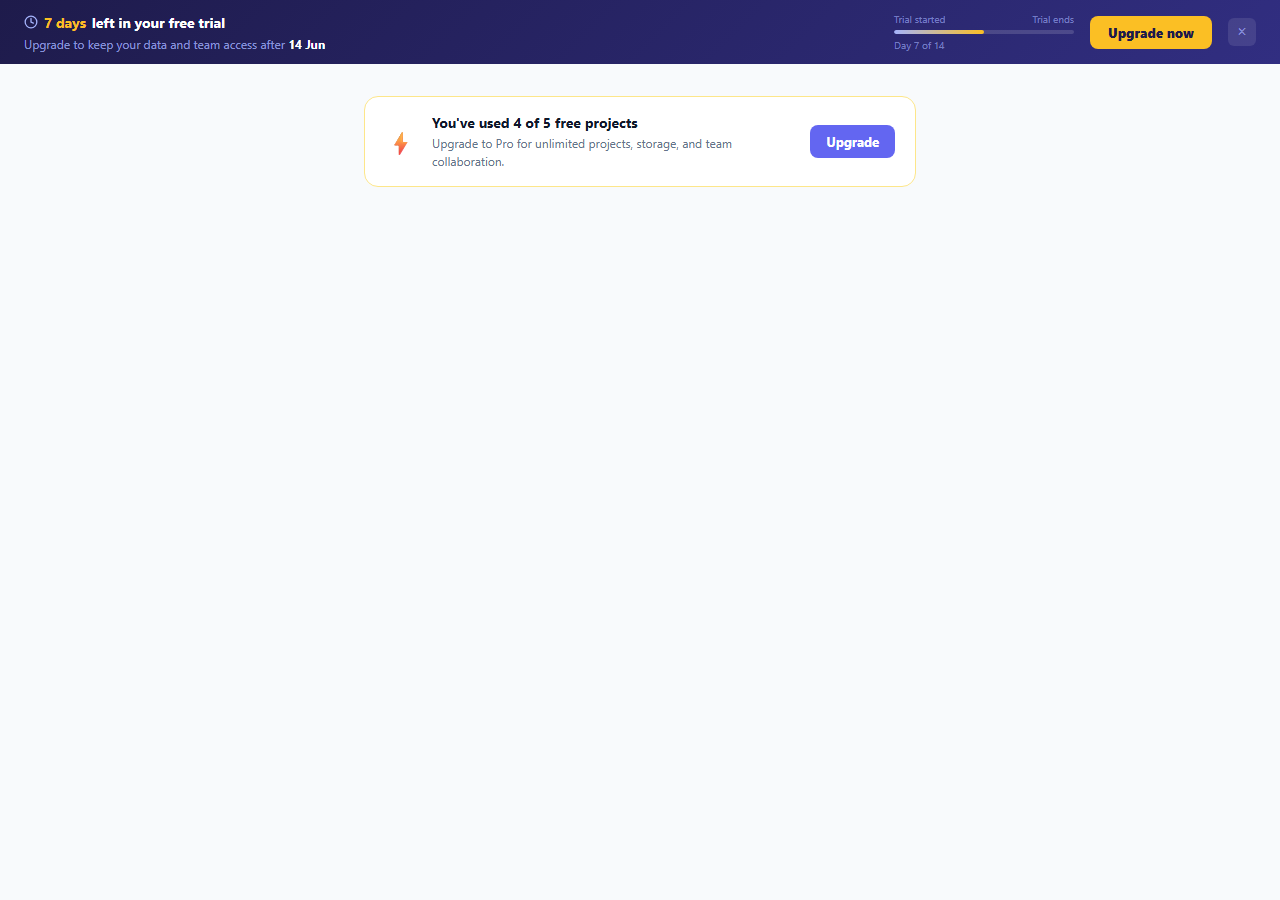
A trial countdown banner keeps free trial users aware of their remaining trial time throughout their product session — the most effective in-product conversion mechanism for SaaS products. This snippet provides a complete in-app trial countdown system: a top banner with days remaining, a trial progress bar (Day X of 14), an expiry date, a high-contrast amber upgrade CTA, a dismiss button, and a separate feature limit warning card that appears in the main content area. For a persistent page-wide variant, see the upgrade banner snippet.
The trial countdown calculation
The initTrial() function computes elapsed and remaining days from the trial start date. elapsed = floor((now - start) / 86400000) — the difference in milliseconds divided by milliseconds per day. remaining = TRIAL_DAYS - elapsed. The progress bar fill percentage = elapsed / TRIAL_DAYS * 100. The expire date is computed by adding TRIAL_DAYS to the start date.
The banner design
A dark indigo gradient banner (linear-gradient from #1e1b4b to #312e81) sits at the top of the app shell. White text on the dark background provides high contrast. The days remaining number is highlighted in amber (#fbbf24) — the most urgent visual signal without red. The upgrade button also uses amber, creating visual alignment between the urgency signal and the action.
The trial progress bar
A horizontal progress bar shows how far through the trial the user is. The gradient fill goes from indigo to amber — moving toward the amber urgency colour as the trial nears its end. "Trial started" and "Trial ends" labels frame the bar. "Day X of 14" below gives exact context.
The feature limit warning card
A separate limit card appears in the main content area when the user approaches a free plan limit (4 of 5 projects used). This contextual prompt converts at a higher rate than the persistent banner alone — it triggers at the exact moment the user encounters the constraint.
Dismiss handling
The dismiss button collapses the banner via JavaScript animation (max-height from scrollHeight to 0). Uncommenting the localStorage line in dismissBanner() persists the dismiss across page loads. For server-rendered apps, save the dismiss timestamp to the user's account instead. For a fully server-rendered approach, add a dismissed_at timestamp to the user table and skip the banner HTML entirely when within the TTL.
Build with AI
Build, Understand, Optimize, and Extend It With AI
Instead of working out the date math on your own, paste this snippet's HTML, CSS, and JS into an AI coding assistant like Claude and ask it to explain exactly why initTrial() zeroes out the hours on both the now and start Date objects with setHours(0,0,0,0) before subtracting them, and what bug would appear if that step were skipped near a daylight-saving transition. It's also a good candidate for an optimization pass — ask whether recalculating and re-rendering the whole banner on every page load is the right approach versus computing elapsed/remaining once on the server and passing it down as props. For extending it, have it add a color progression that shifts the banner from indigo to red as remaining days approach zero, wire the dismiss button to localStorage with a re-show timeout, or add a second banner variant driven by usage percentage instead of days. Treat the code less like a finished artifact and more like a starting point for a conversation.
Prompt to recreate it
Copy this into your AI assistant of choice to build the effect from scratch, or as a jumping-off point for your own variant:
Build a SaaS trial countdown banner in plain HTML, CSS, and vanilla JavaScript with no libraries.

Requirements:
- Configure a trial start Date and a trial length in days as top-level constants.
- Compute elapsed days as the floor of the millisecond difference between today and the start date divided by 86400000, after zeroing the hours/minutes/seconds/milliseconds on both Date objects so the calculation is immune to time-of-day drift.
- Compute remaining days as the trial length minus elapsed, clamped to a minimum of zero, and compute a fill percentage as elapsed divided by trial length times 100, clamped to a maximum of 100.
- Display the remaining days with correct singular/plural wording ("1 day" vs "3 days"), update a progress bar's width to the computed percentage, show "Day X of N" text, and compute and format the expiry date (start date plus trial length days) as a short human-readable date like "Jun 7".
- Include a dismiss button that collapses the banner with an animated transition of max-height, opacity, and padding down to zero, driven by first setting max-height to the banner's current scrollHeight, then on the next animation frame collapsing it to zero so the CSS transition actually animates instead of jumping instantly.
- Include a separate feature-limit warning card elsewhere on the page showing usage against a plan limit (e.g. "4 of 5 free projects used"), with its own upgrade call-to-action pointing to the same destination as the banner's upgrade button.
Want to tighten it up first? Run this prompt through the AI Prompt Studio to score it across 8 quality dimensions, catch anti-patterns, and tune the wording for Claude, ChatGPT, or Gemini before you paste it in.
Source Code
<div class="app-shell">
  <div class="trial-banner" id="trial-banner">
    <div class="banner-left">
      <div class="trial-timer" id="timer">
        <svg width="14" height="14" viewBox="0 0 24 24" fill="none" stroke="currentColor" stroke-width="2.2" stroke-linecap="round"><circle cx="12" cy="12" r="10"/><polyline points="12 6 12 12 16 14"/></svg>
        <span id="days-left">7 days</span> left in your free trial
      </div>
      <div class="trial-sub">Upgrade to keep your data and team access after <strong id="expire-date">Jun 7</strong></div>
    </div>
    <div class="banner-right">
      <div class="trial-progress">
        <div class="tp-labels"><span>Trial started</span><span>Trial ends</span></div>
        <div class="tp-bar"><div class="tp-fill" id="tp-fill"></div></div>
        <div class="tp-sublabel" id="tp-sub">Day 7 of 14</div>
      </div>
      <a href="#" class="upgrade-btn">Upgrade now</a>
      <button class="dismiss-btn" onclick="dismissBanner()" aria-label="Dismiss">×</button>
    </div>
  </div>

  <div class="content">
    <div class="limit-card" id="limit-card">
      <div class="limit-icon">⚡</div>
      <div class="limit-body">
        <div class="limit-title">You've used 4 of 5 free projects</div>
        <div class="limit-sub">Upgrade to Pro for unlimited projects, storage, and team collaboration.</div>
      </div>
      <a href="#" class="limit-cta">Upgrade</a>
    </div>
  </div>
</div>
* { box-sizing: border-box; margin: 0; padding: 0; }
body { font-family: system-ui, sans-serif; background: #f8fafc; min-height: 100vh; }
.app-shell { display: flex; flex-direction: column; min-height: 100vh; }
/* Trial banner */
.trial-banner { background: linear-gradient(135deg, #1e1b4b 0%, #312e81 100%); color: #fff; padding: 12px 24px; display: flex; align-items: center; justify-content: space-between; gap: 20px; flex-wrap: wrap; }
.banner-left { display: flex; flex-direction: column; gap: 4px; }
.trial-timer { display: flex; align-items: center; gap: 6px; font-size: 14px; font-weight: 700; }
.trial-timer svg { flex-shrink: 0; color: #a5b4fc; }
#days-left { color: #fbbf24; }
.trial-sub { font-size: 12px; color: rgba(165,180,252,0.8); }
.trial-sub strong { color: #fff; }
.banner-right { display: flex; align-items: center; gap: 16px; flex-wrap: wrap; }
.trial-progress { display: flex; flex-direction: column; gap: 4px; min-width: 180px; }
.tp-labels { display: flex; justify-content: space-between; font-size: 10px; color: rgba(165,180,252,0.6); }
.tp-bar { height: 4px; background: rgba(255,255,255,0.15); border-radius: 2px; overflow: hidden; }
.tp-fill { height: 100%; background: linear-gradient(90deg,#a5b4fc,#fbbf24); border-radius: 2px; transition: width 0.5s; }
.tp-sublabel { font-size: 10px; color: rgba(165,180,252,0.6); }
.upgrade-btn { background: #fbbf24; color: #1e1b4b; font-size: 13px; font-weight: 800; padding: 8px 18px; border-radius: 8px; text-decoration: none; white-space: nowrap; transition: background 0.15s; }
.upgrade-btn:hover { background: #f59e0b; }
.dismiss-btn { background: rgba(255,255,255,0.1); border: none; color: rgba(165,180,252,0.7); font-size: 16px; width: 28px; height: 28px; border-radius: 6px; cursor: pointer; transition: background 0.12s; display: flex; align-items: center; justify-content: center; }
.dismiss-btn:hover { background: rgba(255,255,255,0.2); }
/* Content area */
.content { flex: 1; padding: 32px 24px; display: flex; flex-direction: column; gap: 16px; max-width: 600px; margin: 0 auto; width: 100%; }
.limit-card { background: #fff; border: 1.5px solid #fde68a; border-radius: 14px; padding: 16px 20px; display: flex; align-items: center; gap: 14px; }
.limit-icon { font-size: 24px; flex-shrink: 0; }
.limit-body { flex: 1; }
.limit-title { font-size: 14px; font-weight: 700; color: #0f172a; margin-bottom: 2px; }
.limit-sub { font-size: 12px; color: #64748b; line-height: 1.5; }
.limit-cta { background: #6366f1; color: #fff; font-size: 13px; font-weight: 700; padding: 8px 16px; border-radius: 8px; text-decoration: none; white-space: nowrap; transition: background 0.15s; flex-shrink: 0; }
.limit-cta:hover { background: #4f46e5; }// Configure trial start date and length
const TRIAL_START_DATE = new Date(); TRIAL_START_DATE.setDate(TRIAL_START_DATE.getDate() - 7);
const TRIAL_DAYS = 14;
function initTrial() {
const now = new Date(); now.setHours(0,0,0,0);
const start = new Date(TRIAL_START_DATE); start.setHours(0,0,0,0);
const elapsed = Math.floor((now - start) / 86400000);
const remaining = Math.max(0, TRIAL_DAYS - elapsed);
const pct = Math.min(100, (elapsed / TRIAL_DAYS) * 100);
document.getElementById('days-left').textContent = remaining + ' day' + (remaining !== 1 ? 's' : '');
document.getElementById('tp-fill').style.width = pct + '%';
document.getElementById('tp-sub').textContent = 'Day ' + elapsed + ' of ' + TRIAL_DAYS;
const expire = new Date(TRIAL_START_DATE);
expire.setDate(expire.getDate() + TRIAL_DAYS);
document.getElementById('expire-date').textContent = expire.toLocaleDateString('default', { month:'short', day:'numeric' });
}
function dismissBanner() {
const banner = document.getElementById('trial-banner');
banner.style.transition = 'max-height 0.3s, opacity 0.3s, padding 0.3s';
banner.style.maxHeight = banner.scrollHeight + 'px';
requestAnimationFrame(() => {
banner.style.maxHeight = '0px';
banner.style.opacity = '0';
banner.style.padding = '0';
banner.style.overflow = 'hidden';
});
// localStorage.setItem('trial_banner_dismissed', '1');
}
initTrial();Step by step
How to Use
- 1Set your trial start date and lengthIn the JS panel, set TRIAL_START_DATE to your user's actual trial start (from your database) and TRIAL_DAYS to your trial length (14 or 30 days). The banner auto-computes days remaining, progress bar fill, and expiry date.
- 2Wire the Upgrade CTASet href="#" on .upgrade-btn and .limit-cta to your billing page, Stripe checkout session, or upgrade flow URL. Use the same destination for both to keep the upgrade path consistent.
- 3Update the feature limit cardEdit .limit-title ("You've used 4 of 5 free projects") and .limit-sub to match your actual free plan limits. Show or hide this card based on the user's actual usage relative to the free tier threshold.
- 4Persist dismiss state across page loadsUncomment the localStorage line inside dismissBanner(): localStorage.setItem("trial_banner_dismissed","1"). On page load, check: if (localStorage.getItem("trial_banner_dismissed")) { banner.style.display = "none"; }
- 5Change the banner colour schemeThe banner uses a dark indigo gradient. For a lighter scheme, change background to linear-gradient(135deg, #eff6ff, #dbeafe) and text colour to #1e40af. Update the upgrade button to background: #1e40af and colour: #fff.
- 6Export in your formatClick "HTML" for a standalone file, "JSX" for a React component using a server-fetched trialStartDate prop and useState for dismissed state, or "Tailwind" for a Tailwind CSS version.
Real-world uses
Common Use Cases
Got questions?
Frequently Asked Questions
initTrial() computes elapsed days: const elapsed = Math.floor((now - start) / 86400000). Both dates are set to midnight (setHours(0,0,0,0)) before subtraction to avoid time-zone and hour-of-day drift. 86400000 is the number of milliseconds in one day. remaining = TRIAL_DAYS - elapsed. Progress percentage = elapsed / TRIAL_DAYS * 100. The expiry date is computed by adding TRIAL_DAYS days to the start date using setDate(start.getDate() + TRIAL_DAYS).
Uncomment the localStorage line in dismissBanner(): localStorage.setItem("trial_banner_dismissed", "1"). At the end of initTrial(), add: if (localStorage.getItem("trial_banner_dismissed")) { document.getElementById("trial-banner").style.display = "none"; return; }. For a more sophisticated approach, store a timestamp and re-show the banner after 3 days: const dismissed = localStorage.getItem("trial_dismissed"); if (dismissed && Date.now() - parseInt(dismissed) < 3*24*3600000) return.
In initTrial(), check the remaining days and apply a different gradient class: if (remaining <= 3) { banner.style.background = "linear-gradient(135deg, #7f1d1d, #b91c1c)"; } else if (remaining <= 7) { banner.style.background = "linear-gradient(135deg, #78350f, #92400e)"; }. This creates a colour progression from indigo (comfortable) through amber (urgent) to red (critical) as the trial countdown reaches its final days.
Click "JSX" to download. Accept trialStartDate and trialDays as props from the server (fetched from your database in getServerSideProps or a Server Component). Compute elapsed, remaining, and pct in the component body or with useMemo. Manage dismissed with useState(false). Set the dismiss handler to call setDismissed(true) and optionally write to localStorage. Conditionally render: {!dismissed && <TrialBanner ... />}.