You Might Also Like
Learn Coding Visually
Learn to code with interactive, live-preview playgrounds — HTML, CSS, JavaScript, React & more.
 HTML Playground42 lessons · Click-based · Live preview
 CSS PlaygroundLearn CSS with a live editor
 JavaScript Playground60 lessons · DOM · Async · Canvas
 React PlaygroundLearn React with a live code editor
 GSAP PlaygroundLearn GSAP animation interactively
 SVG Playground44 lessons · shapes · paths · animation
 SCSS Playground45 lessons · Sass modules · tokens
 Tailwind PlaygroundLearn Tailwind CSS with a live editor
 Bootstrap 5 Playground50 lessons · live preview
Auto-Detected Regional Pricing — Free HTML CSS JS Snippet
Auto-Detected Regional Pricing · Pricing · Plain HTML, CSS & JS · Live preview
What's included
Features
About this UI Snippet
Auto-Detected Regional Pricing — navigator.language, Intl.NumberFormat, and a Manual Override
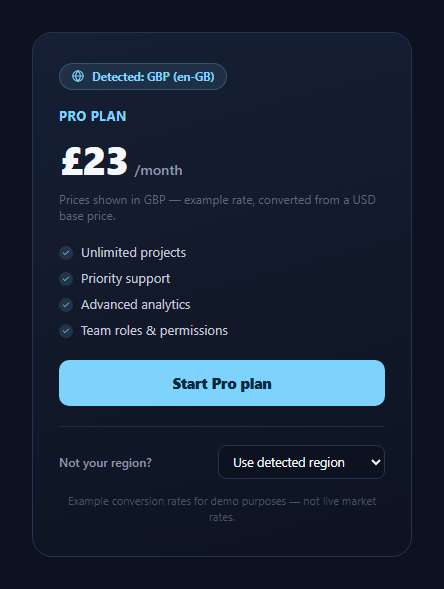
Showing a visitor a locale-correct price the moment a pricing page loads — without a geolocation API call or a server round-trip — is possible using two things the browser already knows: navigator.language and Intl.NumberFormat. This snippet builds a pricing card that reads the visitor's real browser locale, maps it to a plausible region and currency, formats the price correctly for that locale, and gives the visitor a manual override dropdown in case the automatic guess is wrong.
Reading the real locale, not a hardcoded value
detectRegionFromLocale() reads navigator.language directly from the browser — this is the actual language/region tag the visitor's browser reports (e.g. de-DE, en-GB, ja), not a simulated or hardcoded string. A small set of substring checks maps common patterns to one of seven supported regions, defaulting to the US when nothing matches. Because this reads a live browser API, the detected badge genuinely reflects whoever is viewing the page — open it with a browser set to German and it detects Germany; set to Japanese and it detects Japan.
One base price, converted per region
Every region entry in REGION_TABLE pairs a currency code, an Intl-compatible locale string, and a conversion rate. The displayed price is always computed as BASE_USD * entry.rate, rounded, and handed to Intl.NumberFormat(locale, { style: 'currency', currency }) — the same pattern used in Pricing Card Currency Switcher, extended here to seven regions instead of four and driven by automatic detection rather than only manual clicks. Because every conversion originates from the same BASE_USD constant, there's no compounding rounding error from repeatedly converting an already-converted number.
Why the rates are clearly labeled as example rates
The rates in REGION_TABLE are realistic figures a shopper would recognize as plausible, but they are static and will drift from actual market rates over time — the disclaimer beneath the card says so explicitly. A production implementation should fetch current rates from a currency-exchange API on a schedule (hourly or daily is typical for a marketing page) and cache the result, exactly as noted in the currency switcher snippet.
The override exists because detection is a guess, not a fact
navigator.language reflects the browser's configured language, which frequently diverges from the visitor's actual location or preferred billing currency — someone traveling, using a VPN, or simply running their OS in a second language would otherwise be shown a currency they didn't choose. The #rcdRegionSelect dropdown lets them pick "Use detected region" or any of the seven regions directly, and selecting a region re-renders the price using the exact same formatForRegion() function the automatic detection uses — so manual and automatic paths are guaranteed to produce identical, correctly formatted output.
Customizing it
Add more regions to REGION_TABLE, replace the static rates with a fetched exchange-rate feed, or swap navigator.language detection for an IP-geolocation lookup and keep the same override pattern as a fallback. Pair it with Pricing Card Currency Switcher or a Currency Converter elsewhere on the page.
Build with AI
Build, Understand, Optimize, and Extend It With AI
Paste this snippet into an AI coding assistant like Claude and ask it to explain exactly how detectRegionFromLocale() maps the browser's real navigator.language value to a region, and why every currency conversion in formatForRegion() always derives from the single BASE_USD constant rather than whatever is currently displayed. It's also a good candidate to extend with AI help: ask it to replace the static REGION_TABLE rates with a fetched, cached exchange-rate feed, add IP-based geolocation as a first guess with navigator.language as a fallback, or persist the visitor's manual region choice in localStorage so it survives a page reload.
Prompt to recreate it
Copy this into your AI assistant of choice to build the effect from scratch, or as a jumping-off point for your own variant:
Build a pricing card that detects and displays a locale-appropriate price in plain HTML, CSS, and JavaScript, using no libraries — only the built-in navigator.language and Intl.NumberFormat APIs.

Requirements:
- On load, read the browser's real navigator.language value (do not simulate or hardcode it) and map it to one of several supported regions using simple pattern matching, defaulting to a sensible region when nothing matches.
- Maintain a single base price in one currency (e.g. USD) as the sole source of truth, plus a small table mapping each supported region to a currency code, an Intl-compatible locale string, and an illustrative conversion rate clearly commented as example data, not a live rate.
- Format every displayed price by converting from the single base price using the region's rate, then passing the result through Intl.NumberFormat with the correct locale and currency so symbol, grouping, and decimal formatting are correct automatically.
- Show a small "detected" indicator naming which region/currency was automatically detected and from what locale string.
- Provide a manual override dropdown listing all supported regions plus a "use detected region" option, where choosing a region re-renders the price through the exact same formatting function the automatic detection path uses, so manual and automatic results are always consistent.
- Include a visible disclaimer stating the conversion rates are example rates for demonstration, not live market data.
- Give a small fade transition on the price text when it updates so the change is visibly confirmed rather than an instant swap.
Want to tighten it up first? Run this prompt through the AI Prompt Studio to score it across 8 quality dimensions, catch anti-patterns, and tune the wording for Claude, ChatGPT, or Gemini before you paste it in.
Step by step
How to Use
- 1Open the page in different browser localesThe badge reads navigator.language and detects a matching region automatically.
- 2Watch the price format correctlyIntl.NumberFormat renders the right symbol, grouping, and decimals for the detected currency.
- 3Override the region manuallyThe dropdown lets you pick any of seven regions or return to detected.
- 4Compare the disclaimerRates are clearly labeled as example, non-live conversion rates.
- 5Add a regionAdd an entry to REGION_TABLE with a currency, locale, and rate, plus a matching option.
- 6Swap in live ratesReplace the static rate field with a value fetched from a currency API.
Real-world uses
Common Use Cases
Got questions?
Frequently Asked Questions
It detects your browser's configured language via navigator.language, which correlates with location often enough to be a useful first guess but is not the same as IP-based geolocation. Someone running an English-language browser while physically in Germany would be detected as US by this simple mapping, which is exactly why the manual override dropdown exists.
No — they are realistic, clearly labeled example rates hardcoded into REGION_TABLE for demo purposes, exactly like the rates in Pricing Card Currency Switcher. A production implementation should fetch current rates from a currency-exchange API on a periodic schedule and cache the result rather than hardcoding a table that will drift out of date.
Converting an already-converted, already-rounded number repeatedly compounds rounding error. Both the automatic detection path and the manual override path call the same formatForRegion() function against the single BASE_USD constant, so the displayed price is always mathematically consistent no matter how many times the region is switched.
detectRegionFromLocale() falls back to US whenever none of its substring checks match, so the card always renders a valid, correctly formatted price rather than showing nothing or throwing an error for an unmapped locale.
Call a geolocation API (client-side or via your own backend) on load, map its returned country code to an entry in REGION_TABLE the same way detectRegionFromLocale() currently maps navigator.language, and pass the result into render(). Keep the manual override dropdown regardless — geolocation is still a guess a visitor may need to correct.