You Might Also Like
Learn Coding Visually
Learn to code with interactive, live-preview playgrounds — HTML, CSS, JavaScript, React & more.
 HTML Playground42 lessons · Click-based · Live preview
 CSS PlaygroundLearn CSS with a live editor
 JavaScript Playground60 lessons · DOM · Async · Canvas
 React PlaygroundLearn React with a live code editor
 GSAP PlaygroundLearn GSAP animation interactively
 SVG Playground44 lessons · shapes · paths · animation
 SCSS Playground45 lessons · Sass modules · tokens
 Tailwind PlaygroundLearn Tailwind CSS with a live editor
 Bootstrap 5 Playground50 lessons · live preview
Pricing Currency Switcher — Free HTML CSS JS Snippet
Pricing Card Currency Switcher · Pricing · Plain HTML, CSS & JS · Live preview
What's included
Features
About this UI Snippet
Pricing Card Currency Switcher — Live Multi-Currency Display, Intl.NumberFormat & Billing Transparency
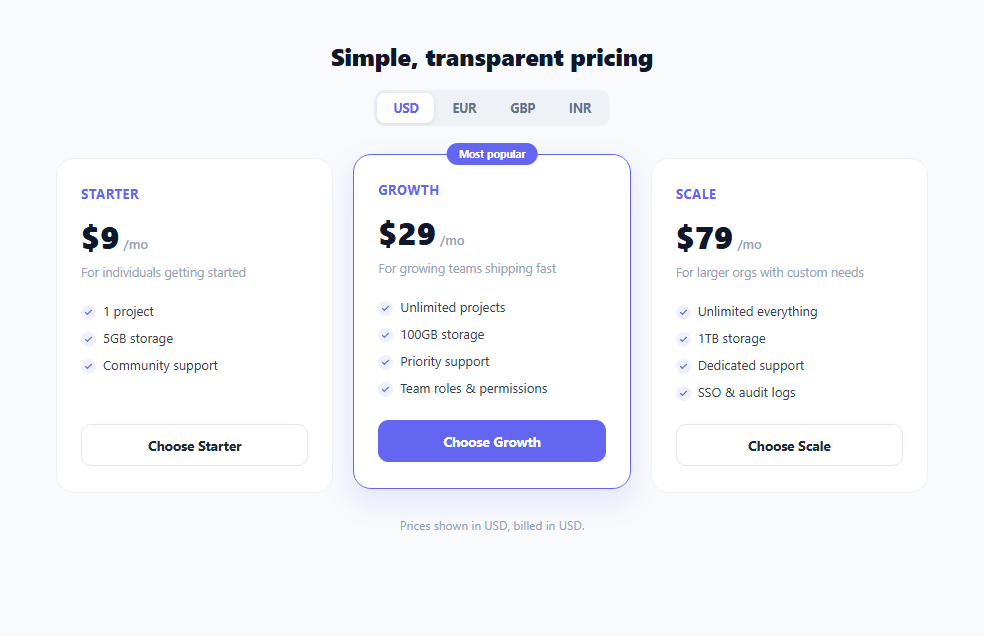
International SaaS pricing pages routinely show prices in a visitor's local currency to reduce the mental friction of converting an unfamiliar figure before deciding to buy — a shopper in Mumbai reads ₹749 far faster than $9.00. This snippet builds a working currency switcher for a three-tier pricing table: a segmented control lets the user pick USD, EUR, GBP, or INR, and every card's displayed price updates simultaneously using a small hardcoded exchange-rate table and locale-correct currency formatting.
Storing one source of truth per plan
Each .plan-card element carries its true price as a data-base-price attribute in US dollars (e.g. data-base-price="29"), which is the single source of truth the switcher always converts *from*, regardless of which currency is currently displayed. This matters because repeatedly converting a previously-converted price (EUR back to GBP, for instance) compounds rounding error — always recomputing from the original USD base avoids that entirely.
A small rate table and Intl.NumberFormat
The RATES object maps each supported currency code to an illustrative conversion rate and an appropriate locale string (en-US, de-DE, en-GB, en-IN). formatPrice() multiplies the USD base by the target rate, rounds to a whole number for clean display, and hands the result to Intl.NumberFormat(locale, { style: 'currency', currency, maximumFractionDigits: 0 }). This single built-in browser API — no library, no manual symbol lookup table — correctly handles everything locale-specific about currency display: the right symbol ($, €, £, ₹), its position relative to the digits (prefix in most locales, but placement and spacing rules genuinely differ), thousands-grouping conventions, and decimal separators. Hardcoding a symbol-and-concatenate approach ('$' + amount) would get every one of those details wrong for at least one of the four supported currencies.
Updating every card at once
Clicking a currency option calls applyCurrency(currency), which iterates every .plan-card, reads its base price, and rewrites the .price-amount text via formatPrice() — all three cards update together in a single pass, so the pricing table never shows a mix of currencies mid-transition. A brief opacity fade (amountEl.style.opacity) on each price during the swap gives a small moment of visual feedback that the numbers actually changed, rather than an instant, easy-to-miss text swap.
The billing disclosure — a small detail with outsized trust impact
Most SaaS billing systems still charge the customer's card in a single base currency (commonly USD) even when the marketing site *displays* prices in the visitor's local currency for convenience — the local-currency figure is an estimate, and the actual charge amount and any bank-side conversion fee depend on the card issuer's own exchange rate at the time of the transaction. Silently showing a EUR price with no clarification about what currency will actually be charged is a subtle trust violation that surfaces painfully at the moment a customer sees an unexpected amount on their statement. This snippet surfaces that reality directly: the disclosure line beneath the pricing grid reads "Prices shown in EUR, billed in USD. Your bank may apply its own conversion rate." whenever a non-USD currency is selected — a small piece of copy that meaningfully improves billing transparency and reduces support tickets and chargebacks from surprised customers.
Why this matters for 2026 trust-driven UX
Transparent, honest pricing disclosure is a core pillar of trust-driven UX: showing a number without the context of what actually gets charged is a dark pattern by omission, even if unintentional. Pairing a genuinely useful convenience feature (localized price display) with an equally visible disclosure about the underlying billing currency is the correct way to implement this pattern — convenience without hidden surprises.
Build with AI
Build, Understand, Optimize, and Extend It With AI
Paste this snippet into an AI coding assistant like Claude and ask it to explain exactly why formatPrice() always converts from the original data-base-price USD value rather than the currently displayed price, and how Intl.NumberFormat's locale argument changes the rendered output for the same numeric amount across en-US, de-DE, en-GB, and en-IN. It's also a strong candidate to extend with AI help: ask it to fetch live exchange rates from a currency API with periodic caching instead of the hardcoded RATES table, add geolocation-based auto-detection of the visitor's likely currency on first load, or add an annual/monthly billing toggle that combines with the currency switcher so both dimensions update the displayed price together correctly.
Prompt to recreate it
Copy this into your AI assistant of choice to build the effect from scratch, or as a jumping-off point for your own variant:
Build a pricing table with a live currency switcher in plain HTML, CSS, and JavaScript, using no libraries — just the built-in Intl.NumberFormat API for currency formatting.

Requirements:
- Display 2-3 pricing tier cards, each with its true price stored in US dollars as a single source of truth (e.g. a data attribute), never in a display-only converted form.
- A segmented control (or dropdown) offering at least four currencies (e.g. USD, EUR, GBP, INR) where exactly one option is visually marked active at a time.
- Selecting a currency must update every pricing card's displayed price simultaneously, using a small hardcoded exchange-rate table mapping each supported currency to a conversion rate and the correct Intl locale string for formatting.
- All currency conversions must always compute from each card's original USD base price, never from whatever is currently displayed, to avoid compounding rounding error across repeated switches.
- Format every displayed price using Intl.NumberFormat with style "currency" and the correct currency code, so symbol placement, grouping, and decimals are locale-correct automatically rather than manually concatenated.
- Include a visible disclosure line beneath the pricing table stating that prices are shown in the selected currency but billed in the base currency (USD), and update this disclosure's exact wording whenever the selected currency changes, since this is a real billing-transparency requirement and not just decorative text.
- Give some lightweight visual feedback (such as a brief fade) when prices update, so it's clear to the user that the switch actually took effect rather than being an instant, easy-to-miss text change.
Want to tighten it up first? Run this prompt through the AI Prompt Studio to score it across 8 quality dimensions, catch anti-patterns, and tune the wording for Claude, ChatGPT, or Gemini before you paste it in.
Step by step
How to Use
- 1Click a currency option to switchThe #currency-switch segmented control listens for clicks via event delegation. Clicking any .currency-opt button calls applyCurrency(currency), which updates the .active class and re-renders every card's price.
- 2Understand the base-price data attributeEach .plan-card stores its true USD price as data-base-price (e.g. data-base-price="29"). formatPrice() always converts from this original USD figure, never from a previously displayed currency, to avoid compounding rounding error.
- 3See the live Intl.NumberFormat conversionformatPrice(baseUsd, currency) multiplies the base by RATES[currency].rate and formats the result with new Intl.NumberFormat(locale, { style: "currency", currency }) — producing correctly symbol-placed, locale-formatted output like €26 or ₹2,409 with zero manual string concatenation.
- 4Read the billing disclosure updateSwitching away from USD updates #billing-disclosure to explicitly state prices are billed in USD regardless of display currency, via the ternary inside applyCurrency(). This is a required transparency detail, not just a stylistic footnote.
- 5Add a new currencyAdd an entry to the RATES object with a rate and matching Intl locale string, e.g. JPY: { rate: 147.2, locale: "ja-JP" }, and add a matching <button class="currency-opt" data-currency="JPY">JPY</button> inside #currency-switch.
- 6Connect to a live exchange-rate APIReplace the hardcoded RATES object with rates fetched from a currency API (refreshed periodically and cached, e.g. hourly) so displayed conversions stay accurate rather than drifting from real market rates over time.
Real-world uses
Common Use Cases
Got questions?
Frequently Asked Questions
Most SaaS billing providers (Stripe, Paddle, and similar) settle merchant payouts in a single base currency, and many merchants choose to charge customers in that same base currency to avoid holding multi-currency balances and reconciling exchange-rate exposure. The local-currency price shown on the page is a convenience estimate to help the visitor understand roughly what they'll pay in familiar terms — the disclosure line makes this explicit so there's no surprise on the customer's actual statement.
Currency formatting rules genuinely differ by locale and currency: symbol placement (before vs. after the number), spacing, thousands-grouping characters (comma vs. period vs. space), and decimal conventions are not the same across USD, EUR, GBP, and INR. Intl.NumberFormat(locale, { style: 'currency', currency }) is a built-in, zero-dependency browser API that handles all of this correctly per the CLDR (Unicode Common Locale Data Repository) standard, which a manual string-concatenation approach would get wrong for at least one supported currency.
This snippet keeps the rate table static and clearly commented as illustrative to keep the demo self-contained with no network dependency. In production, hardcoded rates will drift from real market rates over time and should be replaced with rates fetched periodically from a currency-exchange API (refreshed hourly or daily is typical for a marketing pricing page, since sub-minute freshness isn't necessary for display-only estimates) and cached to avoid rate-limiting a live API on every page load.
Always convert from a single, unchanging source-of-truth value — this snippet stores the true USD price in each card's data-base-price attribute and recomputes formatPrice(baseUsd, currency) fresh from that original value on every switch, rather than converting the currently-displayed number again. Converting an already-converted, already-rounded number repeatedly (USD to EUR, then that EUR figure to GBP) compounds rounding error and can visibly drift from the correct value after a few switches.
Many production pricing pages default to a geolocation-based guess (via IP lookup or the Accept-Language header) rather than always defaulting to USD, since most visitors never manually change the currency switcher even when a more relevant option is available. If you add this, still leave the switcher visible and interactive — some visitors travel, use VPNs, or simply prefer a different display currency than their detected region.