Source Code
<div class="roi-card">
  <h3>ROI calculator</h3>
  <p class="roi-sub">See what Acme saves your team.</p>

  <label class="roi-field"><span>Team members</span>
    <input type="number" id="roiSeats" value="10" min="1"></label>
  <label class="roi-field"><span>Hours saved / person / week</span>
    <input type="number" id="roiHours" value="4" min="0" step="0.5"></label>
  <label class="roi-field"><span>Average hourly cost ($)</span>
    <input type="number" id="roiRate" value="45" min="0"></label>
  <label class="roi-field"><span>Acme cost / person / month ($)</span>
    <input type="number" id="roiCost" value="10" min="0"></label>

  <div class="roi-out">
    <div class="roi-row"><span>Monthly value of time saved</span><b id="roiValue"></b></div>
    <div class="roi-row"><span>Monthly cost of Acme</span><b id="roiSpend"></b></div>
    <div class="roi-row roi-net"><span>Net monthly gain</span><b id="roiNet"></b></div>
    <div class="roi-badge" id="roiRoi"></div>
  </div>
</div>*{box-sizing:border-box;margin:0;padding:0}
body{font-family:system-ui,-apple-system,sans-serif;background:#f1f5f9;min-height:100vh;display:flex;align-items:center;justify-content:center;padding:24px}
.roi-card{background:#fff;border-radius:18px;padding:26px;width:100%;max-width:380px;box-shadow:0 18px 44px rgba(15,23,42,.1)}
.roi-card h3{font-size:17px;font-weight:800;color:#0f172a}
.roi-sub{font-size:13px;color:#64748b;margin-bottom:18px}
.roi-field{display:flex;align-items:center;justify-content:space-between;gap:12px;margin-bottom:11px}
.roi-field span{font-size:13px;font-weight:600;color:#475569;flex:1}
.roi-field input{width:88px;border:1.5px solid #e2e8f0;border-radius:9px;padding:9px 11px;font-size:14px;font-weight:700;font-family:inherit;color:#0f172a;text-align:right}
.roi-field input:focus{outline:none;border-color:#6366f1;box-shadow:0 0 0 3px rgba(99,102,241,.15)}
.roi-out{margin-top:18px;background:#f8fafc;border-radius:13px;padding:16px}
.roi-row{display:flex;justify-content:space-between;align-items:center;font-size:13px;color:#475569;margin-bottom:9px;font-variant-numeric:tabular-nums}
.roi-row b{font-weight:800;color:#0f172a}
.roi-net{border-top:1.5px solid #e2e8f0;padding-top:11px;margin-top:3px;font-size:14.5px}
.roi-net b{color:#16a34a;font-size:16px}
.roi-net.neg b{color:#dc2626}
.roi-badge{margin-top:13px;text-align:center;font-size:13px;font-weight:800;padding:10px;border-radius:10px;background:#dcfce7;color:#15803d}
.roi-badge.neg{background:#fee2e2;color:#b91c1c}var ids = ['roiSeats', 'roiHours', 'roiRate', 'roiCost'];
var inputs = {};
ids.forEach(function (id) { inputs[id] = document.getElementById(id); });
function money(n) { return '$' + Math.round(n).toLocaleString(); }
function num(el) { var v = parseFloat(el.value); return isNaN(v) || v < 0 ? 0 : v; }
function calc() {
var seats = num(inputs.roiSeats);
var hours = num(inputs.roiHours);
var rate = num(inputs.roiRate);
var cost = num(inputs.roiCost);
// ~4.33 weeks per month. Value = people × hours/week × weeks × hourly rate.
var value = seats * hours * 4.33 * rate;
var spend = seats * cost;
var net = value - spend;
// ROI % = return relative to spend.
var roi = spend > 0 ? (net / spend) * 100 : 0;
document.getElementById('roiValue').textContent = money(value);
document.getElementById('roiSpend').textContent = money(spend);
var netEl = document.getElementById('roiNet');
var netRow = netEl.parentElement;
netEl.textContent = (net < 0 ? '−' : '') + money(Math.abs(net));
netRow.classList.toggle('neg', net < 0);
var badge = document.getElementById('roiRoi');
badge.textContent = net >= 0 ? Math.round(roi).toLocaleString() + '% ROI' : 'Not yet profitable';
badge.classList.toggle('neg', net < 0);
}
ids.forEach(function (id) { inputs[id].addEventListener('input', calc); });
calc();Learn Coding Visually
Learn to code with interactive, live-preview playgrounds — HTML, CSS, JavaScript, React & more.
 HTML Playground42 lessons · Click-based · Live preview
 CSS PlaygroundLearn CSS with a live editor
 JavaScript Playground60 lessons · DOM · Async · Canvas
 React PlaygroundLearn React with a live code editor
 GSAP PlaygroundLearn GSAP animation interactively
 SVG Playground44 lessons · shapes · paths · animation
 SCSS Playground45 lessons · Sass modules · tokens
 Tailwind PlaygroundLearn Tailwind CSS with a live editor
 Bootstrap 5 Playground50 lessons · live preview
ROI Calculator — Savings & ROI Widget HTML CSS JS
ROI Calculator · Pricing · Plain HTML, CSS & JS · Live preview
What's included
Features
About this UI Snippet
ROI Calculator — Turn Inputs into Monthly Value, Net Gain, and an ROI Percentage
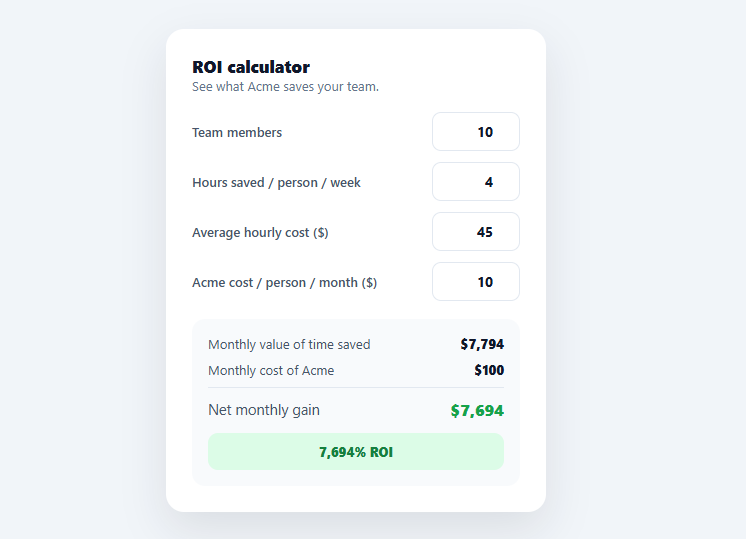
An ROI calculator is one of the highest-converting elements on a B2B pricing or landing page: it lets a prospect plug in their own numbers and see, in their own terms, how much your product saves them. This snippet builds a clean, live ROI calculator in plain HTML, CSS, and vanilla JavaScript — team size, hours saved, hourly cost, and your price in; monthly value, net gain, and an ROI percentage out — no library.
The ROI model, written out
The calculation is transparent and editable: the monthly *value of time saved* is people × hours-saved-per-week × 4.33 weeks × hourly cost (4.33 being the average weeks per month), the monthly *spend* is people × your per-seat price, the *net gain* is value minus spend, and *ROI %* is net relative to spend. Spelling out a defensible model — rather than a black-box number — is what makes an ROI calculator credible; a prospect can see the assumptions and trust the result. Swap the formula to match how your product actually creates value (revenue lift, error reduction, etc.).
Live, on every keystroke
Every input recalculates the outputs on input, so the numbers update as the prospect types — no submit button. Inputs are sanitised (num() floors negatives and treats blanks as zero) so the math never produces NaN or nonsense from an empty or malformed field. This instant feedback is the whole point: the prospect explores their scenario and watches the value climb.
A clear value breakdown
The output panel shows the value of time saved, the cost of your product, and — emphasised with a divider and larger green type — the net monthly gain. Leading with the gross value and then subtracting your cost frames the price as small relative to the benefit, which is the persuasive structure of every good ROI widget. The net turns red if the inputs don't yet pay off, keeping it honest.
An ROI badge
A prominent badge translates the net into a headline "X% ROI" — the single number a buyer repeats to their boss. When the scenario isn't profitable it switches to "Not yet profitable" in red rather than showing a negative percentage, which reads more clearly. Surfacing one memorable figure is what makes the calculator shareable internally.
Data-driven and drop-in
The model lives in one calc() function, so adapting it to your value proposition is editing a few lines, and the fields are plain inputs you can relabel. Wire the result into your CTA ("Start saving $X/mo") for extra impact. It's a clear reference for a transparent ROI model and live, sanitised input-to-output calculation. Default values matter more than they might seem: the calculator opens already filled in (10 seats, 4 hours, $45/hr, $10/mo) rather than blank, so the prospect sees a plausible, already-positive result the instant the page loads — starting from zeros would show "$0 saved" first and undersell the product before anyone has touched a field.
Build with AI
Build, Understand, Optimize, and Extend It With AI
You do not have to reverse-engineer the ROI formula by hand. Paste this snippet's HTML, CSS, and JS into an AI coding assistant like Claude and ask it to explain exactly why the model multiplies by 4.33 rather than 4 or 30/7, and why the num() helper floors invalid or negative input to zero instead of letting the calculation produce NaN or a nonsensical negative team size. The same assistant can help you optimize it — ask whether recalculating and rewriting five DOM text nodes on every single keystroke across four inputs is worth debouncing, or whether it is cheap enough at this scale that debouncing would only add perceived latency. It's also useful for extending the calculator: ask it to add a payback-period readout (how many months until cumulative savings exceed cumulative cost), support an annual view toggle alongside the monthly one, or add input validation messaging when a field is left blank instead of silently treating it as zero. Treat the code less like a finished artifact and more like a starting point for a conversation.
Prompt to recreate it
Copy this into your AI assistant of choice to build the effect from scratch, or as a jumping-off point for your own variant:
Build a live ROI calculator widget in plain HTML, CSS, and JavaScript with no library — team size, hours saved per week, hourly cost, and product price as inputs, with monthly value, net gain, and an ROI percentage as outputs.

Requirements:
- Compute the monthly value of time saved as team size times hours saved per person per week times 4.33 (the average number of weeks in a month) times the average hourly cost, written as one explicit, readable formula rather than a black-box number.
- Compute monthly spend as team size times a per-seat monthly price, and net monthly gain as value minus spend, and an ROI percentage as net divided by spend (guarding against division by zero when spend is zero).
- Every numeric input must recalculate all outputs immediately on the input event (not on blur, not behind a submit button), so the prospect sees numbers update live as they type.
- Sanitize every input through a shared helper that parses the field's value as a float and returns zero for anything that is not a valid non-negative number (blank fields, negative numbers, or garbage text), so the arithmetic can never produce NaN or a negative result partway through typing.
- Visually distinguish a positive outcome from a negative one: the net gain and a prominent "X% ROI" badge must switch to a distinct warning color and different text (e.g. "Not yet profitable" instead of a negative percentage) whenever the computed net gain is negative.
- Pre-fill all four inputs with sensible non-zero default values on page load, so the calculator shows a plausible already-positive result immediately rather than displaying zeroes before the visitor touches anything.
Want to tighten it up first? Run this prompt through the AI Prompt Studio to score it across 8 quality dimensions, catch anti-patterns, and tune the wording for Claude, ChatGPT, or Gemini before you paste it in.
Step by step
How to Use
- 1Paste HTML, CSS, and JSAn ROI calculator renders with four inputs and a live value/net/ROI breakdown.
- 2Enter your numbersAdjust team size, hours saved, hourly cost, and the product price; outputs update live.
- 3Read the resultSee monthly value, your cost, the net gain, and a headline ROI percentage.
- 4Adapt the modelEdit calc() to match how your product creates value (revenue, errors avoided, etc.).
- 5Relabel the fieldsChange the input labels and defaults to fit your audience.
- 6Wire the CTAFeed the net savings into a call-to-action like "Start saving $X/mo".
Real-world uses
Common Use Cases
Got questions?
Frequently Asked Questions
Monthly value of time saved = team members × hours saved per person per week × 4.33 (average weeks per month) × average hourly cost. Monthly spend = team members × your per-seat price. Net gain = value − spend, and ROI % = net ÷ spend × 100. The model is written out in one calc() function so the assumptions are visible and you can replace it with whatever reflects how your product creates value.
Live updates let a prospect explore their scenario and watch the value respond, which is far more engaging and persuasive than filling a form and submitting. Each input listens for the input event and re-runs calc(). Inputs are sanitised so partial typing (an empty or mid-edit field) yields zero rather than NaN, keeping the outputs sensible throughout.
A num() helper parses each field and returns 0 for anything that isn't a valid non-negative number — blanks, negatives, or garbage. This guarantees the arithmetic never produces NaN or negative seat counts, so the outputs stay meaningful even while the user is mid-edit. You can add min attributes (already present) for the browser's own guardrails too.
Edit calc(): change the value formula to match your benefit — e.g. revenue lift = deals × increase × margin, or errors avoided × cost per error — and relabel the inputs accordingly. Keep the value-minus-spend net and the ROI percentage structure, since that's the persuasive frame. Everything downstream (the breakdown and badge) reads from the same computed values.
Hold the input values in state and derive the value, net, and ROI with a computed/useMemo so they update reactively. In React use useState with onChange; in Vue v-model with computed; in Angular ngModel with a getter. The calc() math and sanitisation are framework-agnostic — only the input binding and derived outputs move into the framework.