You Might Also Like
Learn Coding Visually
Learn to code with interactive, live-preview playgrounds — HTML, CSS, JavaScript, React & more.
 HTML Playground42 lessons · Click-based · Live preview
 CSS PlaygroundLearn CSS with a live editor
 JavaScript Playground60 lessons · DOM · Async · Canvas
 React PlaygroundLearn React with a live code editor
 GSAP PlaygroundLearn GSAP animation interactively
 SVG Playground44 lessons · shapes · paths · animation
 SCSS Playground45 lessons · Sass modules · tokens
 Tailwind PlaygroundLearn Tailwind CSS with a live editor
 Bootstrap 5 Playground50 lessons · live preview
Seat-Based Pricing Calculator — Free Self-Serve Quote Widget (HTML/CSS/JS)
Seat-Based Pricing Calculator · Pricing · Plain HTML, CSS & JS · Live preview
What's included
Features
About this UI Snippet
Seat-Based Pricing Calculator — Let Prospects Quote Their Own Team
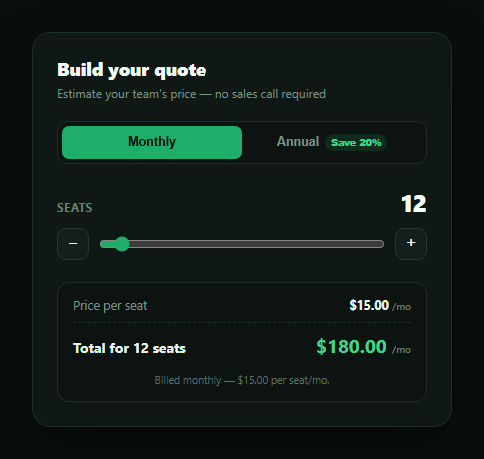
Per-seat SaaS pricing pages convert better when a prospect can answer "what would this cost my team" without filling out a contact form. This snippet builds that self-serve calculator in plain HTML, CSS, and vanilla JavaScript — a seat count, a monthly/annual toggle, and a live-updating total, all driven by one render() function over a tiny state object.
Seat count as a first-class control
Seats are controlled three ways at once — a range slider, and plus/minus stepper buttons — all writing to the same state.seats value and calling render(). Because every control funnels through one state object instead of maintaining its own count, the slider and the buttons can never disagree, and the displayed seat count, the line-item label, and the total all update from a single number.
Annual discount, shown as a distinct line
Rather than silently changing the per-seat price when annual billing is selected, the breakdown shows a full monthly subtotal (seats × $15) followed by a *separate* discount line at 20% off, only visible when annual is selected. This mirrors how a real pricing page should build trust — showing what the discount is worth in dollars rather than just changing a number with no explanation.
Correct monthly-vs-annual math
Monthly billing shows seats × $15 as the total, billed per month. Annual billing computes the same monthly subtotal, subtracts the 20% discount to get an effective discounted monthly rate, and then multiplies by 12 to show the true annual total — with a footer note spelling out both the effective monthly-equivalent rate and the exact per-seat price, so nothing is hidden in the switch between billing cycles. For 12 seats at $15/seat: monthly is $180.00/mo; annual is $180 × 0.8 = $144.00/mo effective, × 12 = $1,728.00/yr.
Where it fits
Drop it into a pricing page next to a pricing toggle or pricing feature table, follow it with a checkout form once a prospect is ready to buy, or pair it with a proration preview card for when an existing customer changes seat count mid-cycle.
Customizing it
Swap in your real per-seat price and discount rate, add volume-based price breaks (e.g. seats 51+ at a lower rate), or add a plan-tier selector alongside the seat count so the calculator covers your full pricing matrix.
Build with AI
Build, Understand, Optimize, and Extend It With AI
You don't have to re-derive the annual-discount math by hand. Paste this snippet's HTML, CSS, and JS into an AI coding assistant like Claude and ask it to walk through exactly how render() computes the monthly subtotal, subtracts the 20% annual discount to get an effective per-seat rate, and then multiplies by 12 for the annual total — and why that's different from simply multiplying the monthly total by 12 without discounting first. The same assistant can help you extend it: ask how to add volume-based price breaks where seats beyond a threshold cost less per seat, how to add a plan-tier selector so the calculator covers Starter/Growth/Scale pricing rather than one flat rate, or how to persist the chosen seat count and cycle into query params so a shared link pre-fills the calculator. Treat the code less like a finished artifact and more like a starting point for a conversation.
Prompt to recreate it
Copy this into your AI assistant of choice to build the effect from scratch, or as a jumping-off point for your own variant:
Build a "seat-based pricing calculator" widget in plain HTML, CSS, and JavaScript with no framework or library.

Requirements:
- Define a fixed monthly price per seat and a fixed annual discount percentage as constants.
- Add a seat-count control using both a range slider (with a visible min/max) and separate plus/minus stepper buttons, all reading from and writing to the same single state value so they never disagree — clamp the stepper buttons to the slider's min/max range.
- Add a monthly/annual billing-cycle toggle (two buttons or a switch), where the annual option visibly advertises the discount percentage (e.g. "Save 20%") right on the control.
- Show a breakdown with: the per-seat monthly price, an annual-discount line (as its own line item with a dollar amount, only visible when annual billing is selected — do not just silently change the per-seat price), and a total.
- On the monthly cycle, the total must equal seats × per-seat price. On the annual cycle, apply the discount to get an effective discounted monthly rate, then multiply that by 12 for the total shown, and display a footer note stating the effective per-seat monthly rate for whichever cycle is active.
- Recalculate every displayed number from one render function whenever the seat count or billing cycle changes, and double-check that the annual total is actually less than 12 × the undiscounted monthly total by exactly the discount percentage.
- Format all money values with thousands separators and two decimal places.
Want to tighten it up first? Run this prompt through the AI Prompt Studio to score it across 8 quality dimensions, catch anti-patterns, and tune the wording for Claude, ChatGPT, or Gemini before you paste it in.
Step by step
How to Use
- 1Paste HTML, CSS, and JSA 12-seat monthly quote of $180.00/mo renders by default.
- 2Adjust the seat countDrag the slider or use +/− to change seats from 1 to 200.
- 3Toggle annual billingThe discount line appears and the total switches to a yearly figure.
- 4Read the effective rateThe footer note shows the discounted per-seat monthly price.
- 5Check the mathTotal always equals seats × per-seat price, minus the discount if annual.
- 6Wire up real pricingReplace PRICE_PER_SEAT_MONTHLY and ANNUAL_DISCOUNT with your live values.
Real-world uses
Common Use Cases
Got questions?
Frequently Asked Questions
It's simply seats multiplied by the per-seat monthly price — for 12 seats at $15/seat, that's $180.00/mo. No discount applies on the monthly cycle, so the displayed per-seat price and the total always match a straightforward multiplication.
Selecting annual billing keeps the same $15/seat monthly subtotal but subtracts a 20% discount from it to get an effective discounted monthly rate ($15 × 0.8 = $12/seat), then multiplies that by 12 months for the total shown. For 12 seats, that's $144.00/mo effective × 12 = $1,728.00/yr — versus $180 × 12 = $2,160/yr at the undiscounted monthly rate, a $432/yr saving.
Showing "seats × full price" followed by an explicit "− 20% annual discount" line lets a prospect see exactly what they're saving in dollars, not just a lower number they have to trust. This transparency is what makes a self-serve calculator persuasive rather than just informative.
Not with the default slider bounds (min 1, max 200) — the +/− buttons are clamped to the same range with Math.min/Math.max, so they can never push the count outside what the slider supports. Raise the max attribute on the range input to support larger teams.
Move seats and cycle into component state (useState/ref) and derive the subtotal, discount, and total with useMemo or a computed property. Bind the slider's onChange/@input and the toggle buttons' onClick to update that state — the pricing math itself is pure and copies over unchanged.