You Might Also Like
Learn Coding Visually
Learn to code with interactive, live-preview playgrounds — HTML, CSS, JavaScript, React & more.
 HTML Playground42 lessons · Click-based · Live preview
 CSS PlaygroundLearn CSS with a live editor
 JavaScript Playground60 lessons · DOM · Async · Canvas
 React PlaygroundLearn React with a live code editor
 GSAP PlaygroundLearn GSAP animation interactively
 SVG Playground44 lessons · shapes · paths · animation
 SCSS Playground45 lessons · Sass modules · tokens
 Tailwind PlaygroundLearn Tailwind CSS with a live editor
 Bootstrap 5 Playground50 lessons · live preview
Plan Upgrade Proration Preview — Free Billing Card (HTML/CSS/JS)
Plan Upgrade Proration Preview · Cards · Plain HTML, CSS & JS · Live preview
What's included
Features
About this UI Snippet
Plan Upgrade Proration Preview — Transparent Mid-Cycle Billing Math
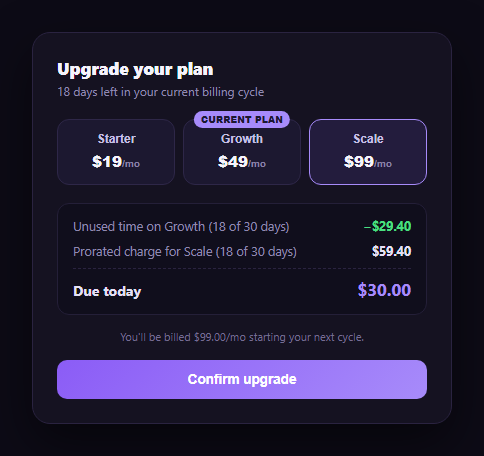
Mid-cycle subscription upgrades are one of the biggest sources of "why was I charged that" support tickets, because most billing systems just show a single number with no explanation. This snippet builds a proration preview card in plain HTML, CSS, and vanilla JavaScript that shows the actual math a billing system runs: the unused-time credit from the current plan, the new plan's prorated charge for the remaining cycle, and a due-today total that is simply the difference between them.
Proration, worked out in the open
Both the credit and the charge are computed the same way a real billing provider computes proration: take the plan's monthly price, divide by the number of days in the cycle to get a daily rate, then multiply by the days remaining. The current plan's unused time becomes a credit; the new plan's remaining-cycle cost becomes a charge. Due today is charge - credit, floored at zero so a downgrade never shows a negative "due" amount.
A live plan selector, not a static example
Three plan buttons — Starter, Growth (the current plan), and Scale — sit above the math. Clicking a different plan re-runs recalc() with that plan's price and re-labels every line, so a prospective upgrade from Growth to Scale and a same-tier lateral move both produce correct, immediately visible numbers. Selecting the current plan itself hides the math and shows a plain "no change to bill" message instead of a confusing zero-value proration.
Every number is checkable by hand
Because the card shows the daily-rate math implicitly through its two line items (rather than a single opaque total), a customer can verify it: 18 days remaining out of a 30-day cycle on a $49/mo plan is an unused-time credit of (49/30) * 18 = $29.40; the same 18 days on a $99/mo plan is a prorated charge of (99/30) * 18 = $59.40; due today is 59.40 - 29.40 = $30.00. Showing this breakdown instead of just "$30.00 due" is what actually reduces billing-confusion support tickets.
Where it fits
Use it in the upgrade-confirmation modal of any subscription product, pair it with a seat-based pricing calculator if seats also change with the plan, or follow it with an invoice preview for the receipt after the charge goes through. It also complements a pricing toggle or pricing card set on the plan-selection page itself.
Customizing it
Swap in your real plan catalog and cycle-length logic (many billing providers prorate by exact days, not a flat 30), add an annual-billing variant, or extend recalc() to handle downgrades by showing a credit balance instead of an amount due.
Build with AI
Build, Understand, Optimize, and Extend It With AI
You don't have to re-derive the proration formula by hand. Paste this snippet's HTML, CSS, and JS into an AI coding assistant like Claude and ask it to walk through exactly how recalc() turns a plan's monthly price, a fixed cycle length, and the days remaining into a daily rate, and why the same formula is applied twice — once to the old plan for a credit, once to the new plan for a charge — so that due today is just their difference. The same assistant can help you harden it: ask whether flooring due-today at zero is the right behavior for a downgrade, or whether it should instead show a credit balance carried to the next invoice. It's also useful for extending the card: ask it to prorate by exact calendar days instead of a flat 30-day cycle, add an annual-billing variant, or show a small breakdown line for when a seat-count change happens alongside the plan change. Treat the code less like a finished artifact and more like a starting point for a conversation.
Prompt to recreate it
Copy this into your AI assistant of choice to build the effect from scratch, or as a jumping-off point for your own variant:
Build a "plan upgrade proration preview" card in plain HTML, CSS, and JavaScript with no framework or library.

Requirements:
- Define a current plan (name, monthly price) and a fixed cycle length in days, plus a fixed number of days remaining in the current billing cycle.
- Render three or more selectable plan buttons (including the current plan, visibly marked), each with a name and monthly price.
- On selecting a different plan, compute an "unused time" credit for the current plan as (current plan price ÷ cycle days) × days remaining, and a prorated charge for the newly selected plan as (new plan price ÷ cycle days) × days remaining — both using the same days-remaining value.
- Show both the credit and the charge as separate, clearly labeled line items (not just a final number), plus a "due today" total equal to the charge minus the credit, floored at zero so it can never go negative.
- When the currently active plan is selected, hide the proration math entirely and show a plain "this is your current plan, no change to your bill" message instead of computing a zero-value proration.
- Add a footer note stating the full monthly price that will be billed starting the next renewal cycle, updating to match whichever plan is selected.
- Make sure every displayed number is internally consistent and can be verified by hand from the displayed price, cycle length, and days-remaining values.
Want to tighten it up first? Run this prompt through the AI Prompt Studio to score it across 8 quality dimensions, catch anti-patterns, and tune the wording for Claude, ChatGPT, or Gemini before you paste it in.
Step by step
How to Use
- 1Paste HTML, CSS, and JSA Growth-plan account previews an upgrade to Scale by default.
- 2Read the mathUnused-time credit and the new plan's prorated charge are both shown.
- 3Pick a different planClick Starter or Scale; the credit, charge, and due-today total recalculate.
- 4Select the current planThe math hides and a plain "no change to bill" message shows instead.
- 5Check the due-today figureIt's always charge minus credit, floored at zero.
- 6Wire up real plansReplace the plan buttons' data-price and CURRENT_PLAN with your live catalog.
Real-world uses
Common Use Cases
Got questions?
Frequently Asked Questions
The current plan's monthly price is divided by the cycle length (30 days) to get a daily rate, then multiplied by the days remaining in the cycle. For a $49/mo plan with 18 days left, that's (49/30) × 18 = $29.40 — the value of the time the customer already paid for but won't use on that plan.
The same formula applies to the new plan's price: its monthly price divided by 30, multiplied by the same 18 remaining days. For a $99/mo plan that's (99/30) × 18 = $59.40 — what the new plan costs for just the remainder of the current cycle.
Due today is the prorated charge for the new plan minus the unused-time credit from the old plan: 59.40 − 29.40 = $30.00 in the default example. The result is floored at zero, so picking a cheaper plan (which would produce a negative number) shows $0.00 due rather than a confusing negative charge — a real system would issue a credit balance instead.
The math section hides entirely and a plain message — "This is your current plan — no change to bill" — replaces it. Showing a $0.00 proration for a non-change would be confusing, so the card treats it as a distinct state rather than a degenerate case of the math.
Keep CURRENT_PLAN, CYCLE_DAYS, and DAYS_REMAINING as props or state, and derive credit, charge, and due with useMemo (React) or a computed property (Vue) whenever the selected plan changes. The recalc() function's math is pure and ports directly; only the DOM-writing lines need to become framework bindings.