You Might Also Like
Learn Coding Visually
Learn to code with interactive, live-preview playgrounds — HTML, CSS, JavaScript, React & more.
 HTML Playground42 lessons · Click-based · Live preview
 CSS PlaygroundLearn CSS with a live editor
 JavaScript Playground60 lessons · DOM · Async · Canvas
 React PlaygroundLearn React with a live code editor
 GSAP PlaygroundLearn GSAP animation interactively
 SVG Playground44 lessons · shapes · paths · animation
 SCSS Playground45 lessons · Sass modules · tokens
 Tailwind PlaygroundLearn Tailwind CSS with a live editor
 Bootstrap 5 Playground50 lessons · live preview
Gift Wrap Option Card — Free HTML CSS JS Snippet
Gift Wrap Option Card · Cards · Plain HTML, CSS & JS · Live preview
What's included
Features
About this UI Snippet
Gift Wrap Option Card — Toggle Add-On With Wrap Colors & a Live Character Count
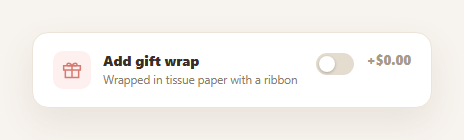
A well-designed checkout add-on does three things: it stays out of the way until the shopper wants it, it makes the exact cost of opting in obvious, and it doesn't ask for more detail than it needs. The gift wrap option card follows all three — a single toggle reveals the wrap-style and message options only when switched on, and a price delta updates the instant the toggle flips. Pair it with a promo code input or checkout form for the rest of the purchase flow.
Collapsed by default, expanded on demand
At rest, the card shows just the toggle, its description, and a "+$0.00" price — a single row that doesn't compete for attention with the actual checkout. Switching the toggle on reveals the wrap-style swatches and the message textarea in one smooth slide-and-fade, and switching it back off collapses everything again, so the detail only ever occupies space when it's relevant to the current decision.
The price delta is the whole point
Rather than hiding the cost of the add-on in a total that updates elsewhere on the page, the price sits directly next to the toggle and updates from "+$0.00" to the real charge ("+$4.50") the instant you opt in, with a color change to draw the eye. This answers the shopper's actual question — "what does checking this box cost me?" — without requiring them to scroll to a summary to find out.
A small, tactile swatch picker
Wrap style is chosen from four color swatches rather than a dropdown, because it's a purely visual decision — seeing the actual colors is faster and more satisfying than reading their names in a <select>. Clicking a swatch removes the .selected ring from whichever was previously chosen and applies it to the new one, guaranteeing exactly one wrap style is ever selected at a time.
A message field that respects a real constraint
Gift messages usually print on a small card, so the textarea enforces a maxlength and shows a live "34/120" counter that updates on every keystroke — the same low-friction pattern as a checkout form's field validation, telling the shopper exactly how much room they have left rather than letting them write past a limit and silently truncating it later.
Wiring it into checkout
On submit, read toggle.checked, the .selected swatch's data-color, and the message textarea's value, and include them in your order payload alongside your normal cart total plus the GIFT_WRAP_PRICE delta if enabled. The card's local state (toggle, swatch selection, message) is intentionally simple enough to lift into a parent cart/checkout state object with no restructuring.
Build with AI
Build, Understand, Optimize, and Extend It With AI
You don't have to work out the toggle-driven reveal pattern by hand. Paste this snippet's HTML, CSS, and JS into an AI coding assistant like Claude and ask it to explain exactly how the "clear all, then select one" pattern in the swatch click handler guarantees exactly one wrap style is ever selected, and why deriving the price display from a single constant and the toggle's boolean state (rather than separate hard-coded strings) prevents the shown price from ever drifting from the real charge. The same assistant can help you optimize it — ask whether the detail section's reveal animation should respect prefers-reduced-motion for accessibility. It's also useful for extending the card: ask it to add a live wrap-color preview illustration that updates as you pick a swatch, support multiple gift-wrap tiers at different price points, or persist the selected options into a shared checkout state object. Treat the code less like a finished artifact and more like a starting point for a conversation.
Prompt to recreate it
Copy this into your AI assistant of choice to build the effect from scratch, or as a jumping-off point for your own variant:
Build a "gift wrap option" checkout add-on card in plain HTML, CSS, and JavaScript — no frameworks or libraries.

Requirements:
- Show a toggle switch (a real checkbox styled as a slider, for accessibility) labeled "Add gift wrap" with a short description, collapsed by default so no extra options are visible until it's switched on.
- Next to the toggle, show a price delta that reads "+$0.00" when the toggle is off and updates instantly to the real add-on price (from a single named price constant, not a hard-coded string) the moment the toggle is switched on, with a visual color change to draw attention to the active price.
- When the toggle is switched on, reveal (with a smooth animated transition, not an abrupt snap) a detail section containing: a row of 3-4 clickable color swatches representing wrap styles, where clicking any swatch visually marks it as the single selected style and always deselects whichever swatch was previously selected (never zero or multiple selected at once); and a gift-message textarea capped at a maximum character length (e.g. 120) with a live counter above it that updates on every keystroke and never allows the count to exceed the max.
- Switching the toggle back off must collapse the detail section again and reset the displayed price back to "+$0.00", without necessarily discarding the user's swatch selection or typed message underneath.
- Keep all interaction state (toggle on/off, selected swatch, message text) simple enough that it could be read out programmatically on form submission and included in an order payload.
Want to tighten it up first? Run this prompt through the AI Prompt Studio to score it across 8 quality dimensions, catch anti-patterns, and tune the wording for Claude, ChatGPT, or Gemini before you paste it in.
Step by step
How to Use
- 1Paste HTML, CSS, and JSA collapsed gift-wrap card renders showing just the toggle and a "+$0.00" price.
- 2Switch the toggle onThe wrap-color swatches and message textarea slide into view; the price updates to "+$4.50".
- 3Pick a wrap colorClick any swatch — the selected ring moves to it and the others deselect.
- 4Type a gift messageThe counter below the label updates live and the textarea won't exceed 120 characters.
- 5Switch the toggle offThe detail section collapses and the price returns to "+$0.00".
- 6Wire to checkoutRead the toggle, selected swatch color, and message on submit and add them to your order payload.
Real-world uses
Common Use Cases
Got questions?
Frequently Asked Questions
The price display reads a single GIFT_WRAP_PRICE constant and formats it with fmtPrice() based only on the toggle's checked state — "+$0.00" when off, the real price when on. Because there's one constant and one formatting function rather than separately hard-coded strings for each state, the price shown can never drift from the actual charge you'd add to the order total.
The click handler is attached once to the swatch container (not to each swatch individually) and, on every click, first removes the .selected class from every swatch before adding it to the one that was clicked. This "clear all, then select one" pattern makes it structurally impossible to end up with zero or multiple swatches selected at once.
The textarea has a native maxlength="120" attribute, so the browser itself prevents typing, pasting, or otherwise inserting text beyond that length — it's enforced at the input level, not just visually. The counter above it reads message.value.length on every input event, so it always reflects the actual current length and never exceeds "120/120".
Edit the GIFT_WRAP_PRICE constant for the price — it's the only place the amount is defined. For wrap styles, add another .gwc-swatch button with its own data-color and a background color in the HTML; the existing click handler works on any number of swatches without changes since it selects by class, not by a fixed count.
Model gift-wrap enabled, the selected swatch color, and the message text as component state (or fields in a parent checkout/cart state object). Derive the price delta and the detail section's visibility from the enabled boolean with a computed value, and bind the swatch buttons' selected state and the textarea's value/onChange to that same state rather than direct DOM class toggling.