Learn Coding Visually
Learn to code with interactive, live-preview playgrounds — HTML, CSS, JavaScript, React & more.
 HTML Playground42 lessons · Click-based · Live preview
 CSS PlaygroundLearn CSS with a live editor
 JavaScript Playground60 lessons · DOM · Async · Canvas
 React PlaygroundLearn React with a live code editor
 GSAP PlaygroundLearn GSAP animation interactively
 SVG Playground44 lessons · shapes · paths · animation
 SCSS Playground45 lessons · Sass modules · tokens
 Tailwind PlaygroundLearn Tailwind CSS with a live editor
 Bootstrap 5 Playground50 lessons · live preview
Gift Card Voucher — Reveal & Copy HTML CSS JS Snippet
Gift Card Voucher · Cards · Plain HTML, CSS & JS · Live preview
What's included
Features
.gc-shine strip translates across the card on a loop using only transform, so the glint is smooth and export-safe.FWDT-••••-•••• so screenshots or onlookers never see it until the recipient reveals it.revealOrCopy reveals on the first click (with a flip-in) and copies on the second — preventing accidental copies of a hidden value.navigator.clipboard.writeText and still confirms if it is unavailable, so the button always gives feedback.CODE constant that the reveal and copy both read — easy to populate from real data.About this UI Snippet
Gift Card Voucher — Animated Shine, Masked Code Reveal & Copy-With-Feedback
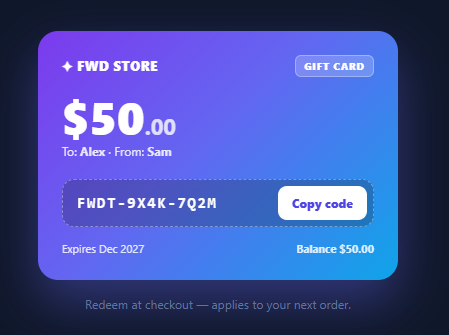
A digital gift card or voucher needs to feel valuable and be effortless to redeem. That means a premium card visual, a code that stays hidden until the recipient chooses to reveal it, and one-tap copying. This snippet implements exactly that in plain HTML, CSS, and vanilla JavaScript: a gradient voucher with an animated shine sweep, a masked code that reveals on click and then copies with confirmation, plus amount, balance, recipient, and expiry details.
A voucher that looks the part
The card uses a multi-stop gradient and a soft coloured shadow to read as a premium, physical-feeling gift card. A .gc-shine element sweeps a diagonal highlight across it on a loop — the light-glint effect that makes gift cards and credit cards feel tactile and special. The animation uses only transform (a translating, rotated gradient strip), so it runs on the compositor and exports cleanly. Brand mark, "GIFT CARD" chip, a large amount, and a to/from line complete the front.
Masked code with reveal-then-copy
The redemption code starts masked (FWDT-••••-••••) so a shared screenshot or an over-the-shoulder glance never exposes it. A single button drives a two-step flow handled by revealOrCopy: the first click reveals the real code (with a small flip-in animation) and changes the button to "Copy code"; the second click copies it to the clipboard and confirms with "Copied ✓" in green for 1.6 seconds before resetting. This reveal-first pattern is both a privacy nicety and a deliberate two-tap interaction that prevents accidental copies of a hidden value.
Robust clipboard copy
revealOrCopy uses the modern navigator.clipboard.writeText API and falls back gracefully (the confirmation still fires) if it is unavailable, so the button always gives feedback. The code is stored once in a CODE constant and revealed/copied from there — a single source of truth.
Redemption details
The footer shows an expiry date and the current balance, and a note clarifies how to redeem ("applies to your next order"). These details are what turn a pretty card into a usable voucher: the amount tells the recipient what it is worth, the balance handles partial redemptions, and the expiry sets expectations so the card does not quietly lapse.
Built to drop into a real flow
Because the whole card is plain markup with one CODE constant and CSS-driven visuals, it slots into an email template, an account "my gift cards" page, or a post-purchase confirmation with minimal work — and the reveal/copy logic is the only JavaScript, so it stays light and dependency-free.
Swap the amount, code, names, and expiry for real values (rendered server-side per gift card) and it is production-ready. Pair this with an order summary where the code applies, a scratch card reveal for a playful unlock, or a confetti celebration card for the gifting moment.
Build with AI
Build, Understand, Optimize, and Extend It With AI
You don't have to trace the two-click state machine by hand. Paste this snippet's HTML, CSS, and JS into an AI coding assistant like Claude and ask it to explain exactly how revealOrCopy uses a single revealed boolean to decide whether a click should unmask the code or copy it to the clipboard, and why the shine sweep only animates the transform property rather than any layout-affecting property. The same assistant can help optimize it — ask whether hardcoding the real redemption code directly in client-side JavaScript is ever appropriate for a production gift card, and what a server-authorized reveal-on-demand flow would need to look like instead. It's also useful for extending the card: ask it to add a QR code rendering of the redemption link next to the masked code, an expiring countdown badge when the card is close to its expiry date, or a share button that generates a pre-filled message for gifting the card to someone else. Treat the code less like a finished artifact and more like a starting point for a conversation.
Prompt to recreate it
Copy this into your AI assistant of choice to build the effect from scratch, or as a jumping-off point for your own variant:
Build a digital gift card voucher in plain HTML, CSS, and JavaScript with a masked, reveal-then-copy redemption code — no library.

Requirements:
- A card with a multi-stop gradient background and a soft colored box-shadow, containing a brand mark, a "gift card" label chip, a large prominently-displayed dollar amount, and a to/from recipient line.
- A diagonal light-glint "shine" element that sweeps across the card on a continuous loop using only a CSS transform-based keyframe animation (translating a rotated gradient strip), so the effect stays smooth and never triggers layout recalculation.
- The redemption code must be masked by default (showing a partial pattern like a prefix followed by dot placeholders, not the real code), stored once in a single constant that both the reveal and copy logic read from — never duplicated anywhere else in the code.
- A single button must drive a two-step interaction: the first click reveals the real code in place (with a brief animated transition as it appears) and changes the button's label to indicate the next action is now to copy; the second click copies the revealed code to the clipboard and shows a temporary success confirmation before reverting the button label after a couple of seconds.
- Use the modern clipboard API for the copy step, but ensure the button still shows its success confirmation even in a fallback path if that API is unavailable, so the interaction never silently fails to give feedback.
- A footer section showing an expiry date and the current remaining balance, plus a short note explaining how and where the card can be redeemed.
- Explain why, in a real production version of this card, the actual redemption code should never be embedded directly in the page's client-side source and should instead be fetched from an authorized endpoint only at the moment the user clicks reveal.
Want to tighten it up first? Run this prompt through the AI Prompt Studio to score it across 8 quality dimensions, catch anti-patterns, and tune the wording for Claude, ChatGPT, or Gemini before you paste it in.
Step by step
How to Use
- 1Paste HTML, CSS, and JSA gradient $50 gift card appears with an animated shine sweep, a to/from line, a masked code, and a "Reveal code" button.
- 2Reveal the codeClick "Reveal code" — the masked dots flip to the real code and the button changes to "Copy code".
- 3Copy itClick "Copy code" — the code is copied to the clipboard and the button confirms "Copied ✓" in green.
- 4Watch the shineA diagonal light glint sweeps across the card on a loop, giving it a premium, physical feel.
- 5Read the detailsThe footer shows the expiry and balance, with a note on how to redeem.
- 6Plug in real valuesSet the
CODEconstant, amount, names, and expiry from your gift-card data (rendered per recipient).
Real-world uses
Common Use Cases
Got questions?
Frequently Asked Questions
Render the amount, recipient/sender names, expiry, balance, and the CODE constant from your gift-card record (server-side, per recipient). Never hard-code real codes in shipped client source for production cards — fetch the code only for the authenticated owner, ideally revealing it via an authorised request rather than embedding it in the page.
Yes — masking the code until the user taps reveal protects it from shoulder-surfing and from being captured in screenshots shared for the card's design, and it makes the copy action deliberate. For sensitive codes, go further: fetch the code from the server only on the reveal click, so it is never present in the page source at all.
Append the code to the redeem flow: a "Redeem now" button can navigate to checkout with ?gift=CODE or call your apply-credit API directly. Validate and apply gift cards server-side (check balance, expiry, single-use), and reflect the new balance back on the card so partial redemptions show the remaining amount.
Make the reveal/copy a real <button> (it is) so it is keyboard-operable, and announce the reveal and copy via an aria-live="polite" region. Ensure the code, when revealed, is selectable text and has sufficient contrast on the gradient; the masked state should have an aria-label like "code hidden, activate to reveal" so screen-reader users understand the control.
In React, hold revealed in useState and the code/amount as props; the button toggles reveal then copies, with a setTimeout for the "Copied" flag. In Vue, use a ref for revealed and a method for the two-step action. In Angular, track revealed on the component. The shine keyframe and card CSS port unchanged.