Source Code
<div class="demo">
  <canvas class="confetti-canvas"></canvas>
  <div class="card">
    <span class="badge">🎉 Milestone reached</span>
    <h3>1,000 subscribers!</h3>
    <p>You just crossed four figures — your audience is officially in the thousands. Keep the streak alive.</p>
    <button class="celebrate-btn" type="button">Celebrate</button>
  </div>
</div>
.demo {
position: relative;
font-family: 'Segoe UI', system-ui, sans-serif;
display: flex;
align-items: center;
justify-content: center;
padding: 40px;
min-height: 320px;
background: radial-gradient(circle at 30% 20%, #312e81, #0f172a 65%);
overflow: hidden;
}
.confetti-canvas {
position: absolute;
inset: 0;
width: 100%;
height: 100%;
pointer-events: none;
}
.card {
position: relative;
z-index: 1;
width: 100%;
max-width: 320px;
background: rgba(255,255,255,0.06);
border: 1px solid rgba(255,255,255,0.14);
backdrop-filter: blur(8px);
border-radius: 16px;
padding: 26px;
text-align: center;
color: #e2e8f0;
box-shadow: 0 20px 60px rgba(0,0,0,0.35);
}
.badge {
display: inline-block;
font-size: 12px;
font-weight: 600;
background: rgba(250,204,21,0.16);
color: #facc15;
padding: 5px 12px;
border-radius: 999px;
margin-bottom: 12px;
}
.card h3 {
margin: 0 0 8px;
font-size: 22px;
color: #fff;
}
.card p {
margin: 0 0 18px;
font-size: 13px;
line-height: 1.6;
color: #cbd5e1;
}
.celebrate-btn {
border: none;
background: linear-gradient(135deg, #f59e0b, #ec4899);
color: #fff;
font-size: 14px;
font-weight: 700;
padding: 11px 24px;
border-radius: 10px;
cursor: pointer;
transition: transform 0.15s ease;
}
.celebrate-btn:active { transform: scale(0.95); }const canvas = document.querySelector('.confetti-canvas');
const ctx = canvas.getContext('2d');
const card = document.querySelector('.card');
const btn = document.querySelector('.celebrate-btn');
const ratio = window.devicePixelRatio || 1;
const colors = ['#f59e0b', '#ec4899', '#6366f1', '#22d3ee', '#34d399'];
let particles = [];
let raf = null;
function resize() {
canvas.width = canvas.clientWidth * ratio;
canvas.height = canvas.clientHeight * ratio;
ctx.setTransform(ratio, 0, 0, ratio, 0, 0);
}
resize();
window.addEventListener('resize', resize);
function burst() {
const w = canvas.clientWidth;
const originX = w / 2;
const originY = canvas.clientHeight * 0.32;
for (let i = 0; i < 90; i++) {
const angle = Math.random() * Math.PI * 2;
const speed = 2 + Math.random() * 5;
particles.push({
x: originX,
y: originY,
vx: Math.cos(angle) * speed,
vy: Math.sin(angle) * speed - 2,
size: 4 + Math.random() * 5,
color: colors[i % colors.length],
rotation: Math.random() * Math.PI,
spin: (Math.random() - 0.5) * 0.3,
life: 1,
});
}
if (!raf) raf = requestAnimationFrame(tick);
}
function tick() {
const w = canvas.clientWidth;
const h = canvas.clientHeight;
ctx.clearRect(0, 0, w, h);
particles.forEach((p) => {
p.vy += 0.12;
p.x += p.vx;
p.y += p.vy;
p.rotation += p.spin;
p.life -= 0.012;
ctx.save();
ctx.globalAlpha = Math.max(p.life, 0);
ctx.translate(p.x, p.y);
ctx.rotate(p.rotation);
ctx.fillStyle = p.color;
ctx.fillRect(-p.size / 2, -p.size / 2, p.size, p.size * 0.6);
ctx.restore();
});
particles = particles.filter((p) => p.life > 0 && p.y < h + 40);
if (particles.length) {
raf = requestAnimationFrame(tick);
} else {
raf = null;
ctx.clearRect(0, 0, w, h);
}
}
btn.addEventListener('click', () => {
card.style.transform = 'scale(0.97)';
setTimeout(() => { card.style.transform = ''; }, 140);
burst();
});Learn Coding Visually
Learn to code with interactive, live-preview playgrounds — HTML, CSS, JavaScript, React & more.
 HTML Playground42 lessons · Click-based · Live preview
 CSS PlaygroundLearn CSS with a live editor
 JavaScript Playground60 lessons · DOM · Async · Canvas
 React PlaygroundLearn React with a live code editor
 GSAP PlaygroundLearn GSAP animation interactively
 SVG Playground44 lessons · shapes · paths · animation
 SCSS Playground45 lessons · Sass modules · tokens
 Tailwind PlaygroundLearn Tailwind CSS with a live editor
 Bootstrap 5 Playground50 lessons · live preview
Confetti Celebration Card — Free HTML CSS JS Snippet
Confetti Celebration Card · Cards · Plain HTML, CSS & JS · Live preview
What's included
Features
vy += 0.12), spin (rotation += spin), and lifetime decay (life -= 0.012) accumulators stack into a convincingly organic burst-arc-tumble-fade motionsave()/translate()/rotate()/restore() sequence with a -size/2 draw offset is the standard, directly-reusable recipe for spinning any shape correctly in Canvasburst() only launches requestAnimationFrame if no loop is active, and tick() nulls the loop reference once every particle has expired, so the canvas never animates an empty scenescale(0.97) transform-and-revert on click makes the celebration trigger feel physically pressed, reinforcing the moment alongside the visual burstdevicePixelRatio scaling plus a resize listener keeps confetti crisp and correctly positioned across screen sizes and zoom levelsAbout this UI Snippet
How this confetti celebration card was built — a lightweight particle system with gravity, spin, and lifetime
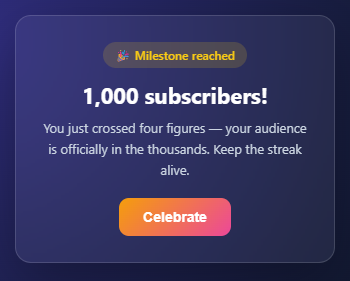
This snippet recreates the "you did it!" celebration moment found in goal-tracker apps, onboarding flows, and achievement screens — a glassy milestone card sits over a full-bleed canvas, and clicking "Celebrate" launches dozens of rotating, gravity-affected confetti rectangles that burst outward, tumble down, and fade away. It's a compact particle system — about 70 lines of JavaScript — built entirely on the Canvas 2D API with no animation or physics library.
Particles as plain objects with physics properties
Each piece of confetti is just a JavaScript object: a position (x, y), a velocity (vx, vy), a size, a color pulled from a five-colour palette, a rotation angle, a spin rate, and a life value that starts at 1 and counts down. burst() creates 90 of these on every click, each with a randomized launch angle (Math.random() * Math.PI * 2) and speed, so the shower fans out in every direction from a fixed origin point near the top of the card rather than looking like a uniform, mechanical spray. This "array of plain objects with simple numeric properties" approach is the simplest possible particle system — no classes, no inheritance, just numbers updated every frame.
Gravity, rotation, and fade — three small accumulators
The animation loop, tick(), applies three independent per-frame adjustments to every particle: p.vy += 0.12 constantly increases downward velocity (gravity), p.rotation += p.spin spins each piece at its own random rate, and p.life -= 0.012 counts down toward zero. Each of these is a single line of arithmetic, yet together they produce a shower that arcs outward, curves downward under gravity, tumbles convincingly as it falls, and gradually disappears — exactly the layered-simple-rules approach that makes procedural animation feel organic rather than scripted. The same "small independent per-frame adjustments stacking into complex motion" idea appears in the Audio Waveform Visualizer's layered sine waves, just applied to physics instead of geometry.
Drawing rotated rectangles around their own center
To make each confetti piece spin around its own midpoint rather than the canvas origin, tick() wraps each draw in ctx.save()/ctx.restore(), calls ctx.translate(p.x, p.y) to move the origin to the particle's position, then ctx.rotate(p.rotation), and finally draws a rectangle *offset by half its own size* (-p.size / 2, -p.size / 2) so it's centered on the new origin. This translate-rotate-draw-centered sequence is the standard recipe for rotating any shape around its own center in Canvas — directly reusable any time you need spinning sprites, gauges, or icons.
A self-starting, self-stopping animation loop
burst() only kicks off requestAnimationFrame(tick) if no loop is already running (if (!raf)), so rapid repeat clicks add more particles to the existing shower instead of starting parallel competing loops. tick() filters out particles whose life has reached zero or that have fallen below the canvas, and the moment the array is empty, it clears the canvas one final time and sets raf = null — stopping the animation loop entirely rather than looping forever on an empty scene. That null-check-and-restart structure is a clean, reusable pattern for any "fire and forget" canvas animation that shouldn't burn CPU once it's finished.
Build with AI
Build, Understand, Optimize, and Extend It With AI
You don't have to work out the translate-rotate-draw sequence yourself to trust why each confetti rectangle spins around its own center instead of the canvas corner. Paste this snippet's HTML, CSS, and JS into an AI coding assistant like Claude and ask it to explain exactly why ctx.translate and ctx.rotate must run before drawing the rectangle at a negative half-size offset, and why that whole sequence is wrapped in ctx.save and ctx.restore per particle. The same assistant can help optimize it — for instance asking whether 90 particles per burst is safely within budget on lower-end mobile GPUs, or whether the object-array approach would still perform well if bursts overlapped from rapid clicking. It's also useful for extending the effect: ask it to vary particle shapes beyond flat rectangles, add a confetti-catching interaction where particles react to the pointer, or trigger the burst automatically when a milestone value crosses a threshold instead of only on click. Treat the code less like a finished artifact and more like a starting point for a conversation.
Prompt to recreate it
Copy this into your AI assistant of choice to build the effect from scratch, or as a jumping-off point for your own variant:
Build a canvas-based confetti burst behind a glass-morphism milestone card, in plain HTML, CSS, and JavaScript using only the Canvas 2D API — no particle library, no physics engine.

Requirements:
- A full-bleed canvas positioned absolutely behind a card element (the card must have position relative and a higher z-index, with pointer-events disabled on the canvas so it never blocks clicks).
- Model every confetti piece as a plain object with position, velocity, size, color, rotation angle, spin rate, and a life value starting at 1 — no classes, no external state library.
- On a button click, push roughly 90 of these particle objects into an array, each with a randomized launch angle across a full circle and a randomized speed, converted into velocity components with cosine and sine.
- Each animation frame must apply three independent, tiny per-frame adjustments to every particle: increment vertical velocity by a small constant (gravity), increment rotation by the particle's own spin rate (tumbling), and decrement life by a small constant (fade-out) — these three rules alone, with no other physics code, must produce the arc-tumble-fade motion.
- Draw each particle as a rotated rectangle centered on its own position: translate the canvas origin to the particle's coordinates, rotate by the particle's rotation value, draw the rectangle offset by negative half its own width and height so it's centered on the new origin, and wrap each particle's drawing in a save/restore pair so transforms never leak between particles.
- Filter out particles whose life has reached zero or that have fallen below the visible canvas height after each frame.
- The animation loop must only start if it isn't already running, so that clicking the celebrate button repeatedly adds more particles to one ongoing shower rather than starting multiple competing animation loops, and the loop must stop itself (clear the canvas and null out its reference) the instant zero particles remain, rather than continuing to run on an empty scene.
- Handle devicePixelRatio scaling and window resize so the canvas stays crisp on high-DPI screens.
Want to tighten it up first? Run this prompt through the AI Prompt Studio to score it across 8 quality dimensions, catch anti-patterns, and tune the wording for Claude, ChatGPT, or Gemini before you paste it in.
Step by step
How to Use
- 1Layer a full-bleed canvas behind a glass cardPosition a
<canvas class="confetti-canvas">withposition: absolute; inset: 0; pointer-events: nonebehind a.cardwithbackdrop-filter: blur()andposition: relative; z-index: 1, so confetti appears to burst from behind the card. - 2Model each particle as a plain object with physics fieldsOn burst, push objects like
{ x, y, vx, vy, size, color, rotation, spin, life: 1 }into aparticlesarray — randomizing launch angle and speed withMath.random()so the shower fans out naturally rather than looking mechanical. - 3Apply gravity, spin, and decay each frameIn the animation loop, run three small per-frame accumulators on every particle:
p.vy += 0.12(gravity),p.rotation += p.spin(tumbling), andp.life -= 0.012(fade-out) — three single-line rules that combine into convincing physical motion. - 4Draw each particle rotated around its own centerWrap each draw in
ctx.save()/ctx.restore(), callctx.translate(p.x, p.y)thenctx.rotate(p.rotation), and draw a rectangle offset by-size/2in both axes — the standard translate-rotate-draw-centered recipe for spinning shapes in Canvas. - 5Filter out dead particles and stop the loop when emptyAfter drawing, run
particles = particles.filter(p => p.life > 0 && p.y < h + 40). If particles remain, re-queuerequestAnimationFrame(tick); if the array is empty, clear the canvas once more and set the loop reference tonullso it stops cleanly. - 6Guard against overlapping burstsIn
burst(), only start the animation loopif (!raf)— repeated clicks then simply add more particles to the array that the already-running loop is animating, instead of spawning duplicate competing loops.
Real-world uses
Common Use Cases
Got questions?
Frequently Asked Questions
Each of the 90 particles created in burst() gets a randomized launch angle via Math.random() * Math.PI * 2 (a full circle in radians) and a randomized speed between 2 and 7. Converting that angle and speed into vx/vy components with Math.cos/Math.sin makes every particle launch in a different direction at a different speed — so the shower fans outward organically, and no two bursts ever look quite the same.
Three tiny per-frame accumulators do all the work. p.vy += 0.12 continuously increases each particle's downward velocity, simulating gravity and producing the characteristic upward-arc-then-fall trajectory. p.rotation += p.spin spins each piece at its own random rate, creating convincing tumbling motion. p.life -= 0.012 counts down a fade-out value applied as ctx.globalAlpha. None of these alone looks like much, but layered together every frame, they combine into motion that reads as genuinely physical.
Canvas always rotates around the *current origin point* — by default, the canvas's top-left corner. To make a shape spin around its own center, you first move the origin to the shape's position with ctx.translate(p.x, p.y), then rotate with ctx.rotate(p.rotation), and finally draw the rectangle offset by half its own width and height (-p.size / 2, -p.size / 2) so it's centered on the new (rotated) origin. Wrapping this in ctx.save()/ctx.restore() ensures each particle's transform doesn't affect the next one's drawing.
So that clicking "Celebrate" repeatedly adds more confetti to an already-running shower instead of starting a second, competing requestAnimationFrame loop that would double-draw every frame and waste CPU. The raf variable holds the current loop's ID (or null when no loop is active); burst() only calls requestAnimationFrame(tick) when that variable is falsy, and tick() resets it to null once every particle has expired.
No — tick() filters the particles array down to only those whose life is still above zero and whose y position is still on screen (p.y < h + 40). The moment that array becomes empty, the loop performs one final clearRect(), sets raf = null, and simply does not re-queue itself — so the canvas goes idle and stops consuming any CPU until the next click triggers a fresh burst.
Yes — copy the HTML, CSS, and JS with the buttons on this page and use them anywhere, including commercial products, with no attribution required. It is built entirely on the native Canvas 2D API and vanilla JavaScript object/array operations — no particle-engine library, animation framework, or licensing to track.