You Might Also Like
Learn Coding Visually
Learn to code with interactive, live-preview playgrounds — HTML, CSS, JavaScript, React & more.
 HTML Playground42 lessons · Click-based · Live preview
 CSS PlaygroundLearn CSS with a live editor
 JavaScript Playground60 lessons · DOM · Async · Canvas
 React PlaygroundLearn React with a live code editor
 GSAP PlaygroundLearn GSAP animation interactively
 SVG Playground44 lessons · shapes · paths · animation
 SCSS Playground45 lessons · Sass modules · tokens
 Tailwind PlaygroundLearn Tailwind CSS with a live editor
 Bootstrap 5 Playground50 lessons · live preview
GLB Spin-to-Reveal Stats Viewer — Free Three.js glTF Product Spec Snippet
GLB Spin-to-Reveal Stats Viewer · Cards · Plain HTML, CSS & JS · Live preview
What's included
Features
About this UI Snippet
GLB Spin-to-Reveal Stats Viewer — Specs Tied to the Camera's Real Orbit Angle
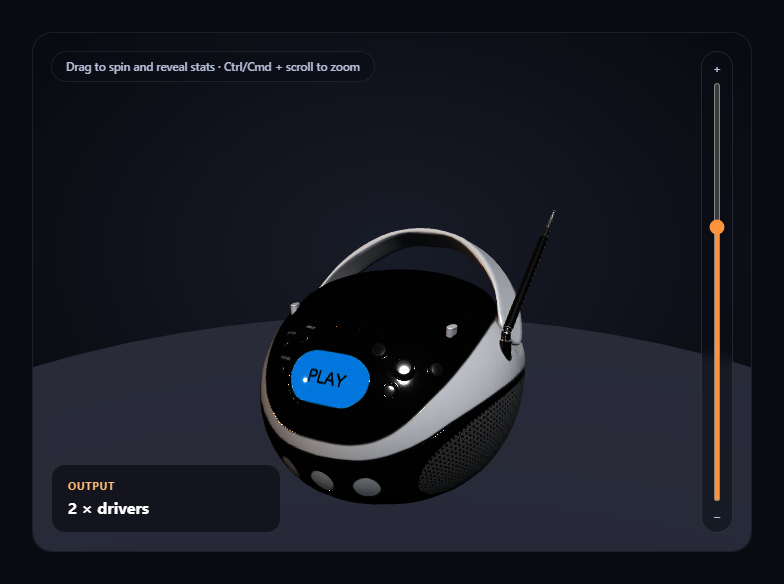
A common product-viewer pattern shows different information depending on which "side" of the object currently faces the camera. This snippet builds that honestly: each stat card is assigned a fixed azimuthal angle around the product, and on every frame the snippet compares that angle against OrbitControls' own current azimuthal angle — reading real orbit state, not a second, hand-rolled rotation tracker running in parallel.
One angle space, not two competing ones
OrbitControls already tracks the camera's azimuthal angle around its target internally to do its own job — and exposes it directly via controls.getAzimuthalAngle(). Rather than building a separate system to track "how far the user has spun the product," this snippet reuses that exact same built-in value. There is only ever one source of truth for the current viewing angle, which is also why the reveal state can never drift out of sync with what a visitor actually sees on screen.
Wrapped angle comparison, not naive subtraction
Azimuthal angles wrap around at plus or minus pi radians, so naively subtracting two angles can produce a value like 1.9 times pi for two angles that are actually very close together (just on opposite sides of the wrap point). angleDiff() normalizes the difference back into the [-pi, pi] range before taking its absolute value, so a stat assigned to the "back" of the product (angle pi) reveals correctly regardless of which direction the visitor spun to get there.
A reveal window, not an exact angle match
Each stat only needs the camera's current azimuth to fall within REVEAL_WINDOW radians of its assigned angle, not to match it exactly — a forgiving enough tolerance that a visitor doesn't have to hit one precise degree to trigger a reveal, while still being narrow enough that generally only one stat (occasionally two, near a boundary) is visible at once.
Camera constrained, not free-roaming
controls.minPolarAngle/maxPolarAngle are both set close to level, keeping the camera at roughly product-shot height throughout the whole interaction — the spin-to-reveal mechanic is specifically about *azimuthal* angle, so vertical wandering is intentionally limited rather than adding a dimension the stat system doesn't account for.
A named, honest fallback if the model fails
If the .glb can't load, a simple box placeholder takes the model's exact position, and the spin-to-reveal stat system keeps working exactly the same — the interaction only depends on the camera's own orbit state, never on anything specific to the loaded geometry.
Zoom is opt-in, not a hijacked scroll wheel
OrbitControls' built-in wheel-zoom is turned off, with zoom reimplemented as a slider plus Ctrl/Cmd + scroll, so a plain scroll over the card always scrolls the page.
Customizing it
Add more stat cards by extending STAT_ANGLES (evenly spacing them around the full circle), swap MODEL_URL for any other product-scaled .glb, or pair this with GLB product color configurator for a combined spec-and-color product page.
Build with AI
Build, Understand, Optimize, and Extend It With AI
Paste this snippet's HTML, CSS, and JS into an AI coding assistant like Claude and ask it to explain exactly why reading OrbitControls' own getAzimuthalAngle() is more robust than building a separate rotation tracker, and why the angle-difference comparison needs to be wrap-aware around the plus-or-minus pi boundary rather than a plain subtraction. It's also useful for extending the demo — ask it to animate each stat card's entrance with a slight delay based on how centered the reveal angle is, add a small on-screen compass indicator showing the current azimuth relative to each stat's position, or extend the reveal system to also account for polar angle so a stat could be tied to a top-down view. Use the conversation to build real intuition for reading live camera-control state to drive UI before applying the same spin-to-reveal pattern to your own product's real specs.
Prompt to recreate it
Copy this into your AI assistant of choice to build the effect from scratch, or as a jumping-off point for your own variant:
Build a "spin-to-reveal product stats" 3D viewer in plain HTML, CSS, and JavaScript using Three.js (core, GLTFLoader, and OrbitControls, all loaded from a CDN with no bundler).

Requirements:
- A full-size Three.js scene with OrbitControls (damping enabled, a bounded min/max zoom distance, and the polar angle constrained to a narrow range near level so the camera stays at a consistent product-shot height) so a visitor can drag to orbit a loaded 3D product around its vertical axis.
- Load a real .glb model using THREE.GLTFLoader pointed at a genuine, freely-licensed, CDN-hosted glTF binary URL small and detailed enough to read as a real product (e.g. one of Khronos' official glTF-Sample-Assets models) — do not substitute a primitive geometry.
- After the model loads, measure its bounding box and scale it to a fixed target height rather than a hardcoded scale number, then reposition it to rest on a ground plane.
- Define at least four stat/spec cards as plain data, each assigned a distinct azimuthal angle evenly spaced around a full circle. On every animation frame, read the camera's current azimuthal angle directly from OrbitControls' own built-in accessor (do not build a separate, parallel rotation-tracking system) and compare it against each stat's assigned angle using an angle-difference calculation that correctly handles wrapping around the plus-or-minus pi boundary (a naive subtraction is not sufficient).
- Reveal (fade/scale in) a stat card only when the camera's current azimuthal angle falls within a defined tolerance window of that stat's assigned angle, and hide it otherwise — dragging the canvas to spin around the product must genuinely reveal different real stat cards as different "sides" face the camera, not a scroll trigger or click-based toggle.
- Turn off OrbitControls' own wheel-zoom and instead implement zoom as an explicit opt-in gesture: a vertical range-input slider next to the canvas, plus Ctrl/Cmd + scroll wheel — a plain scroll must do nothing and pass through to the page normally.
- Handle the GLTFLoader's error callback by logging the real error and substituting a simple placeholder mesh at the model's exact position, so the spin-to-reveal stat system keeps working identically even if the real model fails to load.
Want to tighten it up first? Run this prompt through the AI Prompt Studio to score it across 8 quality dimensions, catch anti-patterns, and tune the wording for Claude, ChatGPT, or Gemini before you paste it in.
Step by step
How to Use
- 1Add all three CDN scriptsthree.min.js, GLTFLoader.js, and OrbitControls.js.
- 2Paste HTML, CSS, and JSThe BoomBox loads with its "Output" stat already revealed, facing forward.
- 3Drag on the canvasSpin the camera around the product; a different stat card fades in per side.
- 4Keep spinningBattery, Connectivity, and Build reveal as their assigned angle comes into view.
- 5Use the slider or Ctrl/Cmd + scroll to zoomPlain scroll always scrolls the page; zoom is a separate, opt-in gesture.
- 6Edit STAT_ANGLES and the HTML cardsReassign which angle reveals which spec, or add more stat cards.
Real-world uses
Common Use Cases
Got questions?
Frequently Asked Questions
OrbitControls already tracks the camera's azimuthal angle around its target internally, and exposes it directly through controls.getAzimuthalAngle(). Rather than building a separate rotation-tracking system, this snippet reads that exact built-in value every frame and compares it against each stat card's own assigned angle — there's only ever one source of truth for the current viewing angle.
Azimuthal angles wrap around at positive and negative pi radians, so a naive subtraction between two angles that are actually close together (but on opposite sides of that wrap point) can produce a misleadingly large difference. The angleDiff() helper normalizes the raw difference back into the -pi to pi range before taking its absolute value, so a stat assigned to the back of the product reveals correctly regardless of which direction the visitor spun the camera to get there.
Requiring the camera's azimuth to match a stat's assigned angle exactly would make the interaction feel unresponsive and fiddly — a visitor would need to hit one precise degree. REVEAL_WINDOW gives each stat a forgiving tolerance range instead, wide enough to feel natural to spin into, while narrow enough that generally only one stat (occasionally two, near a boundary between them) is visible at any moment.
The loader's error callback logs the real failure and swaps in a simple box placeholder at the model's exact position. The spin-to-reveal stat system keeps working identically, since it only ever depends on the camera's own live orbit angle, never on anything specific to the loaded model's geometry.
Set up the renderer, scene, GLTFLoader call, OrbitControls, and STAT_ANGLES inside a mount effect, keeping controls and the stat element references in refs so the per-frame reveal check can reach current values. Call controls.dispose() and renderer.dispose() in the cleanup function to release the WebGL context and drag listeners on unmount.