You Might Also Like
Learn Coding Visually
Learn to code with interactive, live-preview playgrounds — HTML, CSS, JavaScript, React & more.
 HTML Playground42 lessons · Click-based · Live preview
 CSS PlaygroundLearn CSS with a live editor
 JavaScript Playground60 lessons · DOM · Async · Canvas
 React PlaygroundLearn React with a live code editor
 GSAP PlaygroundLearn GSAP animation interactively
 SVG Playground44 lessons · shapes · paths · animation
 SCSS Playground45 lessons · Sass modules · tokens
 Tailwind PlaygroundLearn Tailwind CSS with a live editor
 Bootstrap 5 Playground50 lessons · live preview
GLB Lighting Studio Viewer — Free Three.js glTF Lighting Preset Snippet
GLB Lighting Studio Viewer · Cards · Plain HTML, CSS & JS · Live preview
What's included
Features
About this UI Snippet
GLB Lighting Studio Viewer — Four Full Lighting Recipes on a Real PBR Model
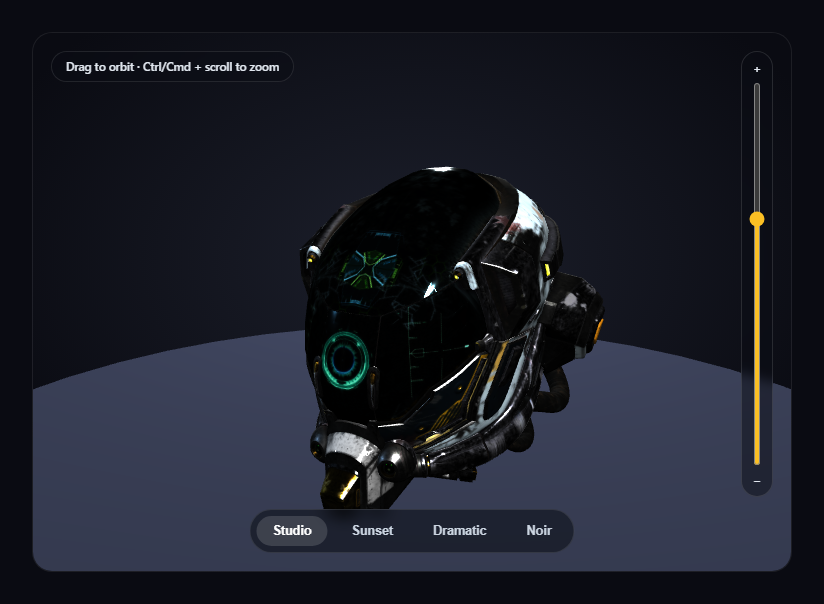
A single fixed lighting setup only ever shows one mood. This snippet loads a real, PBR-textured .glb model and gives it four complete lighting *recipes* to switch between — Studio, Sunset, Dramatic, and Noir — each one a coordinated change to every light's color and intensity plus the surrounding background wash, so the same physical geometry and materials can read as a clean product shot, a golden-hour scene, a high-contrast hero shot, or a moody character study.
One set of lights, retuned — not rebuilt
Rather than destroying and recreating light objects per preset (expensive, and a common source of memory leaks in longer-lived scenes), the four THREE.Light instances — ambient, keyLight, fillLight, rimLight — are created exactly once. applyPreset() simply calls .color.set() and reassigns .intensity on each existing light. Every preset switch is just property mutation on the same four objects, which is instant and leaves nothing to garbage-collect.
A recipe, not a slider
Each entry in the PRESETS object is a small, self-contained object holding a [color, intensity] pair for every light plus a CSS background gradient string — real art direction, not one shared brightness knob. Sunset warms every light's hue and pushes the ambient and key warmer; Dramatic drops ambient and fill almost to zero while cranking the key light hard, producing real chiaroscuro; Noir desaturates everything toward cool grays and blues. Because every preset sets *all four* lights explicitly, switching between any two presets in either order always produces a fully correct result — there's no residual state left over from whichever preset was active before.
A real PBR model to catch the difference
The loaded Damaged Helmet sample asset has genuine metalness/roughness texture variation across its surface — a lighting study is only worth doing on a model whose materials actually respond differently to changing key/fill/rim balance, unlike a flat-colored placeholder.
The background changes too, not just the lights
Each preset also sets a CSS radial-gradient on the wrapper element behind the transparent-alpha canvas, with a 1-second CSS transition already declared on that property — so switching from Studio's cool blue-black to Sunset's warm amber backdrop reads as one coordinated scene change, not just a lighting tweak floating in an unrelated background.
Zoom is opt-in, not a hijacked scroll wheel
OrbitControls' built-in wheel-zoom is turned off, with zoom reimplemented as a slider plus Ctrl/Cmd + scroll, so a plain scroll over the card always scrolls the page.
Customizing it
Add a fifth preset by extending the PRESETS object with a new [color, intensity] recipe, swap MODEL_URL for any other PBR-textured .glb, or pair this with GLB wireframe/solid toggle viewer for a combined material-and-lighting study tool.
Build with AI
Build, Understand, Optimize, and Extend It With AI
Paste this snippet's HTML, CSS, and JS into an AI coding assistant like Claude and ask it to explain exactly why retuning four persistent light objects' colors and intensities is more efficient than recreating lights per preset, and why every preset setting all four lights explicitly (rather than only the ones that differ) is what guarantees correct results regardless of switching order. It's also useful for extending the demo — ask it to animate a smooth interpolated transition between two presets' light values over half a second instead of an instant snap, add a fifth "custom" preset with manual sliders for each light's intensity, or add an environment map (HDRI) that also swaps per preset for more realistic reflections. Use the conversation to build real intuition for coordinated multi-light art direction before applying the same recipe-based preset pattern to your own Three.js lighting setup.
Prompt to recreate it
Copy this into your AI assistant of choice to build the effect from scratch, or as a jumping-off point for your own variant:
Build a "GLB lighting studio viewer" in plain HTML, CSS, and JavaScript using Three.js (core, GLTFLoader, and OrbitControls, all loaded from a CDN with no bundler).

Requirements:
- A full-size Three.js scene with OrbitControls (damping enabled, bounded min/max zoom distance) so a visitor can drag to orbit the camera around a loaded 3D model at any time.
- Load a real .glb model using THREE.GLTFLoader pointed at a genuine, freely-licensed, CDN-hosted glTF binary URL with real PBR (metalness/roughness) material variation across its surface (e.g. one of Khronos' official glTF-Sample-Assets models) — do not substitute a flat-colored primitive geometry.
- After the model loads, measure its bounding box and scale it to a fixed target height rather than a hardcoded scale number, then reposition it to rest on a simple ground plane.
- Create exactly four persistent lights once: an ambient light, a directional key light, a directional fill light, and a point or directional rim light.
- Define at least four named lighting presets as plain data (e.g. Studio, Sunset, Dramatic, Noir), each specifying an explicit color and intensity for every one of the four lights plus a background gradient for the scene's backdrop — every preset must set all four lights explicitly, not just the ones that differ from a previous preset, so switching between any two presets in any order always produces a fully correct result.
- Render a row of preset buttons; clicking one must instantly retune the existing light objects' color and intensity properties (never recreate the lights) and transition the backdrop to that preset's background gradient.
- Turn off OrbitControls' own wheel-zoom and instead implement zoom as an explicit opt-in gesture: a vertical range-input slider next to the canvas, plus Ctrl/Cmd + scroll wheel — a plain scroll must do nothing and pass through to the page normally.
- Handle the GLTFLoader's error callback by logging the real error and substituting a simple placeholder mesh with visible metalness/roughness variation, so every lighting preset still has something real to demonstrate on if the model fails to load.
Want to tighten it up first? Run this prompt through the AI Prompt Studio to score it across 8 quality dimensions, catch anti-patterns, and tune the wording for Claude, ChatGPT, or Gemini before you paste it in.
Step by step
How to Use
- 1Add all three CDN scriptsthree.min.js, GLTFLoader.js, and OrbitControls.js.
- 2Paste HTML, CSS, and JSThe helmet loads under the neutral Studio lighting preset.
- 3Click a preset pillAll four lights and the background retune together, live.
- 4Drag on the canvasOrbit freely under any lighting preset to inspect how it catches the surface.
- 5Use the slider or Ctrl/Cmd + scroll to zoomPlain scroll always scrolls the page; zoom is a separate, opt-in gesture.
- 6Add your own presetExtend the PRESETS object with a new named lighting recipe.
Real-world uses
Common Use Cases
Got questions?
Frequently Asked Questions
Creating and destroying THREE.Light objects repeatedly is wasteful and, in a longer-lived scene, a common source of memory churn. Because each light's color and intensity are ordinary mutable properties, applyPreset() simply reassigns them on the same four persistent light objects every time a preset button is clicked — instant, and nothing needs to be garbage-collected.
Every entry in the PRESETS object sets an explicit color and intensity for all four lights (ambient, key, fill, rim), never just the ones that differ from the previous preset. That means there's never any residual light setting left over from whichever preset was active before — clicking Noir then Sunset then Dramatic in any sequence always produces exactly the same result as clicking Dramatic directly.
A lighting study is only informative on a surface with real material variation to catch light differently across it. The Damaged Helmet's genuine PBR metalness and roughness texture maps respond visibly differently to each preset's ambient/key/fill/rim balance, unlike a flat single-color placeholder shape, which would look nearly identical under every preset.
Both. Each preset also sets a CSS radial-gradient background on the canvas's wrapper element, with a one-second CSS transition already declared on that property, so the backdrop color shifts in sync with the lighting change — a full scene mood switch, not an isolated lighting tweak against an unrelated background.
Set up the renderer, scene, GLTFLoader call, OrbitControls, and the four persistent light objects inside a mount effect, keeping them and the PRESETS object in refs or module scope so the preset button click handlers can reach current values. Call controls.dispose() and renderer.dispose() in the cleanup function to release the WebGL context and drag listeners on unmount.