You Might Also Like
Learn Coding Visually
Learn to code with interactive, live-preview playgrounds — HTML, CSS, JavaScript, React & more.
 HTML Playground42 lessons · Click-based · Live preview
 CSS PlaygroundLearn CSS with a live editor
 JavaScript Playground60 lessons · DOM · Async · Canvas
 React PlaygroundLearn React with a live code editor
 GSAP PlaygroundLearn GSAP animation interactively
 SVG Playground44 lessons · shapes · paths · animation
 SCSS Playground45 lessons · Sass modules · tokens
 Tailwind PlaygroundLearn Tailwind CSS with a live editor
 Bootstrap 5 Playground50 lessons · live preview
GLB Hotspot Annotation Viewer — Free Three.js glTF Screen-Space Marker Snippet
GLB Hotspot Annotation Viewer · Cards · Plain HTML, CSS & JS · Live preview
What's included
Features
About this UI Snippet
GLB Hotspot Annotation Viewer — Real DOM Markers Tracking a 3D Model
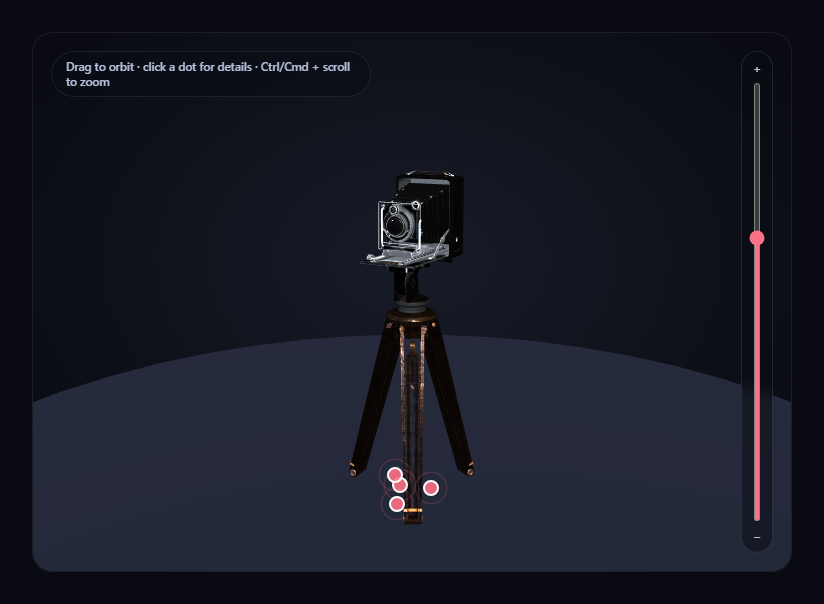
Annotating a 3D model with labeled hotspots means solving one core problem: keeping a flat, clickable 2D marker glued to a specific 3D point on the model as the camera orbits and zooms around it. This snippet solves that with camera.project(), converting each hotspot's fixed world-space position into normalized device coordinates every single frame, and positioning a real absolutely-positioned <div> there — genuine, accessible, styleable DOM elements, not a canvas-drawn overlay.
Defined in local space, converted once the scale is known
Each hotspot in HOTSPOT_DEFS is authored as a local coordinate — a point relative to the model's own unscaled geometry, easy to eyeball from the source asset's proportions. Once the model loads and its auto-fit scale factor is computed, buildHotspots() converts every local point into a fixed world-space Vector3 exactly once, multiplying by that same scale factor and adding the model's final grounded position — so a hotspot always tracks the same physical point on the model regardless of how large or small the auto-fit ends up making it.
`camera.project()`, recomputed every frame
Inside the render loop, updateMarkers() calls .project(camera) on each hotspot's stored world position, which returns normalized device coordinates in the [-1, 1] range for x and y. A short conversion maps that into actual canvas pixel coordinates, and the marker's <div> gets its left/top CSS set directly — recomputed fresh every frame, so dragging to orbit or zooming with the slider or Ctrl/Cmd + scroll all keep every marker glued exactly where it should be with zero lag.
A simple occlusion check, not a full raycast
projected.z > 1 after projection indicates the point has gone behind the camera's near/far range from this viewing angle — the marker's opacity is set to 0 and its pointer-events disabled in that case, so a hotspot on the far side of the model doesn't sit visibly (and clickably) on top of it. This is a lightweight heuristic, not a full raycasted occlusion test against the model's own geometry, but it's enough to keep markers from feeling obviously wrong.
Real DOM, real accessibility, real info cards
Because markers are genuine <div> elements layered in a position: absolute container over the canvas, they support real click listeners, hover states, and focus — clicking one opens a styled info card anchored to the corner of the viewer with that hotspot's title and description, closable independently of which marker triggered it.
A named, honest fallback if the model fails
If the .glb can't load, a simple box placeholder is built and run through the exact same buildHotspots() function, so the four hotspots still appear (in slightly less meaningful spots) and remain fully clickable.
Zoom is opt-in, not a hijacked scroll wheel
OrbitControls' built-in wheel-zoom is turned off, with zoom reimplemented as a slider plus Ctrl/Cmd + scroll, so a plain scroll over the card always scrolls the page.
Customizing it
Adjust each hotspot's local coordinate to point at different features, add more entries to HOTSPOT_DEFS, or pair this with GLB exploded view assembly toggle to label parts once they're pulled apart.
Build with AI
Build, Understand, Optimize, and Extend It With AI
Paste this snippet's HTML, CSS, and JS into an AI coding assistant like Claude and ask it to explain exactly how camera.project() converts a fixed 3D world position into 2D screen pixels every frame, and why authoring hotspots in the model's local space (converted to world space only once the auto-fit scale is known) keeps their placement correct regardless of how large the model ends up being scaled. It's also useful for extending the demo — ask it to add a real raycast-based occlusion check against the model's own geometry instead of the simpler projected-z heuristic, animate markers with a staggered entrance once the model finishes loading, or add a numbered index badge on each marker with a matching numbered list in a sidebar. Use the conversation to build real intuition for screen-space DOM-to-3D tracking before applying the same hotspot pattern to your own annotated glTF model.
Prompt to recreate it
Copy this into your AI assistant of choice to build the effect from scratch, or as a jumping-off point for your own variant:
Build a "GLB hotspot annotation viewer" in plain HTML, CSS, and JavaScript using Three.js (core, GLTFLoader, and OrbitControls, all loaded from a CDN with no bundler).

Requirements:
- A full-size Three.js scene with OrbitControls (damping enabled, bounded min/max zoom distance) so a visitor can drag to orbit the camera around a loaded 3D model at any time, studio-lit with key and fill lights plus a simple grounding disc.
- Load a real .glb model using THREE.GLTFLoader pointed at a genuine, freely-licensed, CDN-hosted glTF binary URL with several visually distinct features worth annotating (e.g. one of Khronos' official glTF-Sample-Assets models) — do not substitute a primitive geometry.
- After the model loads, measure its bounding box and scale it to a fixed target height rather than a hardcoded scale number, then reposition it to rest on a ground plane.
- Define at least four hotspots as plain data, each with a coordinate expressed in the model's own original local (unscaled) space plus a title and description string. Once the model's final auto-fit scale factor and position are known, convert each hotspot's local coordinate into a single fixed world-space position exactly once — do not recompute or re-derive it every frame.
- Create one real absolutely-positioned DOM element per hotspot, layered over the canvas. On every animation frame, project each hotspot's stored world position through the camera (using a method equivalent to Three.js's Vector3.project()) to get normalized device coordinates, convert those into actual canvas pixel coordinates, and set the marker element's position directly — so the markers track the model in real time through any orbit or zoom with no lag.
- Add a simple occlusion heuristic: when a hotspot's projected depth indicates it is currently behind the camera (not in front of it), fade that marker's opacity to zero and disable its pointer events, so hidden-side markers don't appear clickable on top of the model.
- Clicking a hotspot marker must open a small info card showing that hotspot's title and description, closable independently, and switching between hotspots must update the open card's content without needing to close and reopen it manually.
- Turn off OrbitControls' own wheel-zoom and instead implement zoom as an explicit opt-in gesture: a vertical range-input slider next to the canvas, plus Ctrl/Cmd + scroll wheel — a plain scroll must do nothing and pass through to the page normally.
- Handle the GLTFLoader's error callback by logging the real error and running a simple placeholder mesh through the exact same hotspot-building function used for the real model, so the annotation markers keep working even if the model fails to load.
Want to tighten it up first? Run this prompt through the AI Prompt Studio to score it across 8 quality dimensions, catch anti-patterns, and tune the wording for Claude, ChatGPT, or Gemini before you paste it in.
Step by step
How to Use
- 1Add all three CDN scriptsthree.min.js, GLTFLoader.js, and OrbitControls.js.
- 2Paste HTML, CSS, and JSThe camera model loads with four pulsing hotspot markers already tracking it.
- 3Drag on the canvasOrbit around the model; every marker keeps glued to its point in real time.
- 4Click a markerAn info card opens describing that specific feature.
- 5Use the slider or Ctrl/Cmd + scroll to zoomPlain scroll always scrolls the page; markers keep tracking through any zoom.
- 6Edit HOTSPOT_DEFSChange local coordinates, titles, and text to annotate different features.
Real-world uses
Common Use Cases
Got questions?
Frequently Asked Questions
Every hotspot's fixed world-space position is passed through camera.project() once per rendered frame, which returns normalized device coordinates for exactly where that 3D point currently projects onto the 2D screen from the camera's current position and angle. Those coordinates are converted into pixel values and set directly as the marker div's left/top CSS — recomputed fresh every frame, so any orbit or zoom keeps every marker exactly aligned with no lag or drift.
Local coordinates are authored relative to the model's own original, unscaled geometry, which is far easier to eyeball correctly from the source asset's proportions. Once the model loads and its auto-fit scale factor is known, each local coordinate is converted into a fixed world-space position exactly once, using that same scale factor — so a hotspot always tracks the same physical point on the model regardless of how large the auto-fit ends up making it.
After projecting a hotspot's world position through the camera, a projected z value greater than 1 indicates that point is currently behind the camera in its projected depth range. The snippet uses this as a lightweight heuristic to fade out and disable clicking on markers in that state — it is not a full raycast against the model's actual geometry, but it is enough to avoid an obviously wrong-feeling marker sitting on top of the model from the wrong side.
The loader's error callback logs the real failure and builds a simple box placeholder, which is passed through the exact same buildHotspots() function the real model uses — so all four hotspot markers still appear and remain fully clickable, just annotating a placeholder shape instead of the real camera model.
Set up the renderer, scene, GLTFLoader call, OrbitControls, and the hotspots array inside a mount effect, keeping the array and modelRoot in refs so the render loop's updateMarkers() and the card click handlers can reach current values. Call controls.dispose() and renderer.dispose() in the cleanup function to release the WebGL context and drag listeners on unmount.