You Might Also Like
Learn Coding Visually
Learn to code with interactive, live-preview playgrounds — HTML, CSS, JavaScript, React & more.
 HTML Playground42 lessons · Click-based · Live preview
 CSS PlaygroundLearn CSS with a live editor
 JavaScript Playground60 lessons · DOM · Async · Canvas
 React PlaygroundLearn React with a live code editor
 GSAP PlaygroundLearn GSAP animation interactively
 SVG Playground44 lessons · shapes · paths · animation
 SCSS Playground45 lessons · Sass modules · tokens
 Tailwind PlaygroundLearn Tailwind CSS with a live editor
 Bootstrap 5 Playground50 lessons · live preview
GLB Side-by-Side Model Comparison — Free Dual-Viewport Three.js glTF Snippet
GLB Side-by-Side Model Comparison · Cards · Plain HTML, CSS & JS · Live preview
What's included
Features
About this UI Snippet
GLB Side-by-Side Model Comparison — Two Independent Viewports, One Optional Sync
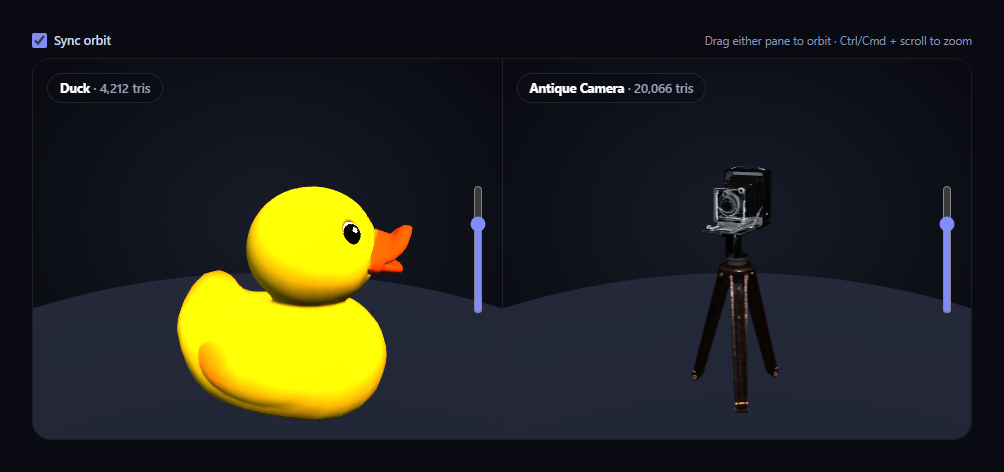
Comparing two 3D models properly means more than putting two screenshots next to each other — it means being able to inspect both from the same angle, live, while still being able to break away and look at either one independently. This snippet runs two entirely separate Three.js scenes, cameras, and OrbitControls instances side by side, and adds a "Sync orbit" toggle that mirrors one pane's camera angle onto the other whenever it's checked.
Two full scenes, not one shared one
Every piece of Three.js state — scene, camera, renderer, and OrbitControls — is built twice, once per key ('A' and 'B'), and stored in small lookup objects rather than duplicated as separate top-level variables. Each pane's GLTFLoader.load() call, resize handler, and render call are entirely independent, so a slow or failing load in one pane never affects the other.
Mirroring spherical coordinates, not raw camera positions
When "Sync orbit" is checked, dragging pane A fires OrbitControls' 'change' event, which calls mirrorOrbit('A', 'B'). Rather than copying A's camera position directly onto B (which would ignore that the two models sit at different distances from their own cameras), the snippet converts A's camera offset from its target into a THREE.Spherical — an azimuthal angle, polar angle, and radius — then rebuilds B's camera offset using A's *angles* but B's own existing *radius*. The result: both panes always show the same relative viewing angle, even while each keeps its own independent zoom level.
Auto-fit scale for both models independently
Each call to loadModel() measures its own model's bounding box with THREE.Box3 and scales it to the same fixed target height, so two models of very different native sizes and origins in their source .glb files still compare fairly, side by side, at a consistent visual scale.
A live triangle count per model
After each model loads, the snippet walks every mesh in its scene graph and sums up triangle counts from either the geometry's index buffer or its raw vertex count, displaying the total next to that pane's label — a genuinely useful, real number for anyone comparing model complexity, not a decorative placeholder.
Independent, honest fallbacks
If either .glb fails to load, that pane's error callback logs which pane failed and swaps in its own distinct placeholder shape and color, so a single broken URL never blanks out the whole comparison.
Zoom is opt-in, not a hijacked scroll wheel
Both panes turn off OrbitControls' built-in wheel-zoom and reimplement it as an explicit slider plus Ctrl/Cmd + scroll, exactly like every other snippet in this family, so a plain scroll over either pane always scrolls the page.
Customizing it
Swap either MODEL_URL for any other Khronos sample-asset .glb, add a third pane by extending the 'A'/'B' keys to 'C', or pair it with GLB product color configurator for a compare-then-customize flow.
Build with AI
Build, Understand, Optimize, and Extend It With AI
Paste this snippet's HTML, CSS, and JS into an AI coding assistant like Claude and ask it to explain exactly why mirroring spherical coordinates (angle only, not radius) is the correct way to sync two independently-zoomed camera views, and why running two fully separate Three.js scenes side by side is more robust than trying to share one scene between two viewports. It's also useful for extending the demo — ask it to add a third comparison pane, add a synced "auto-rotate both" toggle, or add a text diff panel showing each model's triangle count, file size, or material count side by side. Use the conversation to build real intuition for coordinating multiple independent Three.js instances before applying the same pattern to your own multi-model comparison tool.
Prompt to recreate it
Copy this into your AI assistant of choice to build the effect from scratch, or as a jumping-off point for your own variant:
Build a "side-by-side 3D model comparison" viewer in plain HTML, CSS, and JavaScript using Three.js (core, GLTFLoader, and OrbitControls, all loaded from a CDN with no bundler).

Requirements:
- Two side-by-side panes, each with its own independent WebGLRenderer, Scene, PerspectiveCamera, and OrbitControls instance (with damping enabled and a bounded min/max zoom distance) — the two panes must be fully independent Three.js instances, not one shared scene rendered twice.
- Load a different real .glb model into each pane using THREE.GLTFLoader, each pointed at a genuine, freely-licensed, CDN-hosted glTF binary URL (e.g. two different Khronos glTF-Sample-Assets models) — do not substitute primitive geometry for either model.
- After each model loads, measure its bounding box and scale it to the same fixed target height (rather than a hardcoded scale number) so both models compare fairly at a consistent visual size, and reposition each so it rests on its own ground plane.
- Add a "Sync orbit" checkbox. When checked, dragging either pane's camera must mirror that pane's viewing angle (azimuthal and polar angle only, converted via spherical coordinates) onto the other pane's camera, while preserving each pane's own independently-set zoom distance — do not simply copy one camera's raw position onto the other, since the two models may sit at different distances from their cameras.
- Compute and display a live triangle count for each loaded model, calculated by walking every mesh in its scene graph and summing triangle counts from either the indexed geometry's index count or the raw vertex count.
- Turn off OrbitControls' own wheel-zoom on both panes and instead implement zoom as an explicit opt-in gesture per pane: a vertical range-input slider, plus Ctrl/Cmd + scroll wheel — a plain scroll over either pane must do nothing and pass through to the page normally.
- Handle each pane's GLTFLoader error callback independently by logging which pane failed and substituting a distinct placeholder mesh in that pane only, so a single broken model URL never blanks out the other pane.
Want to tighten it up first? Run this prompt through the AI Prompt Studio to score it across 8 quality dimensions, catch anti-patterns, and tune the wording for Claude, ChatGPT, or Gemini before you paste it in.
Step by step
How to Use
- 1Add all three CDN scriptsthree.min.js, GLTFLoader.js, and OrbitControls.js.
- 2Paste HTML, CSS, and JSTwo models load side by side, each with its own triangle count.
- 3Drag either paneWith "Sync orbit" checked, the other pane mirrors the same viewing angle.
- 4Uncheck "Sync orbit"Each pane orbits fully independently.
- 5Use either slider or Ctrl/Cmd + scrollZoom each pane independently at any time — plain scroll always scrolls the page.
- 6Swap the model URLsPoint either loadModel() call at a different .glb to compare other models.
Real-world uses
Common Use Cases
Got questions?
Frequently Asked Questions
It converts the dragged pane's camera offset from its target into spherical coordinates (an azimuthal angle, a polar angle, and a radius), then rebuilds the other pane's camera offset using the dragged pane's two angles but that other pane's own existing radius. Angle and distance are kept as separate values on purpose, so both panes always face the same direction while each still remembers its own independent zoom.
Two fully separate scenes, cameras, renderers, and OrbitControls instances, each keyed by 'A' or 'B' in small lookup objects. Nothing is shared between them except the mirroring logic that runs only when Sync orbit is checked — a slow load, a failed model, or independent dragging in one pane never touches the other.
After each model loads, the snippet walks every mesh in its scene graph. For each mesh's geometry, it uses the index buffer's vertex count divided by three if the geometry is indexed, or the raw position attribute's vertex count divided by three otherwise, then sums that across every mesh in the model.
Each pane has its own independent GLTFLoader error callback. If pane B's model fails, its callback logs specifically which pane failed and swaps in its own placeholder shape and label text, while pane A continues to load and render completely normally, so one broken URL never blanks out the whole comparison.
Set up both renderers, scenes, GLTFLoader calls, and OrbitControls instances inside a mount effect, keeping the per-key lookup objects and the syncBox checkbox state in refs so the change-event mirroring logic can reach current values. Call both controls' .dispose() and both renderers' .dispose() in the cleanup function to release both WebGL contexts on unmount.