You Might Also Like
Learn Coding Visually
Learn to code with interactive, live-preview playgrounds — HTML, CSS, JavaScript, React & more.
 HTML Playground42 lessons · Click-based · Live preview
 CSS PlaygroundLearn CSS with a live editor
 JavaScript Playground60 lessons · DOM · Async · Canvas
 React PlaygroundLearn React with a live code editor
 GSAP PlaygroundLearn GSAP animation interactively
 SVG Playground44 lessons · shapes · paths · animation
 SCSS Playground45 lessons · Sass modules · tokens
 Tailwind PlaygroundLearn Tailwind CSS with a live editor
 Bootstrap 5 Playground50 lessons · live preview
GLB Wireframe / Solid Toggle Viewer — Free Three.js glTF Cross-Fade Snippet
GLB Wireframe / Solid Toggle Viewer · Cards · Plain HTML, CSS & JS · Live preview
What's included
Features
About this UI Snippet
GLB Wireframe / Solid Toggle Viewer — A Continuous Blend, Not a Binary Flip
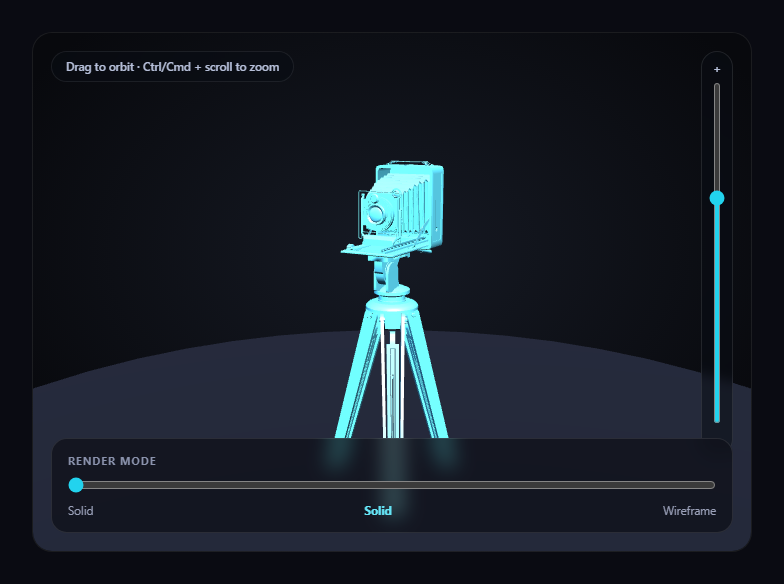
The obvious way to toggle wireframe mode on a Three.js model is flipping material.wireframe = true. That gives a hard, instant snap between two looks. This snippet does something more useful for actually studying a model's geometry: it builds two full mesh clones of every part — one solid-shaded, one wireframe — layered exactly on top of each other, and cross-fades their opacity continuously from a single slider, so a visitor can rest anywhere between "fully solid" and "fully wireframe," not just at the two extremes.
Two meshes per part, sharing one geometry
For every mesh found by traversing the loaded model, buildDualMaterialModel() creates two new THREE.Mesh instances that both reference the *same* node.geometry object — no geometry is duplicated in memory, only the materials differ. One gets a MeshStandardMaterial for solid shading, the other a MeshBasicMaterial with wireframe: true. Both start transparent: true so their opacity can be driven independently.
Baking world transforms instead of reparenting
Rather than trying to preserve and reparent the original model's node hierarchy (position, rotation, and scale at every level), each cloned mesh has matrixAutoUpdate turned off and its .matrix set directly from the source node's already-computed matrixWorld — after the auto-fit scale and ground-alignment shift have both already been applied and the world matrices recomputed with updateMatrixWorld(true). That one .matrix copy is all that's needed to place each flattened clone exactly where its original part was, with no hierarchy to maintain afterward.
The slider drives one function, both groups
applyMix(t01) sets every solid clone's opacity to 1 - t01 and every wireframe clone's opacity to t01 in the same call, so the two groups are always perfectly complementary — there's no moment where both are fully opaque or both are fully transparent, and the model never visually disappears at any point along the slider's range.
Auto-fit before flattening, not after
The bounding-box measurement, scale, and ground-position shift all happen on the *original* loaded model, with model.updateMatrixWorld(true) called before flattening into the dual-material clones — so every clone's baked world matrix already reflects the correctly-sized, correctly-grounded final position.
A named, honest fallback if the model fails
If the .glb can't load, a simple icosahedron is run through the exact same buildDualMaterialModel() function, so the solid/wireframe slider keeps working correctly even without the real model.
Zoom is opt-in, not a hijacked scroll wheel
OrbitControls' built-in wheel-zoom is turned off, with zoom reimplemented as a slider plus Ctrl/Cmd + scroll, so a plain scroll over the card always scrolls the page.
Customizing it
Swap MODEL_URL for any other .glb with clean, readable edges, or pair this with GLB lighting studio viewer to study how lighting and geometry inspection combine.
Build with AI
Build, Understand, Optimize, and Extend It With AI
Paste this snippet's HTML, CSS, and JS into an AI coding assistant like Claude and ask it to explain exactly why layering two transparent mesh clones with complementary opacity produces a smoother, more useful inspection tool than toggling a single material's wireframe boolean, and why sharing one geometry object between the two clones avoids duplicating the model's vertex data in memory. It's also useful for extending the demo — ask it to color wireframe edges by curvature or edge angle instead of a flat tint, add a numeric readout of vertex and edge count, or add a second slider that fades in the model's original textures only on the solid side. Use the conversation to build real intuition for layered-material geometry inspection before applying the same cross-fade technique to your own glTF asset review tooling.
Prompt to recreate it
Copy this into your AI assistant of choice to build the effect from scratch, or as a jumping-off point for your own variant:
Build a "GLB wireframe / solid toggle viewer" in plain HTML, CSS, and JavaScript using Three.js (core, GLTFLoader, and OrbitControls, all loaded from a CDN with no bundler).

Requirements:
- A full-size Three.js scene with OrbitControls (damping enabled, bounded min/max zoom distance) so a visitor can drag to orbit the camera around a loaded 3D model at any time, studio-lit with key and fill lights plus a simple grounding disc.
- Load a real .glb model using THREE.GLTFLoader pointed at a genuine, freely-licensed, CDN-hosted glTF binary URL with clean, readable edge topology (e.g. one of Khronos' official glTF-Sample-Assets models) — do not substitute a primitive geometry.
- After the model loads, measure its bounding box and scale it to a fixed target height rather than a hardcoded scale number, reposition it to rest on the ground plane, and update its world matrices.
- Traverse the loaded model and, for every mesh, create two new mesh instances that both reference the exact same geometry object (do not clone or duplicate the geometry data itself) — one using a solid MeshStandardMaterial and one using a MeshBasicMaterial with wireframe set to true, both marked transparent. Copy each source node's fully-computed world matrix directly onto each new mesh's own matrix (with matrixAutoUpdate disabled) so both clones are positioned correctly without needing to reparent them into a hierarchy.
- Add a single range-input slider from 0 to 100. Its input handler must set every solid clone's opacity to (1 - value) and every wireframe clone's opacity to (value) in the same update, so the two are always complementary and the model is never fully invisible at any point along the slider — a continuous cross-fade, not a binary on/off toggle.
- Turn off OrbitControls' own wheel-zoom and instead implement zoom as an explicit opt-in gesture: a vertical range-input slider next to the canvas, plus Ctrl/Cmd + scroll wheel — a plain scroll must do nothing and pass through to the page normally.
- Handle the GLTFLoader's error callback by logging the real error and running a simple placeholder mesh through the exact same dual-material clone-building function used for the real model, so the cross-fade slider keeps working even if the model fails to load.
Want to tighten it up first? Run this prompt through the AI Prompt Studio to score it across 8 quality dimensions, catch anti-patterns, and tune the wording for Claude, ChatGPT, or Gemini before you paste it in.
Step by step
How to Use
- 1Add all three CDN scriptsthree.min.js, GLTFLoader.js, and OrbitControls.js.
- 2Paste HTML, CSS, and JSThe camera model loads fully solid-shaded.
- 3Drag the render-mode sliderThe model continuously cross-fades from solid toward pure wireframe.
- 4Drag on the canvasOrbit freely at any blend amount to inspect edges from any angle.
- 5Use the slider or Ctrl/Cmd + scroll to zoomPlain scroll always scrolls the page; zoom is a separate, opt-in gesture.
- 6Swap the model URLPoint MODEL_URL at any other .glb to inspect a different model's geometry.
Real-world uses
Common Use Cases
Got questions?
Frequently Asked Questions
Flipping a single material's wireframe boolean only produces a hard, instant snap between two looks. Building a solid-shaded clone and a wireframe clone that share the same underlying geometry, both marked transparent, lets their opacity be cross-faded continuously from a slider — so a visitor can rest anywhere between fully solid and fully wireframe, which a boolean toggle simply cannot represent.
No. Both the solid and wireframe THREE.Mesh instances for a given part reference the exact same geometry object — only two new Mesh wrapper objects and two new materials are created per part, not two copies of the vertex, normal, and UV data. Geometry, which is typically the largest chunk of memory a model uses, is never duplicated.
Preserving a full node hierarchy (with nested position/rotation/scale at every level) for two full clones would be significantly more bookkeeping than needed. Instead, each source node's already-computed matrixWorld — after the auto-fit scale and ground-alignment shift are both applied — is copied directly onto each flattened clone's own .matrix, with matrixAutoUpdate turned off. One matrix copy per clone places it correctly with zero hierarchy left to maintain.
The loader's error callback logs the real failure and builds a simple icosahedron group, which is passed through the exact same buildDualMaterialModel() function the real model uses — so the render-mode slider keeps working correctly, cross-fading a placeholder shape instead of silently doing nothing.
Set up the renderer, scene, GLTFLoader call, OrbitControls, and the solidGroup/wireGroup pair inside a mount effect, keeping them in refs so the slider's input handler can reach current values. Call controls.dispose() and renderer.dispose() in the cleanup function to release the WebGL context and drag listeners on unmount.