You Might Also Like
Learn Coding Visually
Learn to code with interactive, live-preview playgrounds — HTML, CSS, JavaScript, React & more.
 HTML Playground42 lessons · Click-based · Live preview
 CSS PlaygroundLearn CSS with a live editor
 JavaScript Playground60 lessons · DOM · Async · Canvas
 React PlaygroundLearn React with a live code editor
 GSAP PlaygroundLearn GSAP animation interactively
 SVG Playground44 lessons · shapes · paths · animation
 SCSS Playground45 lessons · Sass modules · tokens
 Tailwind PlaygroundLearn Tailwind CSS with a live editor
 Bootstrap 5 Playground50 lessons · live preview
GLB Product Color Configurator — Free Three.js glTF Paint Swatch Snippet
GLB Product Color Configurator · Cards · Plain HTML, CSS & JS · Live preview
What's included
Features
About this UI Snippet
GLB Product Color Configurator — Real glTF Geometry, Live Paint and Finish Swatches
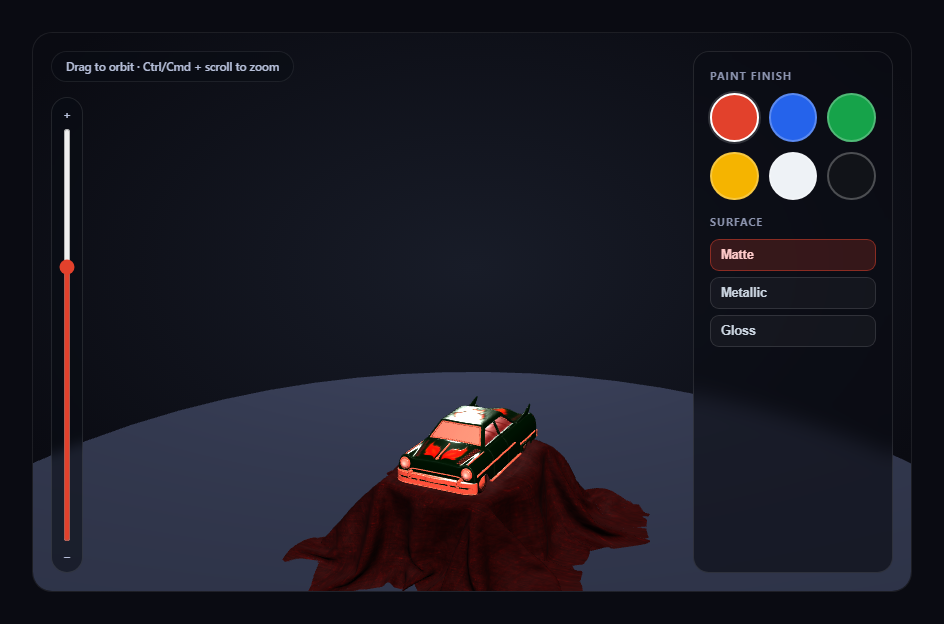
Most "3D color picker" demos recolor a primitive sphere or cube. This snippet does the real thing: it loads a genuine .glb model with Three.js's GLTFLoader, then lets a visitor click through paint swatches and surface-finish presets that change the model's *actual* materials in real time, on the actual loaded geometry.
Cloning materials before touching them
A glTF scene graph frequently reuses one material instance across several mesh nodes. Setting .color on a shared material would recolor every mesh using it, which is rarely what a single-product configurator wants. The moment the model loads, this snippet walks its full node tree with car.traverse(), and for every mesh clones its material with node.material.clone() before collecting it into a paintMaterials array. Every swatch and finish button afterward only ever touches that per-instance clone.
Auto-fit rather than a guessed scale
Different .glb exports — and even different loader versions — can decode the same source asset's geometry at wildly different raw sizes. Rather than hardcoding a scale factor, the snippet measures the loaded model's bounding box with THREE.Box3, finds its largest dimension, and scales it to a known target height. The model is then repositioned so its lowest point rests exactly on the ground disc, regardless of how the source file was authored.
Color and finish are two independent controls
Clicking a paint swatch calls applyColor(), which sets .color on every cloned material. Clicking a finish preset (Matte, Metallic, Gloss) calls applyFinish(), which sets .metalness and .roughness instead — completely separate PBR properties. Because both act on the same live MeshStandardMaterial instances, any combination of the six colors and three finishes renders correctly with zero extra state to track.
A named, honest fallback if the model fails
If GLTFLoader can't fetch the .glb, the real error is logged and a simple box mesh takes its place — reusing the exact same paintMaterials array, so the swatches and finish buttons keep working on the placeholder instead of silently doing nothing.
Zoom is opt-in, not a hijacked scroll wheel
OrbitControls' built-in wheel-zoom is deliberately turned off (controls.enableZoom = false) so a plain scroll over the card always scrolls the page. Zoom is reimplemented as two explicit, opt-in gestures instead: a vertical slider next to the canvas, and Ctrl/Cmd + scroll wheel, both driving the same setZoomDistance() helper.
Customizing it
Swap MODEL_URL for any other Khronos sample-asset .glb, add more swatch colors, or extend applyFinish() with an emissive property for a glow-in-the-dark colorway. Pair it with three product viewer for the non-glTF version of the same recoloring idea, or GLB exploded view assembly toggle for a different way to interact with a loaded model.
Build with AI
Build, Understand, Optimize, and Extend It With AI
Paste this snippet's HTML, CSS, and JS into an AI coding assistant like Claude and ask it to explain exactly why cloning each mesh's material on load prevents one swatch click from accidentally recoloring unrelated geometry that shares a material in the source glTF file, and how the auto-fit bounding-box scale keeps the model correctly sized regardless of which .glb is loaded. It's also useful for extending the demo — ask it to persist the chosen color and finish in localStorage, add a "randomize" button that picks a random swatch and finish combination, or extend applyFinish() with an emissive color for glow-in-the-dark or neon colorways. Use the conversation to build real intuition for live PBR material editing before adapting the technique to your own glTF product model.
Prompt to recreate it
Copy this into your AI assistant of choice to build the effect from scratch, or as a jumping-off point for your own variant:
Build a "GLB product color configurator" in plain HTML, CSS, and JavaScript using Three.js (core, GLTFLoader, and OrbitControls, all loaded from a CDN with no bundler).

Requirements:
- A full-size Three.js scene with OrbitControls (damping enabled, bounded min/max zoom distance) so a visitor can drag to orbit the camera around a loaded 3D product at any time, studio-lit with at least key, fill, and rim lights plus a simple grounding disc.
- Load a real .glb model using THREE.GLTFLoader pointed at a genuine, freely-licensed, CDN-hosted glTF binary URL (e.g. one of Khronos' official glTF-Sample-Assets models) — do not substitute a Three.js primitive geometry standing in for "a product."
- After the model loads, measure its bounding box and scale it to a fixed target height rather than using a hardcoded scale number, then reposition it so its lowest point rests on the ground plane.
- Walk every mesh in the loaded model's scene graph and clone each one's material before storing references to the clones in an array, specifically to avoid mutating a material that might be shared by multiple mesh nodes in the source glTF file.
- Render a row of at least six color swatch buttons; clicking one must set the .color property on every cloned material live, with no mesh rebuild.
- Render a separate row of at least three surface-finish preset buttons (e.g. Matte, Metallic, Gloss); clicking one must set both metalness and roughness together on every cloned material, independently of the currently selected color.
- Turn off OrbitControls' own wheel-zoom (it calls preventDefault() on every wheel event, which would block normal page scrolling) and instead implement zoom as an explicit opt-in gesture: a vertical range-input slider next to the canvas, plus Ctrl/Cmd + scroll wheel — a plain scroll with no modifier key must do nothing and pass through to the page normally.
- Handle the GLTFLoader's error callback by logging the real error and substituting a simple placeholder mesh, adding its material to the same array the swatch and finish buttons already read from, so the configurator keeps working even if the real model fails to load.
Want to tighten it up first? Run this prompt through the AI Prompt Studio to score it across 8 quality dimensions, catch anti-patterns, and tune the wording for Claude, ChatGPT, or Gemini before you paste it in.
Step by step
How to Use
- 1Add all three CDN scriptsthree.min.js, GLTFLoader.js, and OrbitControls.js — in that order.
- 2Paste HTML, CSS, and JSThe toy car loads in racing red on a matte finish.
- 3Drag on the canvasOrbit the camera freely to inspect the model from any angle.
- 4Click a paint swatchEvery mesh's cloned material recolors instantly, live.
- 5Click a finish presetMatte, Metallic, or Gloss changes metalness and roughness together.
- 6Use the slider or Ctrl/Cmd + scroll to zoomPlain scroll always scrolls the page; zoom is a separate, opt-in gesture.
- 7Swap the model URLPoint MODEL_URL at any other .glb to configure a different product.
Real-world uses
Common Use Cases
Got questions?
Frequently Asked Questions
A glTF file frequently reuses one material instance across multiple mesh nodes to keep the file small. Setting .color directly on that shared material would recolor every mesh using it, which usually isn't the intent of a single-product color configurator. Cloning each mesh's material once, right after load, guarantees every swatch click only ever affects this specific model instance.
They control different PBR properties. Paint swatches set .color, the base tint of the surface. Finish presets set .metalness and .roughness together, which controls how that color reflects light — matte, brushed metal, or high gloss. Keeping them independent means any of the six colors can be combined with any of the three finishes without extra state tracking.
After loading, the snippet measures the model's actual bounding box with THREE.Box3, finds its largest dimension, and scales the whole model so that dimension matches a fixed target height. It then re-measures the scaled bounding box and shifts the model vertically so its lowest point sits exactly on the ground disc — a hardcoded scale number would break the moment a differently-exported .glb was swapped in.
The loader's error callback logs the real failure and creates a simple box mesh in its place, adding that placeholder's material to the same paintMaterials array the swatches and finish buttons already read from — so the configurator UI keeps working correctly even without the real model.
Set up the renderer, scene, GLTFLoader call, and OrbitControls inside a mount effect, storing paintMaterials and the loaded model in refs so the swatch and finish click handlers can reach current values. Call controls.dispose() and renderer.dispose() in the cleanup function to release the WebGL context and drag listeners on unmount.