Learn Coding Visually
Learn to code with interactive, live-preview playgrounds — HTML, CSS, JavaScript, React & more.
 HTML Playground42 lessons · Click-based · Live preview
 CSS PlaygroundLearn CSS with a live editor
 JavaScript Playground60 lessons · DOM · Async · Canvas
 React PlaygroundLearn React with a live code editor
 GSAP PlaygroundLearn GSAP animation interactively
 SVG Playground44 lessons · shapes · paths · animation
 SCSS Playground45 lessons · Sass modules · tokens
 Tailwind PlaygroundLearn Tailwind CSS with a live editor
 Bootstrap 5 Playground50 lessons · live preview
Sticky Promo Bar — Announcement Banner HTML CSS JS
Sticky Promo Announcement Bar · Navigation · Plain HTML, CSS & JS · Live preview
What's included
Features
setInterval at 1000ms decrements totalSeconds. font-variant-numeric:tabular-nums prevents layout shifts as digit widths change.closeBar(id) call — hiding one doesn't affect the others. Extend with localStorage to persist dismissal across reloads.rgba(0,0,0,.2) background on digit units works on any bar colour without hardcoding — transparent dark overlay that adapts to the gradient..bar-inner uses flex-wrap: wrap with justify-content: center — countdown and CTA wrap to a second line on mobile without breaking the layout..bar-close is position: absolute; right: 10px — always visible at the right edge regardless of bar content length.About this UI Snippet
Sticky Promo Bar — Live Countdown Timer, Gradient Variants & Dismiss Pattern
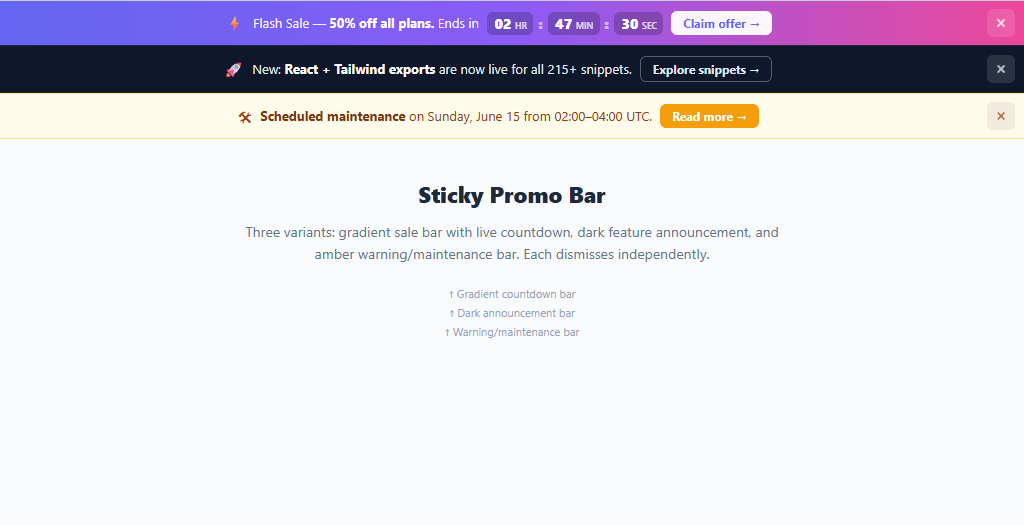
The sticky announcement bar is one of the highest-ROI UI components in SaaS and e-commerce — a single thin bar at the top of the page that communicates a time-sensitive offer, feature launch, or system status without blocking page content. This snippet builds three production-quality bar variants: a gradient sale bar with a live countdown timer, a dark announcement bar for feature launches, and an amber warning bar for maintenance notices. Each bar dismisses independently.
Announcement bars appear on virtually every high-converting SaaS and e-commerce site. Product Hunt uses them for server load notices. Vercel uses them to announce new features. E-commerce stores use them for flash sales with countdown timers. The design challenge is fitting the message, CTA, and dismiss button into 44px of height without the bar feeling cramped — especially on mobile where the bar must wrap gracefully.
Live countdown timer
The countdown timer uses setInterval(tick, 1000) to decrement a totalSeconds counter every second. Hours, minutes, and seconds are derived with integer division and modulo: h = Math.floor(totalSeconds / 3600), m = Math.floor((totalSeconds % 3600) / 60), s = totalSeconds % 60. Each unit is padded to two digits with String(n).padStart(2, '0'). The digits use font-variant-numeric: tabular-nums so the layout doesn't shift as numbers change width — critical for countdown displays.
The countdown unit blocks use background: rgba(0,0,0,.2) — a dark overlay on the gradient background that creates a pill-shaped digit container without hardcoding a background colour. This means the same .cd-unit style works on any bar background colour.
Three bar variants
The gradient bar uses a CSS linear-gradient(90deg, #6366f1, #8b5cf6, #ec4899) — the purple-to-pink gradient commonly associated with urgency and deals. The dark bar uses #0f172a (slate-900) with a subtle border — the pattern used for feature announcements and product updates. The warning bar uses an amber #fffbeb background with amber borders — the universally understood "caution" colour for maintenance windows. All three share the same structural CSS; only the colour scheme changes via class variants.
Dismiss with localStorage persistence
The closeBar function adds a .hidden class for immediate visual dismissal. In production, you'd extend this with localStorage.setItem('promoDismissed_bar1', 'true') and check on page load — so dismissed bars don't reappear on refresh. The localStorage key should include a version or date so new campaigns show even for users who dismissed an older bar.
CTA button variants
Three CTA styles match each bar variant: solid white button on the gradient bar (high contrast), ghost/outline button on the dark bar (subtle, doesn't compete with the headline), and amber filled button on the warning bar (matches the warning colour scheme). All use the same base .bar-cta class with modifier classes for variant styling. Pair with a modal for a full promotional overlay flow.
Build with AI
Build, Understand, Optimize, and Extend It With AI
You don't have to work out the countdown math or the variant structure by hand. Paste this snippet's HTML, CSS, and JS into an AI coding assistant like Claude and ask it to explain exactly how tick derives hours, minutes, and seconds from a single totalSeconds counter using integer division and modulo, and why font-variant-numeric tabular-nums matters for a ticking display. The same assistant can help optimize it — for instance whether three independent setInterval-driven bars would be better consolidated, or whether the countdown should be recomputed from a fixed target Date rather than a decrementing counter so it survives a tab going inactive. It's also useful for extending the bars: ask it to persist each bar's dismissed state to localStorage, drive the free-shipping variant from a live cart total, or add a fourth variant for a beta waitlist countdown. Treat the code less like a finished artifact and more like a starting point for a conversation.
Prompt to recreate it
Copy this into your AI assistant of choice to build the effect from scratch, or as a jumping-off point for your own variant:
Build a set of "sticky promo announcement bars" in plain HTML, CSS, and JavaScript using only setInterval and classList toggling — no animation library, no framework.

Requirements:
- Three independently dismissible bar variants stacked on the page: a gradient sale bar with a live countdown, a dark feature-announcement bar, and an amber warning/maintenance bar — each sharing the same structural markup (icon, message text, CTA link, close button) but differing only by a modifier class controlling colors.
- A closeBar function, callable per bar by id, that adds a hidden class to only that bar, leaving the others untouched and independently visible.
- A countdown timer that decrements a single totalSeconds integer once per second via setInterval, then derives hours, minutes, and seconds using Math.floor and modulo arithmetic (not three separate counters), and renders each unit zero-padded to two digits.
- The countdown digits must use a numeric font feature (tabular-nums or an equivalent monospaced number style) so the layout does not visibly shift width as digits change.
- Each bar's close button must be absolutely positioned at a fixed offset from the bar's edge regardless of how long the message or CTA text is, and the bar's inner content must wrap gracefully (flex-wrap) on narrow viewports without breaking.
- Do not persist dismissal in this base version, but structure closeBar so that adding a localStorage.setItem call and a corresponding page-load check would be a one-line change per bar.
Want to tighten it up first? Run this prompt through the AI Prompt Studio to score it across 8 quality dimensions, catch anti-patterns, and tune the wording for Claude, ChatGPT, or Gemini before you paste it in.
Step by step
How to Use
- 1Paste HTML, CSS, and JSThree stacked announcement bars appear at the top of the page. The first has a live countdown timer ticking down from 2h 47m 33s.
- 2Watch the countdown tickThe H:MM:SS digits update every second. Numbers use tabular-nums spacing so the layout doesn't shift.
- 3Click the × to dismiss each barEach bar hides independently — dismissing the gradient bar leaves the dark and warning bars visible.
- 4Click the CTA links"Claim offer →" on the gradient bar, "Explore snippets →" on the dark bar, "Read more →" on the warning bar — each links independently.
- 5Set your countdown end timeChange
let totalSeconds = 2 * 3600 + 47 * 60 + 33at the top of the JS to your target duration in hours, minutes, seconds. - 6Persist dismiss to localStorageAdd
localStorage.setItem('promoDismissed', '1')insidecloseBarand check it on load to prevent the bar reappearing on refresh.
Real-world uses
Common Use Cases
Got questions?
Frequently Asked Questions
Add position: sticky; top: 0; z-index: 100 to .promo-bar. For a fixed bar that stays visible on scroll, use position: fixed; top: 0; left: 0; right: 0 and add padding-top: 44px to body or the first page section to prevent content being hidden behind it.
Inside closeBar(id), add: localStorage.setItem('dismissed_' + id, '1'). At page load: ['bar1','bar2','bar3'].forEach(id => { if (localStorage.getItem('dismissed_' + id)) document.getElementById(id).classList.add('hidden') }).
Replace the totalSeconds variable with: const deadline = new Date('2026-12-31T23:59:59'); let totalSeconds = Math.floor((deadline - Date.now()) / 1000). This counts down to a fixed date rather than a relative duration.
Create a PromoBar component with props: {variant, emoji, text, cta, ctaHref, deadline}. The countdown uses useEffect with a setInterval cleanup and useState for the remaining seconds. The dismiss uses const [dismissed, setDismissed] = useState(false) — return null when dismissed.