You Might Also Like
Learn Coding Visually
Learn to code with interactive, live-preview playgrounds — HTML, CSS, JavaScript, React & more.
 HTML Playground42 lessons · Click-based · Live preview
 CSS PlaygroundLearn CSS with a live editor
 JavaScript Playground60 lessons · DOM · Async · Canvas
 React PlaygroundLearn React with a live code editor
 GSAP PlaygroundLearn GSAP animation interactively
 SVG Playground44 lessons · shapes · paths · animation
 SCSS Playground45 lessons · Sass modules · tokens
 Tailwind PlaygroundLearn Tailwind CSS with a live editor
 Bootstrap 5 Playground50 lessons · live preview
Live Cursor Name Tags — Free HTML CSS JS Snippet
Live Cursor Name Tags · Cards · Plain HTML, CSS & JS · Live preview
What's included
Features
About this UI Snippet
Live Cursor Name Tags — Simulated Multiplayer Cursors on a Shared Document
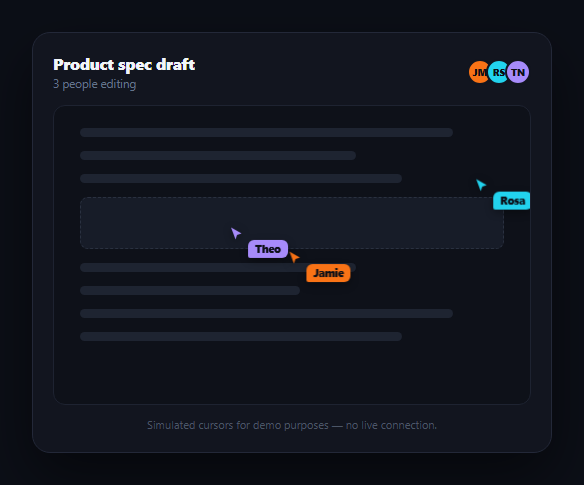
Figma, Google Docs, and Notion all share a visual signature: colored cursors with floating name tags drifting around the canvas as collaborators work. This snippet recreates that visual pattern — not a real multiplayer backend, but the exact look and motion — using plain CSS and requestAnimationFrame, so you can see and reuse the animation technique without standing up WebSockets or a presence server. Pair it with multiplayer cursors for a closer look at cursor rendering, or collaborator presence bar for who's-online UI.
Pre-scripted paths, not random motion
Each cursor follows a small array of waypoint percentages (points) that loop back to the start, rather than random jitter. Random motion reads as noisy and unrealistic; a handful of deliberate waypoints reads as a person actually scrolling and clicking through a document, which is closer to what real presence cursors look like in practice.
One time-based interpolation function
pointAt() takes the array of waypoints and a progress value t between 0 and 1, finds which segment t falls into, and linearly interpolates between that segment's two points. Because position is a pure function of time rather than accumulated per-frame movement, the animation can never drift, stutter, or accumulate floating-point error — reloading or resizing the page just re-samples the same path at the current time.
Driven by requestAnimationFrame, not setInterval
A single tick() loop reads the current timestamp, computes each cursor's position along its path, and sets a CSS transform: translate() — the one property that animates without triggering layout or paint of surrounding content. requestAnimationFrame syncs the loop to the browser's repaint cycle, so motion stays smooth and automatically pauses when the tab isn't visible, unlike a fixed-interval timer.
Staggered offsets keep it readable
Each cursor's offset shifts where it starts along its loop and each has a different speed, so the three cursors never move in lockstep or cross paths predictably — mirroring how real collaborators work at different paces in different parts of a document, which keeps the scene visually interesting rather than looking like one animation copy-pasted three times.
Reusing this for real presence
To make this real, replace the pre-scripted paths with actual cursor coordinates broadcast over a WebSocket or a service like Liveblocks/Pusher — the rendering half (the .lcn-cursor markup, the transform-based positioning, and the name tag styling) stays exactly the same; only the source of x/y changes from a scripted path to a network message.
Build with AI
Build, Understand, Optimize, and Extend It With AI
You don't have to work out the path-interpolation math by hand. Paste this snippet's HTML, CSS, and JS into an AI coding assistant like Claude and ask it to explain exactly how pointAt() converts a 0-to-1 progress value into a position along a multi-point path, and why deriving that position from the current timestamp rather than accumulating per-frame deltas prevents drift over a long-running animation. The same assistant can help you optimize it — ask whether getBoundingClientRect() should be cached instead of called every single frame for a document that doesn't resize often. It's also useful for extending the demo: ask it to add a fourth simulated cursor, make a cursor pause briefly at certain waypoints to mimic someone reading, or wire the whole thing to real WebSocket-delivered coordinates for actual multiplayer presence. Treat the code less like a finished artifact and more like a starting point for a conversation.
Prompt to recreate it
Copy this into your AI assistant of choice to build the effect from scratch, or as a jumping-off point for your own variant:
Build a "live cursor name tags" demo in plain HTML, CSS, and JavaScript that simulates the multiplayer-cursor visual pattern used by tools like Figma and Google Docs — no real backend or network connection, no frameworks or animation libraries.

Requirements:
- Render a mock document area (placeholder text lines and a content block) and 2-3 colored cursor elements, each a small pointer shape plus an attached name-tag label in a matching color.
- Define each cursor's motion as a small array of waypoint positions (expressed as percentages of the document container's width/height, not fixed pixels) that the cursor loops through continuously, rather than moving randomly or jittering.
- Write a single pure interpolation function that takes a path's waypoints and a progress value between 0 and 1, determines which segment of the path that progress falls into, and linearly interpolates the position within that segment — position must be a deterministic function of progress, not something accumulated frame by frame.
- Drive all cursor motion from one requestAnimationFrame loop that computes each cursor's current progress from the frame timestamp (using a different speed and starting offset per cursor so they move independently and never look synchronized), converts each cursor's interpolated percentage position into real pixels based on the document container's current size, and applies it via a CSS transform: translate() (never top/left, to avoid layout thrash).
- Make sure resizing the browser window keeps every cursor correctly positioned relative to the document container, since positions are recalculated from percentages against the container's live bounding rect.
- Include a small, honest caption noting that the cursors are simulated for demonstration and not a live multiplayer connection.
Want to tighten it up first? Run this prompt through the AI Prompt Studio to score it across 8 quality dimensions, catch anti-patterns, and tune the wording for Claude, ChatGPT, or Gemini before you paste it in.
Step by step
How to Use
- 1Paste HTML, CSS, and JSA document mockup renders with three colored cursors already gliding around it.
- 2Watch the pathsEach cursor loops through its own waypoints at a different speed and offset.
- 3Resize the windowCursor positions are read as percentages of the doc area, so they stay correctly placed.
- 4Adjust a pathEdit a cursor's points array to change its route around the document.
- 5Change the paceTune each cursor's speed value to make it drift faster or slower.
- 6Wire to real dataSwap pointAt()'s scripted lookup for live x/y coordinates from your presence backend.
Real-world uses
Common Use Cases
Got questions?
Frequently Asked Questions
No — this snippet simulates the visual pattern with pre-scripted paths and requestAnimationFrame, with no network connection or backend. It's meant to demonstrate and let you reuse the rendering and motion technique. For real presence, you'd broadcast actual cursor coordinates over a WebSocket or a service like Liveblocks and feed them into the same transform-based rendering.
Random per-frame jitter looks noisy and mechanical. A small loop of deliberate waypoints, interpolated smoothly between them, reads as a person actually navigating a document — closer to the motion real presence cursors exhibit in tools like Figma and Google Docs, which is the visual effect this snippet is recreating.
pointAt() derives each cursor's position as a pure function of the current timestamp and its path, rather than adding a small delta every frame. That means there's nothing to accumulate or drift — the animation is always correct no matter how much time passed since the last frame, and it can't stutter if a frame is dropped.
requestAnimationFrame automatically throttles or pauses when a tab is backgrounded, which is the correct, battery-friendly behavior. Because position is computed from the current timestamp rather than accumulated increments, the cursors resume smoothly at the correct position when the tab regains focus instead of jumping or catching up.
Keep the .lcn-cursor markup and its transform-based positioning exactly as is, but replace the pointAt()/PATHS logic with a handler that receives real x/y coordinates from your backend (WebSocket, Liveblocks, Pusher, etc.), converts them to the same percentage-of-container or pixel space, and sets the same translate() transform. Add and remove cursor elements dynamically as collaborators join and leave.