You Might Also Like
Learn Coding Visually
Learn to code with interactive, live-preview playgrounds — HTML, CSS, JavaScript, React & more.
 HTML Playground42 lessons · Click-based · Live preview
 CSS PlaygroundLearn CSS with a live editor
 JavaScript Playground60 lessons · DOM · Async · Canvas
 React PlaygroundLearn React with a live code editor
 GSAP PlaygroundLearn GSAP animation interactively
 SVG Playground44 lessons · shapes · paths · animation
 SCSS Playground45 lessons · Sass modules · tokens
 Tailwind PlaygroundLearn Tailwind CSS with a live editor
 Bootstrap 5 Playground50 lessons · live preview
Subscription Pause/Resume Flow — Free Billing State UI
Subscription Pause/Resume Flow · Cards · Plain HTML, CSS & JS · Live preview
What's included
Features
About this UI Snippet
Subscription Pause/Resume — A Toggle That Explains Its Own Consequences
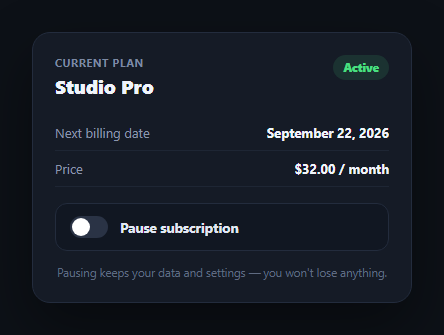
Pausing a subscription is a moment where ambiguity causes support tickets: will I be charged? Do I lose access immediately? When does it come back? This snippet builds a pause/resume card that answers all three questions inline, the moment the toggle flips, instead of hiding the consequences behind a separate help article — a pattern worth pairing with a subscription widget or pricing toggle in a billing settings page.
A real switch, not a decoration
The toggle is a <button role="switch" aria-checked> rather than a styled checkbox — role="switch" is the correct ARIA role for a control that represents an on/off state with an immediate effect (as opposed to a checkbox in a form awaiting submission). The thumb position and track color are driven entirely by the aria-checked attribute via CSS attribute selectors, so the visual state and the accessible state can never drift apart.
The panel that appears only explains, never confuses
Toggling to paused reveals a panel — hidden via the hidden attribute, not CSS-only — with a resume-by date picker and a three-line list, each prefixed with a checkmark, stating exactly what happens: no charge, access continues until period end, and auto-resume behavior. This is the core UX principle: don't just change a status label, restate the consequences at the moment the user needs to know them.
Resume date defaults sensibly
The date input defaults 30 days out and its min attribute is set to today, so a user can't accidentally pick a resume date in the past. Changing the date updates the footnote to a human-readable confirmation ("Your subscription will auto-resume on...") using toLocaleDateString, giving immediate feedback that the date was registered.
One function owns both states
setPaused(paused) is the single function that updates the switch, the status badge, the toggle's own label ("Pause" vs. "Resume"), the panel's visibility, and the footnote text — all from one boolean. This mirrors the same "one source of truth drives every dependent element" pattern used across this library, and makes it straightforward to call setPaused from a real API response instead of just a click handler.
Wiring it to real billing
Replace the toggle handler with an API call to your billing provider (Stripe subscriptions support a native pause-collection state), and only call setPaused once that call resolves — add a brief loading state on the toggle in between. Read the actual next-billing and period-end dates from your subscription object rather than the hardcoded strings here.
Build with AI
Build, Understand, Optimize, and Extend It With AI
You don't have to work out the accessibility details or the consequence-messaging pattern on your own. Paste this snippet's HTML, CSS, and JS into an AI coding assistant like Claude and ask it to explain exactly why role="switch" with aria-checked is the correct ARIA pattern here rather than a checkbox, and how the CSS attribute selectors on aria-checked keep the toggle's visual state permanently in sync with its accessible state. The same assistant can help optimize it — asking whether setPaused() doing too much in one function is a problem as the card grows more billing states (trial, past-due, canceled), or how you'd restructure it into a small state machine. It's also useful for extending the flow: ask it to wire the toggle to a real Stripe pause_collection API call with a loading and error state, add a "cancel instead" secondary action, or show a preview of the exact dollar amount that will be skipped while paused. Treat the code less like a finished artifact and more like a starting point for a conversation.
Prompt to recreate it
Copy this into your AI assistant of choice to build the effect from scratch, or as a jumping-off point for your own variant:
Build a "subscription pause/resume" card in plain HTML, CSS, and JavaScript with no library or CDN dependency.

Requirements:
- A card showing the current plan name, price, next billing date, and a color-coded status badge (green for Active, amber for Paused).
- A toggle control built as a real button with role="switch" and an aria-checked attribute (true/false) — not a styled checkbox — whose visual thumb position and track color are driven purely by CSS attribute selectors reading aria-checked, so the visual and accessible state can never disagree.
- Clicking the toggle must switch between Active and Paused states, and a single function must own updating every dependent element at once (the switch itself, the status badge text/color, the toggle's own label text, and a reveal panel) so none of them can ever fall out of sync with each other.
- When paused, reveal a panel (using the HTML hidden attribute, not just a CSS display trick) containing: a "resume by" date input defaulting to 30 days from today with its min attribute set to today (so a past date cannot be selected), and a three-item checklist explicitly stating that no charge occurs while paused, that access continues until the current billing period ends, and that the subscription auto-resumes on the selected date or can be resumed sooner manually.
- Changing the resume date must update a footnote with a human-readable confirmation of the new resume date (use toLocaleDateString or equivalent), and toggling back to Active must hide the panel and restore a default footnote reassuring the user that pausing preserves their data and settings.
Want to tighten it up first? Run this prompt through the AI Prompt Studio to score it across 8 quality dimensions, catch anti-patterns, and tune the wording for Claude, ChatGPT, or Gemini before you paste it in.
Step by step
How to Use
- 1Paste HTML, CSS, and JSAn active subscription card renders with plan, price, and next billing date.
- 2Click the toggleIt switches to "Paused" and reveals a resume-by date picker plus a plain-language explanation of billing behavior.
- 3Pick a resume dateThe date input defaults 30 days out and can't be set in the past; changing it updates the confirmation footnote.
- 4Click the toggle againIt resumes the subscription, hides the panel, and restores the default footnote.
- 5Wire real billing datesReplace BILLING_DATE_TEXT and PERIOD_END_SHORT with values from your subscription object.
- 6Connect the APICall your billing provider's pause/resume endpoint in the toggle handler before calling setPaused.
Real-world uses
Common Use Cases
Got questions?
Frequently Asked Questions
role="switch" is the correct ARIA role for a control representing an on/off state that takes effect immediately, as opposed to a checkbox that typically awaits form submission. Using a real switch role means screen readers announce it correctly as "Pause subscription, switch, off" and toggling it, rather than describing it as a checkbox being checked.
The pause panel is hidden using the HTML hidden attribute, toggled by the single setPaused(paused) function — the same function that updates the switch, status badge, and toggle label. Because one function owns all of these, the panel can never be visible while the badge still reads "Active", or vice versa.
The date input's min attribute is set to today's date (new Date().toISOString().slice(0, 10)) on page load, which makes the browser's native date picker refuse to let users select an earlier date. The default value is also set 30 days out so there's a sensible starting point rather than an empty field.
Stripe subscriptions support a native pause_collection behavior. In the toggle's click handler, call your backend endpoint that sets or clears pause_collection on the subscription, show a brief loading state on the toggle while that request is in flight, and only call setPaused(true/false) once the API call resolves successfully — reverting the toggle and showing an error if it fails.
Hold isPaused and resumeDate in component state. Derive the switch's aria-checked, the status badge text/color, the panel's visibility, and the footnote all from isPaused in render — mirroring what setPaused() does directly to the DOM here. Make the toggle handler async so it can await a real billing API call before updating state.