You Might Also Like
Learn Coding Visually
Learn to code with interactive, live-preview playgrounds — HTML, CSS, JavaScript, React & more.
 HTML Playground42 lessons · Click-based · Live preview
 CSS PlaygroundLearn CSS with a live editor
 JavaScript Playground60 lessons · DOM · Async · Canvas
 React PlaygroundLearn React with a live code editor
 GSAP PlaygroundLearn GSAP animation interactively
 SVG Playground44 lessons · shapes · paths · animation
 SCSS Playground45 lessons · Sass modules · tokens
 Tailwind PlaygroundLearn Tailwind CSS with a live editor
 Bootstrap 5 Playground50 lessons · live preview
Task Approval Flow Card — Free HTML CSS JS Snippet
Task Approval Flow Card · Cards · Plain HTML, CSS & JS · Live preview
What's included
Features
About this UI Snippet
Task Approval Flow Card — Approve, Reject & Request Changes With a Resolved State
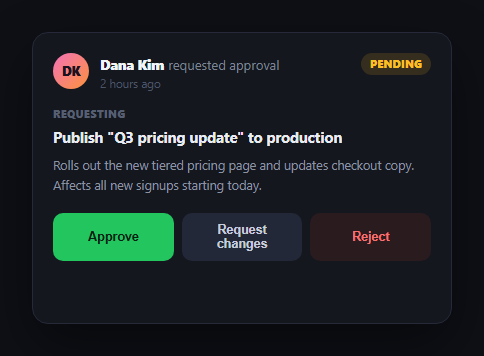
Approval requests show up everywhere teams work together — publishing content, merging a change, releasing a budget, signing off a design. The task approval flow card packages the three real outcomes of an approval decision — approve, reject, or ask for revisions — into one self-contained card with a clean resolved state once acted on. Pair it with task approval flow card's sibling patterns like progress wizard for multi-step approval chains, or comment thread for the discussion that often follows.
Three distinct outcomes, not just yes/no
Most approval UIs collapse to a binary approve/reject, but real review almost always has a third path: "close, but not yet." This card treats Request changes as a first-class action rather than a variant of rejection — clicking it doesn't resolve the card immediately, it opens a comment field, because rejecting and asking for a revision are different intents that deserve different downstream handling (a rejected request usually needs to be resubmitted from scratch; a changes-requested one usually gets edited in place).
A comment field that appears only when needed
The textarea for explaining requested changes stays hidden until you actually click "Request changes," then swaps in for the action row entirely — you either commit to explaining what's needed or cancel back to the three original choices. This keeps the card's default state lean (three buttons, no clutter) while making sure a changes-requested action always comes with context, not a bare status flip.
One resolve() function, three visual outcomes
Approve, reject, and the submitted change request all funnel through a single resolve(kind, message) function that swaps the status badge's color and text, hides the action buttons, and shows a resolved banner with a matching icon and color (green check, red X, indigo pencil). Because every outcome shares one code path, the card can never end up in an inconsistent state — like showing "Approved" while the reject button is still clickable.
Clear, permanent resolved state
Once acted on, the card replaces its action row with a resolved banner and disables further clicks — modeling the reality that an approval decision, once made, is a fact about the request rather than something to be casually re-clicked. This is the same principle behind task approval flow card's status badge switching from a pending amber to a definitive final color.
Wiring it to a real workflow
Swap the click handlers' local resolve() calls for real API requests — POST the decision (and comment, if any) to your backend, then call resolve() once the request succeeds so the UI only shows the final state after it's actually persisted. Add a loading state on the clicked button while the request is in flight, and revert to the action row on failure so the user can retry.
Build with AI
Build, Understand, Optimize, and Extend It With AI
You don't have to design the state machine for this card from scratch. Paste this snippet's HTML, CSS, and JS into an AI coding assistant like Claude and ask it to explain exactly why Request changes is modeled as a distinct outcome from Reject rather than a variant of it, and how funneling all three outcomes through one resolve() function guarantees the status badge and the resolved banner can never disagree. The same assistant can help you optimize it — ask whether the card should support an "undo" within a short window after resolving, or whether the comment textarea should validate a minimum length before allowing submission. It's also useful for extending the flow: ask it to add a loading spinner while a real API call is in flight, chain multiple approval cards into a sequential multi-approver flow, or add file/screenshot attachments to the request-changes comment. Treat the code less like a finished artifact and more like a starting point for a conversation.
Prompt to recreate it
Copy this into your AI assistant of choice to build the effect from scratch, or as a jumping-off point for your own variant:
Build a "task approval flow card" in plain HTML, CSS, and JavaScript — no frameworks or libraries.

Requirements:
- Show a pending approval request card with the requester's avatar, name, a relative timestamp, a short title describing what's being requested, and a longer description, plus a status badge that starts in a "Pending" (amber) state.
- Provide three action buttons: Approve, Reject, and Request changes — these must represent three genuinely distinct outcomes, not a binary approve/reject with "request changes" treated as a lesser form of rejection.
- Clicking Request changes must NOT immediately resolve the card. Instead it should hide the three action buttons and reveal a comment textarea (auto-focused) with Cancel and Send request buttons; Cancel must return to the original three-button state without losing any prior context, and Send request must resolve the card only once submitted, with the resolution text including or referencing the comment that was typed.
- Clicking Approve or Reject must resolve the card immediately: hide the action buttons, update the status badge to a distinct color and label for that outcome, and show a resolved confirmation banner with a matching icon and color (e.g. green check for approved, red X for rejected, a different color/icon for changes-requested).
- Route all three possible resolutions through one shared function that updates the badge and shows the resolved banner, so it is structurally impossible for the badge state and the banner state to disagree with each other.
- Once a card is resolved (approved, rejected, or changes sent), it should not be possible to trigger any of the original three actions again — the action row must be fully replaced by the resolved banner, not merely disabled-looking.
Want to tighten it up first? Run this prompt through the AI Prompt Studio to score it across 8 quality dimensions, catch anti-patterns, and tune the wording for Claude, ChatGPT, or Gemini before you paste it in.
Step by step
How to Use
- 1Paste HTML, CSS, and JSA pending approval card renders with Approve, Reject, and Request changes buttons.
- 2Click Approve or RejectThe status badge updates and a resolved banner replaces the action buttons.
- 3Click Request changesA comment textarea appears in place of the buttons, focused and ready to type.
- 4Send or cancel the requestSending resolves the card with your comment quoted; cancel returns to the three actions.
- 5Reload to resetRefresh the sandbox to see the card in its original pending state again.
- 6Wire to a real APIReplace resolve() calls with actual approve/reject/request-changes endpoint calls.
Real-world uses
Common Use Cases
Got questions?
Frequently Asked Questions
Rejecting and asking for a revision carry different intents and usually trigger different downstream flows — a rejected request is typically closed and resubmitted fresh, while a changes-requested one is expected to be edited and resubmitted in place. Giving Request changes its own comment field makes sure the requester always gets specific, actionable feedback instead of a bare rejection.
All three outcomes call the same resolve(kind, message) function, which is the single place that updates the status badge's class and text, hides the action row and comment box, and shows the resolved banner with a matching color and icon. Because there's one function instead of three separate branches of UI-updating code, the badge and the banner can never fall out of sync.
The Cancel button in the comment box clears the textarea and restores the original three-button action row, with the card still in its pending state — nothing is resolved and no comment is sent unless you explicitly click "Send request."
Replace the resolve() calls inside each button's click handler with an actual API request — POST the decision (and the comment text for a changes request) to your backend — and only call resolve() to update the UI after that request succeeds. Add a brief loading state on the clicked button while waiting, and on failure, leave the action row visible so the user can retry.
Model the card's state as a single status value (pending, approved, rejected, or changes-requested) plus a comment string. Render the action row, comment box, or resolved banner based on that status, and call your framework's state setter from each button's handler instead of resolve()'s direct DOM manipulation — the visual states and CSS classes map over directly.