Comment Thread UI — Free HTML CSS JS Snippet

Comment Thread · Cards · Plain HTML, CSS & JS · Live preview

Share & Support

What's included

Features

Recursive nesting: self-similar markup works at any reply depth
Thread line: left border + indent on .replies, Reddit/HN convention
Toggle voting with base+state tracking — no double-counting
:scope selectors to target immediate children in the recursive tree
Inline reply boxes injected at the correct depth
Sort by Top (votes) or Newest (time) via data attributes
appendChild node-move reordering preserves handlers and state
Auto-growing composer textarea via scrollHeight

About this UI Snippet

Comment Thread — Nested Replies, Voting, Sorting & Auto-Grow Composer
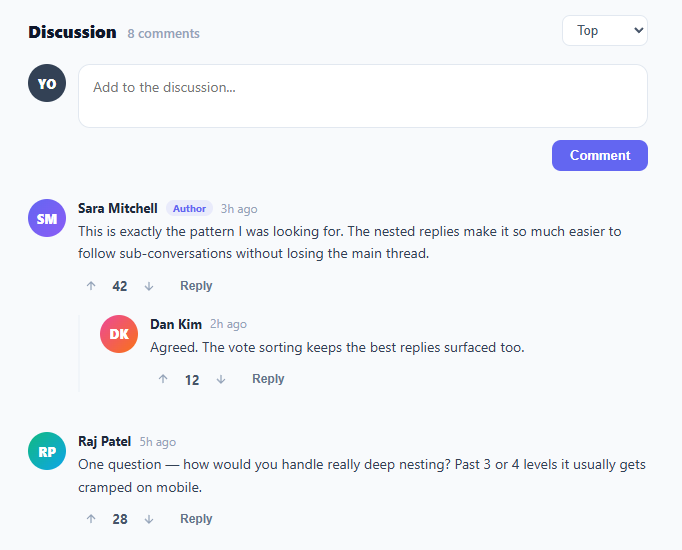
Screenshot of the Comment Thread snippet rendered live

A threaded comment system is one of the most complex common UI patterns — it combines recursion, voting state, dynamic insertion, and sorting. It sits below a social post card in most feeds. This snippet delivers a complete, working comment thread with nested replies, a Reddit-style up/down voting widget (compare the emoji reaction bar), top/newest sorting, an author badge, relative timestamps, and an auto-growing comment composer.

The nesting structure

Each comment is a .comment element containing an avatar and a .comment-body. The body holds the comment content and a .replies container, which itself holds more .comment elements — making the structure naturally recursive. Replies are visually indented with a left padding and a 2px left border that acts as a thread line, the convention popularised by Reddit and Hacker News. Because the markup is self-similar at every depth, the same JavaScript functions work at any nesting level.

The voting widget

The vote() function implements toggle voting with proper state tracking. It stores the base vote count and a per-comment state of 0, 1, or −1. Clicking upvote toggles between +1 and 0; clicking downvote toggles between −1 and 0; switching from up to down moves directly between states. The displayed count is always base + state, and the active arrow gets a coloured highlight. This matches the exact behaviour users expect from social platforms and prevents the common bug of double-counting repeated clicks.

Dynamic reply insertion

toggleReply() injects an inline reply box directly beneath a comment's actions, using the :scope selector to target only the immediate children — critical in a recursive structure where a naive querySelector would match nested descendants. sendReply() builds a new comment node via buildComment() and appends it to that comment's own .replies container, so the reply lands at the correct depth.

Sorting

sortThread() reorders top-level comments by either vote count (Top) or recency (Newest), reading data-votes and data-time attributes. It sorts an array of the DOM nodes and re-appends them in order — appendChild on an existing node moves it rather than cloning, so reordering is efficient and preserves all event handlers and state.

The auto-growing composer

The composer textarea grows to fit its content via autoGrow() — the same auto-resize textarea technique — which resets the height to auto and then sets it to scrollHeight on every input. This avoids inner scrollbars and gives the comfortable expanding-input feel of modern comment boxes. Posting a root comment prepends it to the thread and updates the comment count.

Step by step

How to Use

  1. 1
    Write a top-level commentType in the composer at the top. It grows as you type. Click Comment to post — your comment appears at the top of the thread and the count updates.
  2. 2
    Reply to a commentClick Reply under any comment to open an inline reply box at that exact level. Type your reply and click Reply to nest it under the parent.
  3. 3
    Vote on commentsClick the up or down arrow to vote. Clicking the same arrow again removes your vote; clicking the opposite arrow switches it. The count and arrow colour update instantly.
  4. 4
    Sort the discussionUse the Top / Newest dropdown to reorder top-level comments by vote count or recency.
  5. 5
    Wire to a backendReplace the in-DOM buildComment with API calls: POST new comments and replies to your server, and render the returned comment objects. Store votes server-side keyed by user and comment.
  6. 6
    Export for your frameworkClick "JSX" for a React component that renders comments recursively from a nested data array. Click "Vue" for a Vue 3 SFC using a recursive component.

Real-world uses

Common Use Cases

Blog and article comment section
Drop the thread below articles to enable reader discussion. Wire posting and voting to your backend, render server-stored comments on load, and add pagination or lazy-loading for long threads. The nested structure supports the back-and-forth that flat comment lists cannot.
Community forum and discussion platform
Build a Reddit- or Hacker News-style forum where vote sorting surfaces the best replies. Add moderation actions (pin, remove, lock), user flair via the badge slot, and collapse controls for deep threads. The recursive model scales to arbitrary discussion depth.
Code review and document annotation tool
Adapt threaded comments for inline code review or document feedback, where each thread is anchored to a line or selection. Replies form the review conversation, and resolving a thread collapses it. Voting becomes agreement signalling among reviewers.
Product feedback and feature-request board
Let users post feature requests as top-level comments and discuss them in replies. Vote sorting prioritises the most-wanted features, giving the product team a ranked backlog driven directly by user demand. Add a status badge (Planned, Shipped) to each top-level item.
Study recursion, :scope selectors, and DOM moves
Threaded comments are a masterclass in recursive UI: self-similar markup, scoped DOM queries that avoid matching descendants, toggle-state voting, and efficient reordering via node moves. These patterns underpin file trees, org charts, nested menus, and any hierarchical interface.
Live event or stream chat with threaded replies
Use threaded comments for a live Q&A or stream chat where viewers reply to each other. Vote sorting floats the best questions to the top for the host to answer. Combine with real-time updates (WebSocket) to append incoming comments and replies as they arrive.

Got questions?

Frequently Asked Questions

Each vote count stores two pieces of data: a base value (the original score) and a state of 0, 1, or −1 representing the current user's vote. The displayed number is always base + state. Clicking upvote sets state to 1, or back to 0 if it was already 1. Clicking downvote sets it to −1, or back to 0. Switching directly from up to down moves from 1 to −1 in one click. Because the display is derived from base + state rather than incremented, repeated clicks can never accumulate a runaway count.

In a recursive structure, a comment contains a .replies container that holds more comments, each with their own .comment-actions and .replies. A plain querySelector(".replies") from a comment body would match the first nested .replies anywhere in its subtree, not necessarily its own direct child. The :scope pseudo-class (querySelector(":scope > .replies")) restricts the match to immediate children, so reply boxes and new comments are inserted at the correct depth rather than leaking into a descendant.

Track the depth as you render and stop indenting past a threshold (commonly 3-5 levels), which is how Reddit handles it. Beyond the limit, render deeper replies at the same indentation as their parent and prefix them with "replying to @user" for context. In CSS, you can also cap the cumulative left padding with a max value so the thread line never pushes content off a narrow screen.

Model comments as a nested array where each comment has a replies array. Create a recursive Comment component that renders its content and maps over comment.replies, rendering a Comment for each — the recursion mirrors the DOM nesting. Manage votes and the open reply box in component state or a normalised store keyed by comment id. For posting, update the tree immutably by inserting the new reply into the correct parent's replies array.

Comment Thread — Export as HTML, React, Vue, Angular & Tailwind

HTML
<!DOCTYPE html>
<html lang="en">
<head>
  <meta charset="UTF-8" />
  <meta name="viewport" content="width=device-width, initial-scale=1.0" />
  <title>Comment Thread</title>
  <style>
    * { box-sizing: border-box; margin: 0; padding: 0; }
    body { font-family: system-ui, sans-serif; background: #f8fafc; min-height: 100vh; padding: 32px 20px; }
    .wrap { max-width: 620px; margin: 0 auto; }
    .thread-head { display: flex; justify-content: space-between; align-items: center; margin-bottom: 18px; }
    .thread-title { font-size: 17px; font-weight: 800; color: #0f172a; }
    .count { font-size: 13px; font-weight: 500; color: #94a3b8; margin-left: 6px; }
    .sort { border: 1px solid #e2e8f0; border-radius: 8px; padding: 6px 10px; font-size: 13px; color: #475569; background: #fff; cursor: pointer; }
    .composer { display: flex; gap: 12px; margin-bottom: 28px; }
    .composer-body { flex: 1; }
    .composer-input { width: 100%; border: 1.5px solid #e2e8f0; border-radius: 12px; padding: 12px 14px; font-size: 14px; font-family: inherit; color: #1e293b; resize: none; outline: none; min-height: 44px; transition: border-color 0.15s; }
    .composer-input:focus { border-color: #6366f1; }
    .composer-actions { display: flex; justify-content: flex-end; margin-top: 8px; }
    .post-btn { background: #6366f1; color: #fff; border: none; padding: 8px 18px; border-radius: 9px; font-size: 13px; font-weight: 700; cursor: pointer; transition: background 0.15s; }
    .post-btn:hover { background: #4f46e5; }
    .avatar { width: 38px; height: 38px; border-radius: 50%; color: #fff; font-size: 13px; font-weight: 800; display: flex; align-items: center; justify-content: center; flex-shrink: 0; }
    .avatar.me { background: #334155; }
    .comment { display: flex; gap: 12px; margin-bottom: 20px; }
    .comment-body { flex: 1; min-width: 0; }
    .comment-head { display: flex; align-items: center; gap: 8px; margin-bottom: 4px; flex-wrap: wrap; }
    .author { font-size: 13px; font-weight: 700; color: #1e293b; }
    .badge { font-size: 10px; font-weight: 700; background: rgba(99,102,241,0.1); color: #6366f1; padding: 1px 7px; border-radius: 10px; }
    .time { font-size: 12px; color: #94a3b8; }
    .comment-text { font-size: 14px; color: #334155; line-height: 1.6; margin-bottom: 8px; }
    .comment-actions { display: flex; align-items: center; gap: 4px; }
    .vote-btn { background: none; border: none; color: #94a3b8; cursor: pointer; width: 26px; height: 26px; border-radius: 6px; display: flex; align-items: center; justify-content: center; transition: all 0.12s; }
    .vote-btn:hover { background: #f1f5f9; color: #6366f1; }
    .vote-btn.up-active { color: #6366f1; background: rgba(99,102,241,0.08); }
    .vote-btn.down-active { color: #ef4444; background: rgba(239,68,68,0.08); }
    .vote-count { font-size: 13px; font-weight: 700; color: #475569; min-width: 24px; text-align: center; font-variant-numeric: tabular-nums; }
    .reply-btn { background: none; border: none; color: #64748b; font-size: 12px; font-weight: 700; cursor: pointer; padding: 4px 10px; border-radius: 6px; margin-left: 4px; transition: all 0.12s; }
    .reply-btn:hover { background: #f1f5f9; color: #1e293b; }
    .replies { margin-top: 16px; padding-left: 20px; border-left: 2px solid #f1f5f9; }
    .reply-box { margin-top: 12px; }
    .reply-box textarea { width: 100%; border: 1.5px solid #e2e8f0; border-radius: 10px; padding: 10px 12px; font-size: 13px; font-family: inherit; resize: none; outline: none; min-height: 38px; }
    .reply-box textarea:focus { border-color: #6366f1; }
    .reply-box-actions { display: flex; justify-content: flex-end; gap: 8px; margin-top: 6px; }
    .cancel-btn { background: none; border: none; color: #94a3b8; font-size: 12px; font-weight: 600; cursor: pointer; padding: 6px 12px; }
    .send-btn { background: #6366f1; color: #fff; border: none; padding: 6px 14px; border-radius: 8px; font-size: 12px; font-weight: 700; cursor: pointer; }
  </style>
</head>
<body>
  <div class="wrap">
    <div class="thread-head">
      <h2 class="thread-title">Discussion <span class="count">8 comments</span></h2>
      <select class="sort" onchange="sortThread(this.value)">
        <option value="top">Top</option>
        <option value="new">Newest</option>
      </select>
    </div>
    <div class="composer">
      <div class="avatar me">YO</div>
      <div class="composer-body">
        <textarea class="composer-input" id="rootInput" placeholder="Add to the discussion..." oninput="autoGrow(this)"></textarea>
        <div class="composer-actions"><button class="post-btn" onclick="postRoot()">Comment</button></div>
      </div>
    </div>
    <div class="thread" id="thread">
      <div class="comment" data-votes="42" data-time="3">
        <div class="avatar" style="background:linear-gradient(135deg,#6366f1,#8b5cf6)">SM</div>
        <div class="comment-body">
          <div class="comment-head"><span class="author">Sara Mitchell</span><span class="badge">Author</span><span class="time">3h ago</span></div>
          <div class="comment-text">This is exactly the pattern I was looking for. The nested replies make it so much easier to follow sub-conversations without losing the main thread.</div>
          <div class="comment-actions">
            <button class="vote-btn" onclick="vote(this,1)"><svg width="14" height="14" viewBox="0 0 24 24" fill="none" stroke="currentColor" stroke-width="2.2"><path d="M12 19V5M5 12l7-7 7 7"/></svg></button>
            <span class="vote-count">42</span>
            <button class="vote-btn" onclick="vote(this,-1)"><svg width="14" height="14" viewBox="0 0 24 24" fill="none" stroke="currentColor" stroke-width="2.2"><path d="M12 5v14M19 12l-7 7-7-7"/></svg></button>
            <button class="reply-btn" onclick="toggleReply(this)">Reply</button>
          </div>
          <div class="replies">
            <div class="comment" data-votes="12" data-time="2">
              <div class="avatar" style="background:linear-gradient(135deg,#ec4899,#f97316)">DK</div>
              <div class="comment-body">
                <div class="comment-head"><span class="author">Dan Kim</span><span class="time">2h ago</span></div>
                <div class="comment-text">Agreed. The vote sorting keeps the best replies surfaced too.</div>
                <div class="comment-actions">
                  <button class="vote-btn" onclick="vote(this,1)"><svg width="14" height="14" viewBox="0 0 24 24" fill="none" stroke="currentColor" stroke-width="2.2"><path d="M12 19V5M5 12l7-7 7 7"/></svg></button>
                  <span class="vote-count">12</span>
                  <button class="vote-btn" onclick="vote(this,-1)"><svg width="14" height="14" viewBox="0 0 24 24" fill="none" stroke="currentColor" stroke-width="2.2"><path d="M12 5v14M19 12l-7 7-7-7"/></svg></button>
                  <button class="reply-btn" onclick="toggleReply(this)">Reply</button>
                </div>
              </div>
            </div>
          </div>
        </div>
      </div>
      <div class="comment" data-votes="28" data-time="5">
        <div class="avatar" style="background:linear-gradient(135deg,#10b981,#0ea5e9)">RP</div>
        <div class="comment-body">
          <div class="comment-head"><span class="author">Raj Patel</span><span class="time">5h ago</span></div>
          <div class="comment-text">One question — how would you handle really deep nesting? Past 3 or 4 levels it usually gets cramped on mobile.</div>
          <div class="comment-actions">
            <button class="vote-btn" onclick="vote(this,1)"><svg width="14" height="14" viewBox="0 0 24 24" fill="none" stroke="currentColor" stroke-width="2.2"><path d="M12 19V5M5 12l7-7 7 7"/></svg></button>
            <span class="vote-count">28</span>
            <button class="vote-btn" onclick="vote(this,-1)"><svg width="14" height="14" viewBox="0 0 24 24" fill="none" stroke="currentColor" stroke-width="2.2"><path d="M12 5v14M19 12l-7 7-7-7"/></svg></button>
            <button class="reply-btn" onclick="toggleReply(this)">Reply</button>
          </div>
          <div class="replies"></div>
        </div>
      </div>
    </div>
  </div>
  <script>
    function autoGrow(el) {
      el.style.height = 'auto';
      el.style.height = el.scrollHeight + 'px';
    }
    
    function vote(btn, dir) {
      var actions = btn.parentElement;
      var countEl = actions.querySelector('.vote-count');
      var up = actions.querySelector('.vote-btn:first-child');
      var down = actions.querySelector('.vote-btn:nth-child(3)');
      var base = parseInt(countEl.dataset.base || countEl.textContent);
      if (!countEl.dataset.base) countEl.dataset.base = base;
      var state = countEl.dataset.state || '0';
      var newState = (dir === 1) ? (state === '1' ? '0' : '1') : (state === '-1' ? '0' : '-1');
      countEl.dataset.state = newState;
      countEl.textContent = base + parseInt(newState);
      up.classList.toggle('up-active', newState === '1');
      down.classList.toggle('down-active', newState === '-1');
      var comment = btn.closest('.comment');
      comment.dataset.votes = countEl.textContent;
    }
    
    function toggleReply(btn) {
      var body = btn.closest('.comment-body');
      var existing = body.querySelector(':scope > .reply-box');
      if (existing) { existing.remove(); return; }
      var box = document.createElement('div');
      box.className = 'reply-box';
      box.innerHTML = '<textarea placeholder="Write a reply..." oninput="autoGrow(this)"></textarea><div class="reply-box-actions"><button class="cancel-btn" onclick="this.closest(\'.reply-box\').remove()">Cancel</button><button class="send-btn" onclick="sendReply(this)">Reply</button></div>';
      var actions = body.querySelector(':scope > .comment-actions');
      actions.insertAdjacentElement('afterend', box);
      box.querySelector('textarea').focus();
    }
    
    function sendReply(btn) {
      var box = btn.closest('.reply-box');
      var text = box.querySelector('textarea').value.trim();
      if (!text) return;
      var body = box.closest('.comment-body');
      var replies = body.querySelector(':scope > .replies');
      if (!replies) { replies = document.createElement('div'); replies.className = 'replies'; body.appendChild(replies); }
      replies.appendChild(buildComment('You', 'YO', text, true));
      box.remove();
      bumpCount();
    }
    
    function postRoot() {
      var input = document.getElementById('rootInput');
      var text = input.value.trim();
      if (!text) return;
      var thread = document.getElementById('thread');
      thread.insertBefore(buildComment('You', 'YO', text, true), thread.firstChild);
      input.value = '';
      input.style.height = 'auto';
      bumpCount();
    }
    
    function buildComment(name, initials, text, mine) {
      var c = document.createElement('div');
      c.className = 'comment';
      c.dataset.votes = '0';
      c.dataset.time = '0';
      var bg = mine ? '#334155' : 'linear-gradient(135deg,#6366f1,#8b5cf6)';
      c.innerHTML = '<div class="avatar" style="background:' + bg + '">' + initials + '</div><div class="comment-body"><div class="comment-head"><span class="author">' + name + '</span><span class="time">just now</span></div><div class="comment-text"></div><div class="comment-actions"><button class="vote-btn" onclick="vote(this,1)"><svg width="14" height="14" viewBox="0 0 24 24" fill="none" stroke="currentColor" stroke-width="2.2"><path d="M12 19V5M5 12l7-7 7 7"/></svg></button><span class="vote-count">0</span><button class="vote-btn" onclick="vote(this,-1)"><svg width="14" height="14" viewBox="0 0 24 24" fill="none" stroke="currentColor" stroke-width="2.2"><path d="M12 5v14M19 12l-7 7-7-7"/></svg></button><button class="reply-btn" onclick="toggleReply(this)">Reply</button></div><div class="replies"></div></div>';
      c.querySelector('.comment-text').textContent = text;
      return c;
    }
    
    function bumpCount() {
      var all = document.querySelectorAll('.comment').length;
      document.querySelector('.count').textContent = all + ' comments';
    }
    
    function sortThread(mode) {
      var thread = document.getElementById('thread');
      var comments = Array.from(thread.children);
      comments.sort(function(a, b) {
        if (mode === 'top') return parseInt(b.dataset.votes) - parseInt(a.dataset.votes);
        return parseInt(a.dataset.time) - parseInt(b.dataset.time);
      });
      comments.forEach(function(c) { thread.appendChild(c); });
    }
  </script>
</body>
</html>
Tailwind
<!DOCTYPE html>
<html lang="en">
<head>
  <meta charset="UTF-8" />
  <meta name="viewport" content="width=device-width, initial-scale=1.0" />
  <title>Comment Thread</title>
  <!-- Tailwind CSS v3+ — arbitrary value classes (e.g. bg-[#0f172a]) are valid -->
  <script src="https://cdn.tailwindcss.com"></script>
  <style>
    * {
      box-sizing: border-box; margin: 0; padding: 0;
    }

    body {
      font-family: system-ui, sans-serif; background: #f8fafc; min-height: 100vh; padding: 32px 20px;
    }

    .avatar {
      width: 38px; height: 38px; border-radius: 50%; color: #fff; font-size: 13px; font-weight: 800; display: flex; align-items: center; justify-content: center; flex-shrink: 0;
    }

    .avatar.me {
      background: #334155;
    }

    .comment {
      display: flex; gap: 12px; margin-bottom: 20px;
    }

    .comment-body {
      flex: 1; min-width: 0;
    }

    .comment-head {
      display: flex; align-items: center; gap: 8px; margin-bottom: 4px; flex-wrap: wrap;
    }

    .author {
      font-size: 13px; font-weight: 700; color: #1e293b;
    }

    .time {
      font-size: 12px; color: #94a3b8;
    }

    .comment-text {
      font-size: 14px; color: #334155; line-height: 1.6; margin-bottom: 8px;
    }

    .comment-actions {
      display: flex; align-items: center; gap: 4px;
    }

    .vote-btn {
      background: none; border: none; color: #94a3b8; cursor: pointer; width: 26px; height: 26px; border-radius: 6px; display: flex; align-items: center; justify-content: center; transition: all 0.12s;
    }

    .vote-btn:hover {
      background: #f1f5f9; color: #6366f1;
    }

    .vote-btn.up-active {
      color: #6366f1; background: rgba(99,102,241,0.08);
    }

    .vote-btn.down-active {
      color: #ef4444; background: rgba(239,68,68,0.08);
    }

    .vote-count {
      font-size: 13px; font-weight: 700; color: #475569; min-width: 24px; text-align: center; font-variant-numeric: tabular-nums;
    }

    .reply-btn {
      background: none; border: none; color: #64748b; font-size: 12px; font-weight: 700; cursor: pointer; padding: 4px 10px; border-radius: 6px; margin-left: 4px; transition: all 0.12s;
    }

    .reply-btn:hover {
      background: #f1f5f9; color: #1e293b;
    }

    .replies {
      margin-top: 16px; padding-left: 20px; border-left: 2px solid #f1f5f9;
    }

    .reply-box {
      margin-top: 12px;
    }

    .reply-box textarea {
      width: 100%; border: 1.5px solid #e2e8f0; border-radius: 10px; padding: 10px 12px; font-size: 13px; font-family: inherit; resize: none; outline: none; min-height: 38px;
    }

    .reply-box textarea:focus {
      border-color: #6366f1;
    }

    .reply-box-actions {
      display: flex; justify-content: flex-end; gap: 8px; margin-top: 6px;
    }

    .cancel-btn {
      background: none; border: none; color: #94a3b8; font-size: 12px; font-weight: 600; cursor: pointer; padding: 6px 12px;
    }

    .send-btn {
      background: #6366f1; color: #fff; border: none; padding: 6px 14px; border-radius: 8px; font-size: 12px; font-weight: 700; cursor: pointer;
    }
  </style>
</head>
<body>
  <div class="max-w-[620px] my-0 mx-auto">
    <div class="flex justify-between items-center mb-[18px]">
      <h2 class="text-[17px] font-extrabold text-[#0f172a]">Discussion <span class="count text-[13px] font-medium text-[#94a3b8] ml-1.5">8 comments</span></h2>
      <select class="border border-[#e2e8f0] rounded-lg py-1.5 px-2.5 text-[13px] text-[#475569] bg-[#fff] cursor-pointer" onchange="sortThread(this.value)">
        <option value="top">Top</option>
        <option value="new">Newest</option>
      </select>
    </div>
    <div class="flex gap-3 mb-7">
      <div class="avatar me">YO</div>
      <div class="flex-1">
        <textarea class="w-full border rounded-xl py-3 px-3.5 text-sm font-[inherit] text-[#1e293b] resize-none outline-none min-h-[44px] [transition:border-color_0.15s] focus:border-[#6366f1]" id="rootInput" placeholder="Add to the discussion..." oninput="autoGrow(this)"></textarea>
        <div class="flex justify-end mt-2"><button class="bg-[#6366f1] text-[#fff] border-0 py-2 px-[18px] rounded-[9px] text-[13px] font-bold cursor-pointer [transition:background_0.15s] hover:bg-[#4f46e5]" onclick="postRoot()">Comment</button></div>
      </div>
    </div>
    <div class="thread" id="thread">
      <div class="comment" data-votes="42" data-time="3">
        <div class="avatar" style="background:linear-gradient(135deg,#6366f1,#8b5cf6)">SM</div>
        <div class="comment-body">
          <div class="comment-head"><span class="author">Sara Mitchell</span><span class="text-xs font-bold bg-[rgba(99,102,241,0.1)] text-[#6366f1] py-px px-[7px] rounded-[10px]">Author</span><span class="time">3h ago</span></div>
          <div class="comment-text">This is exactly the pattern I was looking for. The nested replies make it so much easier to follow sub-conversations without losing the main thread.</div>
          <div class="comment-actions">
            <button class="vote-btn" onclick="vote(this,1)"><svg width="14" height="14" viewBox="0 0 24 24" fill="none" stroke="currentColor" stroke-width="2.2"><path d="M12 19V5M5 12l7-7 7 7"/></svg></button>
            <span class="vote-count">42</span>
            <button class="vote-btn" onclick="vote(this,-1)"><svg width="14" height="14" viewBox="0 0 24 24" fill="none" stroke="currentColor" stroke-width="2.2"><path d="M12 5v14M19 12l-7 7-7-7"/></svg></button>
            <button class="reply-btn" onclick="toggleReply(this)">Reply</button>
          </div>
          <div class="replies">
            <div class="comment" data-votes="12" data-time="2">
              <div class="avatar" style="background:linear-gradient(135deg,#ec4899,#f97316)">DK</div>
              <div class="comment-body">
                <div class="comment-head"><span class="author">Dan Kim</span><span class="time">2h ago</span></div>
                <div class="comment-text">Agreed. The vote sorting keeps the best replies surfaced too.</div>
                <div class="comment-actions">
                  <button class="vote-btn" onclick="vote(this,1)"><svg width="14" height="14" viewBox="0 0 24 24" fill="none" stroke="currentColor" stroke-width="2.2"><path d="M12 19V5M5 12l7-7 7 7"/></svg></button>
                  <span class="vote-count">12</span>
                  <button class="vote-btn" onclick="vote(this,-1)"><svg width="14" height="14" viewBox="0 0 24 24" fill="none" stroke="currentColor" stroke-width="2.2"><path d="M12 5v14M19 12l-7 7-7-7"/></svg></button>
                  <button class="reply-btn" onclick="toggleReply(this)">Reply</button>
                </div>
              </div>
            </div>
          </div>
        </div>
      </div>
      <div class="comment" data-votes="28" data-time="5">
        <div class="avatar" style="background:linear-gradient(135deg,#10b981,#0ea5e9)">RP</div>
        <div class="comment-body">
          <div class="comment-head"><span class="author">Raj Patel</span><span class="time">5h ago</span></div>
          <div class="comment-text">One question — how would you handle really deep nesting? Past 3 or 4 levels it usually gets cramped on mobile.</div>
          <div class="comment-actions">
            <button class="vote-btn" onclick="vote(this,1)"><svg width="14" height="14" viewBox="0 0 24 24" fill="none" stroke="currentColor" stroke-width="2.2"><path d="M12 19V5M5 12l7-7 7 7"/></svg></button>
            <span class="vote-count">28</span>
            <button class="vote-btn" onclick="vote(this,-1)"><svg width="14" height="14" viewBox="0 0 24 24" fill="none" stroke="currentColor" stroke-width="2.2"><path d="M12 5v14M19 12l-7 7-7-7"/></svg></button>
            <button class="reply-btn" onclick="toggleReply(this)">Reply</button>
          </div>
          <div class="replies"></div>
        </div>
      </div>
    </div>
  </div>
  <script>
    function autoGrow(el) {
      el.style.height = 'auto';
      el.style.height = el.scrollHeight + 'px';
    }
    
    function vote(btn, dir) {
      var actions = btn.parentElement;
      var countEl = actions.querySelector('.vote-count');
      var up = actions.querySelector('.vote-btn:first-child');
      var down = actions.querySelector('.vote-btn:nth-child(3)');
      var base = parseInt(countEl.dataset.base || countEl.textContent);
      if (!countEl.dataset.base) countEl.dataset.base = base;
      var state = countEl.dataset.state || '0';
      var newState = (dir === 1) ? (state === '1' ? '0' : '1') : (state === '-1' ? '0' : '-1');
      countEl.dataset.state = newState;
      countEl.textContent = base + parseInt(newState);
      up.classList.toggle('up-active', newState === '1');
      down.classList.toggle('down-active', newState === '-1');
      var comment = btn.closest('.comment');
      comment.dataset.votes = countEl.textContent;
    }
    
    function toggleReply(btn) {
      var body = btn.closest('.comment-body');
      var existing = body.querySelector(':scope > .reply-box');
      if (existing) { existing.remove(); return; }
      var box = document.createElement('div');
      box.className = 'reply-box';
      box.innerHTML = '<textarea placeholder="Write a reply..." oninput="autoGrow(this)"></textarea><div class="reply-box-actions"><button class="cancel-btn" onclick="this.closest(\'.reply-box\').remove()">Cancel</button><button class="send-btn" onclick="sendReply(this)">Reply</button></div>';
      var actions = body.querySelector(':scope > .comment-actions');
      actions.insertAdjacentElement('afterend', box);
      box.querySelector('textarea').focus();
    }
    
    function sendReply(btn) {
      var box = btn.closest('.reply-box');
      var text = box.querySelector('textarea').value.trim();
      if (!text) return;
      var body = box.closest('.comment-body');
      var replies = body.querySelector(':scope > .replies');
      if (!replies) { replies = document.createElement('div'); replies.className = 'replies'; body.appendChild(replies); }
      replies.appendChild(buildComment('You', 'YO', text, true));
      box.remove();
      bumpCount();
    }
    
    function postRoot() {
      var input = document.getElementById('rootInput');
      var text = input.value.trim();
      if (!text) return;
      var thread = document.getElementById('thread');
      thread.insertBefore(buildComment('You', 'YO', text, true), thread.firstChild);
      input.value = '';
      input.style.height = 'auto';
      bumpCount();
    }
    
    function buildComment(name, initials, text, mine) {
      var c = document.createElement('div');
      c.className = 'comment';
      c.dataset.votes = '0';
      c.dataset.time = '0';
      var bg = mine ? '#334155' : 'linear-gradient(135deg,#6366f1,#8b5cf6)';
      c.innerHTML = '<div class="avatar" style="background:' + bg + '">' + initials + '</div><div class="comment-body"><div class="comment-head"><span class="author">' + name + '</span><span class="time">just now</span></div><div class="comment-text"></div><div class="comment-actions"><button class="vote-btn" onclick="vote(this,1)"><svg width="14" height="14" viewBox="0 0 24 24" fill="none" stroke="currentColor" stroke-width="2.2"><path d="M12 19V5M5 12l7-7 7 7"/></svg></button><span class="vote-count">0</span><button class="vote-btn" onclick="vote(this,-1)"><svg width="14" height="14" viewBox="0 0 24 24" fill="none" stroke="currentColor" stroke-width="2.2"><path d="M12 5v14M19 12l-7 7-7-7"/></svg></button><button class="reply-btn" onclick="toggleReply(this)">Reply</button></div><div class="replies"></div></div>';
      c.querySelector('.comment-text').textContent = text;
      return c;
    }
    
    function bumpCount() {
      var all = document.querySelectorAll('.comment').length;
      document.querySelector('.count').textContent = all + ' comments';
    }
    
    function sortThread(mode) {
      var thread = document.getElementById('thread');
      var comments = Array.from(thread.children);
      comments.sort(function(a, b) {
        if (mode === 'top') return parseInt(b.dataset.votes) - parseInt(a.dataset.votes);
        return parseInt(a.dataset.time) - parseInt(b.dataset.time);
      });
      comments.forEach(function(c) { thread.appendChild(c); });
    }
  </script>
</body>
</html>
React
import React, { useEffect } from 'react';

// CSS — optionally move to CommentThread.module.css
const css = `
* { box-sizing: border-box; margin: 0; padding: 0; }
body { font-family: system-ui, sans-serif; background: #f8fafc; min-height: 100vh; padding: 32px 20px; }
.wrap { max-width: 620px; margin: 0 auto; }
.thread-head { display: flex; justify-content: space-between; align-items: center; margin-bottom: 18px; }
.thread-title { font-size: 17px; font-weight: 800; color: #0f172a; }
.count { font-size: 13px; font-weight: 500; color: #94a3b8; margin-left: 6px; }
.sort { border: 1px solid #e2e8f0; border-radius: 8px; padding: 6px 10px; font-size: 13px; color: #475569; background: #fff; cursor: pointer; }
.composer { display: flex; gap: 12px; margin-bottom: 28px; }
.composer-body { flex: 1; }
.composer-input { width: 100%; border: 1.5px solid #e2e8f0; border-radius: 12px; padding: 12px 14px; font-size: 14px; font-family: inherit; color: #1e293b; resize: none; outline: none; min-height: 44px; transition: border-color 0.15s; }
.composer-input:focus { border-color: #6366f1; }
.composer-actions { display: flex; justify-content: flex-end; margin-top: 8px; }
.post-btn { background: #6366f1; color: #fff; border: none; padding: 8px 18px; border-radius: 9px; font-size: 13px; font-weight: 700; cursor: pointer; transition: background 0.15s; }
.post-btn:hover { background: #4f46e5; }
.avatar { width: 38px; height: 38px; border-radius: 50%; color: #fff; font-size: 13px; font-weight: 800; display: flex; align-items: center; justify-content: center; flex-shrink: 0; }
.avatar.me { background: #334155; }
.comment { display: flex; gap: 12px; margin-bottom: 20px; }
.comment-body { flex: 1; min-width: 0; }
.comment-head { display: flex; align-items: center; gap: 8px; margin-bottom: 4px; flex-wrap: wrap; }
.author { font-size: 13px; font-weight: 700; color: #1e293b; }
.badge { font-size: 10px; font-weight: 700; background: rgba(99,102,241,0.1); color: #6366f1; padding: 1px 7px; border-radius: 10px; }
.time { font-size: 12px; color: #94a3b8; }
.comment-text { font-size: 14px; color: #334155; line-height: 1.6; margin-bottom: 8px; }
.comment-actions { display: flex; align-items: center; gap: 4px; }
.vote-btn { background: none; border: none; color: #94a3b8; cursor: pointer; width: 26px; height: 26px; border-radius: 6px; display: flex; align-items: center; justify-content: center; transition: all 0.12s; }
.vote-btn:hover { background: #f1f5f9; color: #6366f1; }
.vote-btn.up-active { color: #6366f1; background: rgba(99,102,241,0.08); }
.vote-btn.down-active { color: #ef4444; background: rgba(239,68,68,0.08); }
.vote-count { font-size: 13px; font-weight: 700; color: #475569; min-width: 24px; text-align: center; font-variant-numeric: tabular-nums; }
.reply-btn { background: none; border: none; color: #64748b; font-size: 12px; font-weight: 700; cursor: pointer; padding: 4px 10px; border-radius: 6px; margin-left: 4px; transition: all 0.12s; }
.reply-btn:hover { background: #f1f5f9; color: #1e293b; }
.replies { margin-top: 16px; padding-left: 20px; border-left: 2px solid #f1f5f9; }
.reply-box { margin-top: 12px; }
.reply-box textarea { width: 100%; border: 1.5px solid #e2e8f0; border-radius: 10px; padding: 10px 12px; font-size: 13px; font-family: inherit; resize: none; outline: none; min-height: 38px; }
.reply-box textarea:focus { border-color: #6366f1; }
.reply-box-actions { display: flex; justify-content: flex-end; gap: 8px; margin-top: 6px; }
.cancel-btn { background: none; border: none; color: #94a3b8; font-size: 12px; font-weight: 600; cursor: pointer; padding: 6px 12px; }
.send-btn { background: #6366f1; color: #fff; border: none; padding: 6px 14px; border-radius: 8px; font-size: 12px; font-weight: 700; cursor: pointer; }
`;

export default function CommentThread() {
  // Auto-generated escape hatch: the original snippet's vanilla JS runs once
  // after mount and queries the rendered DOM. For idiomatic React, lift this
  // into state + handlers.
  useEffect(() => {
    const _listeners = [];
    const _originalAddEventListener = EventTarget.prototype.addEventListener;
    EventTarget.prototype.addEventListener = function(type, listener, options) {
      _listeners.push({ target: this, type, listener, options });
      return _originalAddEventListener.call(this, type, listener, options);
    };
    function autoGrow(el) {
      el.style.height = 'auto';
      el.style.height = el.scrollHeight + 'px';
    }
    
    function vote(btn, dir) {
      var actions = btn.parentElement;
      var countEl = actions.querySelector('.vote-count');
      var up = actions.querySelector('.vote-btn:first-child');
      var down = actions.querySelector('.vote-btn:nth-child(3)');
      var base = parseInt(countEl.dataset.base || countEl.textContent);
      if (!countEl.dataset.base) countEl.dataset.base = base;
      var state = countEl.dataset.state || '0';
      var newState = (dir === 1) ? (state === '1' ? '0' : '1') : (state === '-1' ? '0' : '-1');
      countEl.dataset.state = newState;
      countEl.textContent = base + parseInt(newState);
      up.classList.toggle('up-active', newState === '1');
      down.classList.toggle('down-active', newState === '-1');
      var comment = btn.closest('.comment');
      comment.dataset.votes = countEl.textContent;
    }
    
    function toggleReply(btn) {
      var body = btn.closest('.comment-body');
      var existing = body.querySelector(':scope > .reply-box');
      if (existing) { existing.remove(); return; }
      var box = document.createElement('div');
      box.className = 'reply-box';
      box.innerHTML = '<textarea placeholder="Write a reply..." oninput="autoGrow(this)"></textarea><div class="reply-box-actions"><button class="cancel-btn" onclick="this.closest(\'.reply-box\').remove()">Cancel</button><button class="send-btn" onclick="sendReply(this)">Reply</button></div>';
      var actions = body.querySelector(':scope > .comment-actions');
      actions.insertAdjacentElement('afterend', box);
      box.querySelector('textarea').focus();
    }
    
    function sendReply(btn) {
      var box = btn.closest('.reply-box');
      var text = box.querySelector('textarea').value.trim();
      if (!text) return;
      var body = box.closest('.comment-body');
      var replies = body.querySelector(':scope > .replies');
      if (!replies) { replies = document.createElement('div'); replies.className = 'replies'; body.appendChild(replies); }
      replies.appendChild(buildComment('You', 'YO', text, true));
      box.remove();
      bumpCount();
    }
    
    function postRoot() {
      var input = document.getElementById('rootInput');
      var text = input.value.trim();
      if (!text) return;
      var thread = document.getElementById('thread');
      thread.insertBefore(buildComment('You', 'YO', text, true), thread.firstChild);
      input.value = '';
      input.style.height = 'auto';
      bumpCount();
    }
    
    function buildComment(name, initials, text, mine) {
      var c = document.createElement('div');
      c.className = 'comment';
      c.dataset.votes = '0';
      c.dataset.time = '0';
      var bg = mine ? '#334155' : 'linear-gradient(135deg,#6366f1,#8b5cf6)';
      c.innerHTML = '<div class="avatar" style="background:' + bg + '">' + initials + '</div><div class="comment-body"><div class="comment-head"><span class="author">' + name + '</span><span class="time">just now</span></div><div class="comment-text"></div><div class="comment-actions"><button class="vote-btn" onclick="vote(this,1)"><svg width="14" height="14" viewBox="0 0 24 24" fill="none" stroke="currentColor" stroke-width="2.2"><path d="M12 19V5M5 12l7-7 7 7"/></svg></button><span class="vote-count">0</span><button class="vote-btn" onclick="vote(this,-1)"><svg width="14" height="14" viewBox="0 0 24 24" fill="none" stroke="currentColor" stroke-width="2.2"><path d="M12 5v14M19 12l-7 7-7-7"/></svg></button><button class="reply-btn" onclick="toggleReply(this)">Reply</button></div><div class="replies"></div></div>';
      c.querySelector('.comment-text').textContent = text;
      return c;
    }
    
    function bumpCount() {
      var all = document.querySelectorAll('.comment').length;
      document.querySelector('.count').textContent = all + ' comments';
    }
    
    function sortThread(mode) {
      var thread = document.getElementById('thread');
      var comments = Array.from(thread.children);
      comments.sort(function(a, b) {
        if (mode === 'top') return parseInt(b.dataset.votes) - parseInt(a.dataset.votes);
        return parseInt(a.dataset.time) - parseInt(b.dataset.time);
      });
      comments.forEach(function(c) { thread.appendChild(c); });
    }
    // Cleanup: restore addEventListener and remove all listeners
    return () => {
      EventTarget.prototype.addEventListener = _originalAddEventListener;
      for (const { target, type, listener, options } of _listeners) {
        target.removeEventListener(type, listener, options);
      }
    };

    // Expose handlers used by inline JSX events to the global scope
    if (typeof sortThread === 'function') window.sortThread = sortThread;
    if (typeof autoGrow === 'function') window.autoGrow = autoGrow;
    if (typeof postRoot === 'function') window.postRoot = postRoot;
    if (typeof vote === 'function') window.vote = vote;
    if (typeof toggleReply === 'function') window.toggleReply = toggleReply;
    if (typeof closest === 'function') window.closest = closest;
    if (typeof remove === 'function') window.remove = remove;
    if (typeof sendReply === 'function') window.sendReply = sendReply;
  }, []);

  return (
    <>
      <style>{css}</style>
      <div className="wrap">
        <div className="thread-head">
          <h2 className="thread-title">Discussion <span className="count">8 comments</span></h2>
          <select className="sort" onChange={(event) => { sortThread(event.currentTarget.value) }}>
            <option value="top">Top</option>
            <option value="new">Newest</option>
          </select>
        </div>
        <div className="composer">
          <div className="avatar me">YO</div>
          <div className="composer-body">
            <textarea className="composer-input" id="rootInput" placeholder="Add to the discussion..." onInput={(event) => { autoGrow(event.currentTarget) }}></textarea>
            <div className="composer-actions"><button className="post-btn" onClick={(event) => { postRoot() }}>Comment</button></div>
          </div>
        </div>
        <div className="thread" id="thread">
          <div className="comment" data-votes="42" data-time="3">
            <div className="avatar" style={{ background: 'linear-gradient(135deg,#6366f1,#8b5cf6)' }}>SM</div>
            <div className="comment-body">
              <div className="comment-head"><span className="author">Sara Mitchell</span><span className="badge">Author</span><span className="time">3h ago</span></div>
              <div className="comment-text">This is exactly the pattern I was looking for. The nested replies make it so much easier to follow sub-conversations without losing the main thread.</div>
              <div className="comment-actions">
                <button className="vote-btn" onClick={(event) => { vote(event.currentTarget,1) }}><svg width="14" height="14" viewBox="0 0 24 24" fill="none" stroke="currentColor" strokeWidth="2.2"><path d="M12 19V5M5 12l7-7 7 7"/></svg></button>
                <span className="vote-count">42</span>
                <button className="vote-btn" onClick={(event) => { vote(event.currentTarget,-1) }}><svg width="14" height="14" viewBox="0 0 24 24" fill="none" stroke="currentColor" strokeWidth="2.2"><path d="M12 5v14M19 12l-7 7-7-7"/></svg></button>
                <button className="reply-btn" onClick={(event) => { toggleReply(event.currentTarget) }}>Reply</button>
              </div>
              <div className="replies">
                <div className="comment" data-votes="12" data-time="2">
                  <div className="avatar" style={{ background: 'linear-gradient(135deg,#ec4899,#f97316)' }}>DK</div>
                  <div className="comment-body">
                    <div className="comment-head"><span className="author">Dan Kim</span><span className="time">2h ago</span></div>
                    <div className="comment-text">Agreed. The vote sorting keeps the best replies surfaced too.</div>
                    <div className="comment-actions">
                      <button className="vote-btn" onClick={(event) => { vote(event.currentTarget,1) }}><svg width="14" height="14" viewBox="0 0 24 24" fill="none" stroke="currentColor" strokeWidth="2.2"><path d="M12 19V5M5 12l7-7 7 7"/></svg></button>
                      <span className="vote-count">12</span>
                      <button className="vote-btn" onClick={(event) => { vote(event.currentTarget,-1) }}><svg width="14" height="14" viewBox="0 0 24 24" fill="none" stroke="currentColor" strokeWidth="2.2"><path d="M12 5v14M19 12l-7 7-7-7"/></svg></button>
                      <button className="reply-btn" onClick={(event) => { toggleReply(event.currentTarget) }}>Reply</button>
                    </div>
                  </div>
                </div>
              </div>
            </div>
          </div>
          <div className="comment" data-votes="28" data-time="5">
            <div className="avatar" style={{ background: 'linear-gradient(135deg,#10b981,#0ea5e9)' }}>RP</div>
            <div className="comment-body">
              <div className="comment-head"><span className="author">Raj Patel</span><span className="time">5h ago</span></div>
              <div className="comment-text">One question — how would you handle really deep nesting? Past 3 or 4 levels it usually gets cramped on mobile.</div>
              <div className="comment-actions">
                <button className="vote-btn" onClick={(event) => { vote(event.currentTarget,1) }}><svg width="14" height="14" viewBox="0 0 24 24" fill="none" stroke="currentColor" strokeWidth="2.2"><path d="M12 19V5M5 12l7-7 7 7"/></svg></button>
                <span className="vote-count">28</span>
                <button className="vote-btn" onClick={(event) => { vote(event.currentTarget,-1) }}><svg width="14" height="14" viewBox="0 0 24 24" fill="none" stroke="currentColor" strokeWidth="2.2"><path d="M12 5v14M19 12l-7 7-7-7"/></svg></button>
                <button className="reply-btn" onClick={(event) => { toggleReply(event.currentTarget) }}>Reply</button>
              </div>
              <div className="replies"></div>
            </div>
          </div>
        </div>
      </div>
    </>
  );
}
React + Tailwind
import React, { useEffect } from 'react';
// Requires Tailwind CSS v3+ — https://tailwindcss.com/docs/installation
// Arbitrary value classes (e.g. bg-[#0f172a]) are valid Tailwind v3+

export default function CommentThread() {
  // Auto-generated escape hatch: the original snippet's vanilla JS runs once
  // after mount and queries the rendered DOM. For idiomatic React, lift this
  // into state + handlers.
  useEffect(() => {
    const _listeners = [];
    const _originalAddEventListener = EventTarget.prototype.addEventListener;
    EventTarget.prototype.addEventListener = function(type, listener, options) {
      _listeners.push({ target: this, type, listener, options });
      return _originalAddEventListener.call(this, type, listener, options);
    };
    function autoGrow(el) {
      el.style.height = 'auto';
      el.style.height = el.scrollHeight + 'px';
    }
    
    function vote(btn, dir) {
      var actions = btn.parentElement;
      var countEl = actions.querySelector('.vote-count');
      var up = actions.querySelector('.vote-btn:first-child');
      var down = actions.querySelector('.vote-btn:nth-child(3)');
      var base = parseInt(countEl.dataset.base || countEl.textContent);
      if (!countEl.dataset.base) countEl.dataset.base = base;
      var state = countEl.dataset.state || '0';
      var newState = (dir === 1) ? (state === '1' ? '0' : '1') : (state === '-1' ? '0' : '-1');
      countEl.dataset.state = newState;
      countEl.textContent = base + parseInt(newState);
      up.classList.toggle('up-active', newState === '1');
      down.classList.toggle('down-active', newState === '-1');
      var comment = btn.closest('.comment');
      comment.dataset.votes = countEl.textContent;
    }
    
    function toggleReply(btn) {
      var body = btn.closest('.comment-body');
      var existing = body.querySelector(':scope > .reply-box');
      if (existing) { existing.remove(); return; }
      var box = document.createElement('div');
      box.className = 'reply-box';
      box.innerHTML = '<textarea placeholder="Write a reply..." oninput="autoGrow(this)"></textarea><div class="reply-box-actions"><button class="cancel-btn" onclick="this.closest(\'.reply-box\').remove()">Cancel</button><button class="send-btn" onclick="sendReply(this)">Reply</button></div>';
      var actions = body.querySelector(':scope > .comment-actions');
      actions.insertAdjacentElement('afterend', box);
      box.querySelector('textarea').focus();
    }
    
    function sendReply(btn) {
      var box = btn.closest('.reply-box');
      var text = box.querySelector('textarea').value.trim();
      if (!text) return;
      var body = box.closest('.comment-body');
      var replies = body.querySelector(':scope > .replies');
      if (!replies) { replies = document.createElement('div'); replies.className = 'replies'; body.appendChild(replies); }
      replies.appendChild(buildComment('You', 'YO', text, true));
      box.remove();
      bumpCount();
    }
    
    function postRoot() {
      var input = document.getElementById('rootInput');
      var text = input.value.trim();
      if (!text) return;
      var thread = document.getElementById('thread');
      thread.insertBefore(buildComment('You', 'YO', text, true), thread.firstChild);
      input.value = '';
      input.style.height = 'auto';
      bumpCount();
    }
    
    function buildComment(name, initials, text, mine) {
      var c = document.createElement('div');
      c.className = 'comment';
      c.dataset.votes = '0';
      c.dataset.time = '0';
      var bg = mine ? '#334155' : 'linear-gradient(135deg,#6366f1,#8b5cf6)';
      c.innerHTML = '<div class="avatar" style="background:' + bg + '">' + initials + '</div><div class="comment-body"><div class="comment-head"><span class="author">' + name + '</span><span class="time">just now</span></div><div class="comment-text"></div><div class="comment-actions"><button class="vote-btn" onclick="vote(this,1)"><svg width="14" height="14" viewBox="0 0 24 24" fill="none" stroke="currentColor" stroke-width="2.2"><path d="M12 19V5M5 12l7-7 7 7"/></svg></button><span class="vote-count">0</span><button class="vote-btn" onclick="vote(this,-1)"><svg width="14" height="14" viewBox="0 0 24 24" fill="none" stroke="currentColor" stroke-width="2.2"><path d="M12 5v14M19 12l-7 7-7-7"/></svg></button><button class="reply-btn" onclick="toggleReply(this)">Reply</button></div><div class="replies"></div></div>';
      c.querySelector('.comment-text').textContent = text;
      return c;
    }
    
    function bumpCount() {
      var all = document.querySelectorAll('.comment').length;
      document.querySelector('.count').textContent = all + ' comments';
    }
    
    function sortThread(mode) {
      var thread = document.getElementById('thread');
      var comments = Array.from(thread.children);
      comments.sort(function(a, b) {
        if (mode === 'top') return parseInt(b.dataset.votes) - parseInt(a.dataset.votes);
        return parseInt(a.dataset.time) - parseInt(b.dataset.time);
      });
      comments.forEach(function(c) { thread.appendChild(c); });
    }
    // Cleanup: restore addEventListener and remove all listeners
    return () => {
      EventTarget.prototype.addEventListener = _originalAddEventListener;
      for (const { target, type, listener, options } of _listeners) {
        target.removeEventListener(type, listener, options);
      }
    };

    // Expose handlers used by inline JSX events to the global scope
    if (typeof sortThread === 'function') window.sortThread = sortThread;
    if (typeof autoGrow === 'function') window.autoGrow = autoGrow;
    if (typeof postRoot === 'function') window.postRoot = postRoot;
    if (typeof vote === 'function') window.vote = vote;
    if (typeof toggleReply === 'function') window.toggleReply = toggleReply;
    if (typeof closest === 'function') window.closest = closest;
    if (typeof remove === 'function') window.remove = remove;
    if (typeof sendReply === 'function') window.sendReply = sendReply;
  }, []);

  return (
    <>
      <style>{`
* {
  box-sizing: border-box; margin: 0; padding: 0;
}

body {
  font-family: system-ui, sans-serif; background: #f8fafc; min-height: 100vh; padding: 32px 20px;
}

.avatar {
  width: 38px; height: 38px; border-radius: 50%; color: #fff; font-size: 13px; font-weight: 800; display: flex; align-items: center; justify-content: center; flex-shrink: 0;
}

.avatar.me {
  background: #334155;
}

.comment {
  display: flex; gap: 12px; margin-bottom: 20px;
}

.comment-body {
  flex: 1; min-width: 0;
}

.comment-head {
  display: flex; align-items: center; gap: 8px; margin-bottom: 4px; flex-wrap: wrap;
}

.author {
  font-size: 13px; font-weight: 700; color: #1e293b;
}

.time {
  font-size: 12px; color: #94a3b8;
}

.comment-text {
  font-size: 14px; color: #334155; line-height: 1.6; margin-bottom: 8px;
}

.comment-actions {
  display: flex; align-items: center; gap: 4px;
}

.vote-btn {
  background: none; border: none; color: #94a3b8; cursor: pointer; width: 26px; height: 26px; border-radius: 6px; display: flex; align-items: center; justify-content: center; transition: all 0.12s;
}

.vote-btn:hover {
  background: #f1f5f9; color: #6366f1;
}

.vote-btn.up-active {
  color: #6366f1; background: rgba(99,102,241,0.08);
}

.vote-btn.down-active {
  color: #ef4444; background: rgba(239,68,68,0.08);
}

.vote-count {
  font-size: 13px; font-weight: 700; color: #475569; min-width: 24px; text-align: center; font-variant-numeric: tabular-nums;
}

.reply-btn {
  background: none; border: none; color: #64748b; font-size: 12px; font-weight: 700; cursor: pointer; padding: 4px 10px; border-radius: 6px; margin-left: 4px; transition: all 0.12s;
}

.reply-btn:hover {
  background: #f1f5f9; color: #1e293b;
}

.replies {
  margin-top: 16px; padding-left: 20px; border-left: 2px solid #f1f5f9;
}

.reply-box {
  margin-top: 12px;
}

.reply-box textarea {
  width: 100%; border: 1.5px solid #e2e8f0; border-radius: 10px; padding: 10px 12px; font-size: 13px; font-family: inherit; resize: none; outline: none; min-height: 38px;
}

.reply-box textarea:focus {
  border-color: #6366f1;
}

.reply-box-actions {
  display: flex; justify-content: flex-end; gap: 8px; margin-top: 6px;
}

.cancel-btn {
  background: none; border: none; color: #94a3b8; font-size: 12px; font-weight: 600; cursor: pointer; padding: 6px 12px;
}

.send-btn {
  background: #6366f1; color: #fff; border: none; padding: 6px 14px; border-radius: 8px; font-size: 12px; font-weight: 700; cursor: pointer;
}
      `}</style>
      <div className="max-w-[620px] my-0 mx-auto">
        <div className="flex justify-between items-center mb-[18px]">
          <h2 className="text-[17px] font-extrabold text-[#0f172a]">Discussion <span className="count text-[13px] font-medium text-[#94a3b8] ml-1.5">8 comments</span></h2>
          <select className="border border-[#e2e8f0] rounded-lg py-1.5 px-2.5 text-[13px] text-[#475569] bg-[#fff] cursor-pointer" onChange={(event) => { sortThread(event.currentTarget.value) }}>
            <option value="top">Top</option>
            <option value="new">Newest</option>
          </select>
        </div>
        <div className="flex gap-3 mb-7">
          <div className="avatar me">YO</div>
          <div className="flex-1">
            <textarea className="w-full border rounded-xl py-3 px-3.5 text-sm font-[inherit] text-[#1e293b] resize-none outline-none min-h-[44px] [transition:border-color_0.15s] focus:border-[#6366f1]" id="rootInput" placeholder="Add to the discussion..." onInput={(event) => { autoGrow(event.currentTarget) }}></textarea>
            <div className="flex justify-end mt-2"><button className="bg-[#6366f1] text-[#fff] border-0 py-2 px-[18px] rounded-[9px] text-[13px] font-bold cursor-pointer [transition:background_0.15s] hover:bg-[#4f46e5]" onClick={(event) => { postRoot() }}>Comment</button></div>
          </div>
        </div>
        <div className="thread" id="thread">
          <div className="comment" data-votes="42" data-time="3">
            <div className="avatar" style={{ background: 'linear-gradient(135deg,#6366f1,#8b5cf6)' }}>SM</div>
            <div className="comment-body">
              <div className="comment-head"><span className="author">Sara Mitchell</span><span className="text-xs font-bold bg-[rgba(99,102,241,0.1)] text-[#6366f1] py-px px-[7px] rounded-[10px]">Author</span><span className="time">3h ago</span></div>
              <div className="comment-text">This is exactly the pattern I was looking for. The nested replies make it so much easier to follow sub-conversations without losing the main thread.</div>
              <div className="comment-actions">
                <button className="vote-btn" onClick={(event) => { vote(event.currentTarget,1) }}><svg width="14" height="14" viewBox="0 0 24 24" fill="none" stroke="currentColor" strokeWidth="2.2"><path d="M12 19V5M5 12l7-7 7 7"/></svg></button>
                <span className="vote-count">42</span>
                <button className="vote-btn" onClick={(event) => { vote(event.currentTarget,-1) }}><svg width="14" height="14" viewBox="0 0 24 24" fill="none" stroke="currentColor" strokeWidth="2.2"><path d="M12 5v14M19 12l-7 7-7-7"/></svg></button>
                <button className="reply-btn" onClick={(event) => { toggleReply(event.currentTarget) }}>Reply</button>
              </div>
              <div className="replies">
                <div className="comment" data-votes="12" data-time="2">
                  <div className="avatar" style={{ background: 'linear-gradient(135deg,#ec4899,#f97316)' }}>DK</div>
                  <div className="comment-body">
                    <div className="comment-head"><span className="author">Dan Kim</span><span className="time">2h ago</span></div>
                    <div className="comment-text">Agreed. The vote sorting keeps the best replies surfaced too.</div>
                    <div className="comment-actions">
                      <button className="vote-btn" onClick={(event) => { vote(event.currentTarget,1) }}><svg width="14" height="14" viewBox="0 0 24 24" fill="none" stroke="currentColor" strokeWidth="2.2"><path d="M12 19V5M5 12l7-7 7 7"/></svg></button>
                      <span className="vote-count">12</span>
                      <button className="vote-btn" onClick={(event) => { vote(event.currentTarget,-1) }}><svg width="14" height="14" viewBox="0 0 24 24" fill="none" stroke="currentColor" strokeWidth="2.2"><path d="M12 5v14M19 12l-7 7-7-7"/></svg></button>
                      <button className="reply-btn" onClick={(event) => { toggleReply(event.currentTarget) }}>Reply</button>
                    </div>
                  </div>
                </div>
              </div>
            </div>
          </div>
          <div className="comment" data-votes="28" data-time="5">
            <div className="avatar" style={{ background: 'linear-gradient(135deg,#10b981,#0ea5e9)' }}>RP</div>
            <div className="comment-body">
              <div className="comment-head"><span className="author">Raj Patel</span><span className="time">5h ago</span></div>
              <div className="comment-text">One question — how would you handle really deep nesting? Past 3 or 4 levels it usually gets cramped on mobile.</div>
              <div className="comment-actions">
                <button className="vote-btn" onClick={(event) => { vote(event.currentTarget,1) }}><svg width="14" height="14" viewBox="0 0 24 24" fill="none" stroke="currentColor" strokeWidth="2.2"><path d="M12 19V5M5 12l7-7 7 7"/></svg></button>
                <span className="vote-count">28</span>
                <button className="vote-btn" onClick={(event) => { vote(event.currentTarget,-1) }}><svg width="14" height="14" viewBox="0 0 24 24" fill="none" stroke="currentColor" strokeWidth="2.2"><path d="M12 5v14M19 12l-7 7-7-7"/></svg></button>
                <button className="reply-btn" onClick={(event) => { toggleReply(event.currentTarget) }}>Reply</button>
              </div>
              <div className="replies"></div>
            </div>
          </div>
        </div>
      </div>
    </>
  );
}
Vue
<template>
  <div class="wrap">
    <div class="thread-head">
      <h2 class="thread-title">Discussion <span class="count">8 comments</span></h2>
      <select class="sort" @change="sortThread($event.currentTarget.value)">
        <option value="top">Top</option>
        <option value="new">Newest</option>
      </select>
    </div>
    <div class="composer">
      <div class="avatar me">YO</div>
      <div class="composer-body">
        <textarea class="composer-input" id="rootInput" placeholder="Add to the discussion..." @input="autoGrow($event.currentTarget)"></textarea>
        <div class="composer-actions"><button class="post-btn" @click="postRoot()">Comment</button></div>
      </div>
    </div>
    <div class="thread" id="thread">
      <div class="comment" data-votes="42" data-time="3">
        <div class="avatar" style="background:linear-gradient(135deg,#6366f1,#8b5cf6)">SM</div>
        <div class="comment-body">
          <div class="comment-head"><span class="author">Sara Mitchell</span><span class="badge">Author</span><span class="time">3h ago</span></div>
          <div class="comment-text">This is exactly the pattern I was looking for. The nested replies make it so much easier to follow sub-conversations without losing the main thread.</div>
          <div class="comment-actions">
            <button class="vote-btn" @click="vote($event.currentTarget,1)"><svg width="14" height="14" viewBox="0 0 24 24" fill="none" stroke="currentColor" stroke-width="2.2"><path d="M12 19V5M5 12l7-7 7 7"/></svg></button>
            <span class="vote-count">42</span>
            <button class="vote-btn" @click="vote($event.currentTarget,-1)"><svg width="14" height="14" viewBox="0 0 24 24" fill="none" stroke="currentColor" stroke-width="2.2"><path d="M12 5v14M19 12l-7 7-7-7"/></svg></button>
            <button class="reply-btn" @click="toggleReply($event.currentTarget)">Reply</button>
          </div>
          <div class="replies">
            <div class="comment" data-votes="12" data-time="2">
              <div class="avatar" style="background:linear-gradient(135deg,#ec4899,#f97316)">DK</div>
              <div class="comment-body">
                <div class="comment-head"><span class="author">Dan Kim</span><span class="time">2h ago</span></div>
                <div class="comment-text">Agreed. The vote sorting keeps the best replies surfaced too.</div>
                <div class="comment-actions">
                  <button class="vote-btn" @click="vote($event.currentTarget,1)"><svg width="14" height="14" viewBox="0 0 24 24" fill="none" stroke="currentColor" stroke-width="2.2"><path d="M12 19V5M5 12l7-7 7 7"/></svg></button>
                  <span class="vote-count">12</span>
                  <button class="vote-btn" @click="vote($event.currentTarget,-1)"><svg width="14" height="14" viewBox="0 0 24 24" fill="none" stroke="currentColor" stroke-width="2.2"><path d="M12 5v14M19 12l-7 7-7-7"/></svg></button>
                  <button class="reply-btn" @click="toggleReply($event.currentTarget)">Reply</button>
                </div>
              </div>
            </div>
          </div>
        </div>
      </div>
      <div class="comment" data-votes="28" data-time="5">
        <div class="avatar" style="background:linear-gradient(135deg,#10b981,#0ea5e9)">RP</div>
        <div class="comment-body">
          <div class="comment-head"><span class="author">Raj Patel</span><span class="time">5h ago</span></div>
          <div class="comment-text">One question — how would you handle really deep nesting? Past 3 or 4 levels it usually gets cramped on mobile.</div>
          <div class="comment-actions">
            <button class="vote-btn" @click="vote($event.currentTarget,1)"><svg width="14" height="14" viewBox="0 0 24 24" fill="none" stroke="currentColor" stroke-width="2.2"><path d="M12 19V5M5 12l7-7 7 7"/></svg></button>
            <span class="vote-count">28</span>
            <button class="vote-btn" @click="vote($event.currentTarget,-1)"><svg width="14" height="14" viewBox="0 0 24 24" fill="none" stroke="currentColor" stroke-width="2.2"><path d="M12 5v14M19 12l-7 7-7-7"/></svg></button>
            <button class="reply-btn" @click="toggleReply($event.currentTarget)">Reply</button>
          </div>
          <div class="replies"></div>
        </div>
      </div>
    </div>
  </div>
</template>

<script setup>
import { onMounted } from 'vue';

function autoGrow(el) {
  el.style.height = 'auto';
  el.style.height = el.scrollHeight + 'px';
}
function vote(btn, dir) {
  var actions = btn.parentElement;
  var countEl = actions.querySelector('.vote-count');
  var up = actions.querySelector('.vote-btn:first-child');
  var down = actions.querySelector('.vote-btn:nth-child(3)');
  var base = parseInt(countEl.dataset.base || countEl.textContent);
  if (!countEl.dataset.base) countEl.dataset.base = base;
  var state = countEl.dataset.state || '0';
  var newState = (dir === 1) ? (state === '1' ? '0' : '1') : (state === '-1' ? '0' : '-1');
  countEl.dataset.state = newState;
  countEl.textContent = base + parseInt(newState);
  up.classList.toggle('up-active', newState === '1');
  down.classList.toggle('down-active', newState === '-1');
  var comment = btn.closest('.comment');
  comment.dataset.votes = countEl.textContent;
}
function toggleReply(btn) {
  var body = btn.closest('.comment-body');
  var existing = body.querySelector(':scope > .reply-box');
  if (existing) { existing.remove(); return; }
  var box = document.createElement('div');
  box.className = 'reply-box';
  box.innerHTML = '<textarea placeholder="Write a reply..." oninput="autoGrow(this)"></textarea><div class="reply-box-actions"><button class="cancel-btn" onclick="this.closest(\'.reply-box\').remove()">Cancel</button><button class="send-btn" onclick="sendReply(this)">Reply</button></div>';
  var actions = body.querySelector(':scope > .comment-actions');
  actions.insertAdjacentElement('afterend', box);
  box.querySelector('textarea').focus();
}
function sendReply(btn) {
  var box = btn.closest('.reply-box');
  var text = box.querySelector('textarea').value.trim();
  if (!text) return;
  var body = box.closest('.comment-body');
  var replies = body.querySelector(':scope > .replies');
  if (!replies) { replies = document.createElement('div'); replies.className = 'replies'; body.appendChild(replies); }
  replies.appendChild(buildComment('You', 'YO', text, true));
  box.remove();
  bumpCount();
}
function postRoot() {
  var input = document.getElementById('rootInput');
  var text = input.value.trim();
  if (!text) return;
  var thread = document.getElementById('thread');
  thread.insertBefore(buildComment('You', 'YO', text, true), thread.firstChild);
  input.value = '';
  input.style.height = 'auto';
  bumpCount();
}
function buildComment(name, initials, text, mine) {
  var c = document.createElement('div');
  c.className = 'comment';
  c.dataset.votes = '0';
  c.dataset.time = '0';
  var bg = mine ? '#334155' : 'linear-gradient(135deg,#6366f1,#8b5cf6)';
  c.innerHTML = '<div class="avatar" style="background:' + bg + '">' + initials + '</div><div class="comment-body"><div class="comment-head"><span class="author">' + name + '</span><span class="time">just now</span></div><div class="comment-text"></div><div class="comment-actions"><button class="vote-btn" onclick="vote(this,1)"><svg width="14" height="14" viewBox="0 0 24 24" fill="none" stroke="currentColor" stroke-width="2.2"><path d="M12 19V5M5 12l7-7 7 7"/></svg></button><span class="vote-count">0</span><button class="vote-btn" onclick="vote(this,-1)"><svg width="14" height="14" viewBox="0 0 24 24" fill="none" stroke="currentColor" stroke-width="2.2"><path d="M12 5v14M19 12l-7 7-7-7"/></svg></button><button class="reply-btn" onclick="toggleReply(this)">Reply</button></div><div class="replies"></div></div>';
  c.querySelector('.comment-text').textContent = text;
  return c;
}
function bumpCount() {
  var all = document.querySelectorAll('.comment').length;
  document.querySelector('.count').textContent = all + ' comments';
}
function sortThread(mode) {
  var thread = document.getElementById('thread');
  var comments = Array.from(thread.children);
  comments.sort(function(a, b) {
    if (mode === 'top') return parseInt(b.dataset.votes) - parseInt(a.dataset.votes);
    return parseInt(a.dataset.time) - parseInt(b.dataset.time);
  });
  comments.forEach(function(c) { thread.appendChild(c); });
}

onMounted(() => {
  if (typeof autoGrow === 'function') window.autoGrow = autoGrow;
  if (typeof closest === 'function') window.closest = closest;
  if (typeof remove === 'function') window.remove = remove;
  if (typeof sendReply === 'function') window.sendReply = sendReply;
  if (typeof vote === 'function') window.vote = vote;
  if (typeof toggleReply === 'function') window.toggleReply = toggleReply;
});
</script>

<style scoped>
* { box-sizing: border-box; margin: 0; padding: 0; }
body { font-family: system-ui, sans-serif; background: #f8fafc; min-height: 100vh; padding: 32px 20px; }
.wrap { max-width: 620px; margin: 0 auto; }
.thread-head { display: flex; justify-content: space-between; align-items: center; margin-bottom: 18px; }
.thread-title { font-size: 17px; font-weight: 800; color: #0f172a; }
.count { font-size: 13px; font-weight: 500; color: #94a3b8; margin-left: 6px; }
.sort { border: 1px solid #e2e8f0; border-radius: 8px; padding: 6px 10px; font-size: 13px; color: #475569; background: #fff; cursor: pointer; }
.composer { display: flex; gap: 12px; margin-bottom: 28px; }
.composer-body { flex: 1; }
.composer-input { width: 100%; border: 1.5px solid #e2e8f0; border-radius: 12px; padding: 12px 14px; font-size: 14px; font-family: inherit; color: #1e293b; resize: none; outline: none; min-height: 44px; transition: border-color 0.15s; }
.composer-input:focus { border-color: #6366f1; }
.composer-actions { display: flex; justify-content: flex-end; margin-top: 8px; }
.post-btn { background: #6366f1; color: #fff; border: none; padding: 8px 18px; border-radius: 9px; font-size: 13px; font-weight: 700; cursor: pointer; transition: background 0.15s; }
.post-btn:hover { background: #4f46e5; }
.avatar { width: 38px; height: 38px; border-radius: 50%; color: #fff; font-size: 13px; font-weight: 800; display: flex; align-items: center; justify-content: center; flex-shrink: 0; }
.avatar.me { background: #334155; }
.comment { display: flex; gap: 12px; margin-bottom: 20px; }
.comment-body { flex: 1; min-width: 0; }
.comment-head { display: flex; align-items: center; gap: 8px; margin-bottom: 4px; flex-wrap: wrap; }
.author { font-size: 13px; font-weight: 700; color: #1e293b; }
.badge { font-size: 10px; font-weight: 700; background: rgba(99,102,241,0.1); color: #6366f1; padding: 1px 7px; border-radius: 10px; }
.time { font-size: 12px; color: #94a3b8; }
.comment-text { font-size: 14px; color: #334155; line-height: 1.6; margin-bottom: 8px; }
.comment-actions { display: flex; align-items: center; gap: 4px; }
.vote-btn { background: none; border: none; color: #94a3b8; cursor: pointer; width: 26px; height: 26px; border-radius: 6px; display: flex; align-items: center; justify-content: center; transition: all 0.12s; }
.vote-btn:hover { background: #f1f5f9; color: #6366f1; }
.vote-btn.up-active { color: #6366f1; background: rgba(99,102,241,0.08); }
.vote-btn.down-active { color: #ef4444; background: rgba(239,68,68,0.08); }
.vote-count { font-size: 13px; font-weight: 700; color: #475569; min-width: 24px; text-align: center; font-variant-numeric: tabular-nums; }
.reply-btn { background: none; border: none; color: #64748b; font-size: 12px; font-weight: 700; cursor: pointer; padding: 4px 10px; border-radius: 6px; margin-left: 4px; transition: all 0.12s; }
.reply-btn:hover { background: #f1f5f9; color: #1e293b; }
.replies { margin-top: 16px; padding-left: 20px; border-left: 2px solid #f1f5f9; }
.reply-box { margin-top: 12px; }
.reply-box textarea { width: 100%; border: 1.5px solid #e2e8f0; border-radius: 10px; padding: 10px 12px; font-size: 13px; font-family: inherit; resize: none; outline: none; min-height: 38px; }
.reply-box textarea:focus { border-color: #6366f1; }
.reply-box-actions { display: flex; justify-content: flex-end; gap: 8px; margin-top: 6px; }
.cancel-btn { background: none; border: none; color: #94a3b8; font-size: 12px; font-weight: 600; cursor: pointer; padding: 6px 12px; }
.send-btn { background: #6366f1; color: #fff; border: none; padding: 6px 14px; border-radius: 8px; font-size: 12px; font-weight: 700; cursor: pointer; }
</style>
Angular
// @ts-nocheck
// Note: vanilla JS DOM manipulation is preserved as-is inside ngAfterViewInit().
// For idiomatic Angular, replace document.getElementById() with @ViewChild() refs
// and move state into component properties with two-way binding.
import { Component, AfterViewInit, ViewEncapsulation } from '@angular/core';
import { CommonModule } from '@angular/common';

@Component({
  selector: 'app-comment-thread',
  standalone: true,
  imports: [CommonModule],
  encapsulation: ViewEncapsulation.None,
  template: `
    <div class="wrap">
      <div class="thread-head">
        <h2 class="thread-title">Discussion <span class="count">8 comments</span></h2>
        <select class="sort" (change)="sortThread($event.currentTarget.value)">
          <option value="top">Top</option>
          <option value="new">Newest</option>
        </select>
      </div>
      <div class="composer">
        <div class="avatar me">YO</div>
        <div class="composer-body">
          <textarea class="composer-input" id="rootInput" placeholder="Add to the discussion..." (input)="autoGrow($event.currentTarget)"></textarea>
          <div class="composer-actions"><button class="post-btn" (click)="postRoot()">Comment</button></div>
        </div>
      </div>
      <div class="thread" id="thread">
        <div class="comment" data-votes="42" data-time="3">
          <div class="avatar" style="background:linear-gradient(135deg,#6366f1,#8b5cf6)">SM</div>
          <div class="comment-body">
            <div class="comment-head"><span class="author">Sara Mitchell</span><span class="badge">Author</span><span class="time">3h ago</span></div>
            <div class="comment-text">This is exactly the pattern I was looking for. The nested replies make it so much easier to follow sub-conversations without losing the main thread.</div>
            <div class="comment-actions">
              <button class="vote-btn" (click)="vote($event.currentTarget,1)"><svg width="14" height="14" viewBox="0 0 24 24" fill="none" stroke="currentColor" stroke-width="2.2"><path d="M12 19V5M5 12l7-7 7 7"/></svg></button>
              <span class="vote-count">42</span>
              <button class="vote-btn" (click)="vote($event.currentTarget,-1)"><svg width="14" height="14" viewBox="0 0 24 24" fill="none" stroke="currentColor" stroke-width="2.2"><path d="M12 5v14M19 12l-7 7-7-7"/></svg></button>
              <button class="reply-btn" (click)="toggleReply($event.currentTarget)">Reply</button>
            </div>
            <div class="replies">
              <div class="comment" data-votes="12" data-time="2">
                <div class="avatar" style="background:linear-gradient(135deg,#ec4899,#f97316)">DK</div>
                <div class="comment-body">
                  <div class="comment-head"><span class="author">Dan Kim</span><span class="time">2h ago</span></div>
                  <div class="comment-text">Agreed. The vote sorting keeps the best replies surfaced too.</div>
                  <div class="comment-actions">
                    <button class="vote-btn" (click)="vote($event.currentTarget,1)"><svg width="14" height="14" viewBox="0 0 24 24" fill="none" stroke="currentColor" stroke-width="2.2"><path d="M12 19V5M5 12l7-7 7 7"/></svg></button>
                    <span class="vote-count">12</span>
                    <button class="vote-btn" (click)="vote($event.currentTarget,-1)"><svg width="14" height="14" viewBox="0 0 24 24" fill="none" stroke="currentColor" stroke-width="2.2"><path d="M12 5v14M19 12l-7 7-7-7"/></svg></button>
                    <button class="reply-btn" (click)="toggleReply($event.currentTarget)">Reply</button>
                  </div>
                </div>
              </div>
            </div>
          </div>
        </div>
        <div class="comment" data-votes="28" data-time="5">
          <div class="avatar" style="background:linear-gradient(135deg,#10b981,#0ea5e9)">RP</div>
          <div class="comment-body">
            <div class="comment-head"><span class="author">Raj Patel</span><span class="time">5h ago</span></div>
            <div class="comment-text">One question — how would you handle really deep nesting? Past 3 or 4 levels it usually gets cramped on mobile.</div>
            <div class="comment-actions">
              <button class="vote-btn" (click)="vote($event.currentTarget,1)"><svg width="14" height="14" viewBox="0 0 24 24" fill="none" stroke="currentColor" stroke-width="2.2"><path d="M12 19V5M5 12l7-7 7 7"/></svg></button>
              <span class="vote-count">28</span>
              <button class="vote-btn" (click)="vote($event.currentTarget,-1)"><svg width="14" height="14" viewBox="0 0 24 24" fill="none" stroke="currentColor" stroke-width="2.2"><path d="M12 5v14M19 12l-7 7-7-7"/></svg></button>
              <button class="reply-btn" (click)="toggleReply($event.currentTarget)">Reply</button>
            </div>
            <div class="replies"></div>
          </div>
        </div>
      </div>
    </div>
  `,
  styles: [`
    * { box-sizing: border-box; margin: 0; padding: 0; }
    body { font-family: system-ui, sans-serif; background: #f8fafc; min-height: 100vh; padding: 32px 20px; }
    .wrap { max-width: 620px; margin: 0 auto; }
    .thread-head { display: flex; justify-content: space-between; align-items: center; margin-bottom: 18px; }
    .thread-title { font-size: 17px; font-weight: 800; color: #0f172a; }
    .count { font-size: 13px; font-weight: 500; color: #94a3b8; margin-left: 6px; }
    .sort { border: 1px solid #e2e8f0; border-radius: 8px; padding: 6px 10px; font-size: 13px; color: #475569; background: #fff; cursor: pointer; }
    .composer { display: flex; gap: 12px; margin-bottom: 28px; }
    .composer-body { flex: 1; }
    .composer-input { width: 100%; border: 1.5px solid #e2e8f0; border-radius: 12px; padding: 12px 14px; font-size: 14px; font-family: inherit; color: #1e293b; resize: none; outline: none; min-height: 44px; transition: border-color 0.15s; }
    .composer-input:focus { border-color: #6366f1; }
    .composer-actions { display: flex; justify-content: flex-end; margin-top: 8px; }
    .post-btn { background: #6366f1; color: #fff; border: none; padding: 8px 18px; border-radius: 9px; font-size: 13px; font-weight: 700; cursor: pointer; transition: background 0.15s; }
    .post-btn:hover { background: #4f46e5; }
    .avatar { width: 38px; height: 38px; border-radius: 50%; color: #fff; font-size: 13px; font-weight: 800; display: flex; align-items: center; justify-content: center; flex-shrink: 0; }
    .avatar.me { background: #334155; }
    .comment { display: flex; gap: 12px; margin-bottom: 20px; }
    .comment-body { flex: 1; min-width: 0; }
    .comment-head { display: flex; align-items: center; gap: 8px; margin-bottom: 4px; flex-wrap: wrap; }
    .author { font-size: 13px; font-weight: 700; color: #1e293b; }
    .badge { font-size: 10px; font-weight: 700; background: rgba(99,102,241,0.1); color: #6366f1; padding: 1px 7px; border-radius: 10px; }
    .time { font-size: 12px; color: #94a3b8; }
    .comment-text { font-size: 14px; color: #334155; line-height: 1.6; margin-bottom: 8px; }
    .comment-actions { display: flex; align-items: center; gap: 4px; }
    .vote-btn { background: none; border: none; color: #94a3b8; cursor: pointer; width: 26px; height: 26px; border-radius: 6px; display: flex; align-items: center; justify-content: center; transition: all 0.12s; }
    .vote-btn:hover { background: #f1f5f9; color: #6366f1; }
    .vote-btn.up-active { color: #6366f1; background: rgba(99,102,241,0.08); }
    .vote-btn.down-active { color: #ef4444; background: rgba(239,68,68,0.08); }
    .vote-count { font-size: 13px; font-weight: 700; color: #475569; min-width: 24px; text-align: center; font-variant-numeric: tabular-nums; }
    .reply-btn { background: none; border: none; color: #64748b; font-size: 12px; font-weight: 700; cursor: pointer; padding: 4px 10px; border-radius: 6px; margin-left: 4px; transition: all 0.12s; }
    .reply-btn:hover { background: #f1f5f9; color: #1e293b; }
    .replies { margin-top: 16px; padding-left: 20px; border-left: 2px solid #f1f5f9; }
    .reply-box { margin-top: 12px; }
    .reply-box textarea { width: 100%; border: 1.5px solid #e2e8f0; border-radius: 10px; padding: 10px 12px; font-size: 13px; font-family: inherit; resize: none; outline: none; min-height: 38px; }
    .reply-box textarea:focus { border-color: #6366f1; }
    .reply-box-actions { display: flex; justify-content: flex-end; gap: 8px; margin-top: 6px; }
    .cancel-btn { background: none; border: none; color: #94a3b8; font-size: 12px; font-weight: 600; cursor: pointer; padding: 6px 12px; }
    .send-btn { background: #6366f1; color: #fff; border: none; padding: 6px 14px; border-radius: 8px; font-size: 12px; font-weight: 700; cursor: pointer; }
  `]
})
export class CommentThreadComponent implements AfterViewInit {
  ngAfterViewInit(): void {
    function autoGrow(el) {
      el.style.height = 'auto';
      el.style.height = el.scrollHeight + 'px';
    }
    
    function vote(btn, dir) {
      var actions = btn.parentElement;
      var countEl = actions.querySelector('.vote-count');
      var up = actions.querySelector('.vote-btn:first-child');
      var down = actions.querySelector('.vote-btn:nth-child(3)');
      var base = parseInt(countEl.dataset.base || countEl.textContent);
      if (!countEl.dataset.base) countEl.dataset.base = base;
      var state = countEl.dataset.state || '0';
      var newState = (dir === 1) ? (state === '1' ? '0' : '1') : (state === '-1' ? '0' : '-1');
      countEl.dataset.state = newState;
      countEl.textContent = base + parseInt(newState);
      up.classList.toggle('up-active', newState === '1');
      down.classList.toggle('down-active', newState === '-1');
      var comment = btn.closest('.comment');
      comment.dataset.votes = countEl.textContent;
    }
    
    function toggleReply(btn) {
      var body = btn.closest('.comment-body');
      var existing = body.querySelector(':scope > .reply-box');
      if (existing) { existing.remove(); return; }
      var box = document.createElement('div');
      box.className = 'reply-box';
      box.innerHTML = '<textarea placeholder="Write a reply..." oninput="autoGrow(this)"></textarea><div class="reply-box-actions"><button class="cancel-btn" onclick="this.closest(\'.reply-box\').remove()">Cancel</button><button class="send-btn" onclick="sendReply(this)">Reply</button></div>';
      var actions = body.querySelector(':scope > .comment-actions');
      actions.insertAdjacentElement('afterend', box);
      box.querySelector('textarea').focus();
    }
    
    function sendReply(btn) {
      var box = btn.closest('.reply-box');
      var text = box.querySelector('textarea').value.trim();
      if (!text) return;
      var body = box.closest('.comment-body');
      var replies = body.querySelector(':scope > .replies');
      if (!replies) { replies = document.createElement('div'); replies.className = 'replies'; body.appendChild(replies); }
      replies.appendChild(buildComment('You', 'YO', text, true));
      box.remove();
      bumpCount();
    }
    
    function postRoot() {
      var input = document.getElementById('rootInput');
      var text = input.value.trim();
      if (!text) return;
      var thread = document.getElementById('thread');
      thread.insertBefore(buildComment('You', 'YO', text, true), thread.firstChild);
      input.value = '';
      input.style.height = 'auto';
      bumpCount();
    }
    
    function buildComment(name, initials, text, mine) {
      var c = document.createElement('div');
      c.className = 'comment';
      c.dataset.votes = '0';
      c.dataset.time = '0';
      var bg = mine ? '#334155' : 'linear-gradient(135deg,#6366f1,#8b5cf6)';
      c.innerHTML = '<div class="avatar" style="background:' + bg + '">' + initials + '</div><div class="comment-body"><div class="comment-head"><span class="author">' + name + '</span><span class="time">just now</span></div><div class="comment-text"></div><div class="comment-actions"><button class="vote-btn" onclick="vote(this,1)"><svg width="14" height="14" viewBox="0 0 24 24" fill="none" stroke="currentColor" stroke-width="2.2"><path d="M12 19V5M5 12l7-7 7 7"/></svg></button><span class="vote-count">0</span><button class="vote-btn" onclick="vote(this,-1)"><svg width="14" height="14" viewBox="0 0 24 24" fill="none" stroke="currentColor" stroke-width="2.2"><path d="M12 5v14M19 12l-7 7-7-7"/></svg></button><button class="reply-btn" onclick="toggleReply(this)">Reply</button></div><div class="replies"></div></div>';
      c.querySelector('.comment-text').textContent = text;
      return c;
    }
    
    function bumpCount() {
      var all = document.querySelectorAll('.comment').length;
      document.querySelector('.count').textContent = all + ' comments';
    }
    
    function sortThread(mode) {
      var thread = document.getElementById('thread');
      var comments = Array.from(thread.children);
      comments.sort(function(a, b) {
        if (mode === 'top') return parseInt(b.dataset.votes) - parseInt(a.dataset.votes);
        return parseInt(a.dataset.time) - parseInt(b.dataset.time);
      });
      comments.forEach(function(c) { thread.appendChild(c); });
    }

    // Bind inline-handler functions to the component so the template can call them
    Object.assign(this, { autoGrow, vote, toggleReply, sendReply, postRoot, buildComment, bumpCount, sortThread });

    // Expose handlers used by runtime-injected inline markup to window
    if (typeof autoGrow === 'function') window.autoGrow = autoGrow;
    if (typeof closest === 'function') window.closest = closest;
    if (typeof remove === 'function') window.remove = remove;
    if (typeof sendReply === 'function') window.sendReply = sendReply;
    if (typeof vote === 'function') window.vote = vote;
    if (typeof toggleReply === 'function') window.toggleReply = toggleReply;
  }
}